Monitor & respond to Shopify reviews with GPT-4, Slack, Trello & Google Sheets

Workflow preview

Workflow preview
100%
Monitor & respond to Shopify reviews with GPT-4, Slack, Trello & Google Sheets preview
Open on n8n.io

Important notice

This workflow is provided as-is. Please review and test before using in production.

1. Workflow Overview

️ How It Works This workflow is a comprehensive, AI powered system that transforms customer feedback into strategic business intelligence. It operates in a multi stage process to ensure every revi...

Best for

  • Ticket Management automation workflows
  • AI Summarization automation workflows
  • intermediate n8n builders looking for reusable templates

Tools used

n8n-nodes-base.stickynote, n8n-nodes-base.shopifytrigger, @n8n/n8n-nodes-langchain.openai, n8n-nodes-base.code, n8n-nodes-base.if, n8n-nodes-base.slack, n8n-nodes-base.trello, n8n-nodes-base.googlesheets

Source and attribution

This workflow is cataloged by N8N Workflows and links back to its original n8n.io source page by Marth.

Original n8n.io source

1.1 Workflow description

Title
Monitor & respond to Shopify reviews with GPT-4, Slack, Trello & Google Sheets
Workflow name
Monitor & respond to Shopify reviews with GPT-4, Slack, Trello & Google Sheets

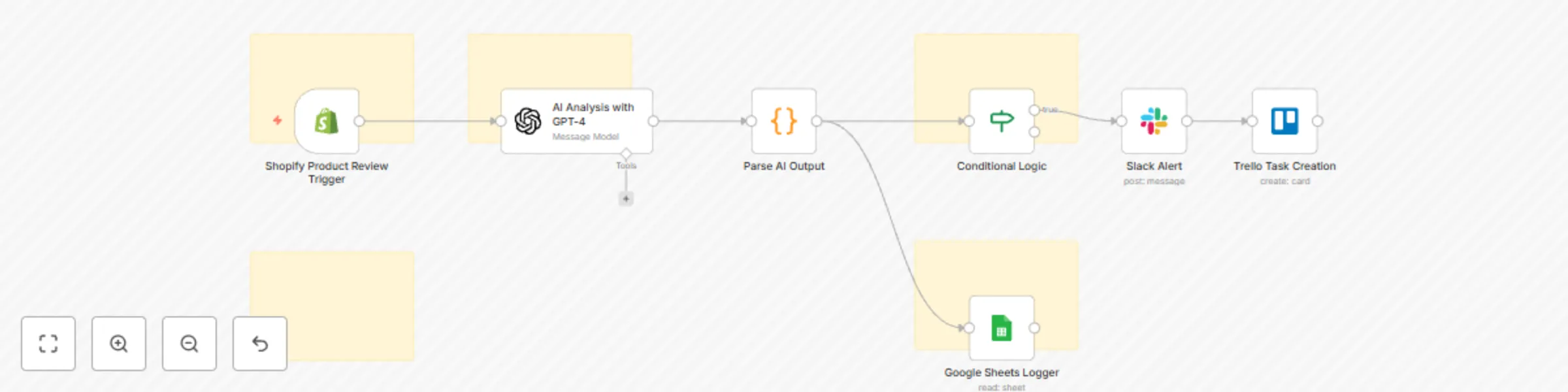
⚙️ How It Works

This workflow is a comprehensive, AI-powered system that transforms customer feedback into strategic business intelligence.
It operates in a multi-stage process to ensure every review or mention is handled proactively and intelligently.

🔊 Multi-Channel Listening

  • Triggers monitor platforms like Shopify, Twitter, and more for new reviews or mentions.

🧠 AI-Powered Analysis

  • When feedback is detected, it's sent to an OpenAI node.
    The AI performs:
    • Sentiment analysis: Positive, Negative, or Neutral
    • Scoring & categorization (e.g., Shipping, Product Quality)
    • Urgency assessment to prioritize response

🔀 Smart Conditional Logic

  • An If node evaluates sentiment and urgency
  • The workflow branches into customized response paths

🚨 Automated Escalation

  • Negative or high-urgency feedback triggers:
    • Slack alerts to the appropriate team channel
    • Trello or Asana tasks for rapid issue resolution

📊 Centralized Logging

  • All feedback + AI analysis is logged in Google Sheets
  • Enables long-term trend analysis and strategic decision-making

💬 Proactive Engagement

  • Positive reviews trigger a "Thank You" email
  • Strengthens customer loyalty and boosts brand trust

🛠️ How to Set Up

1️⃣ Import the Workflow

  • Copy and paste the workflow JSON into your n8n instance

2️⃣ Configure Credentials

Set up access for:

  • OpenAI: Add your API Key
  • Shopify: Add your store's API credentials
  • Slack: Add Bot Token & Channel ID
  • Trello: Add API Key, Token, Board ID & List ID
  • Google Sheets: Add OAuth2 credentials

3️⃣ Customize Triggers

  • Start with the Shopify Trigger node
  • Add additional sources (e.g., Twitter, Webhook) and connect to the AI Analysis Node

4️⃣ Adjust AI Prompt

  • In Node 2 (AI Analysis), update the prompt for:
    • Custom business categories
    • Specific analysis instructions

5️⃣ Update Conditional Logic

  • In Node 4 (If Is Negative):
    • Add conditions like urgency == "High" for critical issues

6️⃣ Replace Placeholders

Replace all placeholder values:

  • YOUR_SLACK_CHANNEL_ID
  • YOUR_TRELLO_BOARD_ID
  • YOUR_SPREADSHEET_ID
    ...with your actual credentials

7️⃣ Save & Activate

  • ✅ Save your workflow
  • 🔁 Click the Inactive toggle in the top-right corner to activate

1.2 Logical Blocks

This catalog entry is organized from the workflow JSON. The node-level section below shows the executable blocks available for review before importing the template.

2. Block-by-Block Analysis

Block 1 - Sticky Note

Type / Role
n8n-nodes-base.stickyNote - stickyNote
Config choices
Version 1

Block 2 - Sticky Note1

Type / Role
n8n-nodes-base.stickyNote - stickyNote
Config choices
Version 1

Block 3 - Sticky Note2

Type / Role
n8n-nodes-base.stickyNote - stickyNote
Config choices
Version 1

Block 4 - Shopify Product Review Trigger

Type / Role
n8n-nodes-base.shopifyTrigger - shopifyTrigger
Config choices
Version 1

Block 5 - AI Analysis with GPT-4

Type / Role
@n8n/n8n-nodes-langchain.openAi - openAi
Config choices
Version 1.8

Block 6 - Parse AI Output

Type / Role
n8n-nodes-base.code - code
Config choices
Version 2

Block 7 - Conditional Logic

Type / Role
n8n-nodes-base.if - if
Config choices
Version 2.2

Block 8 - Slack Alert

Type / Role
n8n-nodes-base.slack - slack
Config choices
Version 2.3

Block 9 - Trello Task Creation

Type / Role
n8n-nodes-base.trello - trello
Config choices
Version 1

Block 10 - Google Sheets Logger

Type / Role
n8n-nodes-base.googleSheets - googleSheets
Config choices
Version 4.6

Block 11 - Sticky Note3

Type / Role
n8n-nodes-base.stickyNote - stickyNote
Config choices
Version 1

Block 12 - Sticky Note4

Type / Role
n8n-nodes-base.stickyNote - stickyNote
Config choices
Version 1

3. Summary Table

Workflow Monitor & respond to Shopify reviews with GPT-4, Slack, Trello & Google Sheets
Complexity intermediate
Nodes 12
Categories Ticket Management, AI Summarization
Author Marth
Published 26 Jul 2025

4. Reproducing the Workflow from Scratch

  1. 1. Download the workflow JSON

    Use the JSON export at /data/workflows/6478/6478.json as the source template for this automation.

  2. 2. Import the template into n8n

    Open n8n, import the downloaded JSON, and review each node before activating the workflow.

  3. 3. Configure credentials and variables

    Replace placeholder credentials, API keys, webhook URLs, account IDs, and environment-specific values with your own settings.

  4. 4. Test with sample data

    Run the workflow manually or in a staging workspace, inspect node output, and confirm downstream systems receive the expected data.

  5. 5. Activate and monitor

    Enable the workflow only after testing, then monitor executions, errors, and rate limits during the first production runs.

5. General Notes & Resources

Review imported nodes carefully before activation. This catalog entry is intended to help you inspect the workflow structure, understand required services, and find related templates faster.

Node names, credentials, schedules, webhook paths, and external service limits may need adjustment for your workspace.

Frequently asked questions

What does Monitor & respond to Shopify reviews with GPT-4, Slack, Trello & Google Sheets do?

️ How It Works This workflow is a comprehensive, AI powered system that transforms customer feedback into strategic business intelligence. It operates in a multi stage process to ensure every revi...

What do I need before importing this workflow?

Review the workflow JSON, configure any required credentials in n8n, and test the automation in a safe workspace before using it in production.

Can I customize this workflow?

Yes. Use the block-by-block analysis and the downloadable JSON to inspect each node, then adjust credentials, prompts, schedules, filters, or destinations for your Ticket Management, AI Summarization use case.