Monitor regulatory updates with ScrapeGraphAI and send alerts via Telegram

Workflow preview

Workflow preview
100%
Monitor regulatory updates with ScrapeGraphAI and send alerts via Telegram preview
Open on n8n.io

Important notice

This workflow is provided as-is. Please review and test before using in production.

1. Workflow Overview

Breaking News Aggregator with Telegram and Redis ️ COMMUNITY TEMPLATE DISCLAIMER: This is a community contributed template that uses ScrapeGraphAI (a community node). Please ensure you have the Sc...

Best for

  • Market Research automation workflows
  • AI Summarization automation workflows
  • advanced n8n builders looking for reusable templates

Tools used

n8n-nodes-base.manualtrigger, n8n-nodes-base.code, n8n-nodes-base.splitinbatches, n8n-nodes-scrapegraphai.scrapegraphai, n8n-nodes-base.merge, n8n-nodes-base.if, n8n-nodes-base.set, n8n-nodes-base.telegram

Source and attribution

This workflow is cataloged by N8N Workflows and links back to its original n8n.io source page by vinci-king-01.

Original n8n.io source

1.1 Workflow description

Title
Monitor regulatory updates with ScrapeGraphAI and send alerts via Telegram
Workflow name
Monitor regulatory updates with ScrapeGraphAI and send alerts via Telegram

Breaking News Aggregator with Telegram and Redis

⚠️ COMMUNITY TEMPLATE DISCLAIMER: This is a community-contributed template that uses ScrapeGraphAI (a community node). Please ensure you have the ScrapeGraphAI community node installed in your n8n instance before using this template.

This workflow monitors selected government websites, regulatory bodies, and legal-news portals for new or amended regulations relevant to specific industries. It scrapes the latest headlines, compares them against previously recorded items in Redis, and pushes real-time compliance alerts to a Telegram channel or chat.

Pre-conditions/Requirements

Prerequisites

  • n8n instance (self-hosted or cloud)
  • ScrapeGraphAI community node installed
  • Redis server accessible from n8n
  • Telegram Bot created via BotFather
  • (Optional) Cron node if you want fully automated scheduling instead of manual trigger

Required Credentials

  • ScrapeGraphAI API Key – Enables ScrapeGraphAI scraping functionality
  • Telegram Bot Token – Allows n8n to send messages via your bot
  • Redis Credentials – Host, port, and (if set) password for your Redis instance

Redis Setup Requirements

Key Name Description Example
latestRegIds Redis Set used to store hashes/IDs of the most recent regulatory articles processed latestRegIds

> Hint: Use a dedicated Redis DB (e.g., DB 1) to keep workflow data isolated from other applications.

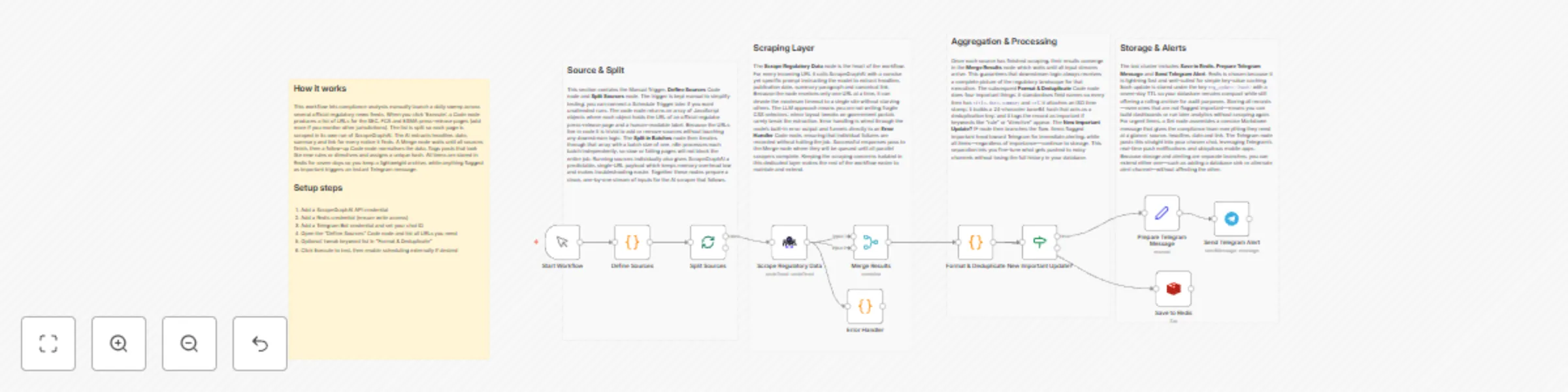
How it works

This workflow monitors selected government websites, regulatory bodies, and legal-news portals for new or amended regulations relevant to specific industries. It scrapes the latest headlines, compares them against previously recorded items in Redis, and pushes real-time compliance alerts to a Telegram channel or chat.

Key Steps:

  • Manual Trigger / Cron: Starts the workflow manually or on a set schedule (e.g., daily at 06:00 UTC).
  • Code (Define Sources): Returns an array of URL objects pointing to regulatory pages to monitor.
  • SplitInBatches: Iterates through each source URL in manageable chunks.
  • ScrapeGraphAI: Extracts article titles, publication dates, and article URLs from each page.
  • Merge (Combine Results): Consolidates scraped items into a single stream.
  • If (Deduplication Check): Verifies whether each article ID already exists in Redis.
  • Set (Format Message): Creates a human-readable Telegram message string.
  • Telegram: Sends the formatted compliance alert to your chosen chat/channel.
  • Redis (Add New IDs): Stores the article ID so it is not sent again in the future.
  • Sticky Note: Provides inline documentation inside the workflow canvas.

Set up steps

Setup Time: 10-15 minutes

  1. Install community nodes: In n8n, go to Settings → Community Nodes and install n8n-nodes-scrapegraphai.
  2. Create credentials:
    a. Telegram → Credentials → Telegram API → paste your bot token.
    b. Redis → Credentials → Redis → fill host, port, password, DB.
    c. ScrapeGraphAI → Credentials → ScrapeGraphAI API → enter your key.
  3. Configure the “Define Sources” Code node: Replace the placeholder URLs with the regulatory pages you need to monitor.
  4. Update Telegram chat ID: Open any chat with your bot and use https://api.telegram.org/bot<token>/getUpdates to find the chat.id. Insert this value in the Telegram node.
  5. Adjust frequency: Replace the Manual Trigger with a Cron node (e.g., daily 06:00 UTC).
  6. Test the workflow: Execute once manually; confirm messages appear in Telegram and that Redis keys are created.
  7. Activate: Enable the workflow so it runs automatically according to your schedule.

Node Descriptions

Core Workflow Nodes:

  • Manual Trigger – Allows on-demand execution during development/testing.
  • Code (Define Sources) – Returns an array of page URLs and meta info to the workflow.
  • SplitInBatches – Prevents overloading websites by scraping in controlled groups.
  • ScrapeGraphAI – Performs the actual web scraping using an AI-assisted parser.
  • Merge – Merges data streams from multiple batches into one.
  • If (Check Redis) – Filters out already-processed articles using Redis SET membership.
  • Set – Shapes output into a user-friendly Telegram message.
  • Telegram – Delivers compliance alerts to stakeholders in real time.
  • Redis – Persists article IDs to avoid duplicate notifications.
  • Sticky Note – Contains usage tips directly on the canvas.

Data Flow:

  1. Manual TriggerCode (Define Sources)SplitInBatchesScrapeGraphAI
  2. ScrapeGraphAIMergeIf (Check Redis)
  3. If (true)SetTelegramRedis

Customization Examples

Change industries or keywords

// Code node snippet
return [
  {
    url: "https://regulator.gov/energy-updates",
    industry: "Energy",
    keywords: ["renewable", "grid", "tariff"]
  },
  {
    url: "https://financewatch.gov/financial-rules",
    industry: "Finance",
    keywords: ["AML", "KYC", "cryptocurrency"]
  }
];

Modify Telegram message formatting

// Set node “Parameters → Value”
items[0].json.message = `🛡️ *${$json.industry} Regulation Update*\n\n*${$json.title}*\n${$json.date}\n${$json.url}`;
return items;

Data Output Format

The workflow outputs structured JSON data:

{
  "title": "EU Proposes New ESG Disclosure Rules",
  "date": "2024-04-18",
  "url": "https://europa.eu/legal/eu-proposes-esg-disclosure",
  "industry": "Finance"
}

Troubleshooting

Common Issues

  1. Empty scraped data – Verify CSS selectors/XPath in the ScrapeGraphAI node; website structure may have changed.
  2. Duplicate alerts – Ensure Redis credentials point to the same DB across nodes; otherwise IDs are not shared.

Performance Tips

  • Limit SplitInBatches to 2-3 URLs at a time if sites implement rate limiting.
  • Use environment variables for credentials to simplify migration between stages.

Pro Tips:

  • Combine this workflow with n8n’s Error Trigger to log failures to Slack or email.
  • Maintain a CSV of source URLs in Google Sheets and fetch it dynamically via the Google Sheets node.
  • Pair with the Webhook node to let team members add new sources on the fly.

1.2 Logical Blocks

This catalog entry is organized from the workflow JSON. The node-level section below shows the executable blocks available for review before importing the template.

2. Block-by-Block Analysis

Block 1 - Start Workflow

Type / Role
n8n-nodes-base.manualTrigger - manualTrigger
Config choices
Version 1

Block 2 - Define Sources

Type / Role
n8n-nodes-base.code - code
Config choices
Version 2

Block 3 - Split Sources

Type / Role
n8n-nodes-base.splitInBatches - splitInBatches
Config choices
Version 3

Block 4 - Scrape Regulatory Data

Type / Role
n8n-nodes-scrapegraphai.scrapegraphAi - scrapegraphAi
Config choices
Version 1

Block 5 - Merge Results

Type / Role
n8n-nodes-base.merge - merge
Config choices
Version 2

Block 6 - Format & Deduplicate

Type / Role
n8n-nodes-base.code - code
Config choices
Version 2

Block 7 - New Important Update?

Type / Role
n8n-nodes-base.if - if
Config choices
Version 2

Block 8 - Prepare Telegram Message

Type / Role
n8n-nodes-base.set - set
Config choices
Version 3

Block 9 - Send Telegram Alert

Type / Role
n8n-nodes-base.telegram - telegram
Config choices
Version 1

Block 10 - Save to Redis

Type / Role
n8n-nodes-base.redis - redis
Config choices
Version 1

Block 11 - Error Handler

Type / Role
n8n-nodes-base.code - code
Config choices
Version 2

Block 12 - Workflow Overview

Type / Role
n8n-nodes-base.stickyNote - stickyNote
Config choices
Version 1

Block 13 - Section – Source & Split

Type / Role
n8n-nodes-base.stickyNote - stickyNote
Config choices
Version 1

Block 14 - Section – Scraping Layer

Type / Role
n8n-nodes-base.stickyNote - stickyNote
Config choices
Version 1

Block 15 - Section – Aggregation & Processing

Type / Role
n8n-nodes-base.stickyNote - stickyNote
Config choices
Version 1

Block 16 - Section – Storage & Alerts

Type / Role
n8n-nodes-base.stickyNote - stickyNote
Config choices
Version 1

3. Summary Table

Workflow Monitor regulatory updates with ScrapeGraphAI and send alerts via Telegram
Complexity advanced
Nodes 16
Categories Market Research, AI Summarization
Author vinci-king-01
Published 23 Dec 2025

4. Reproducing the Workflow from Scratch

  1. 1. Download the workflow JSON

    Use the JSON export at /data/workflows/12072/12072.json as the source template for this automation.

  2. 2. Import the template into n8n

    Open n8n, import the downloaded JSON, and review each node before activating the workflow.

  3. 3. Configure credentials and variables

    Replace placeholder credentials, API keys, webhook URLs, account IDs, and environment-specific values with your own settings.

  4. 4. Test with sample data

    Run the workflow manually or in a staging workspace, inspect node output, and confirm downstream systems receive the expected data.

  5. 5. Activate and monitor

    Enable the workflow only after testing, then monitor executions, errors, and rate limits during the first production runs.

5. General Notes & Resources

Review imported nodes carefully before activation. This catalog entry is intended to help you inspect the workflow structure, understand required services, and find related templates faster.

Node names, credentials, schedules, webhook paths, and external service limits may need adjustment for your workspace.

Frequently asked questions

What does Monitor regulatory updates with ScrapeGraphAI and send alerts via Telegram do?

Breaking News Aggregator with Telegram and Redis ️ COMMUNITY TEMPLATE DISCLAIMER: This is a community contributed template that uses ScrapeGraphAI (a community node). Please ensure you have the Sc...

What do I need before importing this workflow?

Review the workflow JSON, configure any required credentials in n8n, and test the automation in a safe workspace before using it in production.

Can I customize this workflow?

Yes. Use the block-by-block analysis and the downloadable JSON to inspect each node, then adjust credentials, prompts, schedules, filters, or destinations for your Market Research, AI Summarization use case.