Block 1 - Hourly Check
- Type / Role
- n8n-nodes-base.scheduleTrigger - scheduleTrigger
- Config choices
- Version 1.1


 Early Deal
This workflow is provided as-is. Please review and test before using in production.
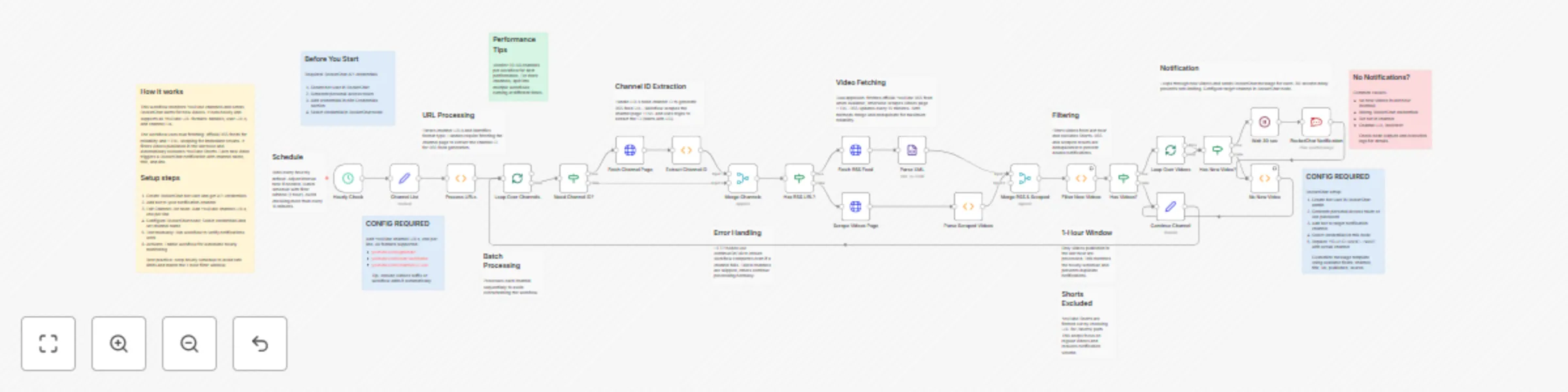
This n8n workflow provides automated monitoring of YouTube channels and sends real time notifications to RocketChat when new videos are published. It supports all YouTube URL formats, uses dual sou...
n8n-nodes-base.scheduletrigger, n8n-nodes-base.set, n8n-nodes-base.function, n8n-nodes-base.splitinbatches, n8n-nodes-base.if, n8n-nodes-base.httprequest, n8n-nodes-base.merge, n8n-nodes-base.xml
This workflow is cataloged by N8N Workflows and links back to its original n8n.io source page by Vigh Sandor.
Original n8n.io sourceThis n8n workflow provides automated monitoring of YouTube channels and sends real-time notifications to RocketChat when new videos are published. It supports all YouTube URL formats, uses dual-source video fetching for reliability, and intelligently filters videos to prevent duplicate notifications.
Monitor competitor channels, track favorite creators, aggregate content from multiple channels, build content curation workflows, stay updated on educational channels, monitor brand mentions, track news channels for breaking updates.
Create Bot User:
Get API Credentials:
Handle Format: https://www.youtube.com/@ChannelHandle
User Format: https://www.youtube.com/user/Username
Channel ID Format: https://www.youtube.com/channel/UCxxxxxxxxxx
All formats supported. Find channel ID in page source or use browser extension.
https://www.youtube.com/@NoCopyrightSounds/videos
https://www.youtube.com/@chillnation/videos
Default: Every 1 hour
To change:
Recommended Intervals:
Important: YouTube RSS updates every 15 minutes. Hourly checks match 1-hour filter window.
No notifications is normal if no videos posted in last hour.
Default Schedule: Hourly
Execution Duration: 1-5 minutes for 10 channels. Rate limiting adds 30 seconds per video.
cutoffDate.setHours(cutoffDate.getHours() - 1);Important: Time window should match or exceed check interval.
RSS Feed (Primary):
HTML Scraping (Fallback):
Benefits of dual approach:
Shorts are filtered by checking URL for /shorts/ path.
To include Shorts:
if (videoUrl && !videoUrl.includes('/shorts/'))30-second wait between notifications:
Impact: 5 videos = 2.5 minutes, 10 videos = 5 minutes
To adjust: Open Wait 30 sec node, change amount field (15-60 seconds recommended)
Channels processed sequentially:
Q: How many channels can I monitor? A: Recommend 20-50 per workflow. Split into multiple workflows for more.
Q: Why use both RSS and scraping? A: RSS is reliable but delayed. Scraping is immediate but fragile. Both ensures no videos missed.
Q: Can I exclude specific video types? A: Yes, add filtering logic in Filter New Videos node. Already excludes Shorts.
Q: Will this get my IP blocked? A: Unlikely with hourly checks. Don't check more than every 15 minutes.
Q: How do I prevent duplicate notifications? A: Ensure time window matches schedule interval. Already implemented.
Q: What if channel changes handle? A: Update URL in Channel List node. YouTube maintains redirects.
Q: Can I monitor playlists? A: Not directly. Would need modifications for playlist RSS feeds.
https://www.youtube.com/@handlenamehttps://www.youtube.com/user/usernamehttps://www.youtube.com/channel/UCxxxxxxhttps://www.youtube.com/feeds/videos.xml?channel_id=UCxxxxxx
Contains up to 15 recent videos with title, link, publish date, thumbnail.
APIs Used: YouTube RSS (public), RocketChat API (requires auth)
License: Open for modification and commercial use
This catalog entry is organized from the workflow JSON. The node-level section below shows the executable blocks available for review before importing the template.
Showing the first 24 of 38 workflow blocks. Download the JSON for the full node graph.
| Workflow | Monitor multiple YouTube channels with real-time RocketChat alerts |
|---|---|
| Complexity | advanced |
| Nodes | 38 |
| Categories | Market Research |
| Author | Vigh Sandor |
| Published | 08 Nov 2025 |
Use the JSON export at /data/workflows/10643/10643.json as the source template for this automation.
Open n8n, import the downloaded JSON, and review each node before activating the workflow.
Replace placeholder credentials, API keys, webhook URLs, account IDs, and environment-specific values with your own settings.
Run the workflow manually or in a staging workspace, inspect node output, and confirm downstream systems receive the expected data.
Enable the workflow only after testing, then monitor executions, errors, and rate limits during the first production runs.
Review imported nodes carefully before activation. This catalog entry is intended to help you inspect the workflow structure, understand required services, and find related templates faster.
Node names, credentials, schedules, webhook paths, and external service limits may need adjustment for your workspace.
This n8n workflow provides automated monitoring of YouTube channels and sends real time notifications to RocketChat when new videos are published. It supports all YouTube URL formats, uses dual sou...
Review the workflow JSON, configure any required credentials in n8n, and test the automation in a safe workspace before using it in production.
Yes. Use the block-by-block analysis and the downloadable JSON to inspect each node, then adjust credentials, prompts, schedules, filters, or destinations for your Market Research use case.