Monitor multi-city weather with OpenWeatherMap, GPT-4o-mini, and Discord

Workflow preview

Workflow preview
100%
Monitor multi-city weather with OpenWeatherMap, GPT-4o-mini, and Discord preview
Open on n8n.io

Important notice

This workflow is provided as-is. Please review and test before using in production.

1. Workflow Overview

Weather Monitoring Across Multiple Cities with OpenWeatherMap, GPT 4o mini, and Discord This workflow provides an automated, intelligent solution for global weather monitoring. It goes beyond simpl...

Best for

  • Market Research automation workflows
  • AI Summarization automation workflows
  • advanced n8n builders looking for reusable templates

Tools used

n8n-nodes-base.stickynote, n8n-nodes-base.scheduletrigger, n8n-nodes-base.set, n8n-nodes-base.splitout, n8n-nodes-base.openweathermap, n8n-nodes-base.httprequest, n8n-nodes-base.merge, n8n-nodes-base.code

Source and attribution

This workflow is cataloged by N8N Workflows and links back to its original n8n.io source page by 荒城直也.

Original n8n.io source

1.1 Workflow description

Title
Monitor multi-city weather with OpenWeatherMap, GPT-4o-mini, and Discord
Workflow name
Monitor multi-city weather with OpenWeatherMap, GPT-4o-mini, and Discord

Weather Monitoring Across Multiple Cities with OpenWeatherMap, GPT-4o-mini, and Discord

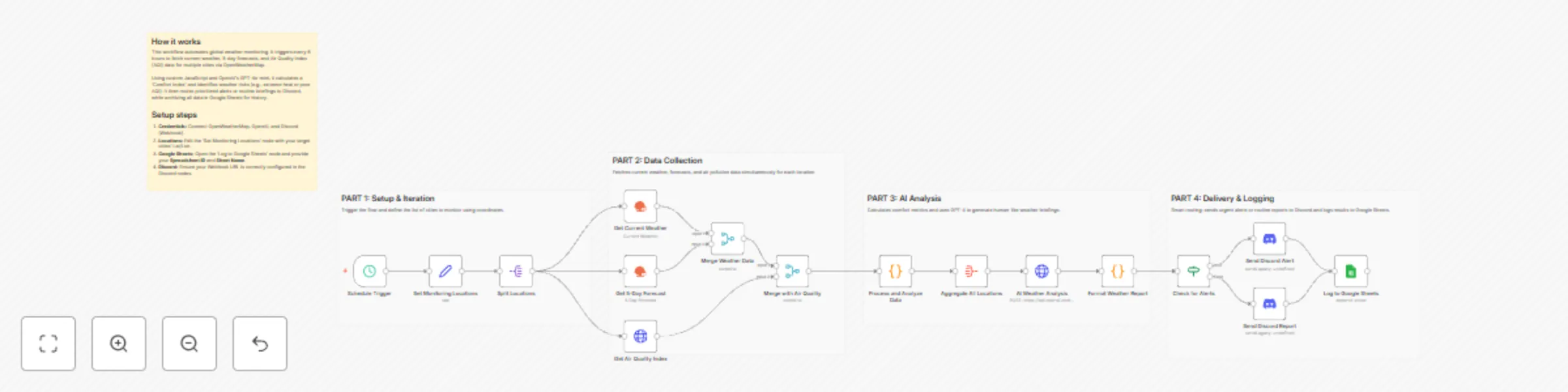
This workflow provides an automated, intelligent solution for global weather monitoring. It goes beyond simple data fetching by calculating a custom "Comfort Index" and using AI to provide human-like briefings and activity recommendations. Whether you are managing remote teams or planning travel, this template centralizes complex environmental data into actionable insights.

Who’s it for

  • Remote Team Leads: Keep an eye on environmental conditions for team members across different time zones.
  • Frequent Travelers & Event Planners: Monitor weather risks and comfort levels for multiple destinations simultaneously.
  • Smart Home/Life Enthusiasts: Receive daily morning briefings on air quality and weather alerts directly in Discord.

How it works

  1. Schedule Trigger: The workflow runs every 6 hours (customizable) to ensure data is up to date.
  2. Data Collection: It loops through a list of cities, fetching current weather, 5-day forecasts, and Air Quality Index (AQI) data via the OpenWeatherMap node and HTTP Request node.
  3. Smart Processing: A Code node calculates a "Comfort Index" (based on temperature and humidity) and flags specific alerts (e.g., extreme heat, high winds, or poor AQI).
  4. AI Analysis: The OpenAI node (using GPT-4o-mini) analyzes the aggregated data to compare cities and recommend the best location for outdoor activities.
  5. Conditional Routing: An If node checks for active weather alerts. Urgent alerts are routed to a specific Discord notification, while routine briefings are sent normally.
  6. Archiving: All processed data is appended to Google Sheets for historical tracking and future analysis.

How to set up

  1. Credentials: Connect your OpenWeatherMap, OpenAI, Discord (Webhook), and Google Sheets accounts.
  2. Locations: Open the 'Set Monitoring Locations' node and edit the JSON array with the cities, latitudes, and longitudes you wish to track.
  3. Google Sheets: Configure the 'Log to Google Sheets' node with your specific Spreadsheet ID and Sheet Name.
  4. Discord: Ensure your Webhook URL is correctly pasted into the Discord nodes.

Requirements

  • OpenWeatherMap API Key (Free tier is sufficient).
  • OpenAI API Key (Configured for GPT-4o-mini).
  • Discord Webhook URL.
  • Google Sheet with headers ready for logging.

How to customize

  • Adjust Alert Thresholds: Modify the logic in the 'Process and Analyze Data' Code node to change what triggers a "High Wind" or "Extreme Heat" alert.
  • Refine AI Persona: Edit the System Prompt in the 'AI Weather Analysis' node to change the tone or focus of the weather briefing.
  • Change Frequency: Adjust the Schedule Trigger to run once a day or every hour depending on your needs.

1.2 Logical Blocks

This catalog entry is organized from the workflow JSON. The node-level section below shows the executable blocks available for review before importing the template.

2. Block-by-Block Analysis

Block 1 - Main Overview

Type / Role
n8n-nodes-base.stickyNote - stickyNote
Config choices
Version 1

Block 2 - Part 1 Sticky

Type / Role
n8n-nodes-base.stickyNote - stickyNote
Config choices
Version 1

Block 3 - Part 2 Sticky

Type / Role
n8n-nodes-base.stickyNote - stickyNote
Config choices
Version 1

Block 4 - Part 3 Sticky

Type / Role
n8n-nodes-base.stickyNote - stickyNote
Config choices
Version 1

Block 5 - Part 4 Sticky

Type / Role
n8n-nodes-base.stickyNote - stickyNote
Config choices
Version 1

Block 6 - Schedule Trigger

Type / Role
n8n-nodes-base.scheduleTrigger - scheduleTrigger
Config choices
Version 1.2

Block 7 - Set Monitoring Locations

Type / Role
n8n-nodes-base.set - set
Config choices
Version 3.4

Block 8 - Split Locations

Type / Role
n8n-nodes-base.splitOut - splitOut
Config choices
Version 1

Block 9 - Get Current Weather

Type / Role
n8n-nodes-base.openWeatherMap - openWeatherMap
Config choices
Version 1

Block 10 - Get 5-Day Forecast

Type / Role
n8n-nodes-base.openWeatherMap - openWeatherMap
Config choices
Version 1

Block 11 - Get Air Quality Index

Type / Role
n8n-nodes-base.httpRequest - httpRequest
Config choices
Version 4.2

Block 12 - Merge Weather Data

Type / Role
n8n-nodes-base.merge - merge
Config choices
Version 3

Block 13 - Merge with Air Quality

Type / Role
n8n-nodes-base.merge - merge
Config choices
Version 3

Block 14 - Process and Analyze Data

Type / Role
n8n-nodes-base.code - code
Config choices
Version 2

Block 15 - Aggregate All Locations

Type / Role
n8n-nodes-base.aggregate - aggregate
Config choices
Version 1

Block 16 - AI Weather Analysis

Type / Role
n8n-nodes-base.httpRequest - httpRequest
Config choices
Version 4.2

Block 17 - Format Weather Report

Type / Role
n8n-nodes-base.code - code
Config choices
Version 2

Block 18 - Check for Alerts

Type / Role
n8n-nodes-base.if - if
Config choices
Version 2

Block 19 - Send Discord Alert

Type / Role
n8n-nodes-base.discord - discord
Config choices
Version 2

Block 20 - Send Discord Report

Type / Role
n8n-nodes-base.discord - discord
Config choices
Version 2

Block 21 - Log to Google Sheets

Type / Role
n8n-nodes-base.googleSheets - googleSheets
Config choices
Version 4.5

3. Summary Table

Workflow Monitor multi-city weather with OpenWeatherMap, GPT-4o-mini, and Discord
Complexity advanced
Nodes 21
Categories Market Research, AI Summarization
Author 荒城直也
Published 12 Jan 2026

4. Reproducing the Workflow from Scratch

  1. 1. Download the workflow JSON

    Use the JSON export at /data/workflows/12653/12653.json as the source template for this automation.

  2. 2. Import the template into n8n

    Open n8n, import the downloaded JSON, and review each node before activating the workflow.

  3. 3. Configure credentials and variables

    Replace placeholder credentials, API keys, webhook URLs, account IDs, and environment-specific values with your own settings.

  4. 4. Test with sample data

    Run the workflow manually or in a staging workspace, inspect node output, and confirm downstream systems receive the expected data.

  5. 5. Activate and monitor

    Enable the workflow only after testing, then monitor executions, errors, and rate limits during the first production runs.

5. General Notes & Resources

Review imported nodes carefully before activation. This catalog entry is intended to help you inspect the workflow structure, understand required services, and find related templates faster.

Node names, credentials, schedules, webhook paths, and external service limits may need adjustment for your workspace.

Frequently asked questions

What does Monitor multi-city weather with OpenWeatherMap, GPT-4o-mini, and Discord do?

Weather Monitoring Across Multiple Cities with OpenWeatherMap, GPT 4o mini, and Discord This workflow provides an automated, intelligent solution for global weather monitoring. It goes beyond simpl...

What do I need before importing this workflow?

Review the workflow JSON, configure any required credentials in n8n, and test the automation in a safe workspace before using it in production.

Can I customize this workflow?

Yes. Use the block-by-block analysis and the downloadable JSON to inspect each node, then adjust credentials, prompts, schedules, filters, or destinations for your Market Research, AI Summarization use case.