荒城直也

3
Workflows

Workflows by 荒城直也

Workflow preview: Monitor multi-city weather with OpenWeatherMap, GPT-4o-mini, and Discord
Free advanced

Monitor multi-city weather with OpenWeatherMap, GPT-4o-mini, and Discord

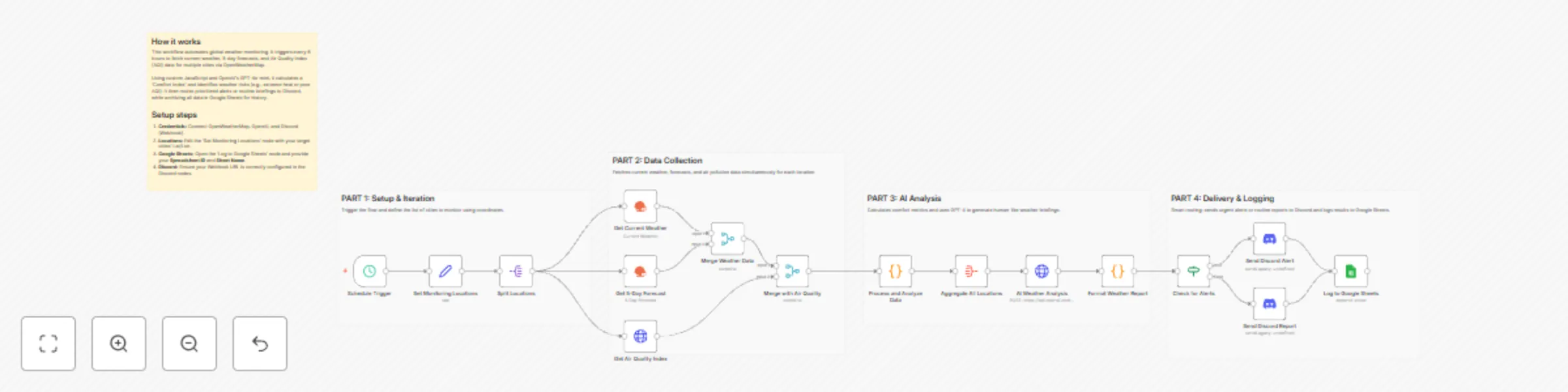
## Weather Monitoring Across Multiple Cities with OpenWeatherMap, GPT-4o-mini, and Discord This workflow provides an automated, intelligent solution for global weather monitoring. It goes beyond simple data fetching by calculating a custom "Comfort Index" and using AI to provide human-like briefings and activity recommendations. Whether you are managing remote teams or planning travel, this template centralizes complex environmental data into actionable insights. ## Who’s it for - **Remote Team Leads:** Keep an eye on environmental conditions for team members across different time zones. - **Frequent Travelers & Event Planners:** Monitor weather risks and comfort levels for multiple destinations simultaneously. - **Smart Home/Life Enthusiasts:** Receive daily morning briefings on air quality and weather alerts directly in Discord. ## How it works 1. **Schedule Trigger:** The workflow runs every 6 hours (customizable) to ensure data is up to date. 2. **Data Collection:** It loops through a list of cities, fetching current weather, 5-day forecasts, and Air Quality Index (AQI) data via the **OpenWeatherMap node** and **HTTP Request node**. 3. **Smart Processing:** A **Code node** calculates a "Comfort Index" (based on temperature and humidity) and flags specific alerts (e.g., extreme heat, high winds, or poor AQI). 4. **AI Analysis:** The **OpenAI node** (using GPT-4o-mini) analyzes the aggregated data to compare cities and recommend the best location for outdoor activities. 5. **Conditional Routing:** An **If node** checks for active weather alerts. Urgent alerts are routed to a specific Discord notification, while routine briefings are sent normally. 6. **Archiving:** All processed data is appended to **Google Sheets** for historical tracking and future analysis. ## How to set up 1. **Credentials:** Connect your OpenWeatherMap, OpenAI, Discord (Webhook), and Google Sheets accounts. 2. **Locations:** Open the **'Set Monitoring Locations'** node and edit the JSON array with the cities, latitudes, and longitudes you wish to track. 3. **Google Sheets:** Configure the **'Log to Google Sheets'** node with your specific Spreadsheet ID and Sheet Name. 4. **Discord:** Ensure your Webhook URL is correctly pasted into the **Discord nodes**. ## Requirements - **OpenWeatherMap API Key** (Free tier is sufficient). - **OpenAI API Key** (Configured for GPT-4o-mini). - **Discord Webhook URL**. - **Google Sheet** with headers ready for logging. ## How to customize - **Adjust Alert Thresholds:** Modify the logic in the 'Process and Analyze Data' Code node to change what triggers a "High Wind" or "Extreme Heat" alert. - **Refine AI Persona:** Edit the System Prompt in the 'AI Weather Analysis' node to change the tone or focus of the weather briefing. - **Change Frequency:** Adjust the Schedule Trigger to run once a day or every hour depending on your needs.

荒城直也
Market Research
12 Jan 2026
0
0
Workflow preview: Automate Zoom attendance follow-ups with recordings & Google Sheets tracking
Free advanced

Automate Zoom attendance follow-ups with recordings & Google Sheets tracking

Workflow Overview Zoom Attendance Evaluator with Follow-up is an n8n automation workflow that automatically evaluates Zoom meeting attendance and sends follow-up emails to no-shows and early leavers with recordings and materials. Who's it for * Companies and organizations that regularly host online seminars and webinars * Educational institutions conducting online classes * Anyone looking to streamline participant attendance management and follow-up processes How it works 1. Scheduled execution: Runs automatically every hour 2. Fetch meeting data: Retrieves recent Zoom meetings and participant information 3. Evaluate attendance: Automatically classifies participants into four categories: * No-show: 0 minutes attended * Early-leaver: Less than 50% attendance * Partial attendance: 50-80% attendance * Full attendance: Over 80% attendance 4. Automatic follow-up: Sends automated emails with recording links and materials to no-shows and early leavers 5. Record keeping: Logs all follow-ups to Google Sheets for tracking Requirements * Zoom account: OAuth2 authentication setup required * SMTP email server: Configuration needed (Gmail, SendGrid, etc.) * Google Drive: For storing handout materials * Google Sheets: For attendance logging * Credentials for each service configured in n8n How to customize the workflow * Adjust attendance thresholds: Modify the 50% and 80% values in the "Evaluate Attendance" node code * Change execution frequency: Configure the time interval in the "Schedule Trigger" node * Customize email template: Edit subject and body in the "Prepare Email Data" node * Next session registration link: Replace the placeholder URL in the code with your actual registration link This workflow completely automates post-meeting follow-up tasks, helping improve participant engagement and reduce manual work.

荒城直也
Ticket Management
23 Dec 2025
25
0

Workflow preview: AI news digest: Summarize top stories with GPT-4o and DALL-E for Telegram
Free advanced

AI news digest: Summarize top stories with GPT-4o and DALL-E for Telegram

**Title:** Create daily AI news digest and send to Telegram **Description:** Stay ahead of the rapidly evolving artificial intelligence landscape without the information overload. This workflow acts as your personal AI news editor, automatically curating, summarizing, and visualizing the top stories of the day, delivered directly to your Telegram. It goes beyond simple RSS aggregation by using an AI Agent to rewrite headlines and summaries into a digestible format and includes a "Chat Mode" where you can ask follow-up questions about the news directly within the n8n interface. ## Who is it for - **AI Enthusiasts & Researchers:** Keep up with the latest papers and releases without manually checking multiple sites. - **Tech Professionals:** Get a morning briefing on industry trends to start your day informed. - **Content Creators:** Find trending topics for newsletters or social media posts effortlessly. ## How it works 1. **News Aggregation:** Every morning at 8:00 AM, the workflow fetches RSS feeds from top tech sources (Google News AI, The Verge, and TechCrunch). 2. **Smart Filtering:** A Code node aggregates the articles, removes duplicates, and ranks them by recency to select the top 5 stories. 3. **AI Summarization:** An AI Agent (powered by OpenAI) analyzes the selected stories and writes a concise, engaging summary for each. 4. **Visual Generation:** DALL-E generates a unique, futuristic header image based on the day's news context. 5. **Delivery:** The digest is formatted with Markdown and emojis, then sent to your specified Telegram chat. 6. **Interactive Chat:** A separate branch allows you to chat with an AI Agent via the n8n Chat interface to discuss the news or ask general AI questions. ## How to set up 1. **Configure Credentials:** * Set up your **OpenAI API** credential. * Set up your **Telegram API** credential. 2. **Get Telegram Chat ID:** * Create a bot with `@BotFather` on Telegram. * Send a message to your bot. * Use `@userinfobot` to find your numeric Chat ID. 3. **Update Workflow Settings:** * Open the `Workflow Configuration` node. * Paste your Chat ID into the `telegramChatId` value field. 4. **Activate:** Toggle the workflow to "Active" to enable the daily schedule. ## Requirements - **n8n Version:** Must support LangChain nodes. - **OpenAI Account:** API Key with access to GPT-4o-mini (or preferred model) and DALL-E 3. - **Telegram Account:** To create a bot and receive messages. ## How to customize - **Change News Sources:** Edit the RSS URLs in the `Workflow Configuration` node to track different topics (e.g., Crypto, Finance, Sports). - **Adjust Personality:** Modify the system prompt in the `AI News Summarizer Agent` node to change the tone of the summaries (e.g., "explain it like I'm 5" or "highly technical"). - **Change Schedule:** Update the `Daily 8 AM Trigger` node to your preferred time zone and frequency.

荒城直也
Market Research
23 Dec 2025
106
0