Block 1 - Schedule Trigger
- Type / Role
- n8n-nodes-base.scheduleTrigger - scheduleTrigger
- Config choices
- Version 1.2


 Early Deal
This workflow is provided as-is. Please review and test before using in production.
Monitor Google Shopping Prices with Bright Data & Email Alerts This template requires a self hosted n8n instance to run. A comprehensive n8n automation that monitors product prices daily using B...
n8n-nodes-base.scheduletrigger, n8n-nodes-base.set, n8n-nodes-base.stickynote, n8n-nodes-base.googlesheets, @brightdata/n8n-nodes-brightdata.brightdata, n8n-nodes-base.filter, n8n-nodes-base.splitinbatches, n8n-nodes-base.gmail
This workflow is cataloged by N8N Workflows and links back to its original n8n.io source page by Dvir Sharon.
Original n8n.io sourceThis template requires a self-hosted n8n instance to run.
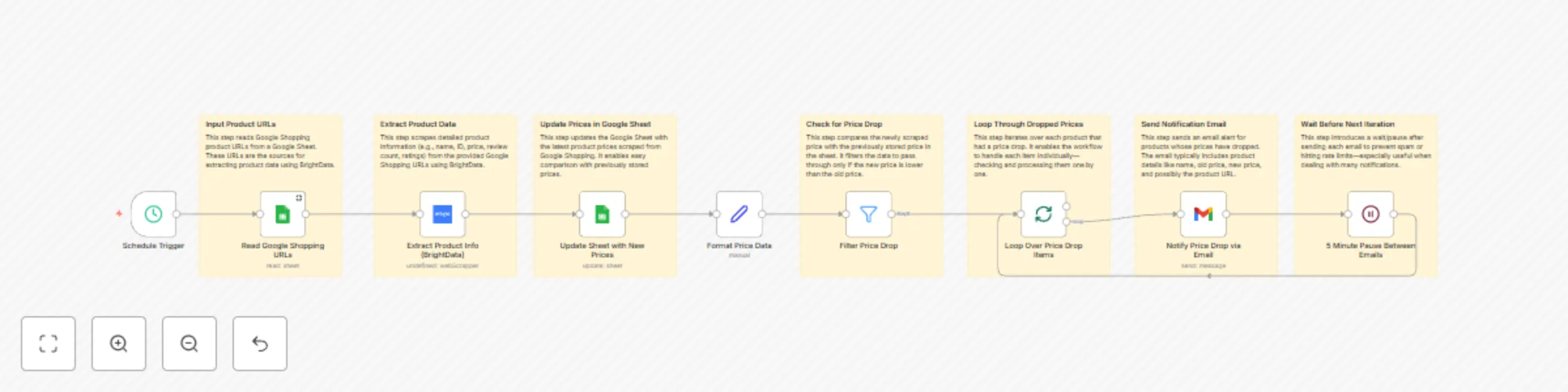
A comprehensive n8n automation that monitors product prices daily using Bright Data's Google Shopping dataset and sends smart email alerts when price conditions are met.
This workflow provides an automated price monitoring solution that tracks product prices from Google Shopping daily and sends intelligent email notifications. Perfect for e-commerce monitoring, competitor analysis, deal hunting, and inventory management.
| Field | Description | Example |
|---|---|---|
| Product URL | Original Google Shopping URL | https://shopping.google.com/product/... |
| Product Name | Product title | iPhone 15 Pro Max 256GB |
| Ratings | Product rating score | 4.5 |
| Reviews | Number of reviews | 1,247 |
| Old Price | Previous price | $1,199.00 |
| New Price | Current scraped price | $1,199.00 |
| Timestamp | When the check occurred | 2025-05-30T09:00:00Z |
Your Google Sheet should have the following columns to ensure the workflow functions correctly:
The default setting for this workflow is to send an email alert when the new price equals the old price. This might seem counterintuitive, but it's useful for specific scenarios, such as:
You can easily customize the alert logic to trigger on different conditions as described below.
new_price < old_pricenew_price < (old_price * 0.9) (e.g., price dropped by more than 10%)new_price > old_pricenew_price != old_priceYour workflow provides a solid foundation for automated price monitoring. Customize it to fit your specific needs and use cases for maximum effectiveness in tracking Google Shopping prices with intelligent email notifications.
Please note that this template uses Community Nodes. Ensure you understand the risks before using community nodes.
This catalog entry is organized from the workflow JSON. The node-level section below shows the executable blocks available for review before importing the template.
| Workflow | Monitor Google Shopping prices with Bright Data & email alerts |
|---|---|
| Complexity | advanced |
| Nodes | 16 |
| Categories | Market Research |
| Author | Dvir Sharon |
| Published | 01 Jun 2025 |
Use the JSON export at /data/workflows/4554/4554.json as the source template for this automation.
Open n8n, import the downloaded JSON, and review each node before activating the workflow.
Replace placeholder credentials, API keys, webhook URLs, account IDs, and environment-specific values with your own settings.
Run the workflow manually or in a staging workspace, inspect node output, and confirm downstream systems receive the expected data.
Enable the workflow only after testing, then monitor executions, errors, and rate limits during the first production runs.
Review imported nodes carefully before activation. This catalog entry is intended to help you inspect the workflow structure, understand required services, and find related templates faster.
Node names, credentials, schedules, webhook paths, and external service limits may need adjustment for your workspace.
Monitor Google Shopping Prices with Bright Data & Email Alerts This template requires a self hosted n8n instance to run. A comprehensive n8n automation that monitors product prices daily using B...
Review the workflow JSON, configure any required credentials in n8n, and test the automation in a safe workspace before using it in production.
Yes. Use the block-by-block analysis and the downloadable JSON to inspect each node, then adjust credentials, prompts, schedules, filters, or destinations for your Market Research use case.