Block 1 - Schedule
- Type / Role
- n8n-nodes-base.scheduleTrigger - scheduleTrigger
- Config choices
- Version 1


 Early Deal
This workflow is provided as-is. Please review and test before using in production.
Monitor GitHub Repositories for Unauthorized Actions How it works: This workflow monitors GitHub for high risk activities to ensure that only authorized users can modify the repository. It periodic...
n8n-nodes-base.scheduletrigger, n8n-nodes-base.code, n8n-nodes-base.datatable, n8n-nodes-base.httprequest, n8n-nodes-base.switch, n8n-nodes-base.if, n8n-nodes-base.stickynote, n8n-nodes-base.slack
This workflow is cataloged by N8N Workflows and links back to its original n8n.io source page by RamS.
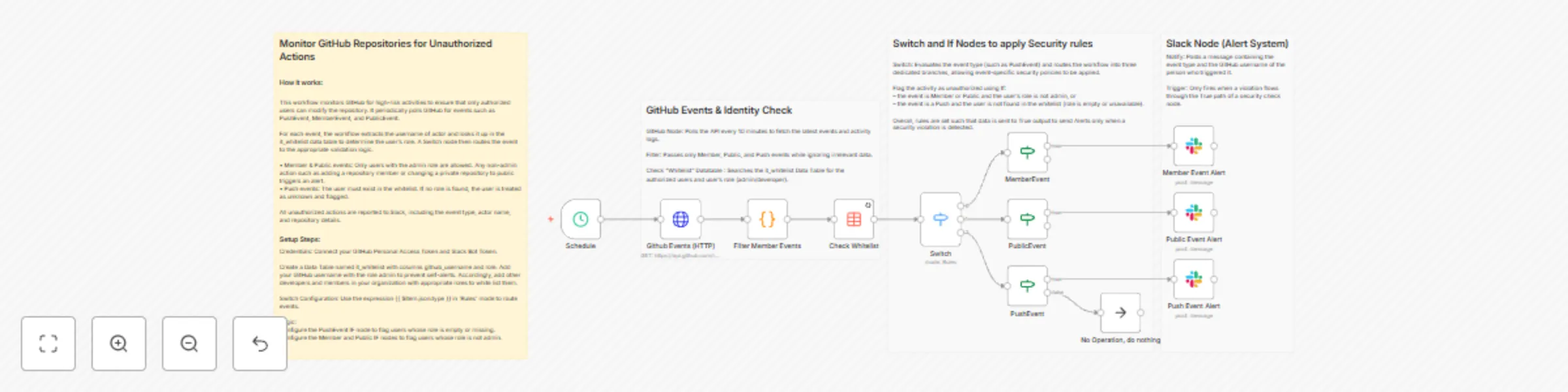
Original n8n.io sourceThis workflow monitors GitHub for high-risk activities to ensure that only authorized users can modify the repository. It periodically polls GitHub for events such as PushEvent, MemberEvent, and PublicEvent.
For each event, the workflow extracts the username of actor and looks it up in the it_whitelist data table to determine the user’s role. A Switch node then routes the event to the appropriate validation logic.
• Member & Public events: Only users with the admin role are allowed. Any non-admin action such as adding a repository member or changing a private repository to public triggers an alert. • Push events: The user must exist in the whitelist. If no role is found, the user is treated as unknown and flagged.
All unauthorized actions are reported to Slack, including the event type, actor name, and repository details.
Credentials: Connect your GitHub Personal Access Token and Slack Bot Token.
Create a Data Table named it_whitelist with columns github_username and role. Add your GitHub username with the role admin to prevent self-alerts. Accordingly, add other developers and members in your organization with appropriate roles to white list them.
Switch Configuration: Use the expression {{ $item.json.type }} in 'Rules' mode to route events.
Logic: Configure the PushEvent IF node to flag users whose role is empty or missing. Configure the Member and Public IF nodes to flag users whose role is not admin.
This catalog entry is organized from the workflow JSON. The node-level section below shows the executable blocks available for review before importing the template.
| Workflow | Monitor GitHub repo access and push events with GitHub and Slack alerts |
|---|---|
| Complexity | advanced |
| Nodes | 16 |
| Categories | SecOps |
| Author | RamS |
| Published | 31 Dec 2025 |
Use the JSON export at /data/workflows/12336/12336.json as the source template for this automation.
Open n8n, import the downloaded JSON, and review each node before activating the workflow.
Replace placeholder credentials, API keys, webhook URLs, account IDs, and environment-specific values with your own settings.
Run the workflow manually or in a staging workspace, inspect node output, and confirm downstream systems receive the expected data.
Enable the workflow only after testing, then monitor executions, errors, and rate limits during the first production runs.
Review imported nodes carefully before activation. This catalog entry is intended to help you inspect the workflow structure, understand required services, and find related templates faster.
Node names, credentials, schedules, webhook paths, and external service limits may need adjustment for your workspace.
Monitor GitHub Repositories for Unauthorized Actions How it works: This workflow monitors GitHub for high risk activities to ensure that only authorized users can modify the repository. It periodic...
Review the workflow JSON, configure any required credentials in n8n, and test the automation in a safe workspace before using it in production.
Yes. Use the block-by-block analysis and the downloadable JSON to inspect each node, then adjust credentials, prompts, schedules, filters, or destinations for your SecOps use case.