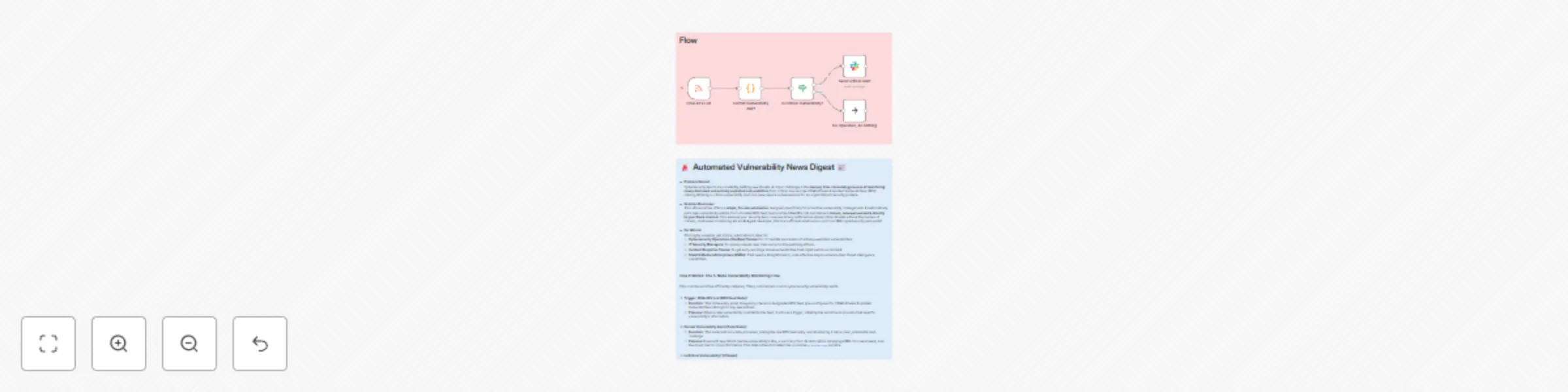
Monitor CISA critical vulnerability alerts with RSS feed & Slack notifications

Workflow preview

Workflow preview
100%
Monitor CISA critical vulnerability alerts with RSS feed & Slack notifications preview
Open on n8n.io

Important notice

This workflow is provided as-is. Please review and test before using in production.

1. Workflow Overview

How It Works: The 5 Node Monitoring Flow This concise workflow efficiently captures, filters, and delivers crucial cybersecurity related mentions. 1. Monitor: Cybersecurity Keywords (X/Twitter Trig...

Best for

  • SecOps automation workflows
  • intermediate n8n builders looking for reusable templates

Tools used

n8n-nodes-base.rssfeedreadtrigger, n8n-nodes-base.code, n8n-nodes-base.if, n8n-nodes-base.slack, n8n-nodes-base.noop, n8n-nodes-base.stickynote

Source and attribution

This workflow is cataloged by N8N Workflows and links back to its original n8n.io source page by Marth.

Original n8n.io source

1.1 Workflow description

Title
Monitor CISA critical vulnerability alerts with RSS feed & Slack notifications
Workflow name
Monitor CISA critical vulnerability alerts with RSS feed & Slack notifications

How It Works: The 5-Node Monitoring Flow

This concise workflow efficiently captures, filters, and delivers crucial cybersecurity-related mentions.

1. Monitor: Cybersecurity Keywords (X/Twitter Trigger)

This is the entry point of your workflow. It actively searches X (formerly Twitter) for tweets containing the specific keywords you define.

  • Function: Continuously polls X for tweets that match your specified queries (e.g., your company name, "Log4j," "CVE-2024-XXXX," "ransomware").
  • Process: As soon as a matching tweet is found, it triggers the workflow to begin processing that information.

2. Format Notification (Code Node)

This node prepares the raw tweet data, transforming it into a clean, actionable message for your alerts.

  • Function: Extracts key details from the raw tweet and structures them into a clear, concise message.
  • Process: It pulls out the tweet's text, the user's handle (@screen_name), and the direct URL to the tweet. These pieces are then combined into a user-friendly notificationMessage. You can also include basic filtering logic here if needed.

3. Valid Mention? (If Node)

This node acts as a quick filter to help reduce noise and prevent irrelevant alerts from reaching your team.

  • Function: Serves as a simple conditional check to validate the mention's relevance.
  • Process: It evaluates the notificationMessage against specific criteria (e.g., ensuring it doesn't contain common spam words like "bot"). If the mention passes this basic validation, the workflow continues. Otherwise, it quietly ends for that particular tweet.

4. Send Notification (Slack Node)

This is the delivery mechanism for your alerts, ensuring your team receives instant, visible notifications.

  • Function: Delivers the formatted alert message directly to your designated communication channel.
  • Process: The notificationMessage is sent straight to your specified Slack channel (e.g., #cyber-alerts or #security-ops).

5. End Workflow (No-Op Node)

This node simply marks the successful completion of the workflow's execution path.

  • Function: Indicates the end of the workflow's process for a given trigger.

How to Set Up

Implementing this simple cybersecurity monitor in your n8n instance is quick and straightforward.

1. Prepare Your Credentials

Before building the workflow, ensure all necessary accounts are set up and their respective credentials are ready for n8n.

  • X (Twitter) API: You'll need an X (Twitter) developer account to create an application and obtain your Consumer Key/Secret and Access Token/Secret. Use these to set up your Twitter credential in n8n.
  • Slack API: Set up your Slack credential in n8n. You'll also need the Channel ID of the Slack channel where you want your security alerts to be posted (e.g., #security-alerts or #it-ops).

2. Import the Workflow JSON

Get the workflow structure into your n8n instance.

  • Import: In your n8n instance, go to the "Workflows" section. Click the "New" or "+" icon, then select "Import from JSON." Paste the provided JSON code (from the previous response) into the import dialog and import the workflow.

3. Configure the Nodes

Customize the imported workflow to fit your specific monitoring needs.

  • Monitor: Cybersecurity Keywords (X/Twitter):
    • Click on this node.
    • Select your newly created Twitter Credential.
    • CRITICAL: Modify the "Query" parameter to include your specific brand names, relevant CVEs, or general cybersecurity terms. For example: "YourCompany" OR "CVE-2024-1234" OR "phishing alert". Use OR to combine multiple terms.
  • Send Notification (Slack):
    • Click on this node.
    • Select your Slack Credential.
    • Replace "YOUR_SLACK_CHANNEL_ID" with the actual Channel ID you noted earlier for your security alerts.
  • (Optional: You can adjust the "Valid Mention?" node's condition if you find specific patterns of false positives in your search results that you want to filter out.)

4. Test and Activate

Verify that your workflow is working correctly before setting it live.

  • Manual Test: Click the "Test Workflow" button (usually in the top right corner of the n8n editor). This will execute the workflow once.
  • Verify Output: Check your specified Slack channel to confirm that any detected mentions are sent as notifications in the correct format. If no matching tweets are found, you won't see a notification, which is expected.
  • Activate: Once you're satisfied with the test results, toggle the "Active" switch (usually in the top right corner of the n8n editor) to ON. Your workflow will then automatically monitor X (Twitter) at the specified polling interval.

1.2 Logical Blocks

This catalog entry is organized from the workflow JSON. The node-level section below shows the executable blocks available for review before importing the template.

2. Block-by-Block Analysis

Block 1 - CISA KEV List

Type / Role
n8n-nodes-base.rssFeedReadTrigger - rssFeedReadTrigger
Config choices
Version 1

Block 2 - Format Vulnerability Alert

Type / Role
n8n-nodes-base.code - code
Config choices
Version 2

Block 3 - Is Critical Vulnerability?

Type / Role
n8n-nodes-base.if - if
Config choices
Version 2.2

Block 4 - Send Critical Alert

Type / Role
n8n-nodes-base.slack - slack
Config choices
Version 2.3

Block 5 - No Operation, do nothing

Type / Role
n8n-nodes-base.noOp - noOp
Config choices
Version 1

Block 6 - Sticky Note

Type / Role
n8n-nodes-base.stickyNote - stickyNote
Config choices
Version 1

Block 7 - Sticky Note1

Type / Role
n8n-nodes-base.stickyNote - stickyNote
Config choices
Version 1

3. Summary Table

Workflow Monitor CISA critical vulnerability alerts with RSS feed & Slack notifications
Complexity intermediate
Nodes 7
Categories SecOps
Author Marth
Published 31 Jul 2025

4. Reproducing the Workflow from Scratch

  1. 1. Download the workflow JSON

    Use the JSON export at /data/workflows/6724/6724.json as the source template for this automation.

  2. 2. Import the template into n8n

    Open n8n, import the downloaded JSON, and review each node before activating the workflow.

  3. 3. Configure credentials and variables

    Replace placeholder credentials, API keys, webhook URLs, account IDs, and environment-specific values with your own settings.

  4. 4. Test with sample data

    Run the workflow manually or in a staging workspace, inspect node output, and confirm downstream systems receive the expected data.

  5. 5. Activate and monitor

    Enable the workflow only after testing, then monitor executions, errors, and rate limits during the first production runs.

5. General Notes & Resources

Review imported nodes carefully before activation. This catalog entry is intended to help you inspect the workflow structure, understand required services, and find related templates faster.

Node names, credentials, schedules, webhook paths, and external service limits may need adjustment for your workspace.

Frequently asked questions

What does Monitor CISA critical vulnerability alerts with RSS feed & Slack notifications do?

How It Works: The 5 Node Monitoring Flow This concise workflow efficiently captures, filters, and delivers crucial cybersecurity related mentions. 1. Monitor: Cybersecurity Keywords (X/Twitter Trig...

What do I need before importing this workflow?

Review the workflow JSON, configure any required credentials in n8n, and test the automation in a safe workspace before using it in production.

Can I customize this workflow?

Yes. Use the block-by-block analysis and the downloadable JSON to inspect each node, then adjust credentials, prompts, schedules, filters, or destinations for your SecOps use case.