Monitor and report OKR variance from Monday.com and Jira via Slack and Email

Workflow preview

Workflow preview
100%
Monitor and report OKR variance from Monday.com and Jira via Slack and Email preview
Open on n8n.io

Important notice

This workflow is provided as-is. Please review and test before using in production.

1. Workflow Overview

Description Synchronize OKRs (Objectives and Key Results) between Monday.com and Jira to automatically calculate progress variance, update dashboards, and share variance reports via Slack and Outlo...

Best for

  • Project Management automation workflows
  • advanced n8n builders looking for reusable templates

Tools used

n8n-nodes-base.stickynote, n8n-nodes-base.scheduletrigger, n8n-nodes-base.mondaycom, n8n-nodes-base.set, n8n-nodes-base.code, n8n-nodes-base.jira, n8n-nodes-base.merge, n8n-nodes-base.aggregate

Source and attribution

This workflow is cataloged by N8N Workflows and links back to its original n8n.io source page by Rahul Joshi.

Original n8n.io source

1.1 Workflow description

Title
Monitor and report OKR variance from Monday.com and Jira via Slack and Email
Workflow name
Monitor and report OKR variance from Monday.com and Jira via Slack and Email

Description

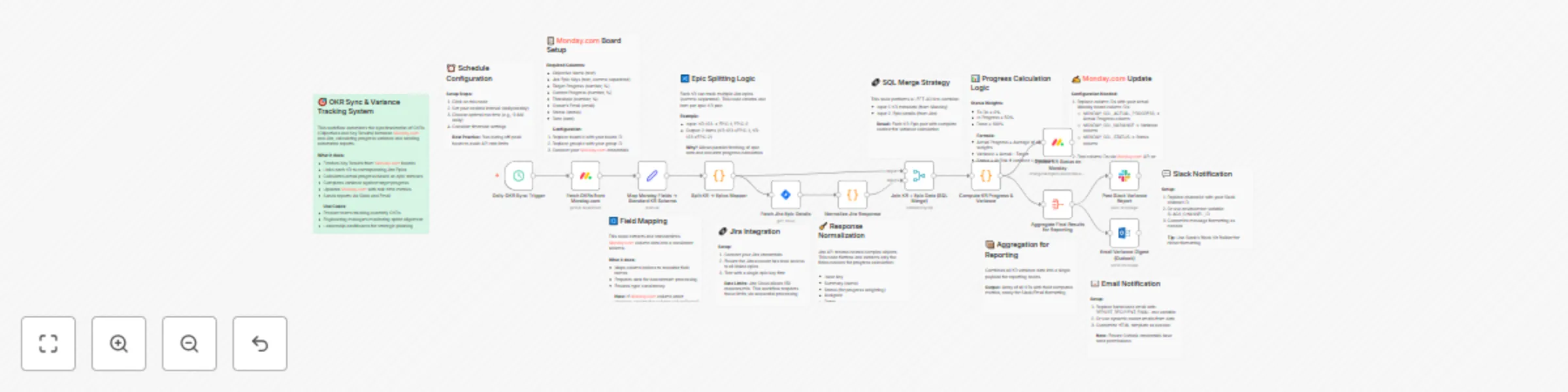
Synchronize OKRs (Objectives and Key Results) between Monday.com and Jira to automatically calculate progress variance, update dashboards, and share variance reports via Slack and Outlook. This workflow ensures teams have accurate, real-time visibility into performance metrics and project alignment — without manual reconciliation. 🎯📈💬

What This Template Does

  • Step 1: Triggers daily at a scheduled time to fetch the latest OKRs from Monday.com. ⏰
  • Step 2: Extracts Key Results and their linked Jira epic keys from the OKR board. 🔗
  • Step 3: Fetches corresponding Jira epic details such as status, assignee, and last updated date. 🧩
  • Step 4: Merges Monday.com KR data with Jira epic progress through SQL-style joins. 📋
  • Step 5: Calculates real-time progress and variance against target goals. 📊
  • Step 6: Updates Monday.com KR items with actual progress, variance percentage, and status (“On Track”, “At Risk”, or “Ahead”). 🔄
  • Step 7: Aggregates all KR data into a consolidated report for communication. 📦
  • Step 8: Sends formatted variance reports to Slack and Outlook, with summaries of owner, progress, and variance metrics. 📢

Key Benefits

✅ Automates end-to-end OKR and Jira synchronization ✅ Eliminates manual progress tracking errors ✅ Provides daily visibility on team and project health ✅ Enables proactive risk detection via variance thresholds ✅ Keeps all stakeholders updated via Slack and Outlook ✅ Centralizes OKR performance metrics for reporting

Features

  • Daily scheduled trigger for automatic OKR sync
  • Monday.com → Jira data integration via API
  • Real-time variance computation logic
  • Automatic updates of OKR fields in Monday.com
  • SQL-style data merging and aggregation
  • Slack notification with variance summaries
  • Outlook email digest with formatted HTML tables

Requirements

  • Monday.com API credentials with board access
  • Jira API credentials with permission to view epics
  • Slack Bot token with chat:write permissions
  • Microsoft Outlook OAuth2 credentials for sending emails
  • Environment variables for board, channel, and recipient configuration

Target Audience

  • Product and engineering teams managing OKRs across platforms 🎯
  • Project managers tracking cross-tool performance metrics 📋
  • Leadership teams needing automated OKR reporting 💼
  • Operations and strategy teams monitoring execution health 🧭

Step-by-Step Setup Instructions

  • Connect your Monday.com, Jira, Slack, and Outlook credentials in n8n. 🔑
  • Replace MONDAY_BOARD_ID, GROUP_ID, and column identifiers with your own. 🧩
  • Set environment variables for SLACK_CHANNEL_ID and REPORT_RECIPIENT_EMAIL. 💬
  • Adjust the cron expression to define your sync frequency (e.g., daily at 9 AM). ⏰
  • Test the workflow with a single OKR item to confirm successful synchronization. 🧠
  • Enable the workflow to automate daily OKR variance tracking and reporting. ✅

1.2 Logical Blocks

This catalog entry is organized from the workflow JSON. The node-level section below shows the executable blocks available for review before importing the template.

2. Block-by-Block Analysis

Block 1 - Workflow Overview

Type / Role
n8n-nodes-base.stickyNote - stickyNote
Config choices
Version 1

Block 2 - Note: Schedule Setup

Type / Role
n8n-nodes-base.stickyNote - stickyNote
Config choices
Version 1

Block 3 - Daily OKR Sync Trigger

Type / Role
n8n-nodes-base.scheduleTrigger - scheduleTrigger
Config choices
Version 1.2

Block 4 - Note: Monday Board Config

Type / Role
n8n-nodes-base.stickyNote - stickyNote
Config choices
Version 1

Block 5 - Fetch OKRs from Monday.com

Type / Role
n8n-nodes-base.mondayCom - mondayCom
Config choices
Version 1

Block 6 - Note: Field Mapping Logic

Type / Role
n8n-nodes-base.stickyNote - stickyNote
Config choices
Version 1

Block 7 - Map Monday Fields → Standard KR Schema

Type / Role
n8n-nodes-base.set - set
Config choices
Version 3.4

Block 8 - Note: Epic Splitting

Type / Role
n8n-nodes-base.stickyNote - stickyNote
Config choices
Version 1

Block 9 - Split KR → Epics Mapper

Type / Role
n8n-nodes-base.code - code
Config choices
Version 2

Block 10 - Note: Jira Epic Fetching

Type / Role
n8n-nodes-base.stickyNote - stickyNote
Config choices
Version 1

Block 11 - Fetch Jira Epic Details

Type / Role
n8n-nodes-base.jira - jira
Config choices
Version 1

Block 12 - Note: Jira Response Cleanup

Type / Role
n8n-nodes-base.stickyNote - stickyNote
Config choices
Version 1

Block 13 - Normalize Jira Response

Type / Role
n8n-nodes-base.code - code
Config choices
Version 2

Block 14 - Note: Data Merging

Type / Role
n8n-nodes-base.stickyNote - stickyNote
Config choices
Version 1

Block 15 - Join KR + Epic Data (SQL Merge)

Type / Role
n8n-nodes-base.merge - merge
Config choices
Version 3.2

Block 16 - Note: Variance Calculation

Type / Role
n8n-nodes-base.stickyNote - stickyNote
Config choices
Version 1

Block 17 - Compute KR Progress & Variance

Type / Role
n8n-nodes-base.code - code
Config choices
Version 2

Block 18 - Note: Monday Board Update

Type / Role
n8n-nodes-base.stickyNote - stickyNote
Config choices
Version 1

Block 19 - Update KR Status on Monday

Type / Role
n8n-nodes-base.mondayCom - mondayCom
Config choices
Version 1

Block 20 - Note: Data Aggregation

Type / Role
n8n-nodes-base.stickyNote - stickyNote
Config choices
Version 1

Block 21 - Aggregate Final Results for Reporting

Type / Role
n8n-nodes-base.aggregate - aggregate
Config choices
Version 1

Block 22 - Note: Slack Configuration

Type / Role
n8n-nodes-base.stickyNote - stickyNote
Config choices
Version 1

Block 23 - Post Slack Variance Report

Type / Role
n8n-nodes-base.slack - slack
Config choices
Version 2.3

Block 24 - Note: Email Configuration

Type / Role
n8n-nodes-base.stickyNote - stickyNote
Config choices
Version 1

Showing the first 24 of 25 workflow blocks. Download the JSON for the full node graph.

3. Summary Table

Workflow Monitor and report OKR variance from Monday.com and Jira via Slack and Email
Complexity advanced
Nodes 25
Categories Project Management
Author Rahul Joshi
Published 17 Oct 2025

4. Reproducing the Workflow from Scratch

  1. 1. Download the workflow JSON

    Use the JSON export at /data/workflows/9831/9831.json as the source template for this automation.

  2. 2. Import the template into n8n

    Open n8n, import the downloaded JSON, and review each node before activating the workflow.

  3. 3. Configure credentials and variables

    Replace placeholder credentials, API keys, webhook URLs, account IDs, and environment-specific values with your own settings.

  4. 4. Test with sample data

    Run the workflow manually or in a staging workspace, inspect node output, and confirm downstream systems receive the expected data.

  5. 5. Activate and monitor

    Enable the workflow only after testing, then monitor executions, errors, and rate limits during the first production runs.

5. General Notes & Resources

Review imported nodes carefully before activation. This catalog entry is intended to help you inspect the workflow structure, understand required services, and find related templates faster.

Node names, credentials, schedules, webhook paths, and external service limits may need adjustment for your workspace.

Frequently asked questions

What does Monitor and report OKR variance from Monday.com and Jira via Slack and Email do?

Description Synchronize OKRs (Objectives and Key Results) between Monday.com and Jira to automatically calculate progress variance, update dashboards, and share variance reports via Slack and Outlo...

What do I need before importing this workflow?

Review the workflow JSON, configure any required credentials in n8n, and test the automation in a safe workspace before using it in production.

Can I customize this workflow?

Yes. Use the block-by-block analysis and the downloadable JSON to inspect each node, then adjust credentials, prompts, schedules, filters, or destinations for your Project Management use case.