Manage Google Calendar events with OpenAI Assistant (Get, create, delete)
Workflow preview


 Early Deal
DISCOUNT 20%

Important notice
This workflow is provided as-is. Please review and test before using in production.
Overview
What this workflow does
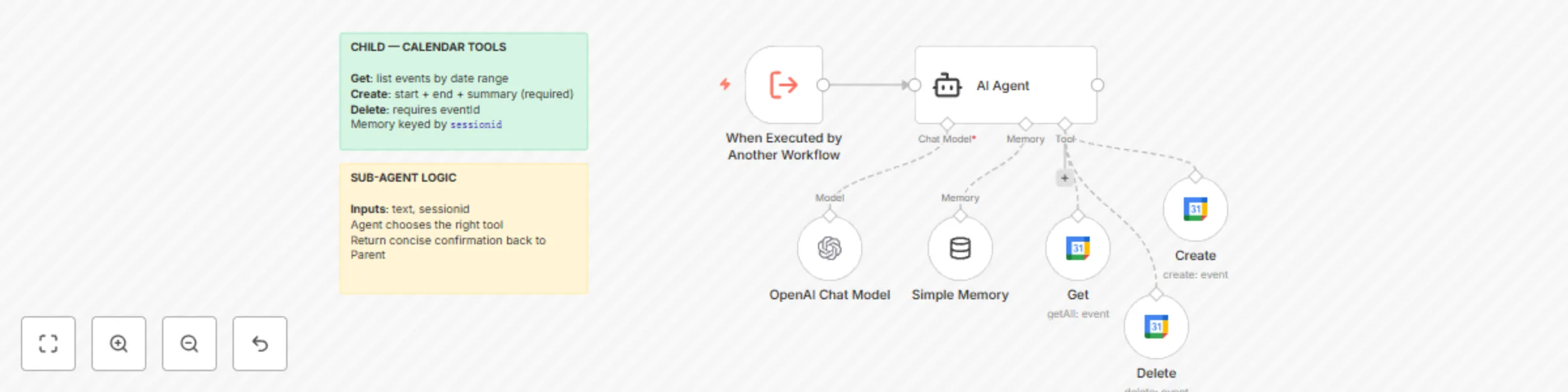
Provides the tools layer for the Parent agent to manage Google Calendar: Get (list events), Create, and Delete. Accepts text + sessionid from the Parent and uses an LLM with short-term memory to choose and run the correct tool.
Pipeline: Execute Workflow Trigger → Sub-Agent → (Get / Create / Delete) → Google Calendar
Category: Productivity / Calendar / Agentic
Time to set up: ~10 minutes
Difficulty: Intermediate
Cost: Mostly free (n8n CE; OpenAI + Google Calendar usage as configured)
What you'll need
OpenAI credentials.
Google Calendar OAuth2 credentials.
A calendar ID (use a placeholder like
[email protected]in the node and select your actual calendar at runtime).
Set up steps
Import this Sub-Agent workflow.
Open the Google Calendar tool nodes (Get, Create, Delete) and select your OAuth2 credential and calendar.
Ensure the Execute Workflow Trigger exposes two inputs:
textandsessionid.Connect the Parent's
toolWorkflownode to this workflow.
Testing (direct call example)
From the Parent, send: "Schedule 'Team Sync' tomorrow 10:00--11:00" → Sub-Agent should call Create.
"List events next week" → Get with
timeMin/timeMax."Delete event 'Team Sync'" → Delete with
eventIdonce matched.