Live airport delay dashboard with FlightStats, Google Sheets & Slack alerts
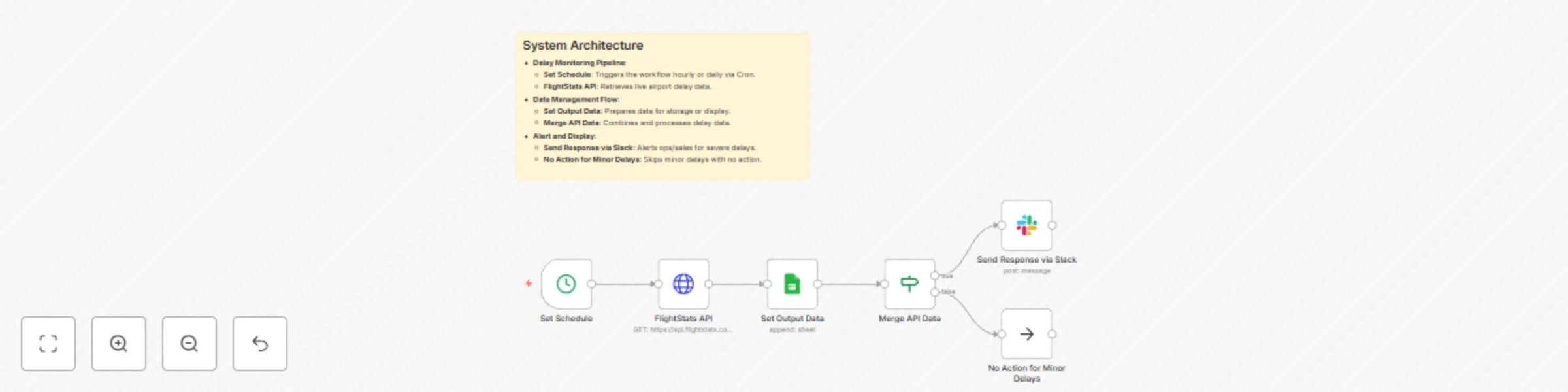
Workflow preview

$20/month : Unlimited workflows
2500 executions/month

THE #1 IN WEB SCRAPING
Scrape any website without limits
HOSTINGER  Early Deal
DISCOUNT 20% Try free
Early DealDISCOUNT 20%
Self-hosted n8n
Unlimited workflows - from $4.99/mo

#1 hub for scraping, AI & automation
6000+ actors - $5 credits/mo
Important notice
This workflow is provided as-is. Please review and test before using in production.
Overview
Live Airport Delay Dashboard with FlightStats & Team Alerts
Description
- Automates live monitoring of airport delays using FlightStats API.
- Stores and displays delay data, with Slack alerts for severe delays to operations/sales teams.
Essential Information
- Runs on a scheduled trigger (e.g., hourly or daily).
- Fetches real-time delay data from FlightStats API.
- Stores data in Google Sheets and alerts teams via Slack for severe delays.
System Architecture
- Delay Monitoring Pipeline:
- Set Schedule: Triggers the workflow hourly or daily via Cron.
- FlightStats API: Retrieves live airport delay data.
- Data Management Flow:
- Set Output Data: Prepares data for storage or display.
- Merge API Data: Combines and processes delay data.
- Alert and Display:
- Send Response via Slack: Alerts ops/sales for severe delays.
- No Action for Minor Delays: Skips minor delays with no action.
Implementation Guide
- Import the workflow JSON into n8n.
- Configure Cron node for desired schedule (e.g., every 1 hr).
- Set up FlightStats API credentials and endpoint (e.g., https://api.flightstats.com).
- Configure Google Sheets or Notion for data storage/display.
- Test with a sample API call and verify Slack alerts.
- Adjust delay severity thresholds as needed.
Technical Dependencies
- Cron service for scheduling.
- FlightStats API for real-time delay data.
- Google Sheets API or Notion API for data storage/display.
- Slack API for team notifications.
- n8n for workflow automation.
Database & Sheet Structure
- Delay Tracking Sheet (e.g., AirportDelays):
- Columns:
airport_code,delay_status,delay_minutes,timestamp,alert_sent - Example:
JFK,Severe,120,2025-07-29T20:28:00Z,Yes
- Columns:
Customization Possibilities
- Adjust Cron schedule for different frequencies (e.g., every 30 min).
- Modify FlightStats API parameters to track specific airports.
- Customize Slack alert messages in the
Send Response via Slacknode. - Integrate with a dashboard tool (e.g., Google Data Studio) for live display.
- Add email alerts for additional notification channels.