Block 1 - Workflow Overview
- Type / Role
- n8n-nodes-base.stickyNote - stickyNote
- Config choices
- Version 1


 Early Deal
This workflow is provided as-is. Please review and test before using in production.
LinkedIn Post Automation with AI Generation (Gpt 4o) & Slack Approval How it Works This workflow automates the creation and publishing of LinkedIn posts with AI generated content and human approval...
n8n-nodes-base.stickynote, n8n-nodes-base.limit, @n8n/n8n-nodes-langchain.outputparserstructured, @n8n/n8n-nodes-langchain.lmchatopenai, n8n-nodes-base.webhook, n8n-nodes-base.googlesheetstrigger, n8n-nodes-base.if, @n8n/n8n-nodes-langchain.agent
This workflow is cataloged by N8N Workflows and links back to its original n8n.io source page by Amit Mehta.
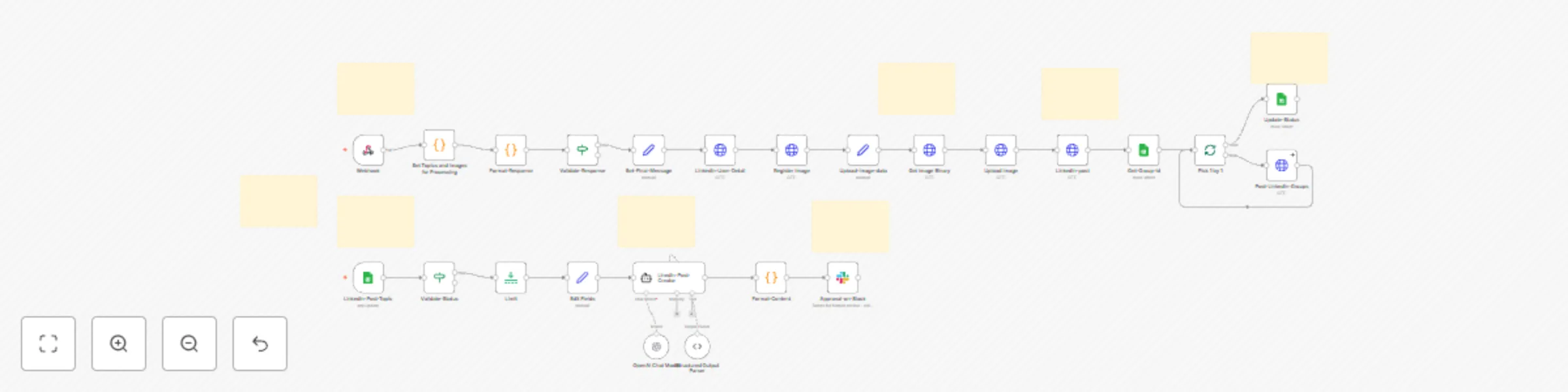
Original n8n.io sourceThis workflow automates the creation and publishing of LinkedIn posts with AI-generated content and human approval via Slack, using Google Sheets, OpenAI (GPT-4), Slack Interactive Messages, and the LinkedIn API.
Whether you're a social media manager, content creator, or marketing professional, this workflow helps you maintain consistent LinkedIn presence and scale content creation while keeping human oversight — all managed from a simple spreadsheet.
Ideal for:
Linkedin PostStatus as PendingConnect your Google account to:
Linkedin-Post-Topic (Trigger node)Update-Status Get-Group-idOnce live, the workflow will:
PostedPending statusPosted in sheet| Node Name | Description |
|---|---|
| Linkedin-Post-Topic | Monitors spreadsheet for new post topics |
| Validate-Status | Filters only 'Pending' items |
| Limit | Processes one item at a time |
| Linedin-Post-Creator | Generates post content using GPT-4 |
| Format-Content | Prepares content for Slack display |
| Approval-on-Slack | Sends interactive approval message |
| Webhook | Receives Slack button responses |
| Format-Response | Extracts edited content from Slack |
| Set-Final-Message | Prepares approved content |
| Linkedin-User-Detail | Fetches LinkedIn user info |
| Register Image | Initiates LinkedIn image upload |
| Upload Image | Uploads image to LinkedIn |
| Linkedin-post | Publishes to personal profile |
| Get-Group-id | Retrieves LinkedIn group IDs |
| Post-Linkedin-Groups | Posts to multiple groups |
| Update-Status | Marks as completed in sheet |
| Node/Section | Sticky Note Content |
|---|---|
| Linkedin-Post-Topic | "Triggers every minute for new posts in your spreadsheet" |
| Validate-Status | "Filters to process only 'Pending' items - prevents duplicates" |
| Linedin-Post-Creator | "Uses GPT-4 to generate LinkedIn content - customize prompt for your brand voice" |
| Approval-on-Slack | "Sends for human review - edit the Slack user to change approver" |
| Webhook | "Receives approval responses - ensure URL is configured in Slack app" |
| Register Image | "Initiates LinkedIn media upload - requires valid image URL from sheet" |
| Linkedin-post | "Publishes to your profile - update with your LinkedIn credentials" |
| Post-Linkedin-Groups | "Posts to multiple groups - add group IDs in Groups sheet" |
| Update-Status | "Marks as 'Posted' to prevent reprocessing" |
The workflow uses a sophisticated prompt that:
LinkedIn App Requirements:
r_liteprofile - Read profile datar_emailaddress - Access emailw_member_social - Post contentrw_organization_admin - Group postingSlack Bot Permissions:
chat:write - Send messagesim:write - Direct messagesusers:read - User information| Component | Purpose |
|---|---|
| Google Sheet | Store post topics and status |
| LinkedIn App | API access for posting |
| Slack App | Interactive approval flow |
| OpenAI Account | GPT-4 content generation |
| N8N Instance | Workflow execution |
PendingPostedLinkedIn API Errors:
Slack Integration:
Image Upload Failures:
| File Name | Purpose |
|---|---|
| Linkedin Post | Google Sheet to hold post topics and status |
This catalog entry is organized from the workflow JSON. The node-level section below shows the executable blocks available for review before importing the template.
Showing the first 24 of 32 workflow blocks. Download the JSON for the full node graph.
| Workflow | LinkedIn post automation with AI (GPT-4o) generation & Slack approval |
|---|---|
| Complexity | advanced |
| Nodes | 32 |
| Categories | Social Media, Multimodal AI |
| Author | Amit Mehta |
| Published | 29 May 2025 |
Use the JSON export at /data/workflows/4483/4483.json as the source template for this automation.
Open n8n, import the downloaded JSON, and review each node before activating the workflow.
Replace placeholder credentials, API keys, webhook URLs, account IDs, and environment-specific values with your own settings.
Run the workflow manually or in a staging workspace, inspect node output, and confirm downstream systems receive the expected data.
Enable the workflow only after testing, then monitor executions, errors, and rate limits during the first production runs.
Review imported nodes carefully before activation. This catalog entry is intended to help you inspect the workflow structure, understand required services, and find related templates faster.
Node names, credentials, schedules, webhook paths, and external service limits may need adjustment for your workspace.
LinkedIn Post Automation with AI Generation (Gpt 4o) & Slack Approval How it Works This workflow automates the creation and publishing of LinkedIn posts with AI generated content and human approval...
Review the workflow JSON, configure any required credentials in n8n, and test the automation in a safe workspace before using it in production.
Yes. Use the block-by-block analysis and the downloadable JSON to inspect each node, then adjust credentials, prompts, schedules, filters, or destinations for your Social Media, Multimodal AI use case.