Block 1 - Verify Webhook
- Type / Role
- n8n-nodes-base.respondToWebhook - respondToWebhook
- Config choices
- Version 1


 Early Deal
This workflow is provided as-is. Please review and test before using in production.
Video Demo: [Click here to see a video of this workflow in action](https://www.loom.com/share/bbeaa4b9295d4746b2cbab38a40f6f4b?sid=8326242c 3848 47db 872a 116a4...
n8n-nodes-base.respondtowebhook, @n8n/n8n-nodes-langchain.lmchatopenai, n8n-nodes-base.noop, @n8n/n8n-nodes-langchain.memorybufferwindow, n8n-nodes-base.if, n8n-nodes-base.slack, n8n-nodes-base.stickynote, n8n-nodes-base.webhook
This workflow is cataloged by N8N Workflows and links back to its original n8n.io source page by Angel Menendez.
Original n8n.io sourceClick here to see a video of this workflow in action.
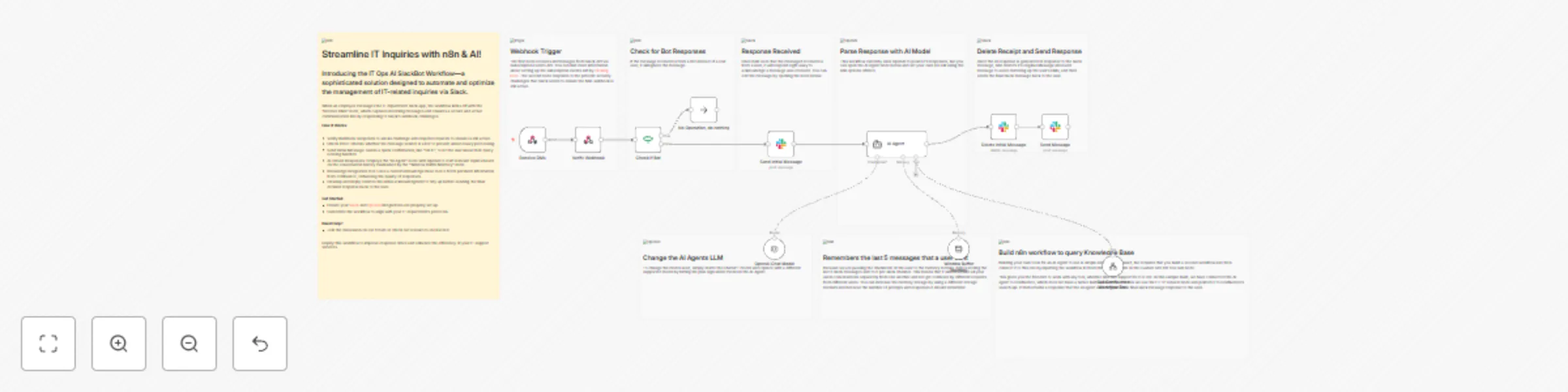
The "IT Department Q&A Workflow" is designed to streamline and automate the process of handling IT-related inquiries from employees through Slack. When an employee sends a direct message (DM) to the IT department's Slack channel, the workflow is triggered. The initial step involves the "Receive DMs" node, which listens for new messages. Upon receiving a message, the workflow verifies the webhook by responding to Slack's challenge request, ensuring that the communication channel is active and secure.
Once the webhook is verified, the workflow checks if the message sender is a bot using the "Check if Bot" node. If the sender is identified as a bot, the workflow terminates the process to avoid unnecessary actions. If the sender is a human, the workflow sends an acknowledgment message back to the user, confirming that their query is being processed. This is achieved through the "Send Initial Message" node, which posts a simple message like "On it!" to the user's Slack channel.
The core functionality of the workflow is powered by the "AI Agent" node, which utilizes the OpenAI GPT-4 model to interpret and respond to the user's query. This AI-driven node processes the text of the received message, generating an appropriate response based on the context and information available. To maintain conversation context, the "Window Buffer Memory" node stores the last five messages from each user, ensuring that the AI agent can provide coherent and contextually relevant answers.
Additionally, the workflow includes a custom Knowledge Base (KB) tool (see that tool template here) that integrates with the AI agent, allowing it to search the company's internal KB for relevant information. After generating the response, the workflow cleans up the initial acknowledgment message using the "Delete Initial Message" node to keep the conversation thread clean. Finally, the generated response is sent back to the user via the "Send Message" node, providing them with the information or assistance they requested. This workflow effectively automates the IT support process, reducing response times and improving efficiency.
To quickly deploy the Knowledge Ninja app in Slack, use the app manifest below and don't forget to replace the two sample urls:
{
    "display_information": {
        "name": "Knowledge Ninja",
        "description": "IT Department Q&A Workflow",
        "background_color": "#005e5e"
    },
    "features": {
        "bot_user": {
            "display_name": "IT Ops AI SlackBot Workflow",
            "always_online": true
        }
    },
    "oauth_config": {
        "redirect_urls": [
            "Replace everything inside the double quotes with your slack redirect oauth url, for example: https://n8n.domain.com/rest/oauth2-credential/callback"
        ],
        "scopes": {
            "user": [
                "search:read"
            ],
            "bot": [
                "chat:write",
                "chat:write.customize",
                "groups:history",
                "groups:read",
                "groups:write",
                "groups:write.invites",
                "groups:write.topic",
                "im:history",
                "im:read",
                "im:write",
                "mpim:history",
                "mpim:read",
                "mpim:write",
                "mpim:write.topic",
                "usergroups:read",
                "usergroups:write",
                "users:write",
                "channels:history"
            ]
        }
    },
    "settings": {
        "event_subscriptions": {
            "request_url": "Replace everything inside the double quotes with your workflow webhook url, for example: https://n8n.domain.com/webhook/99db3e73-57d8-4107-ab02-5b7e713894ad",
            "bot_events": [
                "message.im"
            ]
        },
        "org_deploy_enabled": false,
        "socket_mode_enabled": false,
        "token_rotation_enabled": false
    }
}
This catalog entry is organized from the workflow JSON. The node-level section below shows the executable blocks available for review before importing the template.
| Workflow | IT ops AI SlackBot workflow - chat with your knowledge base |
|---|---|
| Complexity | advanced |
| Nodes | 20 |
| Categories | Internal Wiki, AI RAG |
| Author | Angel Menendez |
| Published | 03 Sept 2024 |
Use the JSON export at /data/workflows/2397/2397.json as the source template for this automation.
Open n8n, import the downloaded JSON, and review each node before activating the workflow.
Replace placeholder credentials, API keys, webhook URLs, account IDs, and environment-specific values with your own settings.
Run the workflow manually or in a staging workspace, inspect node output, and confirm downstream systems receive the expected data.
Enable the workflow only after testing, then monitor executions, errors, and rate limits during the first production runs.
Review imported nodes carefully before activation. This catalog entry is intended to help you inspect the workflow structure, understand required services, and find related templates faster.
Node names, credentials, schedules, webhook paths, and external service limits may need adjustment for your workspace.
Video Demo: [Click here to see a video of this workflow in action](https://www.loom.com/share/bbeaa4b9295d4746b2cbab38a40f6f4b?sid=8326242c 3848 47db 872a 116a4...
Review the workflow JSON, configure any required credentials in n8n, and test the automation in a safe workspace before using it in production.
Yes. Use the block-by-block analysis and the downloadable JSON to inspect each node, then adjust credentials, prompts, schedules, filters, or destinations for your Internal Wiki, AI RAG use case.