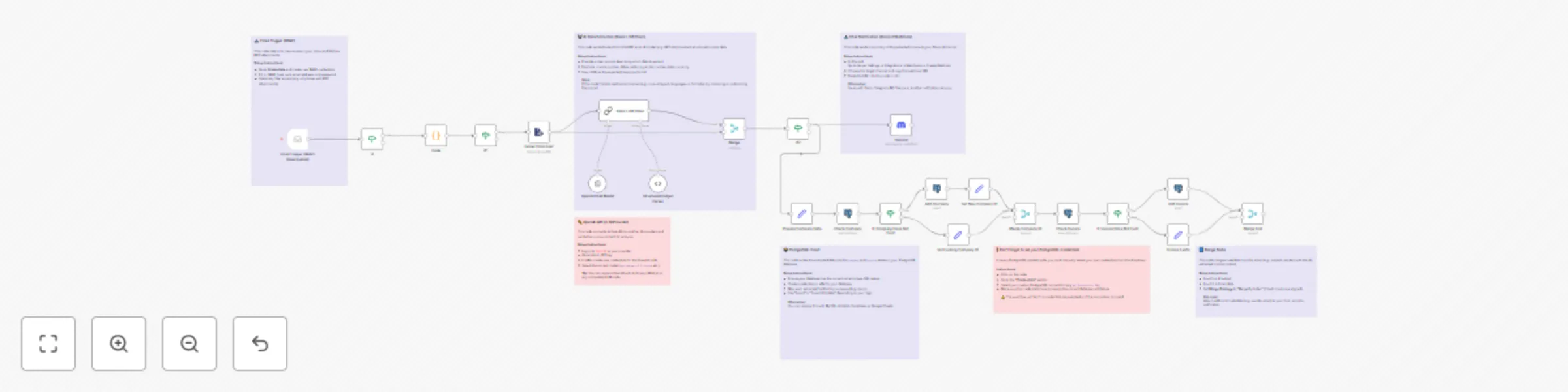
Invoice processing: Email to PostgreSQL database with GPT-4o & Discord alerts

Workflow preview

Workflow preview
100%
Invoice processing: Email to PostgreSQL database with GPT-4o & Discord alerts preview
Open on n8n.io

Important notice

This workflow is provided as-is. Please review and test before using in production.

1. Workflow Overview

AI Powered Invoice Processing: from Email to Database & Chat Notifications Automatically process PDF invoices directly from your email inbox. This workflow uses AI to extract key data, saves it to ...

Best for

  • Invoice Processing automation workflows
  • AI Summarization automation workflows
  • advanced n8n builders looking for reusable templates

Tools used

n8n-nodes-base.emailreadimap, n8n-nodes-base.discord, @n8n/n8n-nodes-langchain.chainllm, @n8n/n8n-nodes-langchain.lmchatopenai, @n8n/n8n-nodes-langchain.outputparserstructured, n8n-nodes-base.code, n8n-nodes-base.extractfromfile, n8n-nodes-base.if

Source and attribution

This workflow is cataloged by N8N Workflows and links back to its original n8n.io source page by Halfbit 🚀.

Original n8n.io source

1.1 Workflow description

Title
Invoice processing: Email to PostgreSQL database with GPT-4o & Discord alerts
Workflow name
Invoice processing: Email to PostgreSQL database with GPT-4o & Discord alerts

AI-Powered Invoice Processing: from Email to Database & Chat Notifications

Automatically process PDF invoices directly from your email inbox. This workflow uses AI to extract key data, saves it to a PostgreSQL database, and instantly notifies you about the new document in your preferred chat application.

The workflow listens for new emails, fetches PDF attachments, and then passes their content to a Large Language Model (LLM) for intelligent recognition and data extraction. Finally, the information is securely archived in the database, and a summary of the invoice is sent as a notification.

> 📝 This workflow is highly customizable.
> It uses PostgreSQL, OpenAI (GPT), and Discord by default, but you can easily swap these components.
> Feel free to use a different database like MySQL or Airtable, another AI model provider, or send notifications to Slack, MS Teams, or any other chat platform.

> ⚠️ Note: If the workflow fails to extract data correctly from invoices issued by certain companies, you may need to adjust the prompt used in the Basic LLM Chain node to improve parsing accuracy.


Use Case

  • Automating accounts payable for small businesses and freelancers
  • Centralizing financial documents without manual data entry
  • Creating a searchable database of all incoming invoices
  • Receiving real-time notifications for new financial commitments

Features

  • 📧 Email Trigger (IMAP): Monitors a dedicated email inbox for new messages with attachments
  • 📄 PDF Filtering: Automatically identifies and processes only PDF attachments
  • 🤖 AI-Powered Data Extraction: Uses an LLM (e.g., GPT-4o-mini) to extract invoice number, buyer/seller details, amounts, currency, and due dates
  • ⚙️ Structured Data Output: Converts AI output to standardized JSON
  • 🔍 Database Write Logic: Prevents duplicates by checking invoice/company combo
  • 🗄️ PostgreSQL Integration: Stores extracted data into company and invoice tables
  • 💬 Chat Notifications: Sends invoice summary as message to a designated channel

Setup Instructions

⚠️ API Access & Costs

To use the AI extraction feature, you need an API key from a provider like OpenAI.
Most providers charge for access to language models. You'll likely need a billing account.


1. PostgreSQL Database Configuration

Ensure your database has the following tables:

-- Table for companies (invoice issuers)
CREATE TABLE company (
    id SERIAL PRIMARY KEY,
    tax_number VARCHAR(255) UNIQUE NOT NULL,
    name VARCHAR(255),
    address TEXT,
    created_at TIMESTAMP WITH TIME ZONE DEFAULT CURRENT_TIMESTAMP
);

-- Table for invoices
CREATE TABLE invoice (
    id SERIAL PRIMARY KEY,
    company_id INTEGER REFERENCES company(id),
    invoice_number VARCHAR(255) NOT NULL,
    -- Add other fields: total_to_pay, currency, due_date
    created_at TIMESTAMP WITH TIME ZONE DEFAULT CURRENT_TIMESTAMP,
    UNIQUE(company_id, invoice_number)
);

Then, in n8n, create a credential for your PostgreSQL DB.


2. Email (IMAP) Configuration

In n8n, add credentials for the email account that receives invoices:

  • IMAP host
  • IMAP port
  • Username
  • Password

3. AI Provider Configuration

  • Log in to OpenAI (or similar provider)
  • Generate API key
  • In n8n, create credentials and paste the key

4. Chat Notification (Discord)

  • Go to Discord > Server Settings > Integrations > Webhooks > New Webhook
  • Select channel
  • Copy Webhook URL
  • In n8n, paste URL into the Discord node

Placeholders and Fields to Fill

Placeholder Description Example
YOUR_EMAIL_CREDENTIALS Your IMAP email account in n8n My Invoice Mailbox
YOUR_OPENAI_CREDENTIALS API credentials for AI model My OpenAI Key
YOUR_POSTGRES_CREDENTIALS Your PostgreSQL DB credentials in n8n My Production DB
YOUR_DISCORD_WEBHOOK Webhook URL for your chat system https://discord.com/api/webhooks/...

Testing the Workflow

  1. Send a test invoice to the inbox as a PDF attachment
  2. Run the workflow manually in n8n and check if the IMAP node fetches the message
  3. Verify AI Extraction – inspect the LLM output (e.g., GPT node) and confirm structured JSON
  4. Check the DB – ensure new rows appear in company and invoice
  5. Check the chat – verify the invoice summary appears in the chosen channel

Customization Tips

  • Change the DB: Use MySQL, Airtable, or Google Sheets instead of PostgreSQL
  • Other notifications: Swap Discord for Slack, MS Teams, Telegram, etc.
  • Expand AI logic: Extract line items, prices, etc. by customizing the prompt
  • Add payment logic: Allow marking invoices as paid via emoji or a separate webhook

1.2 Logical Blocks

This catalog entry is organized from the workflow JSON. The node-level section below shows the executable blocks available for review before importing the template.

2. Block-by-Block Analysis

Block 1 - Email Trigger (IMAP)

Type / Role
n8n-nodes-base.emailReadImap - emailReadImap
Config choices
Version 2

Block 2 - Discord

Type / Role
n8n-nodes-base.discord - discord
Config choices
Version 2

Block 3 - Basic LLM Chain

Type / Role
@n8n/n8n-nodes-langchain.chainLlm - chainLlm
Config choices
Version 1.5

Block 4 - OpenAI Chat Model

Type / Role
@n8n/n8n-nodes-langchain.lmChatOpenAi - lmChatOpenAi
Config choices
Version 1.2

Block 5 - Structured Output Parser

Type / Role
@n8n/n8n-nodes-langchain.outputParserStructured - outputParserStructured
Config choices
Version 1.2

Block 6 - Code

Type / Role
n8n-nodes-base.code - code
Config choices
Version 2

Block 7 - Extract from File1

Type / Role
n8n-nodes-base.extractFromFile - extractFromFile
Config choices
Version 1

Block 8 - If

Type / Role
n8n-nodes-base.if - if
Config choices
Version 2.2

Block 9 - Merge

Type / Role
n8n-nodes-base.merge - merge
Config choices
Version 3

Block 10 - If1

Type / Role
n8n-nodes-base.if - if
Config choices
Version 2.2

Block 11 - If2

Type / Role
n8n-nodes-base.if - if
Config choices
Version 2.2

Block 12 - Prepare Company Data

Type / Role
n8n-nodes-base.set - set
Config choices
Version 2

Block 13 - Check Company

Type / Role
n8n-nodes-base.postgres - postgres
Config choices
Version 2.1

Block 14 - IF Company Does Not Exist

Type / Role
n8n-nodes-base.if - if
Config choices
Version 1

Block 15 - Add Company

Type / Role
n8n-nodes-base.postgres - postgres
Config choices
Version 2.1

Block 16 - Set Existing Company ID

Type / Role
n8n-nodes-base.set - set
Config choices
Version 2

Block 17 - Set New Company ID

Type / Role
n8n-nodes-base.set - set
Config choices
Version 2

Block 18 - Merge Company ID

Type / Role
n8n-nodes-base.merge - merge
Config choices
Version 2

Block 19 - Check Invoice

Type / Role
n8n-nodes-base.postgres - postgres
Config choices
Version 2.1

Block 20 - IF Invoice Does Not Exist

Type / Role
n8n-nodes-base.if - if
Config choices
Version 1

Block 21 - Add Invoice

Type / Role
n8n-nodes-base.postgres - postgres
Config choices
Version 2.1

Block 22 - Invoice Exists

Type / Role
n8n-nodes-base.set - set
Config choices
Version 2

Block 23 - Merge End

Type / Role
n8n-nodes-base.merge - merge
Config choices
Version 2

Block 24 - Sticky Note

Type / Role
n8n-nodes-base.stickyNote - stickyNote
Config choices
Version 1

Showing the first 24 of 30 workflow blocks. Download the JSON for the full node graph.

3. Summary Table

Workflow Invoice processing: Email to PostgreSQL database with GPT-4o & Discord alerts
Complexity advanced
Nodes 30
Categories Invoice Processing, AI Summarization
Author Halfbit 🚀
Published 28 Jul 2025

4. Reproducing the Workflow from Scratch

  1. 1. Download the workflow JSON

    Use the JSON export at /data/workflows/6558/6558.json as the source template for this automation.

  2. 2. Import the template into n8n

    Open n8n, import the downloaded JSON, and review each node before activating the workflow.

  3. 3. Configure credentials and variables

    Replace placeholder credentials, API keys, webhook URLs, account IDs, and environment-specific values with your own settings.

  4. 4. Test with sample data

    Run the workflow manually or in a staging workspace, inspect node output, and confirm downstream systems receive the expected data.

  5. 5. Activate and monitor

    Enable the workflow only after testing, then monitor executions, errors, and rate limits during the first production runs.

5. General Notes & Resources

Review imported nodes carefully before activation. This catalog entry is intended to help you inspect the workflow structure, understand required services, and find related templates faster.

Node names, credentials, schedules, webhook paths, and external service limits may need adjustment for your workspace.

Frequently asked questions

What does Invoice processing: Email to PostgreSQL database with GPT-4o & Discord alerts do?

AI Powered Invoice Processing: from Email to Database & Chat Notifications Automatically process PDF invoices directly from your email inbox. This workflow uses AI to extract key data, saves it to ...

What do I need before importing this workflow?

Review the workflow JSON, configure any required credentials in n8n, and test the automation in a safe workspace before using it in production.

Can I customize this workflow?

Yes. Use the block-by-block analysis and the downloadable JSON to inspect each node, then adjust credentials, prompts, schedules, filters, or destinations for your Invoice Processing, AI Summarization use case.