Interactive Slack approval & data submission system with webhooks

Workflow preview

Workflow preview
100%
Interactive Slack approval & data submission system with webhooks preview
Open on n8n.io

Important notice

This workflow is provided as-is. Please review and test before using in production.

1. Workflow Overview

Slack Bot n8n Integration Hub Workflow Submission Showcase: Endless Possibilities with n8n Integration This repository demonstrates a powerful Slack Bot Socket App that seamlessly integrates wit...

Best for

  • Project Management automation workflows
  • intermediate n8n builders looking for reusable templates

Tools used

n8n-nodes-base.webhook, n8n-nodes-base.slack, n8n-nodes-base.function, n8n-nodes-base.stickynote

Source and attribution

This workflow is cataloged by N8N Workflows and links back to its original n8n.io source page by Niranjan G.

Original n8n.io source

1.1 Workflow description

Title
Interactive Slack approval & data submission system with webhooks
Workflow name
Interactive Slack approval & data submission system with webhooks

Slack Bot n8n Integration Hub - Workflow Submission

πŸš€ Showcase: Endless Possibilities with n8n Integration

This repository demonstrates a powerful Slack Bot Socket App that seamlessly integrates with n8n for automation workflows. This is just a showcase of what's possible when combining Slack's interactive capabilities with n8n's automation power - the possibilities are truly endless!

πŸ“‹ Project Overview

Repository: slack-n8n-integration-hub

Status: βœ… Committed and Ready for Submission

This project showcases how to create seamless interactions between Slack users and n8n workflows, demonstrating:

  • Real-time Data Submission from Slack to n8n workflows
  • Interactive Approval/Rejection workflows triggered from Slack
  • Secure Webhook Communication with optional Basic Authentication
  • Dynamic Modal Interactions with immediate feedback
  • Error Handling and User Experience optimization

🎯 Key Features Demonstrated

1. Data Input Integration

  • Users can submit custom data directly from Slack
  • Data is instantly sent to n8n workflows for processing
  • Real-time feedback and confirmation messages

2. Approval Workflow Automation

  • Interactive approve/reject buttons in Slack modals
  • Decisions trigger different n8n workflow paths
  • Automated decision logging and processing

3. Enhanced User Experience

  • Modal closes automatically after actions
  • Submit button positioned below input for better UX
  • Comprehensive error handling and user feedback

4. Security & Authentication

  • Optional HTTP Basic Auth for webhook security
  • Environment-based configuration management
  • Secure credential handling

πŸ”§ Technical Implementation

Slack Bot Features:

  • Socket Mode for real-time communication
  • Custom slash commands (/automation)
  • Interactive modals with dynamic content
  • Button actions and form submissions

n8n Integration:

  • Webhook triggers for data reception
  • Structured payload formats
  • Authentication support
  • Error handling and response management

Workflow Payload Examples:

Data Submission:

{
  "type": "data_submission",
  "data": "User input data here",
  "user": {
    "id": "U1234567890",
    "name": "username"
  },
  "timestamp": "2024-01-01T12:00:00.000Z",
  "source": "slack_bot"
}

Approval Action:

{
  "type": "approval_action",
  "action": "approve",
  "user": {
    "id": "U1234567890",
    "name": "username"
  },
  "timestamp": "2024-01-01T12:00:00.000Z",
  "source": "slack_bot"
}

🌟 Why This Matters for n8n Community

This project demonstrates how n8n can be the backbone for:

  • Human-in-the-loop automation workflows
  • Interactive approval processes
  • Real-time data collection from team communication tools
  • Seamless integration between chat platforms and automation
  • Scalable workflow triggers from multiple sources

πŸš€ Endless Possibilities

This is just the beginning! With this foundation, you can build:

  • IT Service Desk automation with Slack approvals
  • Content Publishing workflows with team reviews
  • Data Collection and processing pipelines
  • Incident Management with automated escalations
  • Project Management with status updates and approvals
  • Customer Support ticket routing and responses
  • DevOps Deployments with approval gates
  • Financial Approvals with audit trails
  • HR Processes with automated workflows
  • Marketing Campaigns with content approvals

πŸ“ Repository Structure

slack-n8n-integration-hub/
β”œβ”€β”€ app.js                          # Main Slack Bot application
β”œβ”€β”€ package.json                    # Dependencies and scripts
β”œβ”€β”€ .env.example                    # Environment configuration template
β”œβ”€β”€ README.md                       # Complete setup documentation
β”œβ”€β”€ CONTRIBUTING.md                 # Contribution guidelines
β”œβ”€β”€ Slack_Bot_n8n_Integration_Hub.json  # n8n workflow export
β”œβ”€β”€ n8n-workflow-examples.json     # Additional workflow examples
└── test-webhook.js                 # Webhook testing utilities

πŸŽ‰ Ready for n8n Community

This workflow is:

  • βœ… Fully Tested and working
  • βœ… Well Documented with setup instructions
  • βœ… Open Source and ready for community use
  • βœ… Extensible for various use cases
  • βœ… Production Ready with error handling

πŸ”— Get Started

  1. Clone the repository: git clone https://github.com/iam-niranjan/slack-n8n-integration-hub.git
  2. Follow the setup guide in the main README.md
  3. Import the n8n workflows from the JSON files
  4. Customize for your use case and explore the possibilities!

This showcase demonstrates that with n8n and Slack integration, the automation possibilities are truly endless! πŸš€

Ready to submit to n8n community for sharing and collaboration.

1.2 Logical Blocks

This catalog entry is organized from the workflow JSON. The node-level section below shows the executable blocks available for review before importing the template.

2. Block-by-Block Analysis

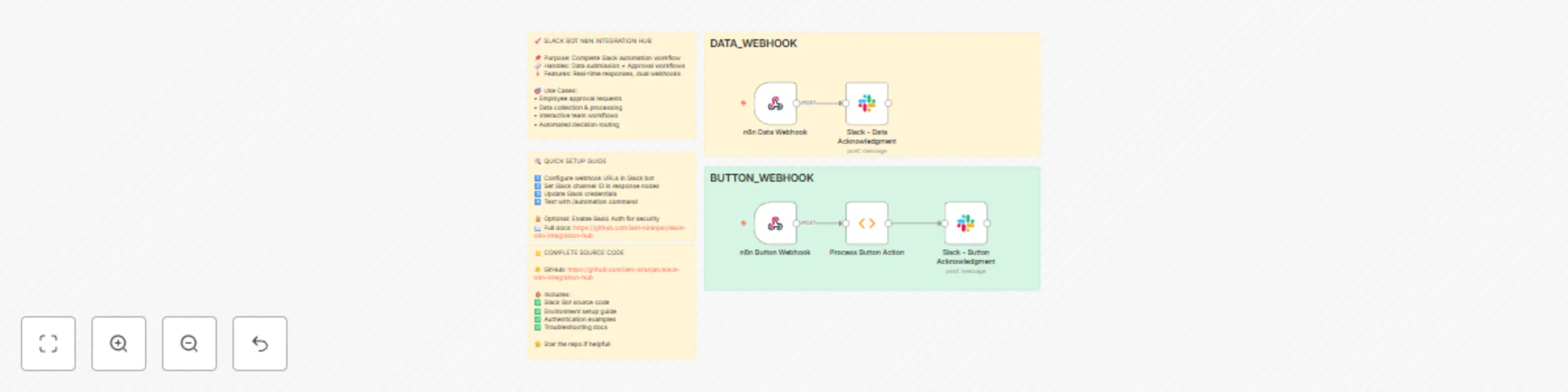
Block 1 - n8n Data Webhook

Type / Role
n8n-nodes-base.webhook - webhook
Config choices
Version 2

Block 2 - Slack - Data Acknowledgment

Type / Role
n8n-nodes-base.slack - slack
Config choices
Version 2.3

Block 3 - n8n Button Webhook

Type / Role
n8n-nodes-base.webhook - webhook
Config choices
Version 2

Block 4 - Process Button Action

Type / Role
n8n-nodes-base.function - function
Config choices
Version 1

Block 5 - Slack - Button Acknowledgment

Type / Role
n8n-nodes-base.slack - slack
Config choices
Version 2.3

Block 6 - Sticky Note

Type / Role
n8n-nodes-base.stickyNote - stickyNote
Config choices
Version 1

Block 7 - Sticky Note1

Type / Role
n8n-nodes-base.stickyNote - stickyNote
Config choices
Version 1

Block 8 - Sticky Note2

Type / Role
n8n-nodes-base.stickyNote - stickyNote
Config choices
Version 1

Block 9 - Sticky Note3

Type / Role
n8n-nodes-base.stickyNote - stickyNote
Config choices
Version 1

Block 10 - Sticky Note4

Type / Role
n8n-nodes-base.stickyNote - stickyNote
Config choices
Version 1

3. Summary Table

Workflow Interactive Slack approval & data submission system with webhooks
Complexity intermediate
Nodes 10
Categories Project Management
Author Niranjan G
Published 19 Jun 2025

4. Reproducing the Workflow from Scratch

  1. 1. Download the workflow JSON

    Use the JSON export at /data/workflows/5049/5049.json as the source template for this automation.

  2. 2. Import the template into n8n

    Open n8n, import the downloaded JSON, and review each node before activating the workflow.

  3. 3. Configure credentials and variables

    Replace placeholder credentials, API keys, webhook URLs, account IDs, and environment-specific values with your own settings.

  4. 4. Test with sample data

    Run the workflow manually or in a staging workspace, inspect node output, and confirm downstream systems receive the expected data.

  5. 5. Activate and monitor

    Enable the workflow only after testing, then monitor executions, errors, and rate limits during the first production runs.

5. General Notes & Resources

Review imported nodes carefully before activation. This catalog entry is intended to help you inspect the workflow structure, understand required services, and find related templates faster.

Node names, credentials, schedules, webhook paths, and external service limits may need adjustment for your workspace.

Frequently asked questions

What does Interactive Slack approval & data submission system with webhooks do?

Slack Bot n8n Integration Hub Workflow Submission Showcase: Endless Possibilities with n8n Integration This repository demonstrates a powerful Slack Bot Socket App that seamlessly integrates wit...

What do I need before importing this workflow?

Review the workflow JSON, configure any required credentials in n8n, and test the automation in a safe workspace before using it in production.

Can I customize this workflow?

Yes. Use the block-by-block analysis and the downloadable JSON to inspect each node, then adjust credentials, prompts, schedules, filters, or destinations for your Project Management use case.