Niranjan G
Workflows by Niranjan G

Automated AWS IAM key compromise response with Slack & Claude AI
# 🛡️ Automated AWS Key Compromise Remediation ## Description This n8n workflow provides a secure, enterprise-grade response system for AWS IAM access key compromises with built-in form submission and human approval mechanisms. When an AWS access key is suspected to be compromised, this workflow enables rapid containment through a secure web form interface with basic authentication, human approval via Slack, and automated damage prevention through immediate key deactivation, credential invalidation, and comprehensive security reporting. ## How This Workflow is Useful ### Secure Form-Based Response - **Authenticated Form Submission**: Secure web form with basic authentication for capturing compromise details - **Human Approval Workflow**: Slack-based approval system for sensitive security operations - **Rapid Key Deactivation**: Instantly disables compromised access keys after approval - **Credential Invalidation**: Creates and applies security policies to invalidate existing temporary credentials - **Policy Analysis**: Automatically scans and analyzes both inline and attached IAM policies for the affected user - **AI-Powered Reporting**: Generates detailed security reports with intelligent analysis and team notifications ### Business Value - **Reduces Mean Time to Response (MTTR)**: Automates manual security procedures that typically take hours - **Minimizes Security Exposure**: Immediate containment prevents potential data breaches and unauthorized resource access - **Ensures Compliance**: Provides audit trails and documentation required for security compliance frameworks - **Cost Prevention**: Prevents potential financial damage from compromised credentials being used maliciously - **Rapid Response Capability**: Streamlines security response procedures when incidents are detected ### Technical Benefits - **AWS Best Practices**: Implements official AWS security recommendations for key compromise response - **Scalable Architecture**: Handles multiple access keys and complex IAM policy structures - **Error Handling**: Robust error handling ensures workflow continues even if individual steps fail - **Audit Trail**: Complete logging of all actions taken during the incident response - **Integration Ready**: Easily integrates with existing security tools and notification systems ## Use Cases ### 1. **Incident Response Automation** - Automated response to security alerts from AWS CloudTrail - Integration with SIEM systems for immediate key compromise response - 24/7 security monitoring and automated containment ### 2. **Compliance and Audit** - Meeting regulatory requirements for incident response documentation - Providing audit trails for security compliance frameworks (SOC 2, ISO 27001, PCI DSS) - Demonstrating due diligence in security incident handling ### 3. **Multi-Account Management** - Centralized security response across multiple AWS accounts - Consistent incident response procedures across different environments - Standardized security automation for enterprise AWS deployments ### 4. **Security Training and Testing** - Security team training on AWS incident response procedures - Tabletop exercises and security drills - Testing and validation of security response capabilities ## Key Features ### Core Functionality - ✅ **Secure Form Interface**: Web form with basic authentication for secure data submission - ✅ **Human Approval Gate**: Slack-based approval workflow for sensitive operations - ✅ **Authenticated Data Processing**: Secure handling of form submissions with validation - ✅ **Immediate Key Deactivation**: Instant disabling of compromised credentials after approval - ✅ **Security Policy Generation**: Automatic creation and attachment of credential invalidation policies - ✅ **Policy Analysis**: Deep analysis of user permissions and attached policies - ✅ **AI Security Analysis**: Intelligent security report generation with risk assessment - ✅ **Team Notifications**: Real-time Slack notifications to security teams - ✅ **Comprehensive Logging**: Complete audit trail of all response actions ### Technical Specifications - **Secure Form Interface**: Web form with basic authentication for secure data capture - **Human Approval System**: Slack-based approval workflow for sensitive operations - **AWS API Integration**: Direct integration with AWS IAM APIs - **Authentication Layer**: Basic auth protection for form submissions - **Error Handling**: Robust error handling with continuation on non-critical failures - **Scalable Processing**: Handles multiple policies and complex IAM structures - **Security Best Practices**: No hardcoded credentials, uses AWS credential management - **Modular Design**: Easy to customize and extend for specific organizational needs ## Prerequisites ### Required Credentials - **AWS Credentials** with IAM permissions for: - ListAccessKeys, UpdateAccessKey - ListUserPolicies, ListAttachedUserPolicies - CreatePolicy, AttachUserPolicy - GetPolicy, GetPolicyVersion, GetUserPolicy ### Required Integrations - **Slack Workspace** for approval workflow and team notifications - **Basic Authentication Setup** for secure form access ### Optional Integrations - **AI Language Model** (Claude/OpenAI) for intelligent security analysis and report generation ## Installation and Setup 1. **Import the workflow** into your n8n instance 2. **Configure AWS credentials** in n8n credential manager 3. **Set up basic authentication** for the secure form interface 4. **Configure Slack integration** for approval notifications and team alerts 5. **Set up AI model** (optional) for enhanced security analysis and reporting 6. **Configure approval workflow** in Slack for human oversight 7. **Test in development environment** before production use ## Workflow Inputs ### Secure Form Submission This workflow uses a secure web form with basic authentication to capture compromise details: - **Username**: The AWS IAM username of the compromised account - **Access Key ID**: The specific access key ID that has been compromised ### Authentication & Approval Process 1. **Form Authentication**: Basic authentication protects the submission form 2. **Data Processing**: Secure handling and validation of submitted credentials 3. **Human Approval**: Slack notification sent to security team for approval 4. **Automated Execution**: Upon approval, the workflow executes the security response This multi-layered approach ensures that sensitive security operations require both authentication and human oversight before execution. ## 🚀 Automate with Slack Integration Want to fully automate and simplify this workflow? Connect it with Slack for seamless team collaboration and instant response capabilities! ### Interactive Slack Automation Combine this AWS Key Compromise Response workflow with our **Interactive Slack Approval & Data Submission System** to create a fully automated incident response pipeline: - **Instant Slack Alerts**: Receive immediate notifications when key compromises are detected - **One-Click Response**: Trigger the AWS response workflow directly from Slack with interactive buttons - **Team Collaboration**: Enable security teams to respond collectively through Slack channels - **Approval Workflows**: Add human approval gates before executing critical security actions - **Real-time Updates**: Get live status updates and completion notifications in Slack ### How the Complete Solution Works 1. **Detection**: External security monitoring tools (CloudTrail, SIEM, etc.) detect potential key compromise 2. **Secure Form Access**: Security team accesses the authenticated web form to submit compromise details 3. **Form Submission**: Credentials are securely submitted through the basic auth-protected form 4. **Human Approval**: Slack notification sent to security team for review and approval 5. **Approved Execution**: Upon approval, the AWS security response executes automatically 6. **Real-time Updates**: Progress and completion notifications sent back to Slack 7. **Security Analysis**: AI-powered analysis and comprehensive reporting delivered to the team ### Get Started with Full Automation To enable automatic notifications and complete the automation pipeline, use the **Interactive Slack Approval & Data Submission System with Webhooks** workflow: [https://n8n.io/workflows/5049-interactive-slack-approval-and-data-submission-system-with-webhooks/](https://n8n.io/workflows/5049-interactive-slack-approval-and-data-submission-system-with-webhooks/) This integration transforms manual security responses into streamlined, team-collaborative automation that reduces response time from hours to minutes. ## Security Considerations - **Form Authentication**: Basic authentication protects the submission interface - **Human Approval Gate**: Slack-based approval prevents unauthorized execution - **AWS Credential Management**: Uses AWS credential management best practices - **No Sensitive Data Storage**: No sensitive data stored in workflow configuration - **Least-Privilege Access**: Implements least-privilege access principles - **Complete Audit Trails**: Provides complete audit trails for compliance - **Secure Data Processing**: Encrypted handling of form submissions and approvals - **Immediate Damage Prevention**: Designed for rapid containment after approval --- ## ⚠️ Important Disclaimer **Use with Caution**: Disabling access keys without proper understanding can significantly impact your personal or business operations. This workflow immediately deactivates AWS access keys, which may disrupt running applications, automated processes, or services that depend on these credentials. **AWS Best Practices Recommendation**: - **Use IAM Roles instead of Access Keys** whenever possible for enhanced security - IAM roles provide temporary credentials and eliminate the need for long-term access keys - Follow the principle of least privilege when assigning permissions - Regularly rotate and audit your AWS credentials - Implement proper monitoring and alerting for credential usage **Before Using This Workflow**: - Ensure you understand which services and applications use the target access key - Have a rollback plan in case of accidental disruption - Test in a non-production environment first - Coordinate with your team before executing in production For comprehensive AWS security best practices, refer to the [AWS Security Best Practices Guide](https://docs.aws.amazon.com/security/). --- For more workflows and automation solutions, visit: [https://n8n.io/creators/niranjan/](https://n8n.io/creators/niranjan/) ---
Interactive Slack approval & data submission system with webhooks
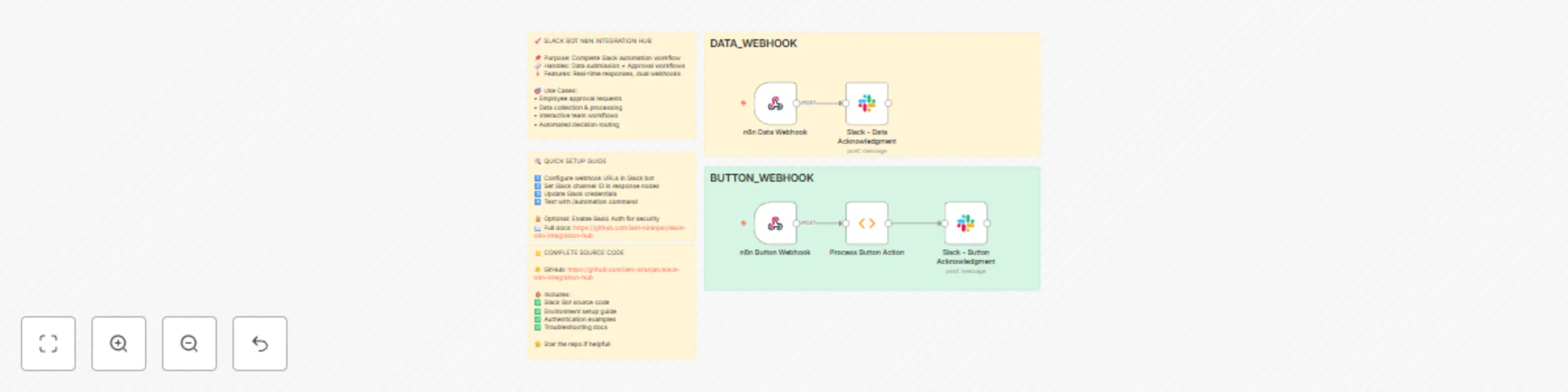
# Slack Bot n8n Integration Hub - Workflow Submission ## 🚀 Showcase: Endless Possibilities with n8n Integration This repository demonstrates a powerful **Slack Bot Socket App** that seamlessly integrates with n8n for automation workflows. This is just a **showcase** of what's possible when combining Slack's interactive capabilities with n8n's automation power - the possibilities are truly endless! ## 📋 Project Overview **Repository:** [slack-n8n-integration-hub](https://github.com/iam-niranjan/slack-n8n-integration-hub) **Status:** ✅ Committed and Ready for Submission This project showcases how to create seamless interactions between Slack users and n8n workflows, demonstrating: - **Real-time Data Submission** from Slack to n8n workflows - **Interactive Approval/Rejection** workflows triggered from Slack - **Secure Webhook Communication** with optional Basic Authentication - **Dynamic Modal Interactions** with immediate feedback - **Error Handling and User Experience** optimization ## 🎯 Key Features Demonstrated ### 1. **Data Input Integration** - Users can submit custom data directly from Slack - Data is instantly sent to n8n workflows for processing - Real-time feedback and confirmation messages ### 2. **Approval Workflow Automation** - Interactive approve/reject buttons in Slack modals - Decisions trigger different n8n workflow paths - Automated decision logging and processing ### 3. **Enhanced User Experience** - Modal closes automatically after actions - Submit button positioned below input for better UX - Comprehensive error handling and user feedback ### 4. **Security & Authentication** - Optional HTTP Basic Auth for webhook security - Environment-based configuration management - Secure credential handling ## 🔧 Technical Implementation ### **Slack Bot Features:** - Socket Mode for real-time communication - Custom slash commands (`/automation`) - Interactive modals with dynamic content - Button actions and form submissions ### **n8n Integration:** - Webhook triggers for data reception - Structured payload formats - Authentication support - Error handling and response management ### **Workflow Payload Examples:** **Data Submission:** ```json { "type": "data_submission", "data": "User input data here", "user": { "id": "U1234567890", "name": "username" }, "timestamp": "2024-01-01T12:00:00.000Z", "source": "slack_bot" } ``` **Approval Action:** ```json { "type": "approval_action", "action": "approve", "user": { "id": "U1234567890", "name": "username" }, "timestamp": "2024-01-01T12:00:00.000Z", "source": "slack_bot" } ``` ## 🌟 Why This Matters for n8n Community This project demonstrates how n8n can be the backbone for: - **Human-in-the-loop** automation workflows - **Interactive approval** processes - **Real-time data collection** from team communication tools - **Seamless integration** between chat platforms and automation - **Scalable workflow triggers** from multiple sources ## 🚀 Endless Possibilities This is just the beginning! With this foundation, you can build: - **IT Service Desk** automation with Slack approvals - **Content Publishing** workflows with team reviews - **Data Collection** and processing pipelines - **Incident Management** with automated escalations - **Project Management** with status updates and approvals - **Customer Support** ticket routing and responses - **DevOps Deployments** with approval gates - **Financial Approvals** with audit trails - **HR Processes** with automated workflows - **Marketing Campaigns** with content approvals ## 📁 Repository Structure ``` slack-n8n-integration-hub/ ├── app.js # Main Slack Bot application ├── package.json # Dependencies and scripts ├── .env.example # Environment configuration template ├── README.md # Complete setup documentation ├── CONTRIBUTING.md # Contribution guidelines ├── Slack_Bot_n8n_Integration_Hub.json # n8n workflow export ├── n8n-workflow-examples.json # Additional workflow examples └── test-webhook.js # Webhook testing utilities ``` ## 🎉 Ready for n8n Community This workflow is: - ✅ **Fully Tested** and working - ✅ **Well Documented** with setup instructions - ✅ **Open Source** and ready for community use - ✅ **Extensible** for various use cases - ✅ **Production Ready** with error handling ## 🔗 Get Started 1. **Clone the repository:** `git clone https://github.com/iam-niranjan/slack-n8n-integration-hub.git` 2. **Follow the setup guide** in the main README.md 3. **Import the n8n workflows** from the JSON files 4. **Customize for your use case** and explore the possibilities! --- **This showcase demonstrates that with n8n and Slack integration, the automation possibilities are truly endless! 🚀** *Ready to submit to n8n community for sharing and collaboration.*
Automated GitHub scanner for exposed AWS IAM keys
# Automated GitHub Scanner for Exposed AWS IAM Keys ## Overview This n8n workflow automatically scans GitHub for exposed AWS IAM access keys associated with your AWS account, helping security teams quickly identify and respond to potential security breaches. When compromised keys are found, the workflow generates detailed security reports and sends Slack notifications with actionable remediation steps. ## 🔑 Key Features - **Automated AWS IAM Key Scanning**: Regularly checks for exposed AWS access keys on GitHub - **Real-time Security Alerts**: Sends immediate Slack notifications when compromised keys are detected - **Comprehensive Security Reports**: Generates detailed reports with exposure information and risk assessment - **Actionable Remediation Steps**: Provides clear instructions for securing compromised credentials - **Continuous Monitoring**: Maintains ongoing surveillance of your AWS environment ## 📋 Workflow Steps 1. **List AWS Users**: Retrieves all users from your AWS account 2. **Split Users for Processing**: Processes each user individually 3. **Get User Access Keys**: Retrieves access keys for each user 4. **Filter Active Keys Only**: Focuses only on currently active access keys 5. **Search GitHub for Exposed Keys**: Scans GitHub repositories for exposed access keys 6. **Aggregate Search Results**: Consolidates and deduplicates search findings 7. **Check For Compromised Keys**: Determines if any keys have been exposed 8. **Generate Security Report**: Creates detailed security reports for compromised keys 9. **Extract AWS Usernames**: Extracts usernames from AWS response for notification 10. **Format Slack Alert**: Prepares comprehensive Slack notifications 11. **Send Slack Notification**: Delivers alerts with actionable information 12. **Continue Scanning**: Maintains continuous monitoring cycle ## 🛠️ Setup Requirements ### Prerequisites - Active n8n instance - AWS account with IAM permissions - GitHub account/token for searching repositories - Slack workspace for notifications ### Required Credentials 1. **AWS Credentials**: - IAM user with permissions to list users and access keys - Access Key ID and Secret Access Key 2. **GitHub Credentials**: - Personal Access Token with search permissions 3. **Slack Credentials**: - Webhook URL for your notification channel ## ⚙️ Configuration 1. **AWS Configuration**: - Configure the "List AWS Users" node with your AWS credentials - Ensure proper IAM permissions for listing users and access keys 2. **GitHub Configuration**: - Set up the "Search GitHub for Exposed Keys" node with your GitHub token - Adjust search parameters if needed 3. **Slack Configuration**: - Configure the Slack node with your webhook URL - Customize notification format if desired ## 🚀 Usage ### Running the Workflow 1. **Manual Execution**: Click "Execute Workflow" to run an immediate scan 2. **Scheduled Execution**: Set up a schedule to run periodic scans (recommended daily or weekly) ### Repository Compatibility This workflow is compatible with both public and private GitHub repositories to which you have access. It will scan all repositories you have permission to view based on your GitHub credentials. ### Handling Alerts When a compromised key is detected: 1. Review the Slack notification for details about the exposure 2. Follow the recommended remediation steps: - Deactivate the compromised key immediately - Create a new key if needed - Investigate the exposure source - Update any services using the compromised key ## ⚠️ Disclaimer This workflow template is provided for reference purposes only to demonstrate how to automate AWS IAM key exposure scanning. Please note: - The scanning process may produce false positives as it only matches potential AWS access key patterns - Always verify any reported exposures manually before taking action - Disabling or deleting access keys without proper verification could have significant negative impacts on your environment - Understand which systems and applications rely on identified access keys before deactivating them - This template should be customized to fit your specific environment and security policies **IMPORTANT**: Use this workflow with caution and only after thoroughly understanding your AWS environment. The authors of this template are not responsible for any disruptions or damages resulting from its use. ## 🔒 Security Considerations - This workflow requires access to sensitive AWS credentials - Store all credentials securely within n8n - Review and rotate access keys regularly ## 📝 Customization Options - Adjust GitHub search parameters for more targeted scanning - Customize Slack notification format and content - Modify security report generation for your specific needs - Integrate with additional notification channels (email, MS Teams, etc.) ### Optional: Enabling Interactive Slack Buttons The Slack Block Kit notification format supports interactive buttons that can be implemented if you want to perform actions directly from Slack: 1. **Disable Key**: This button can be configured to automatically disable the compromised AWS IAM access key 2. **View Details**: This button can be set up to show additional information about the exposure 3. **Acknowledge**: This button can be used to mark the alert as acknowledged To make these buttons functional: 1. **Set up a Slack Socket Mode App**: - Create a Slack app in the [Slack API Console](https://api.slack.com/apps) - Enable Socket Mode and Interactive Components - Subscribe to the `block_actions` event to capture button clicks 2. **Create an n8n Webhook Endpoint**: - Add a new webhook node to receive Slack button click events - Create separate workflows for each button action 3. **Implement AWS Key Disabling**: - For the "Disable Key" button, create a workflow that uses the n8n HTTP Request node to call the AWS IAM `UpdateAccessKey` API - Example HTTP request that can be implemented in n8n: ``` Method: POST URL: https://iam.amazonaws.com/ Query Parameters: Action: UpdateAccessKey AccessKeyId: AKIAIOSFODNN7EXAMPLE Status: Inactive UserName: {{$json.username}} Version: 2010-05-08 ``` 4. **Update the Slack Message Format**: - Modify the `Format Slack Alert` node to include your webhook URL in the button action values - Add callback_id and action_id values to identify which button was clicked This implementation allows for immediate response to security incidents directly from the Slack interface, reducing response time and improving security posture.
Track CVE vulnerability details & history with NVD API and Google Sheets
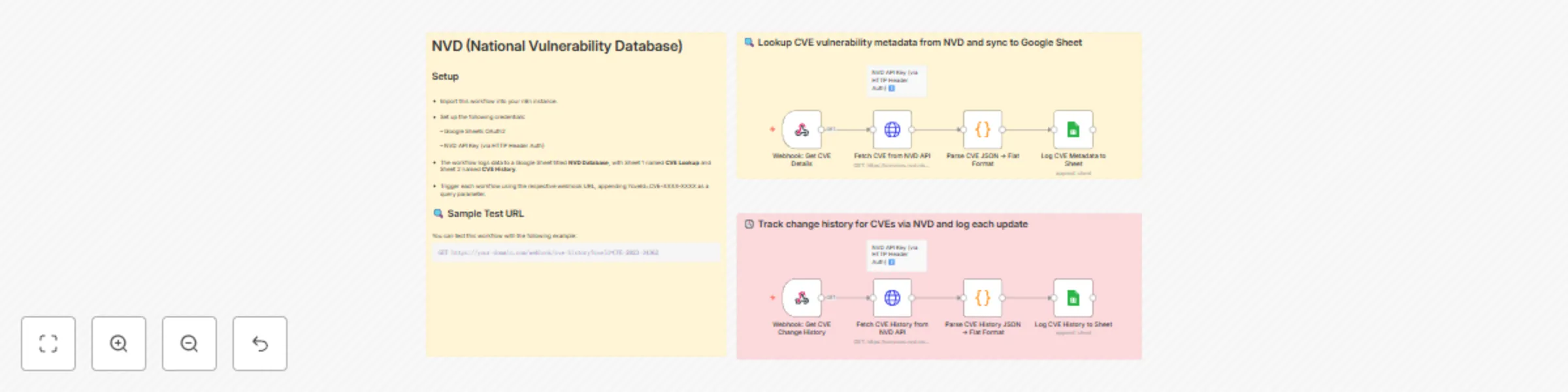
## Who is this for? NVD (National Vulnerability Database) data is essential for security analysts, vulnerability managers, and DevSecOps professionals who need to perform both CVE lookups and monitor historical change logs. This workflow helps streamline those efforts by providing structured outputs for audit, triage, or compliance tracking purposes. 📝 Note: While this example uses Google Sheets as the destination, you can easily modify the final destination node (e.g., send to Slack, email, database, etc.) based on your specific automation needs.? ## What problem is this solving? Security teams often manually look up CVE data and track changes across multiple tools. This process is inefficient and error-prone. This workflow automates the CVE lookup and historical change tracking by logging enriched vulnerability data into Google Sheets in real-time. ## What this workflow does This workflow is designed for CVE API lookup and change history tracking. In many vulnerability automation pipelines, it is essential to determine not only the metadata of a CVE but also how it has evolved over time. Based on the operational need—whether it's enrichment, risk scoring, or remediation validation—this workflow becomes particularly handy in surfacing both current and historical CVE data. This template performs the following actions: * Accepts incoming webhook requests containing a CVE ID * Queries the NVD CVE Lookup API to fetch vulnerability metadata * Queries the NVD CVE History API to retrieve all historical changes * Flattens both datasets into a sheet-compatible structure * Appends vulnerability metadata to one sheet and change history to another within the same Google Spreadsheet ## Setup 🔑 Request an NVD API Key To request an NVD API Key, please provide your organization name, a valid email address, and indicate your organization type at [NVD API Key Request](https://nvd.nist.gov/developers/request-an-api-key). You must scroll to the end of the Terms of Use Agreement and check "I agree to the Terms of Use" to obtain an API Key. After submission, you will receive a single-use hyperlink via email to activate and view your API Key. If not activated within seven days, a new request must be submitted. 📊 API Rate Limits Without an API key, you're limited to 5 requests per 30-second window. With an API key, you’re allowed up to 50 requests in the same period. To prevent request throttling, it's recommended to introduce slight delays between consecutive API calls in production setups. 1. Clone or import this workflow into your n8n instance. 2. Set up the following credentials: * Google Sheets OAuth2 * NVD API Key (via HTTP Header Auth) 3. The workflow logs data to a Google Sheet titled **NVD Database**, with Sheet 1 named **CVE Lookup** and Sheet 2 named **CVE History**. 4. Trigger each workflow using the respective webhook URL, appending `?cveId=CVE-XXXX-XXXX` as a query parameter. ### 🔍 Example Webhook Request (CVE Change History) You can test this workflow with the following example: ``` GET https://your-domain.com/webhook/cve-history?cveId=CVE-2023-34362 ``` ## How to customize this workflow * Use the `Edit Fields` node (optional) to centralize configuration like sheet name or query input * Extend the CVE flattening logic to include more nested metadata if needed * Integrate notification systems (e.g., Slack or email) by branching from the processing nodes * Modify webhook paths for better endpoint organization ## 🔐 Production Security Tips * Use **HTTP Header Auth** on the webhook for secure access > ⚠️ **This template uses webhooks and NVD API access with authentication headers.** --- This template uses two flows: * **Webhook 1:** `NVD CVE Lookup` — Lookup CVE vulnerability metadata from NVD and sync to Google Sheet * **Webhook 2:** `NVD CVE Change History` — Track change history for CVEs via NVD and log each update Each flow: * Hits NVD’s respective endpoint * Uses custom JS Code node to flatten the nested JSON * Syncs data to dedicated Google Sheet tabs * 🧩 4 nodes: Webhook → API Call → Parse → Sheet Sync Make sure both flows are activated and webhooks exposed for external access. Based on your needs, ensure you have a secure setup—whether hosted internally or in a cloud environment—when running n8n in production.
Daily auto-archive for Gmail messages
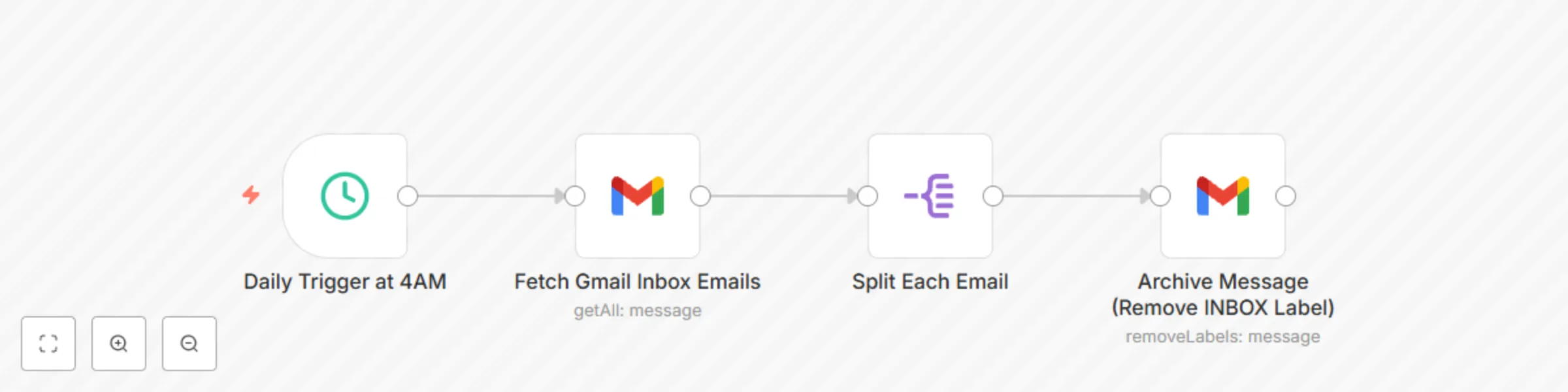
## Who is this for? Professionals, solopreneurs, or productivity enthusiasts who want to keep their Gmail inbox clean and organized without manual effort. ## What problem does this solve? Manually archiving emails clutters your time and slows you down. This workflow automates inbox cleanup by removing the **"INBOX"** label from messages received over 24 hours ago. A perfect companion to AI-based labeling workflows, this keeps your inbox light and relevant. ## What this workflow does - Triggers every day at **4 AM** - Fetches Gmail messages from the **INBOX** that are **older than 24 hours** - Processes them one by one using the **Split Out** node - Removes the **INBOX** label, effectively archiving the messages ## Setup 1. Connect your Gmail account using OAuth2 credentials. 2. Customize the **Schedule Trigger** node to adjust the run time. 3. Modify the Gmail filter if you want to archive unread or labeled emails instead. ## How to customize this workflow to your needs - Schedule different frequencies (e.g. twice a day or weekly). ## 🔄 Pairs Well With This complements the [Intelligent Email Organization with AI-Powered Content Classification](https://n8n.io/workflows/4557-intelligent-email-organization-with-ai-powered-content-classification-for-gmail/) workflow. Use that to **label emails smartly using AI**, and this one to **auto-archive** them for a clean, clutter-free inbox.
Intelligent AI digest for security, privacy, and compliance feeds
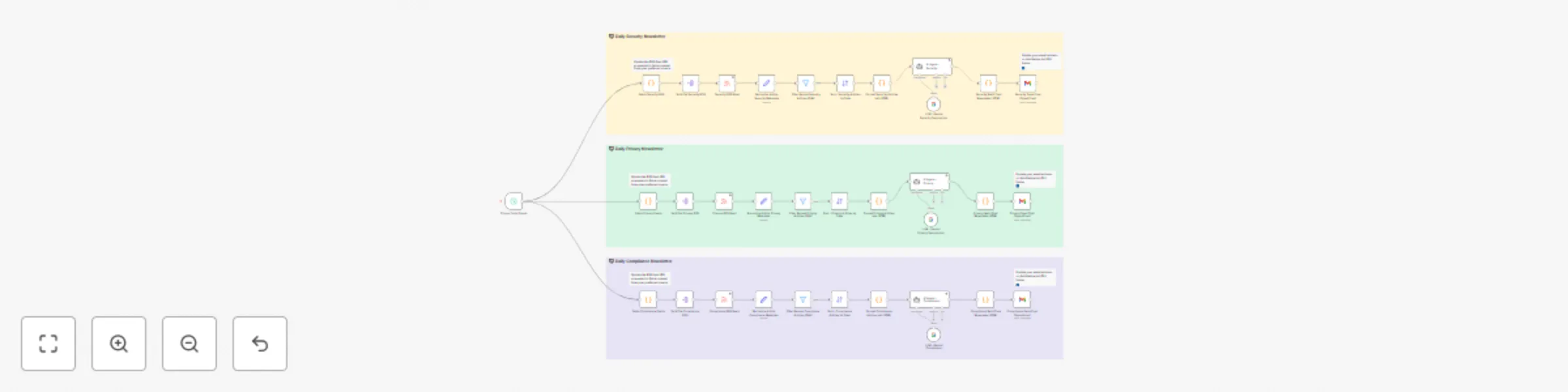
**How it works** This workflow acts like your own personal AI assistant, automatically fetching and summarizing the most relevant Security, Privacy, and Compliance news from curated RSS feeds. It processes only the latest articles (past 24 hours), organizes them by category, summarizes key insights using AI, and delivers a clean HTML digest straight to your inbox—saving you time every day. **Key Highlights** - Handles three independent tracks: Security, Privacy, and Compliance - Processes content from customizable RSS sources (add/remove easily) - Filters fresh articles, removes duplicates, and sorts by recency - Uses AI to summarize and format insights in a digestible format - Sends polished HTML digests via Gmail—one per category - Fully modular and extensible—adapt it to your needs **Personalization** You can easily tailor the workflow: 🎯 Customize feeds: Add or remove sources in the following Code nodes: ``` Fetch Security RSS, Fetch Privacy Feeds, and Fetch Compliance Feeds ``` 🔧 Modify logic: Adjust filters, sorting, formatting, or even AI prompts as needed 🧠 Bring your own LLM: Works with Gemini, but easily swappable for other LLM APIs **Setup Instructions** - Requires Gmail and LLM (e.g., Gemini) credentials - Prebuilt with placeholders for RSS feeds and email output - Designed to be readable, maintainable, and fully adaptable
Intelligent email organization with AI-powered content classification for Gmail
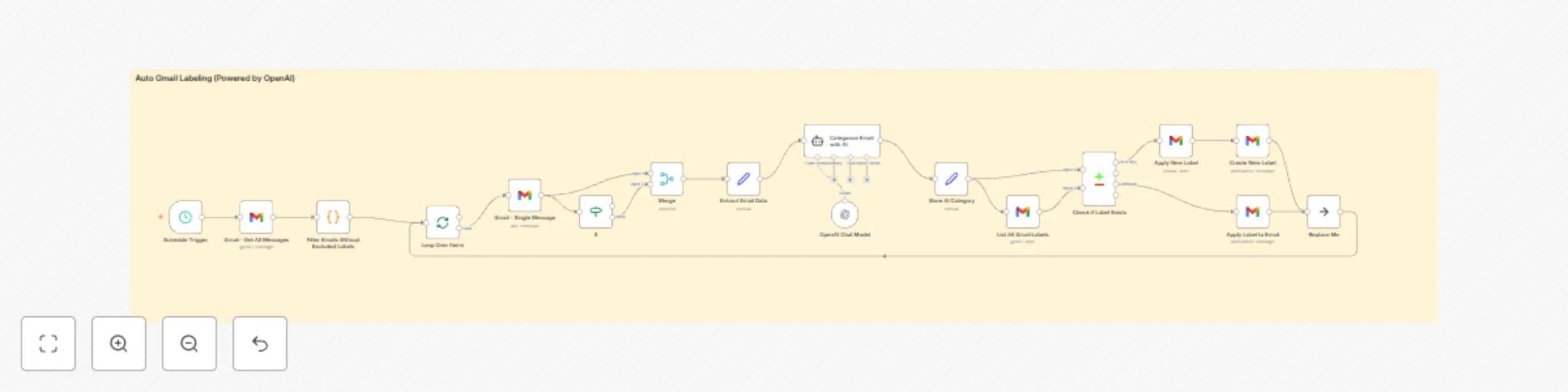
This workflow leverages AI to intelligently analyze incoming Gmail messages and automatically apply relevant labels based on the email content. The default configuration includes the following labels: * **Newsletter**: Subscription updates or promotional content. * **Inquiry**: Emails requesting information or responses. * **Invoice**: Billing and payment-related emails. * **Proposal**: Business offers or collaboration opportunities. * **Action Required**: Emails demanding immediate tasks or actions. * **Follow-up Reminder**: Emails prompting follow-up actions. * **Task**: Emails containing actionable tasks. * **Personal**: Non-work-related emails. * **Urgent**: Time-sensitive or critical communications. * **Bank**: Banking alerts and financial statements. * **Job Update**: Recruitment or job-related communications. * **Spam/Junk**: Unwanted or irrelevant bulk emails. * **Social/Networking**: Notifications from social platforms. * **Receipt**: Purchase confirmations and receipts. * **Event Invite**: Invitations or calendar-related messages. * **Subscription Renewal**: Reminders for subscription expirations. * **System Notification**: Technical alerts from services or systems. You can customize labels and definitions based on your specific use case. ### How it works: * The workflow periodically retrieves new Gmail messages. * Only emails without existing labels, regardless of read status, are sent to the AI for analysis. * Email content (subject and body) is analyzed by an AI model to determine the appropriate label. * Labels identified by the AI are applied to each email accordingly. **Note:** This workflow performs 100% better than the default Gmail trigger method, which is why the workflow was switched from Gmail trigger to a scheduled workflow. By selectively processing only unlabeled emails, it ensures comprehensive labeling while significantly reducing AI processing costs. ### Setup Steps: 1. Configure credentials for Gmail and your chosen AI service (e.g., OpenAI). 2. Ensure labels exist in your Gmail account matching the workflow definitions. 3. Adjust the AI prompt to match your labeling needs. 4. Optionally customize the polling interval (default: every 2 minutes). This workflow streamlines your email management, keeping your inbox organized effortlessly while optimizing resource usage.