Block 1 - Sticky Note1
- Type / Role
- n8n-nodes-base.stickyNote - stickyNote
- Config choices
- Version 1


 Early Deal
This workflow is provided as-is. Please review and test before using in production.
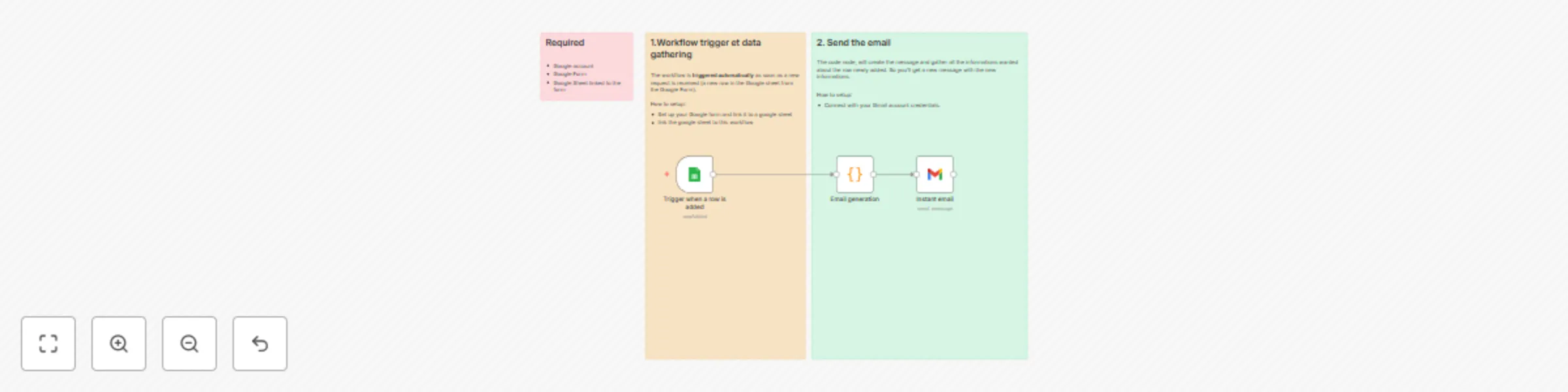
Description Get a single Gmail notification immediately whenever someone submits your Google Forms. The workflow watches the Form linked Google Sheets for new rows and sends a clean, readable email...
n8n-nodes-base.stickynote, n8n-nodes-base.code, n8n-nodes-base.googlesheetstrigger, n8n-nodes-base.gmail
This workflow is cataloged by N8N Workflows and links back to its original n8n.io source page by Yassin Zehar.
Original n8n.io sourceGet a single Gmail notification immediately whenever someone submits your Google Forms. The workflow watches the Form-linked Google Sheets for new rows and sends a clean, readable email within about a minute—perfect for time-sensitive workflows.
Stay responsive to urgent requests without inbox overload. Get notified immediately when new submissions arrive, with all key details in one clean email.
Teams collecting support requests, project inputs, or approvals.
Anyone who needs to respond quickly to new form submissions.
Perfect for time-sensitive workflows.
Google account
A Google Forms linked to a Google Sheets (Responses → “Link to Sheet”)
Gmail account connected to n8n (OAuth)
🗒️ Use the sticky notes in the n8n canvas to:
Create a Google Forms and link it to a Google Sheets.
Credentials: Add/verify Google (Sheets) and Gmail credentials in n8n.
Add Google Sheets Trigger node.
Spreadsheet: your Form-linked sheet.
Polling interval: every 1 minute (or adjust as needed).
Send Gmail: Add Gmail node and set up recipient team inbox or on-call email.
Test & Activate: Submit a sample form, wait 1 minute, confirm the email.
Make sure the workflow is always activated
You’ll get this:
A Gmail message with key details (requester, summary, priority, link to the sheet), easy to scan and act on.
Watch the Youtube Tutorial video
⏰ Trigger: workflow runs every time you get a request from the form (trigger checks every minute)
📝 Prepare: Format the submission into a concise message.
📨 Notify: Sends one Gmail email per submission
I’m Yassin a Project & Product Manager Scaling tech products with data-driven project management. 📬 Feel free to connect with me on Linkedin
This catalog entry is organized from the workflow JSON. The node-level section below shows the executable blocks available for review before importing the template.
| Workflow | Instant Gmail notifications for Google Form submissions |
|---|---|
| Complexity | intermediate |
| Nodes | 6 |
| Categories | Ticket Management, Multimodal AI |
| Author | Yassin Zehar |
| Published | 15 Aug 2025 |
Use the JSON export at /data/workflows/7432/7432.json as the source template for this automation.
Open n8n, import the downloaded JSON, and review each node before activating the workflow.
Replace placeholder credentials, API keys, webhook URLs, account IDs, and environment-specific values with your own settings.
Run the workflow manually or in a staging workspace, inspect node output, and confirm downstream systems receive the expected data.
Enable the workflow only after testing, then monitor executions, errors, and rate limits during the first production runs.
Review imported nodes carefully before activation. This catalog entry is intended to help you inspect the workflow structure, understand required services, and find related templates faster.
Node names, credentials, schedules, webhook paths, and external service limits may need adjustment for your workspace.
Description Get a single Gmail notification immediately whenever someone submits your Google Forms. The workflow watches the Form linked Google Sheets for new rows and sends a clean, readable email...
Review the workflow JSON, configure any required credentials in n8n, and test the automation in a safe workspace before using it in production.
Yes. Use the block-by-block analysis and the downloadable JSON to inspect each node, then adjust credentials, prompts, schedules, filters, or destinations for your Ticket Management, Multimodal AI use case.