Influencer brand safety auditor with engagement analysis

Workflow preview

Workflow preview
100%
Influencer brand safety auditor with engagement analysis preview
Open on n8n.io

Important notice

This workflow is provided as-is. Please review and test before using in production.

1. Workflow Overview

Here is the template specification based on the provided workflow and guidelines. Audit Instagram Influencer Safety and Engagement to Slack Description Protect your brand reputation and optimize yo...

Best for

  • Market Research automation workflows
  • AI Summarization automation workflows
  • advanced n8n builders looking for reusable templates

Tools used

n8n-nodes-base.formtrigger, n8n-nodes-base.set, n8n-nodes-base.googlesheets, n8n-nodes-base.httprequest, n8n-nodes-base.code, n8n-nodes-base.aggregate, @n8n/n8n-nodes-langchain.openai, n8n-nodes-base.slack

Source and attribution

This workflow is cataloged by N8N Workflows and links back to its original n8n.io source page by MAMI YAMANE.

Original n8n.io source

1.1 Workflow description

Title
Influencer brand safety auditor with engagement analysis
Workflow name
Influencer brand safety auditor with engagement analysis

Here is the template specification based on the provided workflow and guidelines.

Audit Instagram Influencer Safety and Engagement to Slack

Description

Protect your brand reputation and optimize your marketing budget by automatically vetting potential influencer partners. Manually analyzing engagement rates and reading through hundreds of comments to detect brand safety risks is time-consuming and prone to error.

This workflow streamlines the due diligence process. By simply entering an Instagram username into a form, the system scrapes recent data, calculates engagement metrics to detect potential fake followers or bot activity, and uses AI to scan content for offensive language or competitor mentions. The final detailed audit report is delivered instantly to your Slack channel and logged in Google Sheets for record-keeping.

Who is this for

  • Influencer Marketing Managers: To quickly vet creators before sending collaboration offers.
  • Digital Agencies: To perform scalable due diligence for client campaigns.
  • Brand Managers: To ensure potential partners align with brand safety guidelines and do not promote direct competitors.

How it works

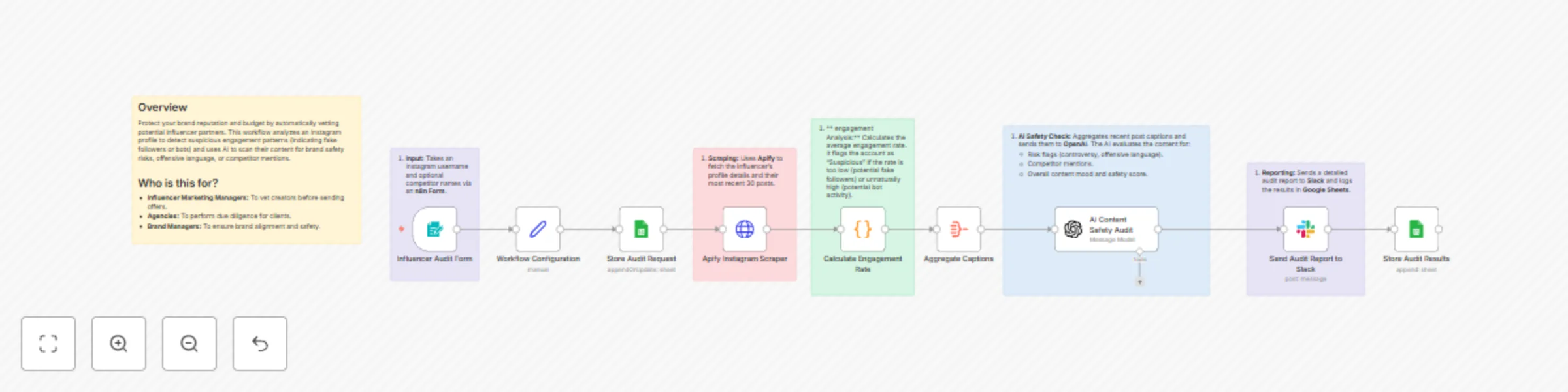
  1. Input: The workflow starts with an n8n Form where you enter the influencer’s Instagram handle and optional competitor names.
  2. Data Extraction: It triggers Apify (using the Instagram Scraper) to fetch the profile’s statistics and their most recent 30 posts.
  3. Engagement Analysis: A Code Node calculates the average engagement rate. It logic flags the account as "Suspicious" if the rate is unnaturally low (indicating fake followers) or suspiciously high (indicating bot farms).
  4. AI Safety Check: Recent post captions are aggregated and sent to OpenAI. The AI analyzes the text for risk flags (controversy, profanity), competitor mentions, and assigns a safety score.
  5. Reporting: The workflow saves the raw request and results to Google Sheets and sends a formatted summary report to a specific Slack channel.

Requirements

  • Apify Account: You will need an API token and access to the Instagram Scraper actor.
  • OpenAI Account: An API key to perform the content safety analysis.
  • Google Cloud Platform: Credential with access to the Google Sheets API.
  • Slack Workspace: A configured Slack app/bot to post messages.

How to set up

  1. Configure Credentials: Connect your Apify, Google Sheets, OpenAI, and Slack accounts in the respective nodes.
  2. Setup Google Sheet: Create a Google Sheet with two tabs:
    • Audit Requests (Columns: username, timestamp)
    • Audit Results (Columns: username, followers, engagementRate, status, safetyScore, riskFlags, recommendation)
  3. Configure Variables: Open the Workflow Configuration node (Set node) to input:
    • Your apifyApiToken.
    • engagementThresholdLow (default is 1%).
    • engagementThresholdHigh (default is 10%).
  4. Update IDs:
    • In the Store Audit Request and Store Audit Results nodes, select your created Google Sheet.
    • In the Send Audit Report to Slack node, select the channel where you want reports to appear.

How to customize the workflow

  • Adjust Thresholds: Change the engagementThresholdLow or engagementThresholdHigh values in the Workflow Configuration node to fit your specific industry benchmarks.
  • Modify AI Criteria: Edit the system prompt in the AI Content Safety Audit node to check for specific brand values, specific keywords, or tone of voice requirements.
  • Change Output: Replace the Slack node with an Email node (Gmail/Outlook) or a Notion node if you prefer to store reports in a project management database.

1.2 Logical Blocks

This catalog entry is organized from the workflow JSON. The node-level section below shows the executable blocks available for review before importing the template.

2. Block-by-Block Analysis

Block 1 - Influencer Audit Form

Type / Role
n8n-nodes-base.formTrigger - formTrigger
Config choices
Version 2.3

Block 2 - Workflow Configuration

Type / Role
n8n-nodes-base.set - set
Config choices
Version 3.4

Block 3 - Store Audit Request

Type / Role
n8n-nodes-base.googleSheets - googleSheets
Config choices
Version 4.7

Block 4 - Apify Instagram Scraper

Type / Role
n8n-nodes-base.httpRequest - httpRequest
Config choices
Version 4.3

Block 5 - Calculate Engagement Rate

Type / Role
n8n-nodes-base.code - code
Config choices
Version 2

Block 6 - Aggregate Captions

Type / Role
n8n-nodes-base.aggregate - aggregate
Config choices
Version 1

Block 7 - AI Content Safety Audit

Type / Role
@n8n/n8n-nodes-langchain.openAi - openAi
Config choices
Version 2

Block 8 - Send Audit Report to Slack

Type / Role
n8n-nodes-base.slack - slack
Config choices
Version 2.3

Block 9 - Store Audit Results

Type / Role
n8n-nodes-base.googleSheets - googleSheets
Config choices
Version 4.7

Block 10 - Sticky Note

Type / Role
n8n-nodes-base.stickyNote - stickyNote
Config choices
Version 1

Block 11 - Sticky Note1

Type / Role
n8n-nodes-base.stickyNote - stickyNote
Config choices
Version 1

Block 12 - Sticky Note2

Type / Role
n8n-nodes-base.stickyNote - stickyNote
Config choices
Version 1

Block 13 - Sticky Note3

Type / Role
n8n-nodes-base.stickyNote - stickyNote
Config choices
Version 1

Block 14 - Sticky Note4

Type / Role
n8n-nodes-base.stickyNote - stickyNote
Config choices
Version 1

Block 15 - Sticky Note5

Type / Role
n8n-nodes-base.stickyNote - stickyNote
Config choices
Version 1

3. Summary Table

Workflow Influencer brand safety auditor with engagement analysis
Complexity advanced
Nodes 15
Categories Market Research, AI Summarization
Author MAMI YAMANE
Published 15 Dec 2025

4. Reproducing the Workflow from Scratch

  1. 1. Download the workflow JSON

    Use the JSON export at /data/workflows/11808/11808.json as the source template for this automation.

  2. 2. Import the template into n8n

    Open n8n, import the downloaded JSON, and review each node before activating the workflow.

  3. 3. Configure credentials and variables

    Replace placeholder credentials, API keys, webhook URLs, account IDs, and environment-specific values with your own settings.

  4. 4. Test with sample data

    Run the workflow manually or in a staging workspace, inspect node output, and confirm downstream systems receive the expected data.

  5. 5. Activate and monitor

    Enable the workflow only after testing, then monitor executions, errors, and rate limits during the first production runs.

5. General Notes & Resources

Review imported nodes carefully before activation. This catalog entry is intended to help you inspect the workflow structure, understand required services, and find related templates faster.

Node names, credentials, schedules, webhook paths, and external service limits may need adjustment for your workspace.

Frequently asked questions

What does Influencer brand safety auditor with engagement analysis do?

Here is the template specification based on the provided workflow and guidelines. Audit Instagram Influencer Safety and Engagement to Slack Description Protect your brand reputation and optimize yo...

What do I need before importing this workflow?

Review the workflow JSON, configure any required credentials in n8n, and test the automation in a safe workspace before using it in production.

Can I customize this workflow?

Yes. Use the block-by-block analysis and the downloadable JSON to inspect each node, then adjust credentials, prompts, schedules, filters, or destinations for your Market Research, AI Summarization use case.