Block 1 - Sticky Note
- Type / Role
- n8n-nodes-base.stickyNote - stickyNote
- Config choices
- Version 1


 Early Deal
This workflow is provided as-is. Please review and test before using in production.
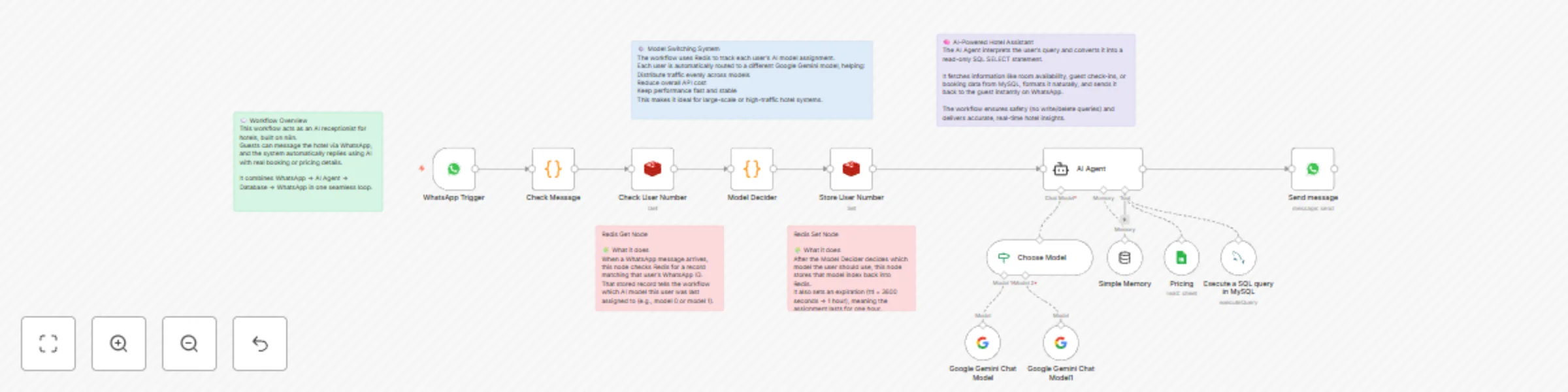
This project is an AI powered hotel receptionist built using n8n , designed to handle guest queries automatically through WhatsApp . It integrates Google Gemini , Redis , MySQL , and Google Sheets ...
n8n-nodes-base.stickynote, @n8n/n8n-nodes-langchain.agent, @n8n/n8n-nodes-langchain.memorybufferwindow, @n8n/n8n-nodes-langchain.lmchatgooglegemini, n8n-nodes-base.googlesheetstool, n8n-nodes-base.whatsapptrigger, n8n-nodes-base.code, n8n-nodes-base.whatsapp
This workflow is cataloged by N8N Workflows and links back to its original n8n.io source page by Akshay.
Original n8n.io sourceThis project is an AI-powered hotel receptionist built using n8n, designed to handle guest queries automatically through WhatsApp.
It integrates Google Gemini, Redis, MySQL, and Google Sheets via LangChain to create an intelligent conversational system that understands and answers booking-related questions in real time.
A standout feature of this workflow is its AI model-switching system — it dynamically assigns users to different Gemini models, balancing traffic, improving performance, and reducing API costs.
The workflow starts when a hotel guest sends a message through WhatsApp.
The system captures the message text, contact details, and session information for further processing.
The Model Selector routes each user’s request to the correct Gemini instance, enabling parallel execution across multiple AI models for faster response times and cost optimization.
The LangChain AI Agent serves as the system’s reasoning core. It:
Once the AI Agent formulates an answer, it sends a natural-sounding message back to the guest via WhatsApp, completing the interaction loop.
Before deploying this workflow, ensure the following:
Configure Credentials
Prepare Databases
bookings(id, guest_name, room_type, check_in, check_out) rooms(id, type, rate, status)Set Up Redis
llm-user:<whatsapp_id> = { "modelIndex": 0 }
Connect Google Sheets (Optional)
WhatsApp Webhook Configuration
Testing the Workflow
| Guest Query | AI Response Example |
|---|---|
| “Who checked in today?” | “Two guests have checked in today: Mr. Ahmed (Room 203) and Ms. Priya (Room 410).” |
| “How much is a deluxe room for two nights?” | “A deluxe room costs $120 per night. The total for two nights is $240.” |
| “Do you have any discounts this week?” | “Yes! We’re offering a 10% weekend discount on all deluxe and suite rooms.” |
| “Show me tomorrow’s check-outs.” | “Three check-outs are scheduled tomorrow: Mr. Khan (101), Ms. Lee (207), and Mr. Singh (309).” |
You can modify the Model Decider node to:
Adjust the system prompt to control tone and response behavior — for example:
Extend MySQL to include:
This workflow demonstrates how AI automation can transform hotel operations by combining WhatsApp communication, database intelligence, and multi-model AI reasoning.
It’s a production-ready foundation for scalable, cost-optimized, AI-driven hospitality solutions that deliver fast, accurate, and personalized guest interactions.
This catalog entry is organized from the workflow JSON. The node-level section below shows the executable blocks available for review before importing the template.
| Workflow | Hotel receptionist with WhatsApp, Gemini model-switching, Redis & Google Sheets |
|---|---|
| Complexity | advanced |
| Nodes | 18 |
| Categories | Support Chatbot, AI Chatbot |
| Author | Akshay |
| Published | 27 Oct 2025 |
Use the JSON export at /data/workflows/10214/10214.json as the source template for this automation.
Open n8n, import the downloaded JSON, and review each node before activating the workflow.
Replace placeholder credentials, API keys, webhook URLs, account IDs, and environment-specific values with your own settings.
Run the workflow manually or in a staging workspace, inspect node output, and confirm downstream systems receive the expected data.
Enable the workflow only after testing, then monitor executions, errors, and rate limits during the first production runs.
Review imported nodes carefully before activation. This catalog entry is intended to help you inspect the workflow structure, understand required services, and find related templates faster.
Node names, credentials, schedules, webhook paths, and external service limits may need adjustment for your workspace.
This project is an AI powered hotel receptionist built using n8n , designed to handle guest queries automatically through WhatsApp . It integrates Google Gemini , Redis , MySQL , and Google Sheets ...
Review the workflow JSON, configure any required credentials in n8n, and test the automation in a safe workspace before using it in production.
Yes. Use the block-by-block analysis and the downloadable JSON to inspect each node, then adjust credentials, prompts, schedules, filters, or destinations for your Support Chatbot, AI Chatbot use case.