Akshay
Workflows by Akshay
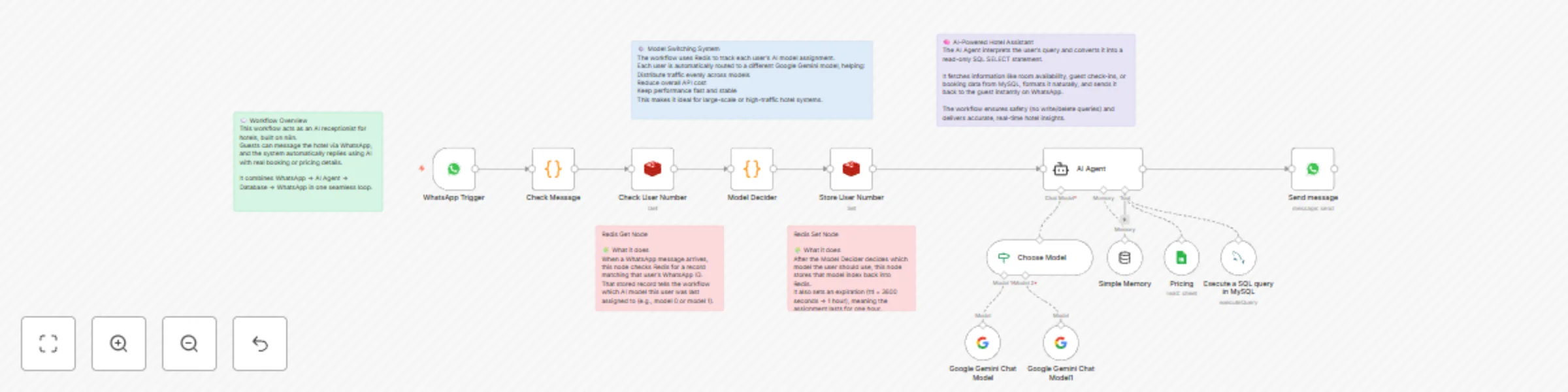
Hotel receptionist with WhatsApp, Gemini model-switching, Redis & Google Sheets
### Overview This project is an **AI-powered hotel receptionist** built using **n8n**, designed to handle guest queries automatically through **WhatsApp**. It integrates **Google Gemini**, **Redis**, **MySQL**, and **Google Sheets** via **LangChain** to create an intelligent conversational system that understands and answers booking-related questions in real time. A standout feature of this workflow is its **AI model-switching system** — it dynamically assigns users to different Gemini models, balancing traffic, improving performance, and reducing API costs. --- ## How It Works ### WhatsApp Trigger The workflow starts when a hotel guest sends a message through WhatsApp. The system captures the **message text**, **contact details**, and **session information** for further processing. ### Redis-Based Model Management - The workflow checks **Redis** for a saved record of the user’s previously assigned AI model. - If no record exists, a **Model Decider** node assigns a new model (e.g., Gemini 1 or Gemini 2). - Redis then stores this model assignment for an hour, ensuring consistent routing and controlled traffic distribution. ### Model Selector The **Model Selector** routes each user’s request to the correct Gemini instance, enabling parallel execution across multiple AI models for **faster response times** and **cost optimization**. ### AI Agent Logic The **LangChain AI Agent** serves as the system’s reasoning core. It: - Interprets guest questions such as: - “Who checked in today?” - “Show me tomorrow’s bookings.” - “What’s the price for a deluxe suite for two nights?” - Generates safe, **read-only SQL SELECT queries**. - Fetches the requested data from the **MySQL database**. - Combines this with dynamic pricing or promotions from **Google Sheets**, if available. ### Response Delivery Once the AI Agent formulates an answer, it sends a natural-sounding message back to the guest via WhatsApp, completing the interaction loop. --- ## Setup & Requirements ### Prerequisites Before deploying this workflow, ensure the following: - **n8n Instance** (local or hosted) - **WhatsApp Cloud API** with messaging permissions - **Google Gemini API Key** (for both models) - **Redis Database** for user session and model routing - **MySQL Database** for hotel booking and guest data - **Google Sheets Account** (optional, for pricing or offer data) ### Step-by-Step Setup 1. **Configure Credentials** - Add all API credentials in **n8n → Settings → Credentials** (WhatsApp, Redis, MySQL, Google). 2. **Prepare Databases** - **MySQL Tables Example:** - `bookings(id, guest_name, room_type, check_in, check_out)` - `rooms(id, type, rate, status)` - Ensure the MySQL user has **read-only** permissions. 3. **Set Up Redis** - Create Redis keys for each user: ``` llm-user:<whatsapp_id> = { "modelIndex": 0 } ``` - TTL: 3600 seconds (1 hour). 4. **Connect Google Sheets (Optional)** - Add your sheet under **Google Sheets OAuth2**. - Use it to manage room rates, discounts, or seasonal offers dynamically. 5. **WhatsApp Webhook Configuration** - In Meta’s Developer Console, set the webhook URL to your n8n instance. - Select message updates to trigger the workflow. 6. **Testing the Workflow** - Send messages like “Who booked today?” or a voice message. - Confirm responses include real data from MySQL and contextual replies. --- ## Key Features - **Text & voice support** for guest interactions - **Automatic AI model-switching** using Redis - **Session memory** for context-aware conversations - **Read-only SQL query generation** for database safety - **Google Sheets integration** for live pricing and availability - **Scalable design** supporting multiple LLM instances --- ## Example Guest Queries | Guest Query | AI Response Example | |--------------|--------------------| | “Who checked in today?” | “Two guests have checked in today: Mr. Ahmed (Room 203) and Ms. Priya (Room 410).” | | “How much is a deluxe room for two nights?” | “A deluxe room costs $120 per night. The total for two nights is $240.” | | “Do you have any discounts this week?” | “Yes! We’re offering a 10% weekend discount on all deluxe and suite rooms.” | | “Show me tomorrow’s check-outs.” | “Three check-outs are scheduled tomorrow: Mr. Khan (101), Ms. Lee (207), and Mr. Singh (309).” | --- ## Customization Options ### 🧩 Model Assignment Logic You can modify the **Model Decider node** to: - Assign models based on user load, region, or priority level. - Increase or decrease TTL in Redis for longer model persistence. ### 🧠 AI Agent Prompt Adjust the **system prompt** to control tone and response behavior — for example: - Add multilingual support. - Include upselling or booking confirmation messages. ### 🗂️ Database Expansion Extend MySQL to include: - Staff schedules - Maintenance records - Restaurant reservations Then link new queries in the AI Agent node for richer responses. --- ## Tech Stack - **n8n** – Workflow automation & orchestration - **Google Gemini (PaLM)** – LLM for reasoning & generation - **Redis** – Model assignment & session management - **MySQL** – Booking & guest data storage - **Google Sheets** – Dynamic pricing reference - **WhatsApp Cloud API** – Messaging interface --- ## Outcome This workflow demonstrates how **AI automation** can transform hotel operations by combining **WhatsApp communication**, **database intelligence**, and **multi-model AI reasoning**. It’s a production-ready foundation for **scalable, cost-optimized, AI-driven hospitality solutions** that deliver fast, accurate, and personalized guest interactions. ````
WhatsApp virtual receptionist with Gemini AI - handles text & voice with knowledge base
### Overview This project is an **AI-powered WhatsApp virtual receptionist** built using **n8n**, designed to handle both **text** and **voice-based customer messages** automatically. The workflow integrates **Google Gemini**, **Pinecone**, and the **WhatsApp Business API** to provide intelligent, context-aware responses that feel natural and professional. --- ## How It Works ### Message Detection The workflow begins when a message arrives on WhatsApp. It identifies whether the message is **text** or **voice** and routes it accordingly. ### Voice Message Handling 1. Audio messages are securely **downloaded from WhatsApp**. 2. The files are **converted to Base64** format and sent to the **Gemini API** for transcription. 3. The **transcribed text** is then passed to the AI Agent for further processing. ### AI Agent Processing The **LangChain AI Agent** acts as the brain of the system. It uses: - **Google Gemini Chat Model** for natural language understanding and response generation. - **Pinecone Vector Store** to retrieve company-specific information and product data. - **Memory Buffer** to remember the last 20 user messages, ensuring context-aware responses. The agent also follows a set of **custom communication rules** — replying only in approved languages, skipping greetings, and focusing on direct, helpful, and professional responses (e.g., product recommendations, support, or guidance). ### Knowledge Retrieval The **AI Agent** connects to a **Pinecone database** containing detailed company data, such as product catalogs or service FAQs. Using **Gemini-generated embeddings**, it retrieves the most relevant information for each user query. ### Response Delivery Once the AI Agent prepares the response, it is **instantly sent back to the user** via WhatsApp, completing the conversational loop. --- ## Who It’s For This system is ideal for businesses seeking to **automate their customer communication** through WhatsApp. It’s especially valuable for: - **Product-based companies** with frequent customer inquiries. - **Service providers** offering 24/7 customer assistance or quote requests. - **SMBs** looking to scale their communication without hiring additional staff. --- ## Tech Stack & Requirements - **n8n** – Workflow automation and orchestration. - **WhatsApp Cloud API** – For sending and receiving messages. - **Google Gemini (PaLM)** – For LLM-based transcription and response generation. - **Pinecone** – Vector database for product and service knowledge retrieval. - **LangChain Integration** – For connecting memory, vector store, and reasoning tools. - **Custom Business Rules** – Configurable within the AI Agent node to manage tone, style, and workflow behavior. --- ## Key Features - Handles **both text and voice** messages seamlessly. - Responds in **multiple languages**, including English. - Maintains **conversation memory** per user session. - Retrieves **accurate company-specific information** using vector search. - Fully **automated**, with customizable behavior for different industries or use cases. --- ## Setup Instructions ### 1. Prerequisites Before importing the workflow, ensure you have: - An active **n8n instance** (self-hosted or n8n Cloud). - **WhatsApp Cloud API credentials** from Meta. - **Google Gemini API key** with model access (for chat and transcription). - **Pinecone API key** with a preconfigured vector index containing your company data. ### 2. Environment Setup - Install all required credentials under **Settings → Credentials** in n8n. - Add environment variables (if applicable) for keys like: ```bash GOOGLE_API_KEY=your_google_gemini_key PINECONE_API_KEY=your_pinecone_key WHATSAPP_ACCESS_TOKEN=your_whatsapp_token ``` ### 3. Pinecone Configuration - Create a Pinecone index named, for example, `products-index`. - Upload company documents or product details as **vector embeddings** using Gemini or LangChain utilities. - Adjust the **retrieval limit** in the Pinecone node settings for broader or narrower search responses. ### 4. WhatsApp API Configuration - Set up a **WhatsApp Business Account** via Meta Developer Dashboard. - Create a webhook endpoint URL (n8n’s public URL) to receive WhatsApp messages. - Use the **WhatsApp Trigger Node** to capture messages in real time. ### 5. AI Agent Customization You can personalize how the AI behaves by editing the **system prompt** inside the AI Agent node: - Modify tone, response length, or product focus. - Add new “rules” for language preferences or conversation flow. - Include links or custom text output (e.g., quotation formats, product catalog messages). ### 6. Handling Voice Messages - Ensure your WhatsApp Business Account has **media message permissions** enabled. - Verify the **HTTP Request node** that connects to the Gemini API for transcription is correctly authenticated. - You can adjust the transcription model or prompt if you prefer shorter, keyword-based outputs. ### 7. Testing - Send both **text and voice messages** from a test WhatsApp number. - Check response time and message formatting. - Use n8n’s **execution logs** to debug errors (especially for media downloads or API credentials). --- ## Customization Options ### 🧩 AI Behavior - Modify the **AI Agent’s system message** to adapt tone and personality (e.g., sales-oriented, support-driven). - Update memory length (default: last 20 messages) for longer or shorter conversations. ### 🌍 Multi-language Support - Add or remove allowed languages in the rules section of the AI Agent node. - For multilingual businesses, duplicate the AI Agent path and route messages by language detection. ### 📦 Industry Adaptation - Swap the Pinecone dataset to suit different industries — retail, hospitality, logistics, etc. - Replace product data with FAQs, customer records, or support documentation.