Block 1 - Workflow Overview
- Type / Role
- n8n-nodes-base.stickyNote - stickyNote
- Config choices
- Version 1


 Early Deal
This workflow is provided as-is. Please review and test before using in production.
Medical Research Tracker with Matrix and Pipedrive ️ COMMUNITY TEMPLATE DISCLAIMER: This is a community contributed template that uses ScrapeGraphAI (a community node). Please ensure you have the ...
n8n-nodes-base.stickynote, n8n-nodes-base.scheduletrigger, n8n-nodes-base.code, n8n-nodes-base.splitinbatches, n8n-nodes-scrapegraphai.scrapegraphai, n8n-nodes-base.merge, n8n-nodes-base.if, n8n-nodes-base.set
This workflow is cataloged by N8N Workflows and links back to its original n8n.io source page by vinci-king-01.
Original n8n.io source⚠️ COMMUNITY TEMPLATE DISCLAIMER: This is a community-contributed template that uses ScrapeGraphAI (a community node). Please ensure you have the ScrapeGraphAI community node installed in your n8n instance before using this template.
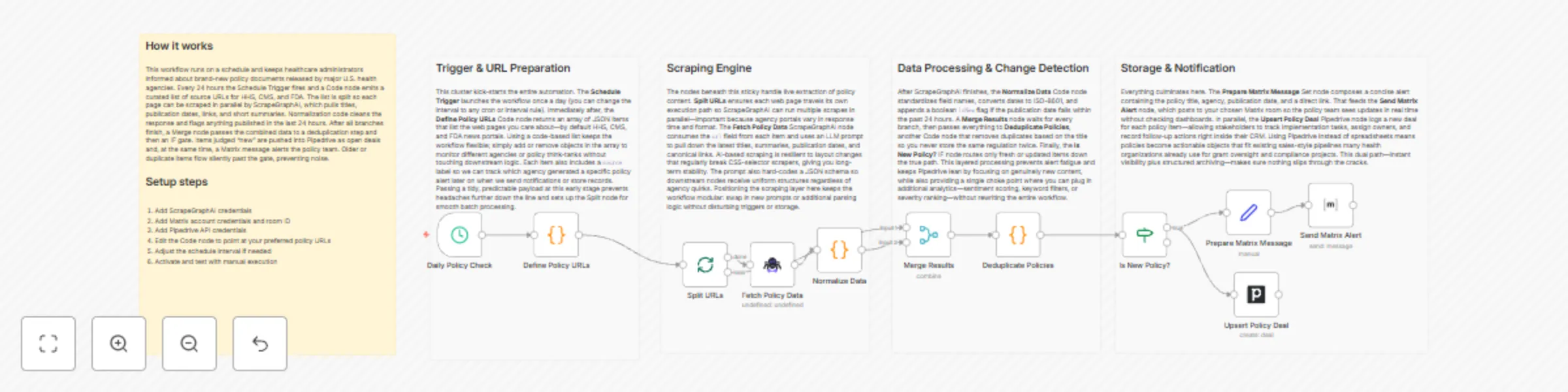
This workflow automatically monitors selected government and healthcare-policy websites, extracts newly published or updated policy documents, logs them as deals in a Pipedrive pipeline, and announces critical changes in a Matrix room. It gives healthcare administrators and policy analysts a near real-time view of policy developments without manual web checks.
| Variable | Description | Example |
|---|---|---|
POLICY_SITES |
Comma-separated list of URLs to scrape | https://health.gov/policies,https://who.int/proposals |
PD_PIPELINE_ID |
Pipedrive pipeline where deals are created | 5 |
PD_STAGE_ID_ALERT |
Stage ID for “Review Needed” | 17 |
MATRIX_ROOM_ID |
Room to send alerts (incl. leading !) |
!policy:matrix.org |
Edit the initial Set node to provide these values before running.
This workflow automatically monitors selected government and healthcare-policy websites, extracts newly published or updated policy documents, logs them as deals in a Pipedrive pipeline, and announces critical changes in a Matrix room. It gives healthcare administrators and policy analysts a near real-time view of policy developments without manual web checks.
POLICY_SITES for downstream batching.Setup Time: 15-20 minutes
Install Community Node
– In n8n, go to Settings → Community Nodes → Install and search for ScrapeGraphAI.
Add Credentials
– Create New credentials for ScrapeGraphAI, Pipedrive, and Matrix under Credentials.
Configure Environment Variables
– Open the Set (Initial Config) node and replace placeholders (POLICY_SITES, PD_PIPELINE_ID, etc.) with your values.
Review Schedule
– Double-click the Schedule Trigger node to adjust the interval if needed.
Activate Workflow
– Click Activate. The workflow will run at the next scheduled interval.
Verify Outputs
– Check Pipedrive for new deals and the Matrix room for alert messages after the first run.
POLICY_SITES variable into an array.// Inside ScrapeGraphAI node → Selectors
{
"title": "//h1/text()",
"date": "//time/@datetime",
"summary": "//p[1]/text()",
"author": "//span[@class='author']/text()" // new line
}
// Replace Matrix node with “Send Email”
{
  "to": "[email protected]",
  "subject": "New Healthcare Policy Detected: {{$json.title}}",
  "text": "Summary:\n{{$json.summary}}\n\nRead more at {{$json.url}}"
}
The workflow outputs structured JSON data for each new policy article:
{
  "title": "Affordable Care Expansion Act – 2024",
  "url": "https://health.gov/policies/acea-2024",
  "date": "2024-06-14T09:00:00Z",
  "summary": "Proposes expansion of coverage to rural areas...",
  "source": "health.gov",
  "hash": "2d6f1c8e3b..."
}
ScrapeGraphAI returns empty objects
– Verify selectors match the current HTML structure; inspect the site with developer tools and update the node configuration.
Duplicate deals appear in Pipedrive
– Ensure the “Find or Create” option is enabled in the Pipedrive node, using the page hash or url as a unique key.
POLICY_SITES to under 50 URLs per run to avoid hitting rate limits.Pro Tips:
This catalog entry is organized from the workflow JSON. The node-level section below shows the executable blocks available for review before importing the template.
| Workflow | Healthcare policy monitoring with ScrapeGraphAI, Pipedrive and Matrix alerts |
|---|---|
| Complexity | advanced |
| Nodes | 16 |
| Categories | Market Research, AI Summarization |
| Author | vinci-king-01 |
| Published | 11 Dec 2025 |
Use the JSON export at /data/workflows/11722/11722.json as the source template for this automation.
Open n8n, import the downloaded JSON, and review each node before activating the workflow.
Replace placeholder credentials, API keys, webhook URLs, account IDs, and environment-specific values with your own settings.
Run the workflow manually or in a staging workspace, inspect node output, and confirm downstream systems receive the expected data.
Enable the workflow only after testing, then monitor executions, errors, and rate limits during the first production runs.
Review imported nodes carefully before activation. This catalog entry is intended to help you inspect the workflow structure, understand required services, and find related templates faster.
Node names, credentials, schedules, webhook paths, and external service limits may need adjustment for your workspace.
Medical Research Tracker with Matrix and Pipedrive ️ COMMUNITY TEMPLATE DISCLAIMER: This is a community contributed template that uses ScrapeGraphAI (a community node). Please ensure you have the ...
Review the workflow JSON, configure any required credentials in n8n, and test the automation in a safe workspace before using it in production.
Yes. Use the block-by-block analysis and the downloadable JSON to inspect each node, then adjust credentials, prompts, schedules, filters, or destinations for your Market Research, AI Summarization use case.