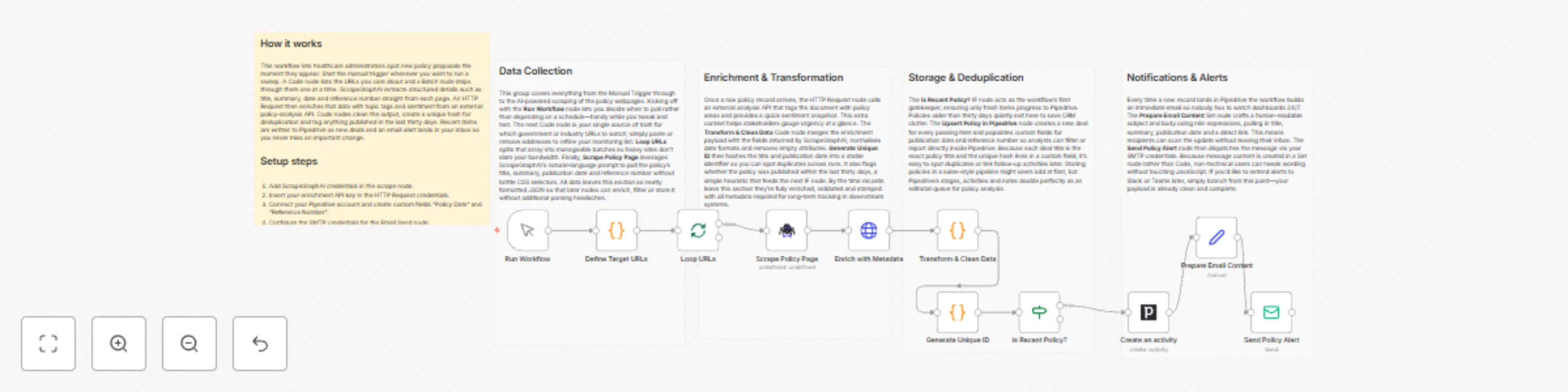
Healthcare policy monitoring with ScrapeGraphAI, Pipedrive and email alerts

Workflow preview

Workflow preview
100%
Healthcare policy monitoring with ScrapeGraphAI, Pipedrive and email alerts preview
Open on n8n.io

Important notice

This workflow is provided as-is. Please review and test before using in production.

1. Workflow Overview

Medical Research Tracker with Email and Pipedrive ️ COMMUNITY TEMPLATE DISCLAIMER: This is a community contributed template that uses ScrapeGraphAI (a community node). Please ensure you have the S...

Best for

  • Market Research automation workflows
  • AI Summarization automation workflows
  • advanced n8n builders looking for reusable templates

Tools used

n8n-nodes-base.manualtrigger, n8n-nodes-base.code, n8n-nodes-base.splitinbatches, n8n-nodes-scrapegraphai.scrapegraphai, n8n-nodes-base.httprequest, n8n-nodes-base.if, n8n-nodes-base.set, n8n-nodes-base.emailsend

Source and attribution

This workflow is cataloged by N8N Workflows and links back to its original n8n.io source page by vinci-king-01.

Original n8n.io source

1.1 Workflow description

Title
Healthcare policy monitoring with ScrapeGraphAI, Pipedrive and email alerts
Workflow name
Healthcare policy monitoring with ScrapeGraphAI, Pipedrive and email alerts

Medical Research Tracker with Email and Pipedrive

⚠️ COMMUNITY TEMPLATE DISCLAIMER: This is a community-contributed template that uses ScrapeGraphAI (a community node). Please ensure you have the ScrapeGraphAI community node installed in your n8n instance before using this template.

This workflow automatically scans authoritative healthcare policy websites for new research, bills, or regulatory changes, stores relevant findings in Pipedrive, and immediately notifies key stakeholders via email. It is ideal for healthcare administrators and policy analysts who need to stay ahead of emerging legislation or guidance that could impact clinical operations, compliance, and strategy.

Pre-conditions/Requirements

Prerequisites

  • n8n instance (self-hosted or n8n cloud)
  • ScrapeGraphAI community node installed
  • Pipedrive account and API token
  • SMTP credentials (or native n8n Email credentials) for sending alerts
  • List of target URLs or RSS feeds from government or healthcare policy organizations
  • Basic familiarity with n8n credential setup

Required Credentials

Service Credential Name Purpose
ScrapeGraphAI API Key Perform web scraping
Pipedrive API Token Create / update deals & notes
Email (SMTP/Nodemailer) SMTP creds Send alert emails

Environment Variables (optional)

Variable Example Value Description
N8N_DEFAULT_EMAIL_FROM [email protected] Default sender for Email Send node
POLICY_KEYWORDS telehealth, Medicare, HIPAA Comma-separated keywords for filtering

How it works

This workflow automatically scans authoritative healthcare policy websites for new research, bills, or regulatory changes, stores relevant findings in Pipedrive, and immediately notifies key stakeholders via email. It is ideal for healthcare administrators and policy analysts who need to stay ahead of emerging legislation or guidance that could impact clinical operations, compliance, and strategy.

Key Steps:

  • Manual Trigger: Kick-starts the workflow or schedules it via cron.
  • Set → URL List: Defines the list of healthcare policy pages or RSS feeds to scrape.
  • Split In Batches: Iterates through each URL so scraping happens sequentially.
  • ScrapeGraphAI: Extracts headlines, publication dates, and links.
  • Code (Filter & Normalize): Removes duplicates, standardizes JSON structure, and applies keyword filters.
  • HTTP Request: Optionally enriches data with summary content using external APIs (e.g., OpenAI, SummarizeBot).
  • If Node: Checks if the policy item is new (not already logged in Pipedrive).
  • Pipedrive: Creates a new deal or note for tracking and collaboration.
  • Email Send: Sends an alert to compliance or leadership teams with the policy summary.
  • Sticky Note: Provides inline documentation inside the workflow.

Set up steps

Setup Time: 15–20 minutes

  1. Install ScrapeGraphAI: In n8n, go to “Settings → Community Nodes” and install n8n-nodes-scrapegraphai.
  2. Create Credentials:
    a. Pipedrive → “API Token” from your Pipedrive settings → add in n8n.
    b. ScrapeGraphAI → obtain API key → add as credential.
    c. Email SMTP → configure sender details in n8n.
  3. Import Workflow: Copy the JSON template into n8n (“Import from clipboard”).
  4. Update URL List: Open the initial Set node and replace placeholder URLs with the sites you monitor (e.g., cms.gov, nih.gov, who.int, state health departments).
  5. Define Keywords (optional):
    a. Open the Code node “Filter & Normalize”.
    b. Adjust the const keywords = [...] array to match topics you care about.
  6. Test Run: Trigger manually; verify that:
    • Scraped items appear in the execution logs.
    • New deals/notes show up in Pipedrive.
    • Alert email lands in your inbox.
  7. Schedule: Add a Cron node (e.g., every 6 hours) in place of Manual Trigger for automated execution.

Node Descriptions

Core Workflow Nodes:

  • Manual Trigger – Launches the workflow on demand.
  • Set – URL List – Holds an array of target policy URLs/RSS feeds.
  • Split In Batches – Processes each URL one at a time to avoid rate limiting.
  • ScrapeGraphAI – Scrapes page content and parses structured data.
  • Code – Filter & Normalize – Cleans results, removes duplicates, applies keyword filter.
  • HTTP Request – Summarize – Calls a summarization API (optional).
  • If – Duplicate Check – Queries Pipedrive to see if the policy item already exists.
  • Pipedrive (Deal/Note) – Logs a new deal or adds a note with policy details.
  • Email Send – Alert – Notifies subscribed stakeholders.
  • Sticky Note – Embedded instructions inside the canvas.

Data Flow:

  1. Manual TriggerSet (URLs)Split In BatchesScrapeGraphAICode (Filter)If (Duplicate?)PipedriveEmail Send

Customization Examples

1. Add Slack notifications

// Insert after Email Send
{
  "node": "Slack",
  "parameters": {
    "channel": "#policy-alerts",
    "text": `New policy update: ${$json["title"]} - ${$json["url"]}`
  }
}

2. Use different CRM (HubSpot)

// Replace Pipedrive node config
{
  "resource": "deal",
  "operation": "create",
  "title": $json["title"],
  "properties": {
    "dealstage": "appointmentscheduled",
    "description": $json["summary"]
  }
}

Data Output Format

The workflow outputs structured JSON data:

{
  "title": "Telehealth Expansion Act of 2024",
  "date": "2024-05-30",
  "url": "https://www.congress.gov/bill/118th-congress-house-bill/1234",
  "summary": "This bill proposes expanding Medicare reimbursement for telehealth services...",
  "source": "congress.gov",
  "status": "new"
}

Troubleshooting

Common Issues

  1. Empty Scrape Results – Check if the target site uses JavaScript rendering; ScrapeGraphAI may need a headless browser option enabled.
  2. Duplicate Deals in Pipedrive – Ensure the “If Duplicate?” node compares a unique field (e.g., URL or title) before creating a new deal.

Performance Tips

  • Limit batch size to avoid API rate limits.
  • Cache or store the last scraped timestamp to skip unchanged pages.

Pro Tips:

  • Combine this workflow with an n8n “Cron” or “Webhook” trigger for fully automated monitoring.
  • Use environment variables for keywords and email recipients to avoid editing nodes each time.
  • Leverage Pipedrive’s automations to notify additional teams (e.g., legal) when high-priority items are logged.

1.2 Logical Blocks

This catalog entry is organized from the workflow JSON. The node-level section below shows the executable blocks available for review before importing the template.

2. Block-by-Block Analysis

Block 1 - Run Workflow

Type / Role
n8n-nodes-base.manualTrigger - manualTrigger
Config choices
Version 1

Block 2 - Define Target URLs

Type / Role
n8n-nodes-base.code - code
Config choices
Version 2

Block 3 - Loop URLs

Type / Role
n8n-nodes-base.splitInBatches - splitInBatches
Config choices
Version 3

Block 4 - Scrape Policy Page

Type / Role
n8n-nodes-scrapegraphai.scrapegraphAi - scrapegraphAi
Config choices
Version 1

Block 5 - Enrich with Metadata

Type / Role
n8n-nodes-base.httpRequest - httpRequest
Config choices
Version 4

Block 6 - Transform & Clean Data

Type / Role
n8n-nodes-base.code - code
Config choices
Version 2

Block 7 - Generate Unique ID

Type / Role
n8n-nodes-base.code - code
Config choices
Version 2

Block 8 - Is Recent Policy?

Type / Role
n8n-nodes-base.if - if
Config choices
Version 2

Block 9 - Prepare Email Content

Type / Role
n8n-nodes-base.set - set
Config choices
Version 3.4

Block 10 - Send Policy Alert

Type / Role
n8n-nodes-base.emailSend - emailSend
Config choices
Version 2.1

Block 11 - Workflow Overview

Type / Role
n8n-nodes-base.stickyNote - stickyNote
Config choices
Version 1

Block 12 - Section – Data Collection

Type / Role
n8n-nodes-base.stickyNote - stickyNote
Config choices
Version 1

Block 13 - Section – Enrichment & Transformation

Type / Role
n8n-nodes-base.stickyNote - stickyNote
Config choices
Version 1

Block 14 - Section – Storage

Type / Role
n8n-nodes-base.stickyNote - stickyNote
Config choices
Version 1

Block 15 - Section – Notifications

Type / Role
n8n-nodes-base.stickyNote - stickyNote
Config choices
Version 1

Block 16 - Create an activity

Type / Role
n8n-nodes-base.pipedrive - pipedrive
Config choices
Version 1

3. Summary Table

Workflow Healthcare policy monitoring with ScrapeGraphAI, Pipedrive and email alerts
Complexity advanced
Nodes 16
Categories Market Research, AI Summarization
Author vinci-king-01
Published 23 Dec 2025

4. Reproducing the Workflow from Scratch

  1. 1. Download the workflow JSON

    Use the JSON export at /data/workflows/12073/12073.json as the source template for this automation.

  2. 2. Import the template into n8n

    Open n8n, import the downloaded JSON, and review each node before activating the workflow.

  3. 3. Configure credentials and variables

    Replace placeholder credentials, API keys, webhook URLs, account IDs, and environment-specific values with your own settings.

  4. 4. Test with sample data

    Run the workflow manually or in a staging workspace, inspect node output, and confirm downstream systems receive the expected data.

  5. 5. Activate and monitor

    Enable the workflow only after testing, then monitor executions, errors, and rate limits during the first production runs.

5. General Notes & Resources

Review imported nodes carefully before activation. This catalog entry is intended to help you inspect the workflow structure, understand required services, and find related templates faster.

Node names, credentials, schedules, webhook paths, and external service limits may need adjustment for your workspace.

Frequently asked questions

What does Healthcare policy monitoring with ScrapeGraphAI, Pipedrive and email alerts do?

Medical Research Tracker with Email and Pipedrive ️ COMMUNITY TEMPLATE DISCLAIMER: This is a community contributed template that uses ScrapeGraphAI (a community node). Please ensure you have the S...

What do I need before importing this workflow?

Review the workflow JSON, configure any required credentials in n8n, and test the automation in a safe workspace before using it in production.

Can I customize this workflow?

Yes. Use the block-by-block analysis and the downloadable JSON to inspect each node, then adjust credentials, prompts, schedules, filters, or destinations for your Market Research, AI Summarization use case.