Block 1 - Sticky Note - Main Explanation
- Type / Role
- n8n-nodes-base.stickyNote - stickyNote
- Config choices
- Version 1


 Early Deal
This workflow is provided as-is. Please review and test before using in production.
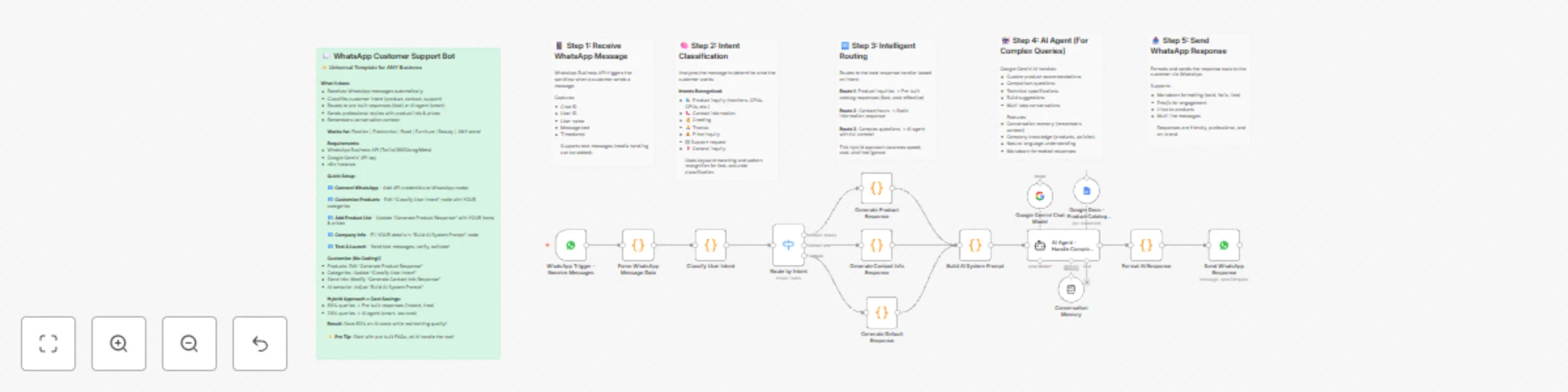
Handle WhatsApp customer inquiries with AI and intent routing (Whatsapp Chatbot) An intelligent, fully customizable WhatsApp customer support chatbot template that works for ANY business whether yo...
n8n-nodes-base.stickynote, n8n-nodes-base.whatsapptrigger, n8n-nodes-base.code, n8n-nodes-base.switch, @n8n/n8n-nodes-langchain.agent, @n8n/n8n-nodes-langchain.lmchatgooglegemini, @n8n/n8n-nodes-langchain.memorybufferwindow, n8n-nodes-base.googledocstool
This workflow is cataloged by N8N Workflows and links back to its original n8n.io source page by Hemanth Arety.
Original n8n.io sourceAn intelligent, fully customizable WhatsApp customer support chatbot template that works for ANY business - whether you sell fashion, electronics, food, furniture, cosmetics, or anything else. This workflow combines pre-built responses for common queries with AI for complex questions, creating a cost-effective 24/7 customer support solution that adapts to your specific products and services.
This universal template works for ANY business type:
This is a UNIVERSAL template - it works for ANY business by simply updating the product categories, company information, and response templates. No coding knowledge required for basic customization!
The workflow automates WhatsApp customer support through intelligent routing and AI assistance:
The hybrid approach (pre-built responses + AI) balances speed, cost, and intelligence - common questions get instant answers while complex queries receive personalized AI assistance.
You'll need:
Configure WhatsApp Business API
Customize Company Information
Configure Product Responses
Update Contact Details
Set Up AI Credentials
Activate and Test
Option 1: Meta Cloud API (Official, free for moderate usage)
Option 2: Twilio (Reliable, paid service)
Option 3: 360Dialog (WhatsApp-focused)
Option 4: MessageBird, Vonage, others
The workflow uses keyword pattern matching to classify user intent into these categories:
Priority 1: Contact Information (highest priority)
Priority 2: Greetings
Priority 3: Product Inquiries
Priority 4: AI Fallback
Pre-Built Responses (Fast & Cost-Effective)
AI Agent (Intelligent & Flexible)
The workflow uses buffer window memory to remember recent conversation:
User: "Hi" → Intent: greeting → Response: Welcome message with menu
User: "Show me monitors" → Intent: product_inquiry (monitors) → Response: Pre-built list of monitors with prices
User: "Which one is best for gaming?" → Intent: general_inquiry (complex) → Response: AI analyzes previous context (monitors) and recommends gaming-focused option
User: "What's your address?" → Intent: contact_info → Response: Complete contact details
The workflow comes with example categories for multiple business types. Replace them with YOUR categories:
For a Fashion Store:
const categories = [
  { pattern: /(shirt|tshirt|top)/i, category: 'tops' },
  { pattern: /(jeans|pants|trousers)/i, category: 'bottoms' },
  { pattern: /(dress|gown|kurti)/i, category: 'dresses' },
  { pattern: /(shoe|footwear|heels)/i, category: 'shoes' },
];
For a Grocery Store:
const categories = [
  { pattern: /(vegetable|veggies)/i, category: 'vegetables' },
  { pattern: /(fruit|fruits)/i, category: 'fruits' },
  { pattern: /(dairy|milk|cheese)/i, category: 'dairy' },
  { pattern: /(snack|chips|biscuit)/i, category: 'snacks' },
];
For a Beauty/Cosmetics Store:
const categories = [
  { pattern: /(skincare|cream|serum)/i, category: 'skincare' },
  { pattern: /(makeup|lipstick|foundation)/i, category: 'makeup' },
  { pattern: /(perfume|fragrance)/i, category: 'perfumes' },
  { pattern: /(hair|shampoo|conditioner)/i, category: 'haircare' },
];
For a Home Furniture Store:
const categories = [
  { pattern: /(sofa|couch)/i, category: 'sofas' },
  { pattern: /(bed|mattress)/i, category: 'bedroom' },
  { pattern: /(table|desk|dining)/i, category: 'tables' },
  { pattern: /(chair|seating)/i, category: 'chairs' },
];
For a Restaurant:
const categories = [
  { pattern: /(pizza|italian)/i, category: 'italian' },
  { pattern: /(burger|sandwich)/i, category: 'fast_food' },
  { pattern: /(biryani|curry|indian)/i, category: 'indian' },
  { pattern: /(dessert|sweet|ice cream)/i, category: 'desserts' },
];
Update the "Generate Product Response" node with YOUR actual products:
Example for Fashion Store:
if (category === 'tops') {
  response = `Hi ${userName}! Check out our *TOPS* collection:\\n\\n`;
  response += `👕 *Cotton Casual T-Shirt*\\n   💰 ₹499\\n   🎨 5 colors available\\n   🔗 yourstore.com/tshirts\\n\\n`;
  response += `👚 *Formal Shirt*\\n   💰 ₹899\\n   🎉 Buy 2 Get 20% OFF\\n   🔗 yourstore.com/shirts\\n\\n`;
}
Example for Grocery Store:
if (category === 'vegetables') {
  response = `Fresh *VEGETABLES* available, ${userName}:\\n\\n`;
  response += `🥕 *Fresh Carrots (1kg)*\\n   💰 ₹40\\n   🌱 Organic\\n\\n`;
  response += `🍅 *Tomatoes (1kg)*\\n   💰 ₹30\\n   ✅ Farm Fresh\\n\\n`;
}
Example for Restaurant:
if (category === 'italian') {
response = `Delicious *ITALIAN* dishes, ${userName}:\\n\\n`;
response += `🍕 *Margherita Pizza*\\n 💰 ₹299\\n 👨🍳 Chef's Special\\n\\n`;
response += `🍝 *Creamy Alfredo Pasta*\\n 💰 ₹349\\n 🔥 Bestseller\\n\\n`;
}
Edit the "Build AI System Prompt" node:
For a Boutique:
const systemPrompt = `You are a customer service assistant for Elegant Threads Boutique.

COMPANY INFORMATION:
- Business: Women's Designer Clothing Boutique
- Products: Ethnic wear, western wear, accessories
- Price Range: ₹1,500 - ₹15,000
- Speciality: Custom tailoring available
- Store Address: Shop 12, Fashion Street, Mumbai
- Phone: +91 98XXXXXXXX
- Delivery: Pan-Mumbai, 2-3 days
- Returns: 7-day no-questions-asked return policy
`;
For a Tech Store:
const systemPrompt = `You are customer support for TechHub Electronics.

COMPANY INFORMATION:
- Business: Consumer Electronics Retailer
- Products: Smartphones, laptops, accessories, home appliances
- Price Range: ₹500 - ₹2,00,000
- Speciality: Same-day delivery in Delhi NCR
- Warranty: Extended warranty on all electronics
- Store: Connaught Place, New Delhi
- Phone: +91 11-XXXXXXXX
`;
For a Bakery:
const systemPrompt = `You are the assistant for Sweet Delights Bakery.

COMPANY INFORMATION:
- Business: Fresh Baked Goods & Custom Cakes
- Products: Cakes, pastries, cookies, bread
- Price Range: ₹50 - ₹3,000
- Speciality: Custom cakes for all occasions (24hrs notice)
- Store: Baker Street, Bangalore
- Phone: +91 80-XXXXXXXX
- Delivery: Free above ₹500 within 5km
`;
Replace Google Gemini with other LLM providers:
Simply swap the "Google Gemini Chat Model" node with your preferred model.
Extend the intent classification in the "Classify User Intent" node:
// Add order tracking
if (/track.*order|order.*status|where.*order/i.test(text)) {
  intent = 'order_tracking';
}

// Add complaint handling
if (/complaint|unhappy|problem|issue|refund/i.test(text)) {
  intent = 'complaint';
}

// Add shipping questions
if (/shipping|delivery|courier|when.*arrive/i.test(text)) {
  intent = 'shipping_inquiry';
}
Then add corresponding response nodes in the routing switch.
Connect to HubSpot:
Connect to Salesforce:
Connect to Airtable:
Method 1: Google Translate API
Method 2: Multilingual AI
Send images:
return [{
  chatId: chatId,
  image: 'https://yoursite.com/product.jpg',
  caption: 'Check out this product!'
}];
Send documents:
Send location pins:
Add escalation for complex issues:
// Check if AI can't help
if (complexityScore > 8 || sentiment === 'angry') {
  // Notify human agent
  // Transfer conversation
  // Set status: 'awaiting_agent'
}
Integrate with:
Real-time stock checking:
Dynamic pricing:
Track metrics:
Integration options:
Add business hours logic:
const now = new Date();
const hour = now.getHours();
const isBusinessHours = (hour >= 10 && hour < 20); // 10 AM - 8 PM

if (!isBusinessHours) {
  return [{
    response: "We're currently closed. Our hours are 10 AM - 8 PM. We'll respond when we open!"
  }];
}
Test different response styles:
Track which versions lead to more sales/conversions.
1. Start Simple
2. Monitor and Iterate
3. Balance Pre-Built vs. AI
4. Optimize Response Times
5. Test Different Scenarios
6. Keep Responses Concise
7. Maintain Brand Voice
8. Handle Failures Gracefully
9. Respect Privacy
10. Monitor Costs
Fashion & Apparel Store
Electronics & Tech Store
Grocery & Food Store
Beauty & Cosmetics
Home Furniture Store
Restaurant & Cafe
Jewelry Store
Bookstore
Important Notes:
Getting Started Tip: Start with just contact info and product inquiries. Once that works smoothly, add AI responses for complex queries. Gradually expand based on actual customer needs you observe in conversations.
This catalog entry is organized from the workflow JSON. The node-level section below shows the executable blocks available for review before importing the template.
| Workflow | Handle WhatsApp customer inquiries with AI and intent routing |
|---|---|
| Complexity | advanced |
| Nodes | 20 |
| Categories | Support Chatbot, AI Chatbot |
| Author | Hemanth Arety |
| Published | 28 Oct 2025 |
Use the JSON export at /data/workflows/10240/10240.json as the source template for this automation.
Open n8n, import the downloaded JSON, and review each node before activating the workflow.
Replace placeholder credentials, API keys, webhook URLs, account IDs, and environment-specific values with your own settings.
Run the workflow manually or in a staging workspace, inspect node output, and confirm downstream systems receive the expected data.
Enable the workflow only after testing, then monitor executions, errors, and rate limits during the first production runs.
Review imported nodes carefully before activation. This catalog entry is intended to help you inspect the workflow structure, understand required services, and find related templates faster.
Node names, credentials, schedules, webhook paths, and external service limits may need adjustment for your workspace.
Handle WhatsApp customer inquiries with AI and intent routing (Whatsapp Chatbot) An intelligent, fully customizable WhatsApp customer support chatbot template that works for ANY business whether yo...
Review the workflow JSON, configure any required credentials in n8n, and test the automation in a safe workspace before using it in production.
Yes. Use the block-by-block analysis and the downloadable JSON to inspect each node, then adjust credentials, prompts, schedules, filters, or destinations for your Support Chatbot, AI Chatbot use case.