Google Play review intelligence with Bright Data & Telegram alerts

Workflow preview

Workflow preview
100%
Google Play review intelligence with Bright Data & Telegram alerts preview
Open on n8n.io

Important notice

This workflow is provided as-is. Please review and test before using in production.

1. Workflow Overview

Google Play Review Intelligence with Bright Data & Telegram Alerts Overview This n8n workflow automates the process of scraping Google Play Store reviews, analyzing app performance, and sending ale...

Best for

  • Market Research automation workflows
  • advanced n8n builders looking for reusable templates

Tools used

n8n-nodes-base.stickynote, n8n-nodes-base.formtrigger, n8n-nodes-base.httprequest, n8n-nodes-base.wait, n8n-nodes-base.if, n8n-nodes-base.googlesheets, n8n-nodes-base.telegram

Source and attribution

This workflow is cataloged by N8N Workflows and links back to its original n8n.io source page by Incrementors.

Original n8n.io source

1.1 Workflow description

Title
Google Play review intelligence with Bright Data & Telegram alerts
Workflow name
Google Play review intelligence with Bright Data & Telegram alerts

Google Play Review Intelligence with Bright Data & Telegram Alerts

Overview

This n8n workflow automates the process of scraping Google Play Store reviews, analyzing app performance, and sending alerts for low-rated applications. It integrates with Bright Data for web scraping, Google Sheets for data storage, and Telegram for notifications.

Workflow Components

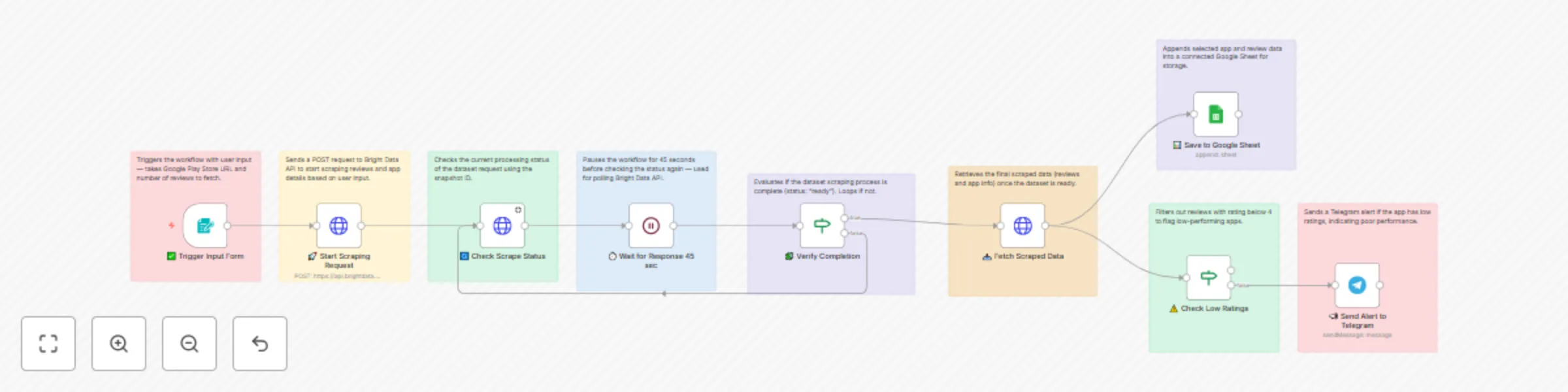
1. ✅ Trigger Input Form

  • Type: Form Trigger
  • Purpose: Initiates the workflow with user input
  • Input Fields:
    • URL (Google Play Store app URL)
    • Number of reviews to fetch
  • Function: Captures user requirements to start the scraping process

2. 🚀 Start Scraping Request

  • Type: HTTP Request (POST)
  • Purpose: Sends scraping request to Bright Data API
  • Endpoint: https://api.brightdata.com/datasets/v3/trigger
  • Parameters:
    • Dataset ID: gd_m6zagkt024uwvvwuyu
    • Include errors: true
    • Limit multiple results: 5
  • Custom Output Fields:
    • url, review_id, reviewer_name, review_date
    • review_rating, review, app_url, app_title
    • app_developer, app_images, app_rating
    • app_number_of_reviews, app_what_new
    • app_content_rating, app_country, num_of_reviews

3. 🔄 Check Scrape Status

  • Type: HTTP Request (GET)
  • Purpose: Monitors the progress of the scraping job
  • Endpoint: https://api.brightdata.com/datasets/v3/progress/{snapshot_id}
  • Function: Checks if the dataset scraping is complete

4. ⏱️ Wait for Response 45 sec

  • Type: Wait Node
  • Purpose: Implements polling mechanism
  • Duration: 45 seconds
  • Function: Pauses workflow before checking status again

5. 🧩 Verify Completion

  • Type: IF Condition
  • Purpose: Evaluates scraping completion status
  • Condition: status === "ready"
  • Logic:
    • True: Proceeds to fetch data
    • False: Loops back to status check

6. 📥 Fetch Scraped Data

  • Type: HTTP Request (GET)
  • Purpose: Retrieves the final scraped data
  • Endpoint: https://api.brightdata.com/datasets/v3/snapshot/{snapshot_id}
  • Format: JSON
  • Function: Downloads completed review and app data

7. 📊 Save to Google Sheet

  • Type: Google Sheets Node
  • Purpose: Stores scraped data for analysis
  • Operation: Append rows
  • Target: Specified Google Sheet document
  • Data Mapping:
    • URL, Review ID, Reviewer Name, Review Date
    • Review Rating, Review Text, App Rating
    • App Number of Reviews, App What's New, App Country

8. ⚠️ Check Low Ratings

  • Type: IF Condition
  • Purpose: Identifies poor-performing apps
  • Condition: review_rating < 4
  • Logic:
    • True: Triggers alert notification
    • False: No action taken

9. 📣 Send Alert to Telegram

  • Type: Telegram Node
  • Purpose: Sends performance alerts
  • Message Format:
    ⚠️ *Low App Performance Alert*
    📱 *App:* {app_title}
    🧑‍💻 *Developer:* {app_developer}
    ⭐ *Rating:* {app_rating}
    📝 *Reviews:* {app_number_of_reviews}
    🔗 [View on Play Store]({url})
    

Workflow Flow

Input Form → Start Scraping → Check Status → Wait 45s → Verify Completion
                                    ↑              ↓
                                    └──── Loop ────┘
                                           ↓
                          Fetch Data → Save to Sheet & Check Ratings
                                                      ↓
                                              Send Telegram Alert

Configuration Requirements

API Keys & Credentials

  • Bright Data API Key: Required for web scraping
  • Google Sheets OAuth2: For data storage access
  • Telegram Bot Token: For alert notifications

Setup Parameters

  • Google Sheet ID: Target spreadsheet identifier
  • Telegram Chat ID: Destination for alerts
  • N8N Instance ID: Workflow instance identifier

Key Features

Data Collection

  • Comprehensive app metadata extraction
  • Review content and rating analysis
  • Developer and country information
  • App store performance metrics

Quality Monitoring

  • Automated low-rating detection
  • Real-time performance alerts
  • Continuous data archiving

Integration Capabilities

  • Bright Data web scraping service
  • Google Sheets data persistence
  • Telegram instant notifications
  • Polling-based status monitoring

Use Cases

  1. App Performance Monitoring

    • Track rating trends over time
    • Identify user sentiment patterns
    • Monitor competitor performance
  2. Quality Assurance

    • Early warning for rating drops
    • Customer feedback analysis
    • Market reputation management
  3. Business Intelligence

    • Review sentiment analysis
    • Performance benchmarking
    • Strategic decision support

Technical Notes

  • Polling Interval: 45-second status checks
  • Rating Threshold: Alerts triggered for ratings < 4
  • Data Format: JSON with structured field mapping
  • Error Handling: Includes error tracking in dataset requests
  • Result Limiting: Maximum 5 multiple results per request

For any questions or support, please contact: [email protected] or fill out this form https://www.incrementors.com/contact-us/

1.2 Logical Blocks

This catalog entry is organized from the workflow JSON. The node-level section below shows the executable blocks available for review before importing the template.

2. Block-by-Block Analysis

Block 1 - Sticky Note

Type / Role
n8n-nodes-base.stickyNote - stickyNote
Config choices
Version 1

Block 2 - Sticky Note1

Type / Role
n8n-nodes-base.stickyNote - stickyNote
Config choices
Version 1

Block 3 - Sticky Note2

Type / Role
n8n-nodes-base.stickyNote - stickyNote
Config choices
Version 1

Block 4 - Sticky Note3

Type / Role
n8n-nodes-base.stickyNote - stickyNote
Config choices
Version 1

Block 5 - Sticky Note4

Type / Role
n8n-nodes-base.stickyNote - stickyNote
Config choices
Version 1

Block 6 - Sticky Note5

Type / Role
n8n-nodes-base.stickyNote - stickyNote
Config choices
Version 1

Block 7 - Sticky Note6

Type / Role
n8n-nodes-base.stickyNote - stickyNote
Config choices
Version 1

Block 8 - Sticky Note7

Type / Role
n8n-nodes-base.stickyNote - stickyNote
Config choices
Version 1

Block 9 - Sticky Note8

Type / Role
n8n-nodes-base.stickyNote - stickyNote
Config choices
Version 1

Block 10 - ✅ Trigger Input Form

Type / Role
n8n-nodes-base.formTrigger - formTrigger
Config choices
Version 2.2

Block 11 - 🚀 Start Scraping Request

Type / Role
n8n-nodes-base.httpRequest - httpRequest
Config choices
Version 4.2

Block 12 - 🔄 Check Scrape Status

Type / Role
n8n-nodes-base.httpRequest - httpRequest
Config choices
Version 4.2

Block 13 - ⏱️ Wait for Response 45 sec

Type / Role
n8n-nodes-base.wait - wait
Config choices
Version 1.1

Block 14 - 🧩 Verify Completion

Type / Role
n8n-nodes-base.if - if
Config choices
Version 2.2

Block 15 - 📥 Fetch Scraped Data

Type / Role
n8n-nodes-base.httpRequest - httpRequest
Config choices
Version 4.2

Block 16 - 📊 Save to Google Sheet

Type / Role
n8n-nodes-base.googleSheets - googleSheets
Config choices
Version 4.6

Block 17 - ⚠️ Check Low Ratings

Type / Role
n8n-nodes-base.if - if
Config choices
Version 2.2

Block 18 - 📣 Send Alert to Telegram

Type / Role
n8n-nodes-base.telegram - telegram
Config choices
Version 1.2

3. Summary Table

Workflow Google Play review intelligence with Bright Data & Telegram alerts
Complexity advanced
Nodes 18
Categories Market Research
Author Incrementors
Published 20 Jun 2025

4. Reproducing the Workflow from Scratch

  1. 1. Download the workflow JSON

    Use the JSON export at /data/workflows/5071/5071.json as the source template for this automation.

  2. 2. Import the template into n8n

    Open n8n, import the downloaded JSON, and review each node before activating the workflow.

  3. 3. Configure credentials and variables

    Replace placeholder credentials, API keys, webhook URLs, account IDs, and environment-specific values with your own settings.

  4. 4. Test with sample data

    Run the workflow manually or in a staging workspace, inspect node output, and confirm downstream systems receive the expected data.

  5. 5. Activate and monitor

    Enable the workflow only after testing, then monitor executions, errors, and rate limits during the first production runs.

5. General Notes & Resources

Review imported nodes carefully before activation. This catalog entry is intended to help you inspect the workflow structure, understand required services, and find related templates faster.

Node names, credentials, schedules, webhook paths, and external service limits may need adjustment for your workspace.

Frequently asked questions

What does Google Play review intelligence with Bright Data & Telegram alerts do?

Google Play Review Intelligence with Bright Data & Telegram Alerts Overview This n8n workflow automates the process of scraping Google Play Store reviews, analyzing app performance, and sending ale...

What do I need before importing this workflow?

Review the workflow JSON, configure any required credentials in n8n, and test the automation in a safe workspace before using it in production.

Can I customize this workflow?

Yes. Use the block-by-block analysis and the downloadable JSON to inspect each node, then adjust credentials, prompts, schedules, filters, or destinations for your Market Research use case.