Block 1 - Embeddings Ollama
- Type / Role
- @n8n/n8n-nodes-langchain.embeddingsOllama - embeddingsOllama
- Config choices
- Version 1


 Early Deal
This workflow is provided as-is. Please review and test before using in production.
Gmail to Vector Embeddings with PGVector and Ollama Who is this for? Everyone! Did you dream of asking an AI " what hotel did I stay in for holidays last summer? " or " what were my marks last seme...
@n8n/n8n-nodes-langchain.embeddingsollama, @n8n/n8n-nodes-langchain.documentdefaultdataloader, @n8n/n8n-nodes-langchain.textsplitterrecursivecharactertextsplitter, n8n-nodes-base.gmailtrigger, n8n-nodes-base.splitinbatches, n8n-nodes-base.splitout, n8n-nodes-base.if, n8n-nodes-base.manualtrigger
This workflow is cataloged by N8N Workflows and links back to its original n8n.io source page by Alfonso Corretti.
Original n8n.io sourceGmail to Vector Embeddings with PGVector and Ollama
Everyone! Did you dream of asking an AI "what hotel did I stay in for holidays last summer?" or "what were my marks last semester like?".
Dream no more, as vector similarity searches and this workflow are the foundations to make it possible (as long as the information appears in your e-mails 😅).
This workflow is designed to use locally-hosted open source. Ollama as LLM provider, nomic-embed-text as the embeddings model, and pgvector as the vector database engine, on top of Postgres.
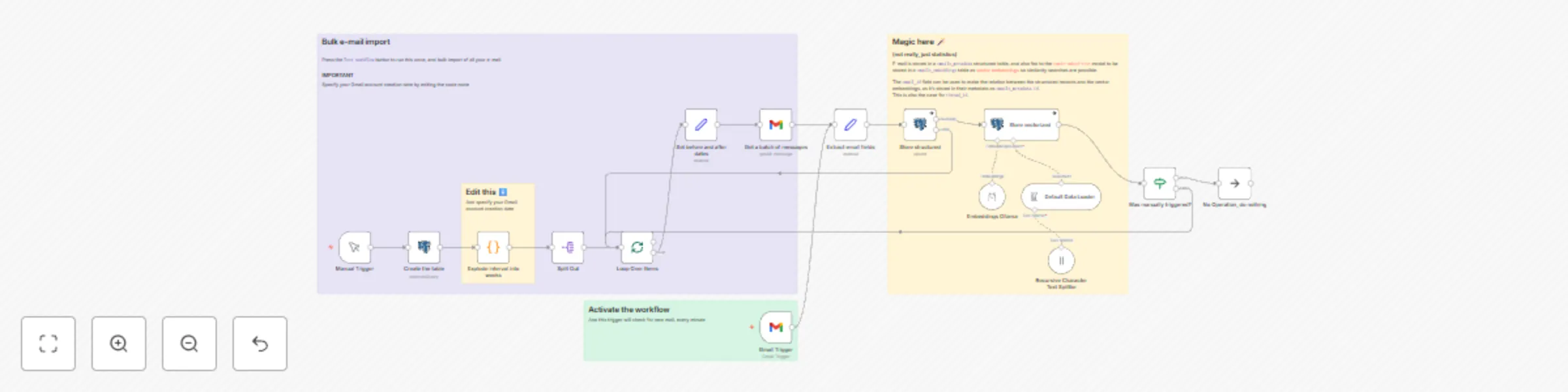
Firstly, specify the date you created your Gmail account on, then manually run the workflow in order to bulk read all your e-mail in monthly batches. Your database is now populated!
Now it's the task for other workflows to query the vector database.
Activate the workflow so that new e-mail is continuously added by the Gmail Trigger upon receiving it.
This workflow stores your e-mail activity in two ways:
And the information in both of them can be correlated by Gmail's messages id, which is stored in the vectors table as metadata property emails_metadata.id.
That way consumers can benefit from both worlds! ✨ Vector similarity searches enable semantic searches, while structured queries can retrieve more factual data like the message id, its date or who it came from.
My template Chat with Your Email History using Telegram, Mistral and Pgvector for RAG is a ready-made solution to consume this workflow.
You may also pair this workflow with my other template to Email Assistant: Convert Natural Language to SQL Queries with Phi4-mini and PostgreSQL and you'll enable RAG workflows that use both structured and vectorized databases.
I suppose the e-mail provider could be changed, but then you'd have to identify an alternative id field. Message-ID would be a more standard option.
There are a few opinionated choices as to what metadata to store, but those shouldn't need adjustments.
This catalog entry is organized from the workflow JSON. The node-level section below shows the executable blocks available for review before importing the template.
| Workflow | Gmail to vector embeddings with PGVector and Ollama |
|---|---|
| Complexity | advanced |
| Nodes | 20 |
| Categories | Personal Productivity, AI RAG |
| Author | Alfonso Corretti |
| Published | 27 Apr 2025 |
Use the JSON export at /data/workflows/3762/3762.json as the source template for this automation.
Open n8n, import the downloaded JSON, and review each node before activating the workflow.
Replace placeholder credentials, API keys, webhook URLs, account IDs, and environment-specific values with your own settings.
Run the workflow manually or in a staging workspace, inspect node output, and confirm downstream systems receive the expected data.
Enable the workflow only after testing, then monitor executions, errors, and rate limits during the first production runs.
Review imported nodes carefully before activation. This catalog entry is intended to help you inspect the workflow structure, understand required services, and find related templates faster.
Node names, credentials, schedules, webhook paths, and external service limits may need adjustment for your workspace.
Gmail to Vector Embeddings with PGVector and Ollama Who is this for? Everyone! Did you dream of asking an AI " what hotel did I stay in for holidays last summer? " or " what were my marks last seme...
Review the workflow JSON, configure any required credentials in n8n, and test the automation in a safe workspace before using it in production.
Yes. Use the block-by-block analysis and the downloadable JSON to inspect each node, then adjust credentials, prompts, schedules, filters, or destinations for your Personal Productivity, AI RAG use case.