Block 1 - Gmail Trigger
- Type / Role
- n8n-nodes-base.gmailTrigger - gmailTrigger
- Config choices
- Version 1.2


 Early Deal
This workflow is provided as-is. Please review and test before using in production.
Want to check out all my flows, follow me on: https://maxmitcham.substack.com/ https://www.linkedin.com/in/max mitcham/ Email Manager Intelligent Gmail Classification This automation flow is design...
n8n-nodes-base.gmailtrigger, n8n-nodes-base.gmail, @n8n/n8n-nodes-langchain.outputparserstructured, @n8n/n8n-nodes-langchain.lmchatanthropic, @n8n/n8n-nodes-langchain.agent, n8n-nodes-base.gmailtool
This workflow is cataloged by N8N Workflows and links back to its original n8n.io source page by Max Mitcham.
Original n8n.io sourceWant to check out all my flows, follow me on:
https://maxmitcham.substack.com/
https://www.linkedin.com/in/max-mitcham/
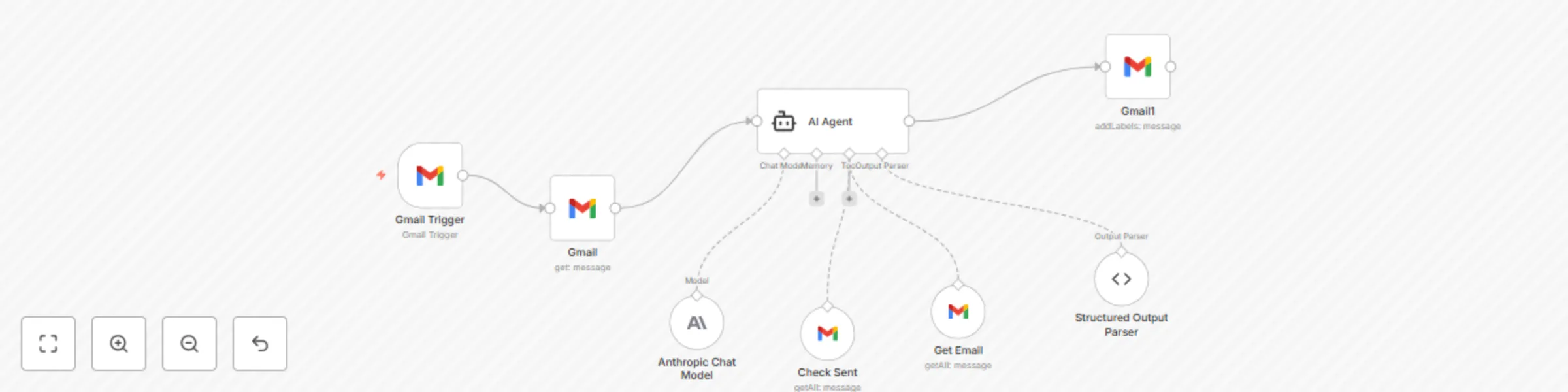
This automation flow is designed to automatically monitor incoming Gmail messages, analyze their content and context using AI, and intelligently classify them with appropriate labels for better email organization and prioritization.
⚙️ How It Works (Step-by-Step):
Polls for new emails every minute
Captures all incoming messages automatically
Triggers workflow for each new email received
Full email body and headers
Sender information and recipient lists
Subject line and metadata
Existing Gmail labels and categories
Email threading information (replies/forwards)
Searches for previous emails from the same sender
Checks sent folder for prior outbound correspondence
Determines if this is a first-time contact (cold email)
Analyzes conversation thread history
Claude Sonnet 4 for sophisticated email analysis
Context-aware classification based on email history
Content analysis for intent and urgency detection
Header analysis for automated vs. human-sent emails
To Respond: Requires direct action/reply
FYI: For awareness, no action needed
Notification: Service updates, policy changes
Marketing: Promotional content and sales pitches
Meeting Update: Calendar-related communications
Comment: Document/task feedback
Uses structured output parsing for reliability
Returns specific Label ID for Gmail integration
Applies label automatically to the email
Maintains classification accuracy
🛠️ Tools Used:
n8n: Workflow automation platform
Gmail API: Email monitoring and label management
Anthropic Claude: Advanced email content analysis
Gmail Tools: Email history checking and search
Structured Output Parser: Consistent AI responses
📦 Key Features:
Real-time email monitoring and classification
Context-aware analysis using email history
Intelligent cold vs. warm email detection
Multiple classification categories for organization
Automatic Gmail label application
Header analysis for automated email detection
Thread-aware conversation tracking
🚀 Ideal Use Cases:
Busy executives managing high email volumes
Sales professionals prioritizing prospect communications
Support teams organizing customer inquiries
Marketing teams filtering promotional content
Anyone wanting automated email organization
Teams needing consistent email prioritization
This catalog entry is organized from the workflow JSON. The node-level section below shows the executable blocks available for review before importing the template.
| Workflow | Gmail AI Email Manager |
|---|---|
| Complexity | intermediate |
| Nodes | 8 |
| Categories | Ticket Management, AI Summarization |
| Author | Max Mitcham |
| Published | 06 Jun 2025 |
Use the JSON export at /data/workflows/4722/4722.json as the source template for this automation.
Open n8n, import the downloaded JSON, and review each node before activating the workflow.
Replace placeholder credentials, API keys, webhook URLs, account IDs, and environment-specific values with your own settings.
Run the workflow manually or in a staging workspace, inspect node output, and confirm downstream systems receive the expected data.
Enable the workflow only after testing, then monitor executions, errors, and rate limits during the first production runs.
Review imported nodes carefully before activation. This catalog entry is intended to help you inspect the workflow structure, understand required services, and find related templates faster.
Node names, credentials, schedules, webhook paths, and external service limits may need adjustment for your workspace.
Want to check out all my flows, follow me on: https://maxmitcham.substack.com/ https://www.linkedin.com/in/max mitcham/ Email Manager Intelligent Gmail Classification This automation flow is design...
Review the workflow JSON, configure any required credentials in n8n, and test the automation in a safe workspace before using it in production.
Yes. Use the block-by-block analysis and the downloadable JSON to inspect each node, then adjust credentials, prompts, schedules, filters, or destinations for your Ticket Management, AI Summarization use case.