GitHub fork status monitor
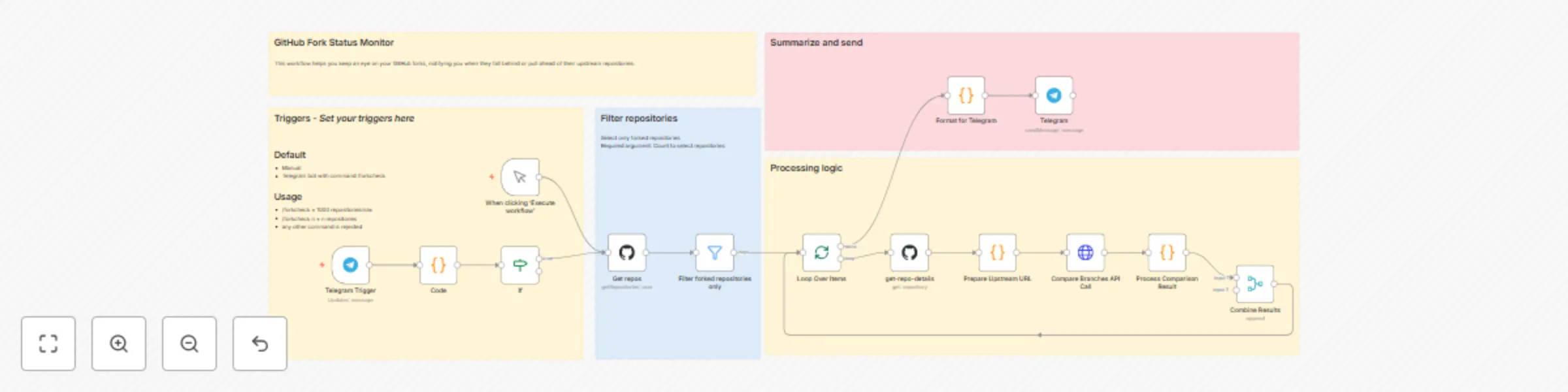
Workflow preview

$20/month : Unlimited workflows
2500 executions/month

THE #1 IN WEB SCRAPING
Scrape any website without limits
HOSTINGER  Early Deal
DISCOUNT 20% Try free
Early DealDISCOUNT 20%
Self-hosted n8n
Unlimited workflows - from $4.99/mo

#1 hub for scraping, AI & automation
6000+ actors - $5 credits/mo
Important notice
This workflow is provided as-is. Please review and test before using in production.
Overview
This workflow helps you keep an eye on your GitHub forks, notifying you when they fall behind or pull ahead of their upstream repositories.
How It Works
- Fetches All Your Repos: The workflow starts by grabbing a list of all repositories owned by your GitHub account.
- Filters for Forks: It then intelligently filters this list to identify only your forked repositories.
- Compares Branches: For each identified fork, it compares its default branch against the upstream repository's default branch to find out how many commits it's ahead or behind.
- Filters for Changes: Only forks that are either ahead or behind their upstream (i.e., not perfectly in sync) are processed further.
- Generates Report: A concise, well-formatted report is compiled, highlighting the status and commit differences for each relevant fork.
- Sends Telegram Notification: Finally, this report is sent directly to your Telegram chat, keeping you informed in real-time.
Setup Steps
- Copy the template
- Update triggers ( optional )
- Update the credentials
Prerequisites
- GitHub Credentials: You'll need to provide your GitHub personal access token for the "Get All Repositories" and "Compare Branches API Call" nodes.
- Telegram Bot Setup: Configure a Telegram Bot and obtain its API token and your chat ID for the "Send Report" node.
- Github Owner Username: Update the "Get All Repositories" node with the GitHub username of the repository owner whose forks you want to monitor.
Explore & Fine-Tune: All detailed instructions and explanations, including how to adjust the filtering logic or output formatting, are provided in sticky notes directly within the workflow canvas.