Block 1 - When clicking ‘Test workflow’
- Type / Role
- n8n-nodes-base.manualTrigger - manualTrigger
- Config choices
- Version 1


 Early Deal
This workflow is provided as-is. Please review and test before using in production.
About the Automation Staying on top of competitor pricing changes can be a full time job. Manual price tracking is time consuming and prone to errors, especially when dealing with complex pricing s...
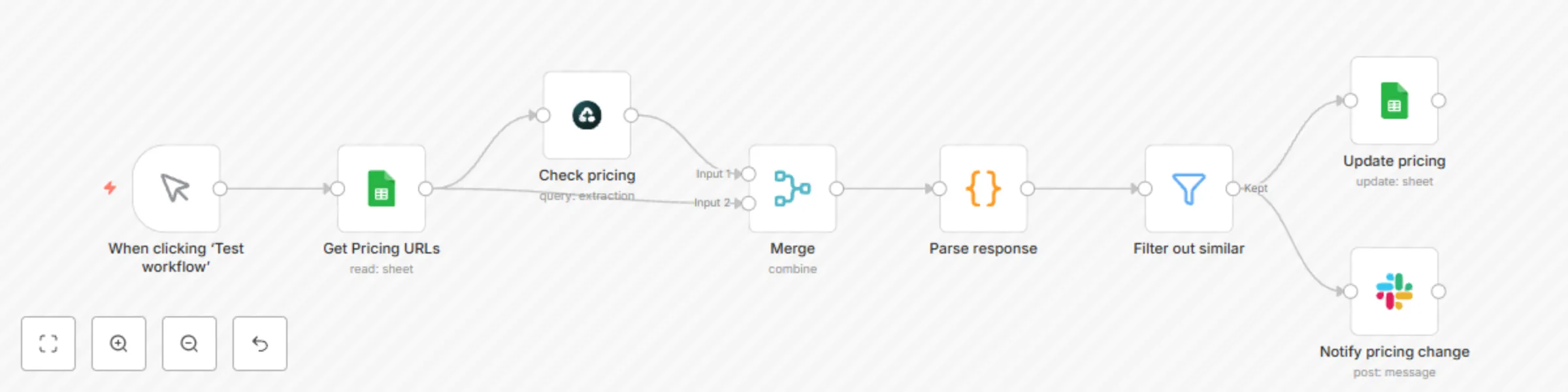
n8n-nodes-base.manualtrigger, n8n-nodes-base.googlesheets, n8n-nodes-base.airtop, n8n-nodes-base.code, n8n-nodes-base.merge, n8n-nodes-base.slack, n8n-nodes-base.filter
This workflow is cataloged by N8N Workflows and links back to its original n8n.io source page by Airtop.
Original n8n.io sourceStaying on top of competitor pricing changes can be a full-time job. Manual price tracking is time-consuming and prone to errors, especially when dealing with complex pricing structures and multiple subscription tiers. Paid competitor price monitoring tools like Competera, Visualping and Fluxguard can be expensive. What if you could automate this process and get instant alerts when competitors adjust their pricing?
With this automation, you'll learn how to set up automated price monitoring system using Airtop's built-in node in n8n. By the end, your system will automatically track competitor pricing changes and notify you of any modifications.
This automation continuously monitors competitor pricing pages and compares them against your baseline data. The workflow:
We've created a ready-to-use blueprint for seamless price monitoring. Here's how to get started:
Enhance the basic template with these popular modifications:
Case Study 1: A B2B SaaS company can use this automation to track competitors' pricing changes. When they identify a market-wide pricing shift, they can adjust their strategy proactively within minutes.
Case Study 2: An online Ecommerce retailer automates monitoring of 100+ competitor products, maintaining optimal pricing positions and increasing profit margins.
To ensure accurate tracking:
Example Structure in Google Sheets:
Competitor: Acme Tools
Basic Plan:
- Monthly: $29
- Annual: $290 ($24.17/mo)
- Features: 5 users, 10GB storage, basic support
Pro Plan:
- Monthly: $79
- Annual: $790 ($65.83/mo)
- Features: 20 users, 50GB storage, priority support
After setting up your price monitoring automation, consider the following:
Happy monitoring!
This catalog entry is organized from the workflow JSON. The node-level section below shows the executable blocks available for review before importing the template.
| Workflow | Get notified when your competitors change their pricing with Airtop and Slack |
|---|---|
| Complexity | intermediate |
| Nodes | 8 |
| Categories | Market Research |
| Author | Airtop |
| Published | 08 Apr 2025 |
Use the JSON export at /data/workflows/3480/3480.json as the source template for this automation.
Open n8n, import the downloaded JSON, and review each node before activating the workflow.
Replace placeholder credentials, API keys, webhook URLs, account IDs, and environment-specific values with your own settings.
Run the workflow manually or in a staging workspace, inspect node output, and confirm downstream systems receive the expected data.
Enable the workflow only after testing, then monitor executions, errors, and rate limits during the first production runs.
Review imported nodes carefully before activation. This catalog entry is intended to help you inspect the workflow structure, understand required services, and find related templates faster.
Node names, credentials, schedules, webhook paths, and external service limits may need adjustment for your workspace.
About the Automation Staying on top of competitor pricing changes can be a full time job. Manual price tracking is time consuming and prone to errors, especially when dealing with complex pricing s...
Review the workflow JSON, configure any required credentials in n8n, and test the automation in a safe workspace before using it in production.
Yes. Use the block-by-block analysis and the downloadable JSON to inspect each node, then adjust credentials, prompts, schedules, filters, or destinations for your Market Research use case.