Block 1 - When chat message received
- Type / Role
- @n8n/n8n-nodes-langchain.chatTrigger - chatTrigger
- Config choices
- Version 1.1


 Early Deal
This workflow is provided as-is. Please review and test before using in production.
This workflow contains community nodes that are only compatible with the self hosted version of n8n. Website sitemap generator and visual tree creator Who's it for Web developers, SEO specialists, ...
@n8n/n8n-nodes-langchain.chattrigger, n8n-nodes-base.if, n8n-nodes-base.googledrive, n8n-nodes-base.googlesheets, n8n-nodes-base.code, n8n-nodes-base.respondtowebhook, @mendable/n8n-nodes-firecrawl.firecrawl, n8n-nodes-base.stickynote
This workflow is cataloged by N8N Workflows and links back to its original n8n.io source page by Growth AI.
Original n8n.io sourceThis workflow contains community nodes that are only compatible with the self-hosted version of n8n.
Web developers, SEO specialists, UX designers, and digital marketers who need to analyze website structure, create visual sitemaps, or audit site architecture for optimization purposes.
This workflow automatically generates a comprehensive sitemap from any website URL and creates an organized hierarchical structure in Google Sheets. It follows the website's sitemap to discover all pages, then organizes them by navigation levels (Level 1, Level 2, etc.) with proper parent-child relationships. The output can be further processed to create visual tree diagrams and mind maps.
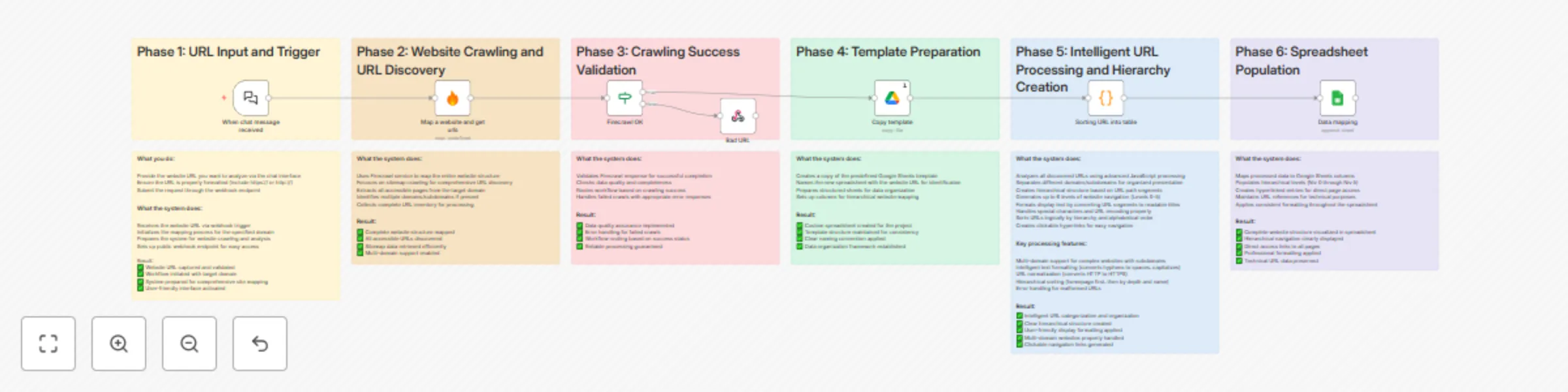
The workflow follows a five-step automation process:
URL Input: Accepts website URL via chat interface Site Crawling: Uses Firecrawl to discover all pages following the website's sitemap only Success Validation: Checks if crawling was successful (some sites block external crawlers) Hierarchical Organization: Processes URLs into a structured tree with proper level relationships Google Sheets Export: Creates a formatted spreadsheet with the complete site architecture
The system respects robots.txt and follows only sitemap-declared pages to ensure ethical crawling.
Firecrawl API key (for website crawling and sitemap discovery) Google Sheets access Google Drive access (for template duplication)
It's recommended to create your own copy of the base template:
Access the base Google Sheets template Make a copy for your personal use Update the workflow's "Copy template" node with your template's file ID (replace the default ID: 12lV4HwgudgzPPGXKNesIEExbFg09Tuu9gyC_jSS1HjI) This ensures you have control over the template formatting and can customize it as needed
Set up the following credentials in n8n:
Firecrawl API: For crawling websites and discovering sitemaps Google Sheets OAuth2: For creating and updating spreadsheets Google Drive OAuth2: For duplicating the template file
The workflow uses optimized Firecrawl settings:
ignoreSitemap: false - Respects the website's sitemap sitemapOnly: true - Only crawls URLs listed in sitemap files These settings ensure ethical crawling and faster processing
The workflow uses a chat trigger interface - no manual configuration needed Simply provide the website URL you want to analyze when prompted
Start the chat: Access the workflow via the chat interface Provide URL: Enter the website URL you want to analyze (e.g., "https://example.com") Wait for processing: The system will crawl, organize, and export the data Receive your results: Get an automatic direct clickable link to your generated Google Sheets - no need to search for the file
Invalid URLs: If the provided URL is invalid or the website blocks crawling, you'll receive an immediate error message Graceful failure: The workflow stops without creating unnecessary files when errors occur Common causes: Incorrect URL format, robots.txt restrictions, or site security settings
Automatic naming: Generated files follow the pattern "[Website URL] - n8n - Arborescence" Google Drive storage: Files are automatically organized in your Google Drive Instant access: Direct link provided immediately upon completion
Once your Google Sheets is ready:
Copy all the hierarchical data from the generated spreadsheet Prepare it for AI processing
Use any AI model with this prompt: Create a hierarchical tree structure from the following website sitemap data. Return ONLY the tree structure using ASCII tree formatting with ├── and └── characters. Do not include any explanations, comments, or additional text - just the pure tree structure. The tree should start with the root domain and show all pages organized by their hierarchical levels. Use proper indentation to show parent-child relationships. Here is the sitemap data: [PASTE THE SITEMAP DATA HERE]
Requirements:
Visit the Whimsical Diagrams GPT Request a mind map creation using your ASCII tree structure Get a professional visual representation of your website architecture
The generated spreadsheet contains:
Niv 0 to Niv 5: Hierarchical levels (0 = homepage, 1-5 = navigation depth) URL column: Complete URLs for reference Hyperlinked structure: Clickable links organized by hierarchy Multi-domain support: Handles subdomains and different domain structures
Automatic sorting: Pages organized by navigation depth and alphabetical order Parent-child relationships: Clear hierarchical structure maintained Domain separation: Main domains and subdomains processed separately Clean formatting: URLs decoded and formatted for readability
Sitemap dependency: Only discovers pages listed in the website's sitemap Crawling restrictions: Some websites may block external crawlers Level depth: Limited to 5 hierarchical levels for clarity Rate limits: Respects Firecrawl API limitations Template dependency: Requires access to the base template for duplication
SEO audits: Analyze site structure for optimization opportunities UX research: Understand navigation patterns and user paths Content strategy: Identify content gaps and organizational issues Site migrations: Document existing structure before redesigns Competitive analysis: Study competitor site architectures Client presentations: Create visual site maps for stakeholder reviews
This catalog entry is organized from the workflow JSON. The node-level section below shows the executable blocks available for review before importing the template.
| Workflow | Generate website sitemaps & visual trees with Firecrawl and Google Sheets |
|---|---|
| Complexity | advanced |
| Nodes | 19 |
| Categories | Market Research, Multimodal AI |
| Author | Growth AI |
| Published | 14 Aug 2025 |
Use the JSON export at /data/workflows/7379/7379.json as the source template for this automation.
Open n8n, import the downloaded JSON, and review each node before activating the workflow.
Replace placeholder credentials, API keys, webhook URLs, account IDs, and environment-specific values with your own settings.
Run the workflow manually or in a staging workspace, inspect node output, and confirm downstream systems receive the expected data.
Enable the workflow only after testing, then monitor executions, errors, and rate limits during the first production runs.
Review imported nodes carefully before activation. This catalog entry is intended to help you inspect the workflow structure, understand required services, and find related templates faster.
Node names, credentials, schedules, webhook paths, and external service limits may need adjustment for your workspace.
This workflow contains community nodes that are only compatible with the self hosted version of n8n. Website sitemap generator and visual tree creator Who's it for Web developers, SEO specialists, ...
Review the workflow JSON, configure any required credentials in n8n, and test the automation in a safe workspace before using it in production.
Yes. Use the block-by-block analysis and the downloadable JSON to inspect each node, then adjust credentials, prompts, schedules, filters, or destinations for your Market Research, Multimodal AI use case.