Block 1 - RSS Feed - n8n & Automation
- Type / Role
- n8n-nodes-base.rssFeedReadTrigger - rssFeedReadTrigger
- Config choices
- Version 1


 Early Deal
Upwork Proposal Automation with AI, Airtable and Slack Description This workflow automates the complete Upwork job discovery and proposal generation process by continuously monitoring job listin...
n8n-nodes-base.rssfeedreadtrigger, n8n-nodes-base.code, n8n-nodes-base.airtable, n8n-nodes-base.if, n8n-nodes-base.slack, @n8n/n8n-nodes-langchain.openai, n8n-nodes-base.stickynote
This workflow is cataloged by N8N Workflows and links back to its original n8n.io source page by Vivekanand M.
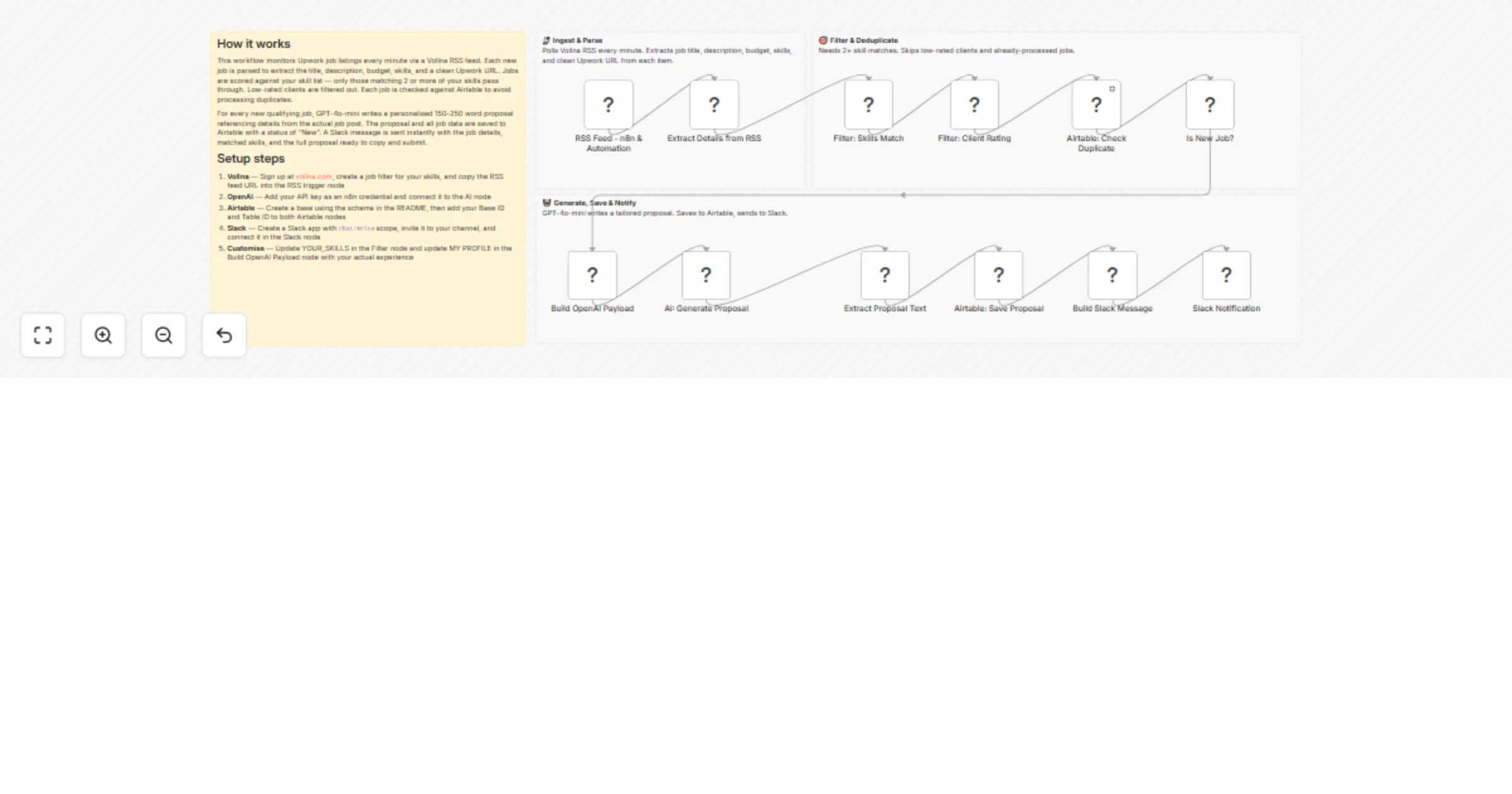
Original n8n.io sourceThis workflow automates the complete Upwork job discovery and proposal generation process by continuously monitoring job listings, intelligently filtering opportunities based on your skill set, generating personalised AI-written proposals, and delivering instant notifications — all without any manual effort.
The workflow is triggered automatically every minute via Vollna's RSS feed, which monitors Upwork job postings matching your configured search filters. Each new job listing is parsed and analysed to extract key details, including title, description, budget, required skills, and job ID. A skills matching engine scores each job against your defined skill set and filters out weak matches. Duplicate jobs are automatically detected and skipped using Airtable as a reference store, ensuring AI credits are never wasted on already-processed listings.
For every qualified new job, GPT-4o-mini generates a tailored 150–250-word proposal that references specific details from the job post, aligns your experience to the client's exact requirements, and ends with a clear call to action. The proposal and all job metadata are saved to an Airtable base for review. A formatted Slack notification is sent instantly with the full job details and generated proposal, allowing you to review, edit, and apply directly from Upwork with a single click.
📡 RSS Feed Monitoring — Polls Vollna's Upwork RSS feed every minute for new job listings matching your skill keywords. Vollna replaces Upwork's discontinued native RSS feed (removed August 2024) and supports 30+ filter parameters, including category, budget, and client history.
🔍 Parse & Extract — Extracts structured fields from each RSS item, including job title, full description, budget, required skills, posted date, job ID, and clean Upwork job URL (decoded from Vollna's redirect format).
🎯 Filter: Skills Match — Scores each job against your defined skill list. Jobs scoring fewer than 2 matched skills are dropped immediately, ensuring only relevant opportunities proceed.
⭐ Filter: Client Quality — Filters out clients with ratings below 4.5. New clients with no rating history are allowed through by default.
🔁 Duplicate Detection — Queries Airtable to check if the job ID has already been processed in a previous run. Duplicate jobs are silently skipped without generating a proposal.
🤖 AI Proposal Generation — Calls GPT-4o-mini with a structured prompt containing the job details and your freelancer profile. Generates a concise, personalised proposal that opens with a specific reference to the job post, highlights relevant experience with real numbers, proposes a concrete first step, and ends with a soft call to action.
💾 Save to Airtable — Creates a new record in your Airtable base with all job fields, matched skills, match score, generated proposal, and status set to "New" for review tracking.
💬 Slack Notification — Sends a formatted message to your Slack channel with the job title, budget, match score, matched skills, required skills, direct Upwork job link, and the full AI-generated proposal — ready to copy and submit.
chat:write permission, invited to your target channelCreate a table called Upwork Proposals with these fields:
| Field Name | Type |
|---|---|
| Job Title | Single line text |
| Job URL | URL |
| Upwork URL | URL |
| Posted At | Date |
| Budget | Single line text |
| Skills Required | Long text |
| Matched Skills | Long text |
| Match Score | Number |
| AI Proposal | Long text |
| Status | Single select: New, Reviewed, Applied, Skipped |
| Job ID | Single line text |
| Notes | Long text |
| Item | Estimated Cost |
|---|---|
| Vollna (free tier) | $0/mo |
| GPT-4o-mini (~50 proposals/day) | ~$1–3/mo |
| Airtable (free tier) | $0/mo |
| n8n self-hosted (AWS t3.small) | ~$10–15/mo |
| Total | ~$11–18/mo |
Authorisation: Bearer sk-...)chat:write scope, install to your workspace, invite the bot to your channel with /invite @your-bot-nameMY PROFILE section with your actual name, skills, and experience detailsYOUR_SKILLS array to match your exact skill set✔ Fully automated job discovery — no manual searching required ✔ Skills-based filtering ensures AI only runs on relevant jobs ✔ Personalised proposals referencing specific job details — not generic templates ✔ Airtable CRM for tracking proposal status and conversion rates ✔ Instant Slack alerts with one-click access to apply on Upwork ✔ Deduplication prevents reprocessing the same job across runs ✔ Modular design — swap OpenAI for Claude or AWS Bedrock with minimal changes ✔ Cost-optimised — GPT-4o-mini keeps proposal generation under $3/month at scale
This catalog entry is organized from the workflow JSON. The node-level section below shows the executable blocks available for review before importing the template.
| Workflow | Generate Upwork proposals with GPT-4o-mini, Airtable and Slack |
|---|---|
| Complexity | advanced |
| Nodes | 16 |
| Categories | Lead Generation, Multimodal AI |
| Author | Vivekanand M |
| Published | 04 Mar 2026 |
Use the JSON export at /data/workflows/13870/13870.json as the source template for this automation.
Open n8n, import the downloaded JSON, and review each node before activating the workflow.
Replace placeholder credentials, API keys, webhook URLs, account IDs, and environment-specific values with your own settings.
Run the workflow manually or in a staging workspace, inspect node output, and confirm downstream systems receive the expected data.
Enable the workflow only after testing, then monitor executions, errors, and rate limits during the first production runs.
Review imported nodes carefully before activation. This catalog entry is intended to help you inspect the workflow structure, understand required services, and find related templates faster.
Node names, credentials, schedules, webhook paths, and external service limits may need adjustment for your workspace.
Upwork Proposal Automation with AI, Airtable and Slack Description This workflow automates the complete Upwork job discovery and proposal generation process by continuously monitoring job listin...
Review the workflow JSON, configure any required credentials in n8n, and test the automation in a safe workspace before using it in production.
Yes. Use the block-by-block analysis and the downloadable JSON to inspect each node, then adjust credentials, prompts, schedules, filters, or destinations for your Lead Generation, Multimodal AI use case.