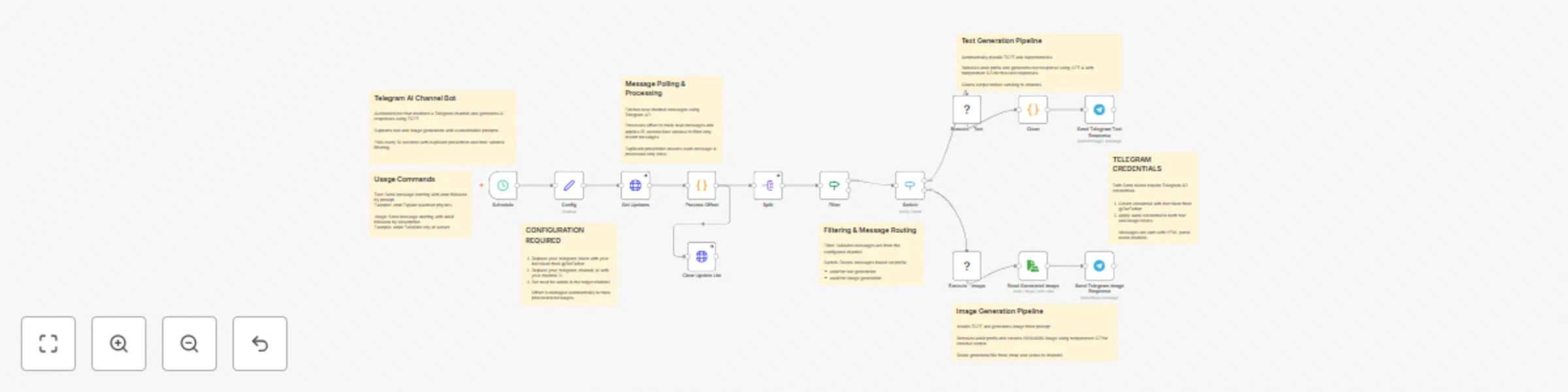
Generate text & image responses in Telegram channels with GPT-4 and TGPT

Workflow preview

Workflow preview
100%
Generate text & image responses in Telegram channels with GPT-4 and TGPT preview
Open on n8n.io

Important notice

This workflow is provided as-is. Please review and test before using in production.

1. Workflow Overview

Telegram AI Channel Bot Text & Image Response Generator with TGPT Overview This n8n workflow creates an automated Telegram channel bot that responds to messages with AI generated text or images usi...

Best for

  • Support Chatbot automation workflows
  • AI Chatbot automation workflows
  • advanced n8n builders looking for reusable templates

Tools used

n8n-nodes-base.scheduletrigger, n8n-nodes-base.set, n8n-nodes-base.httprequest, n8n-nodes-base.code, n8n-nodes-base.splitout, n8n-nodes-base.if, n8n-nodes-base.switch, n8n-nodes-base.executecommand

Source and attribution

This workflow is cataloged by N8N Workflows and links back to its original n8n.io source page by Vigh Sandor.

Original n8n.io source

1.1 Workflow description

Title
Generate text & image responses in Telegram channels with GPT-4 and TGPT
Workflow name
Generate text & image responses in Telegram channels with GPT-4 and TGPT

Telegram AI Channel Bot - Text & Image Response Generator with TGPT

Overview

This n8n workflow creates an automated Telegram channel bot that responds to messages with AI-generated text or images using TGPT. The bot monitors a specific Telegram channel and generates responses based on message prefixes.

Features

  • Automated text response generation using TGPT
  • Image generation capabilities with customizable dimensions (1920x1080)
  • Duplicate message prevention
  • Time-window filtering (15 seconds) to process only recent messages
  • Continuous polling with 10-second intervals

Setup Instructions

Prerequisites

  1. n8n Instance: Ensure you have n8n installed and running
  2. Telegram Bot: Create a new bot via @BotFather on Telegram
  3. Telegram Channel: Create or have admin access to a Telegram channel
  4. Linux Environment: The workflow requires Linux for command execution

Configuration Steps

1. Obtain Telegram Bot Token
  • Open Telegram and search for @BotFather
  • Send /newbot and follow the prompts
  • Save the bot token provided (format: 1234567890:ABCdefGHIjklMNOpqrsTUVwxyz)
2. Get Channel ID
  • Add your bot as an administrator to your Telegram channel
  • Send a test message to the channel
  • Visit: https://api.telegram.org/bot<YOUR_BOT_TOKEN>/getUpdates
  • Look for "chat":{"id":-100XXXXXXXXXX} - this is your channel ID
3. Configure the Workflow
  • Import the workflow JSON into n8n
  • Open the Config node
  • Replace your_telegram_token with your actual bot token
  • Replace your_telegram_channel_id with your channel ID
  • Save the changes
4. Set Up Telegram Credentials in n8n
  • Navigate to the Send Telegram Text Response node
  • Click on the credentials field
  • Create new Telegram credentials using your bot token
  • Apply the same credentials to Send Telegram Image Response node
5. System Requirements

The workflow automatically installs required packages:

  • util-linux-misc (for script command)
  • curl (for downloading TGPT)
  • TGPT binary (downloaded automatically from GitHub)

Activation

  • Save all configuration changes
  • Toggle the workflow to Active status
  • The bot will start polling every 10 seconds

How to Use

Sending Commands to the Bot

Text Generation

To generate a text response, send a message to your Telegram channel with the following format:

am# Your prompt here

Example:

am# Explain quantum computing in simple terms

The bot will:

  1. Remove the am# prefix
  2. Send the prompt to TGPT with GPT-4 model
  3. Generate a response with temperature 0.3 (more focused/deterministic)
  4. Reply with the generated text in the channel
Image Generation

To generate an image, send a message with this format:

ami# Your image description here

Example:

ami# A futuristic city with flying cars at sunset

The bot will:

  1. Remove the ami# prefix
  2. Use TGPT to generate an image (1920x1080 resolution)
  3. Save the image temporarily
  4. Send the generated image to the channel

Important Usage Notes

Response Time
  • The bot checks for new messages every 10 seconds
  • Messages older than 15 seconds are ignored
  • Expect a delay of 10-30 seconds for responses depending on generation time
Message Processing
  • Only messages from the configured channel are processed
  • The bot maintains a list of processed message IDs to avoid duplicates
  • Maximum of 15 messages are retrieved per polling cycle
Limitations
  • Text generation uses temperature 0.3 (less creative, more accurate)
  • Image generation uses temperature 0.7 (more creative)
  • Images are generated at 1920x1080 resolution
  • The bot requires continuous n8n execution

Troubleshooting

Bot Not Responding
  1. Verify the workflow is active
  2. Check that the bot is an admin in the channel
  3. Confirm the channel ID is correct (negative number for channels)
  4. Ensure messages start with exact prefixes: am# or ami#
Duplicate Responses
  • The workflow includes duplicate prevention
  • If issues persist, restart the workflow to clear the processed IDs cache
Missing Dependencies
  • The workflow automatically downloads TGPT on first run
  • If errors occur, check the Execute nodes' output for installation issues
Performance Issues
  • Consider increasing the polling interval if server resources are limited
  • Monitor the n8n execution logs for timeout errors

Advanced Configuration

Modify Polling Interval

Edit the Schedule node to change the 10-second interval

Adjust Time Window

In the Process Offset node, modify timeWindowSeconds variable (default: 15)

Change AI Model Parameters
  • Text generation: Edit --temperature "0.3" in Execute - Text node
  • Image generation: Edit --temperature "0.7" in Execute - Image node
  • Both use --model "gtp-4" by default
Customize Image Dimensions

In Execute - Image node, modify:

  • --height=1080
  • --width=1920

Security Considerations

  • Keep your bot token private
  • Use private channels to prevent unauthorized access
  • Regularly monitor bot activity through Telegram's BotFather
  • Consider implementing rate limiting for production use

Maintenance

  • Regularly check n8n logs for errors
  • Update TGPT version URL in Execute nodes when new versions are released
  • Clear /tmp/ directory periodically to remove temporary files
  • Monitor disk space for image generation temporary files

1.2 Logical Blocks

This catalog entry is organized from the workflow JSON. The node-level section below shows the executable blocks available for review before importing the template.

2. Block-by-Block Analysis

Block 1 - Schedule

Type / Role
n8n-nodes-base.scheduleTrigger - scheduleTrigger
Config choices
Version 1.2

Block 2 - Config

Type / Role
n8n-nodes-base.set - set
Config choices
Version 3.4

Block 3 - Get Updates

Type / Role
n8n-nodes-base.httpRequest - httpRequest
Config choices
Version 4.2

Block 4 - Process Offset

Type / Role
n8n-nodes-base.code - code
Config choices
Version 2

Block 5 - Split

Type / Role
n8n-nodes-base.splitOut - splitOut
Config choices
Version 1

Block 6 - Filter

Type / Role
n8n-nodes-base.if - if
Config choices
Version 2

Block 7 - Clean

Type / Role
n8n-nodes-base.code - code
Config choices
Version 2

Block 8 - Switch

Type / Role
n8n-nodes-base.switch - switch
Config choices
Version 3.2

Block 9 - Execute - Text

Type / Role
n8n-nodes-base.executeCommand - executeCommand
Config choices
Version 1

Block 10 - Execute - Image

Type / Role
n8n-nodes-base.executeCommand - executeCommand
Config choices
Version 1

Block 11 - Send Telegram Text Response

Type / Role
n8n-nodes-base.telegram - telegram
Config choices
Version 1.2

Block 12 - Send Telegram Image Response

Type / Role
n8n-nodes-base.telegram - telegram
Config choices
Version 1.2

Block 13 - Read Generated Image

Type / Role
n8n-nodes-base.readWriteFile - readWriteFile
Config choices
Version 1

Block 14 - Clear Update List

Type / Role
n8n-nodes-base.httpRequest - httpRequest
Config choices
Version 4.2

Block 15 - Sticky Note

Type / Role
n8n-nodes-base.stickyNote - stickyNote
Config choices
Version 1

Block 16 - Sticky Note1

Type / Role
n8n-nodes-base.stickyNote - stickyNote
Config choices
Version 1

Block 17 - Sticky Note2

Type / Role
n8n-nodes-base.stickyNote - stickyNote
Config choices
Version 1

Block 18 - Sticky Note3

Type / Role
n8n-nodes-base.stickyNote - stickyNote
Config choices
Version 1

Block 19 - Sticky Note4

Type / Role
n8n-nodes-base.stickyNote - stickyNote
Config choices
Version 1

Block 20 - Sticky Note5

Type / Role
n8n-nodes-base.stickyNote - stickyNote
Config choices
Version 1

Block 21 - Sticky Note6

Type / Role
n8n-nodes-base.stickyNote - stickyNote
Config choices
Version 1

Block 22 - Sticky Note7

Type / Role
n8n-nodes-base.stickyNote - stickyNote
Config choices
Version 1

3. Summary Table

Workflow Generate text & image responses in Telegram channels with GPT-4 and TGPT
Complexity advanced
Nodes 22
Categories Support Chatbot, AI Chatbot
Author Vigh Sandor
Published 17 Oct 2025

4. Reproducing the Workflow from Scratch

  1. 1. Download the workflow JSON

    Use the JSON export at /data/workflows/9818/9818.json as the source template for this automation.

  2. 2. Import the template into n8n

    Open n8n, import the downloaded JSON, and review each node before activating the workflow.

  3. 3. Configure credentials and variables

    Replace placeholder credentials, API keys, webhook URLs, account IDs, and environment-specific values with your own settings.

  4. 4. Test with sample data

    Run the workflow manually or in a staging workspace, inspect node output, and confirm downstream systems receive the expected data.

  5. 5. Activate and monitor

    Enable the workflow only after testing, then monitor executions, errors, and rate limits during the first production runs.

5. General Notes & Resources

Review imported nodes carefully before activation. This catalog entry is intended to help you inspect the workflow structure, understand required services, and find related templates faster.

Node names, credentials, schedules, webhook paths, and external service limits may need adjustment for your workspace.

Frequently asked questions

What does Generate text & image responses in Telegram channels with GPT-4 and TGPT do?

Telegram AI Channel Bot Text & Image Response Generator with TGPT Overview This n8n workflow creates an automated Telegram channel bot that responds to messages with AI generated text or images usi...

What do I need before importing this workflow?

Review the workflow JSON, configure any required credentials in n8n, and test the automation in a safe workspace before using it in production.

Can I customize this workflow?

Yes. Use the block-by-block analysis and the downloadable JSON to inspect each node, then adjust credentials, prompts, schedules, filters, or destinations for your Support Chatbot, AI Chatbot use case.