Generate sprint review summaries from transcripts with OpenAI and Google Sheets

Workflow preview

Workflow preview
100%
Generate sprint review summaries from transcripts with OpenAI and Google Sheets preview
Open on n8n.io

Important notice

This workflow is provided as-is. Please review and test before using in production.

1. Workflow Overview

What this workflow does This template automates the entire process of documenting Sprint Reviews in Scrum : 1. Input Collection – Through a friendly form, users upload the transcript file (meeting ...

Best for

  • Project Management automation workflows
  • AI Summarization automation workflows
  • intermediate n8n builders looking for reusable templates

Tools used

n8n-nodes-base.formtrigger, n8n-nodes-base.code, @n8n/n8n-nodes-langchain.agent, n8n-nodes-base.form, @n8n/n8n-nodes-langchain.lmchatopenai, n8n-nodes-base.googlesheets, n8n-nodes-base.stickynote

Source and attribution

This workflow is cataloged by N8N Workflows and links back to its original n8n.io source page by Arkadiusz.

Original n8n.io source

1.1 Workflow description

Title
Generate sprint review summaries from transcripts with OpenAI and Google Sheets
Workflow name
Generate sprint review summaries from transcripts with OpenAI and Google Sheets

What this workflow does

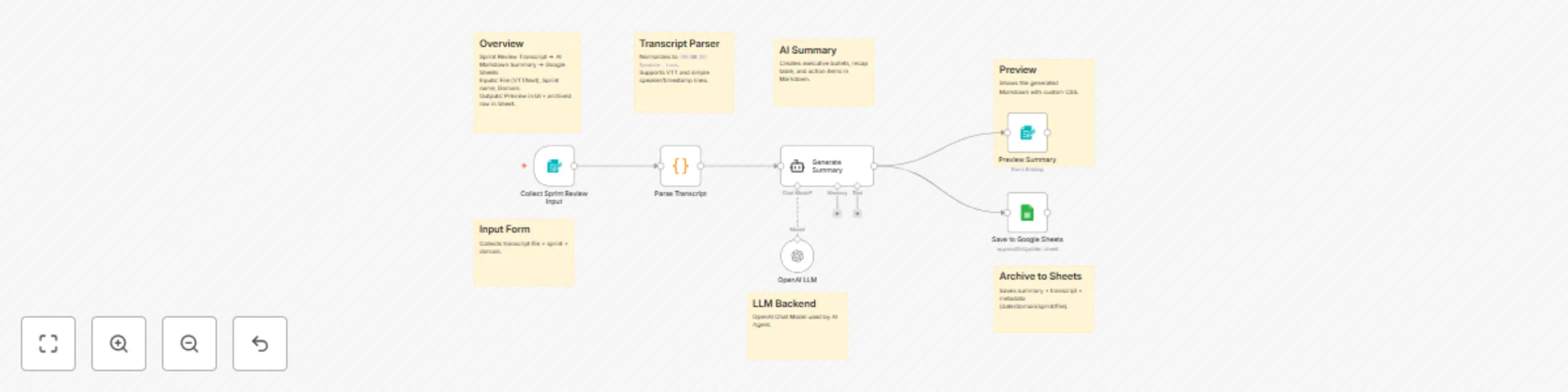
This template automates the entire process of documenting Sprint Reviews in Scrum:

  1. Input Collection – Through a friendly form, users upload the transcript file (meeting notes, sprint review transcript, or VTT captions) and specify the sprint name and domain.
  2. Transcript Parsing – A Code node formats the transcript into clean [HH:MM:SS] Speaker: text lines, supporting VTT, Zoom, or custom timestamp formats used in Scrum events.
  3. AI-Driven Summary – The AI Agent (LangChain + OpenAI) produces a well-structured AI summarization in Markdown, including:
    • A 3–5 bullet Executive Summary of sprint review highlights
    • A Presentation Recap table (Timestamp | Presenter | Topics)
    • A list of Action Items with owners (if recognizable from the transcript)
  4. Preview – The summary renders as a styled card with custom CSS for easy readability in n8n.
  5. Archive – Automatically appends a record to Google Sheets, saving the date, domain, sprint, transcript file name, and the AI-generated sprint review summary.

Why it’s useful

  • Zero manual summarizing – AI extracts key insights from transcript files into Markdown you can instantly share with your Scrum team and stakeholders.
  • Easy setup – drag-and-drop import, plus form-based input for non-technical users during sprint reviews.
  • Centralized tracking – all past sprint summaries live in one spreadsheet for retrospectives, audits, and continuous improvement.
  • Flexible and extendable – you can switch to Airtable, Slack, or Notion, or refine the summary template to match your Scrum workflow.

Ideal for

  • Scrum Masters wanting quick sprint review summaries for stakeholders
  • Agile Coaches analyzing sprint review transcripts, presentation patterns, and follow-up tasks
  • Product Owners keeping a searchable log of sprint outcomes and action items

Prerequisites / Credentials

  • OpenAI API Key — required for the AI Agent node (or any other Agent for summarization)
  • Google Sheets OAuth2 credentials — required for saving sprint review data to Sheets
  • (Optional) Ensure LangChain / AI Agent nodes are installed in your n8n instance

How to Use This Template

  1. Import the workflow JSON into your n8n instance.
  2. Set up credentials:
    • For the OpenAI LLM node, provide your OpenAI API key
    • In Google Sheets, configure OAuth2 and specify your spreadsheet ID (replace YOUR_SHEET_ID)
  3. Create a new sheet with the following columns:
    • Date
    • Domain
    • Sprint name
    • Content
    • VTT file
    • Transcript
  4. Enable and run the workflow.
  5. Fill out the form: upload transcript file, enter sprint & domain, click Create Summary.
  6. View the AI-generated Markdown sprint review summary in the preview card.
  7. Verify the new entry appears in your Google Sheet with all sprint details.

1.2 Logical Blocks

This catalog entry is organized from the workflow JSON. The node-level section below shows the executable blocks available for review before importing the template.

2. Block-by-Block Analysis

Block 1 - Collect Sprint Review Input

Type / Role
n8n-nodes-base.formTrigger - formTrigger
Config choices
Version 2.2

Block 2 - Parse Transcript

Type / Role
n8n-nodes-base.code - code
Config choices
Version 2

Block 3 - Generate Summary

Type / Role
@n8n/n8n-nodes-langchain.agent - agent
Config choices
Version 2.1

Block 4 - Preview Summary

Type / Role
n8n-nodes-base.form - form
Config choices
Version 1

Block 5 - OpenAI LLM

Type / Role
@n8n/n8n-nodes-langchain.lmChatOpenAi - lmChatOpenAi
Config choices
Version 1.2

Block 6 - Save to Google Sheets

Type / Role
n8n-nodes-base.googleSheets - googleSheets
Config choices
Version 4.6

Block 7 - Sticky: Overview1

Type / Role
n8n-nodes-base.stickyNote - stickyNote
Config choices
Version 1

Block 8 - Sticky: Input Form1

Type / Role
n8n-nodes-base.stickyNote - stickyNote
Config choices
Version 1

Block 9 - Sticky: Parser1

Type / Role
n8n-nodes-base.stickyNote - stickyNote
Config choices
Version 1

Block 10 - Sticky: AI Summary1

Type / Role
n8n-nodes-base.stickyNote - stickyNote
Config choices
Version 1

Block 11 - Sticky: Preview1

Type / Role
n8n-nodes-base.stickyNote - stickyNote
Config choices
Version 1

Block 12 - Sticky: Sheets1

Type / Role
n8n-nodes-base.stickyNote - stickyNote
Config choices
Version 1

Block 13 - Sticky: LLM1

Type / Role
n8n-nodes-base.stickyNote - stickyNote
Config choices
Version 1

3. Summary Table

Workflow Generate sprint review summaries from transcripts with OpenAI and Google Sheets
Complexity intermediate
Nodes 13
Categories Project Management, AI Summarization
Author Arkadiusz
Published 09 Sept 2025

4. Reproducing the Workflow from Scratch

  1. 1. Download the workflow JSON

    Use the JSON export at /data/workflows/8400/8400.json as the source template for this automation.

  2. 2. Import the template into n8n

    Open n8n, import the downloaded JSON, and review each node before activating the workflow.

  3. 3. Configure credentials and variables

    Replace placeholder credentials, API keys, webhook URLs, account IDs, and environment-specific values with your own settings.

  4. 4. Test with sample data

    Run the workflow manually or in a staging workspace, inspect node output, and confirm downstream systems receive the expected data.

  5. 5. Activate and monitor

    Enable the workflow only after testing, then monitor executions, errors, and rate limits during the first production runs.

5. General Notes & Resources

Review imported nodes carefully before activation. This catalog entry is intended to help you inspect the workflow structure, understand required services, and find related templates faster.

Node names, credentials, schedules, webhook paths, and external service limits may need adjustment for your workspace.

Frequently asked questions

What does Generate sprint review summaries from transcripts with OpenAI and Google Sheets do?

What this workflow does This template automates the entire process of documenting Sprint Reviews in Scrum : 1. Input Collection – Through a friendly form, users upload the transcript file (meeting ...

What do I need before importing this workflow?

Review the workflow JSON, configure any required credentials in n8n, and test the automation in a safe workspace before using it in production.

Can I customize this workflow?

Yes. Use the block-by-block analysis and the downloadable JSON to inspect each node, then adjust credentials, prompts, schedules, filters, or destinations for your Project Management, AI Summarization use case.