Generate SEO content with Claude AI & competitor analysis using Apify

Workflow preview

Workflow preview
100%
Generate SEO content with Claude AI & competitor analysis using Apify preview
Open on n8n.io

Important notice

This workflow is provided as-is. Please review and test before using in production.

1. Workflow Overview

SEO Content Generation Workflow (Basic Version) n8n Template Instructions Who's it for This workflow is designed for SEO professionals, content marketers, digital agencies, and businesses who need ...

Best for

  • Market Research automation workflows
  • Multimodal AI automation workflows
  • advanced n8n builders looking for reusable templates

Tools used

n8n-nodes-base.filter, n8n-nodes-base.if, @n8n/n8n-nodes-langchain.lmchatanthropic, @n8n/n8n-nodes-langchain.outputparserstructured, n8n-nodes-base.code, n8n-nodes-base.httprequest, n8n-nodes-base.googlesheets, @mendable/n8n-nodes-firecrawl.firecrawl

Source and attribution

This workflow is cataloged by N8N Workflows and links back to its original n8n.io source page by Growth AI.

Original n8n.io source

1.1 Workflow description

Title
Generate SEO content with Claude AI & competitor analysis using Apify
Workflow name
Generate SEO content with Claude AI & competitor analysis using Apify

SEO Content Generation Workflow (Basic Version) - n8n Template Instructions

Who's it for

This workflow is designed for SEO professionals, content marketers, digital agencies, and businesses who need to generate optimized meta tags, H1 headings, and content briefs at scale. Perfect for teams managing multiple clients or large keyword lists who want to automate competitor analysis and SEO content creation without the complexity of vector databases.

How it works

The workflow automates the entire SEO content creation process by analyzing your target keywords against top competitors, then generating optimized meta elements and comprehensive content briefs. It uses AI-powered analysis combined with real competitor data to create SEO-friendly content that's tailored to your specific business context.

The system processes keywords in batches, performs Google searches, scrapes competitor content, analyzes heading structures, and generates personalized SEO content using your company information for maximum relevance.

Requirements

Required Services and Credentials

  • Google Sheets API: For reading configuration and updating results
  • Anthropic API: For AI content generation (Claude Sonnet 4)
  • Apify API: For Google search results
  • Firecrawl API: For competitor website scraping

Template Spreadsheet

Copy this template spreadsheet and configure it with your information: Template Link

How to set up

Step 1: Copy and Configure Template

  1. Make a copy of the template spreadsheet

  2. Fill in the Client Information sheet:

    • Client name: Your company or client's name
    • Client information: Brief business description
    • URL: Website address
    • Tone of voice: Content style preferences
    • Restrictive instructions: Topics or approaches to avoid
  3. Complete the SEO sheet with your target pages:

    • Page: Page you're optimizing (e.g., "Homepage", "Product Page")
    • Keyword: Main search term to target
    • Awareness level: User familiarity with your business
    • Page type: Category (homepage, blog, product page, etc.)

Step 2: Import Workflow

  1. Import the n8n workflow JSON file
  2. Configure all required API credentials in n8n:
    • Google Sheets OAuth2
    • Anthropic API key
    • Apify API key
    • Firecrawl API key

Step 3: Test Configuration

  1. Activate the workflow
  2. Send your Google Sheets URL to the chat trigger
  3. Verify that all sheets are readable and credentials work
  4. Test with a single keyword row first

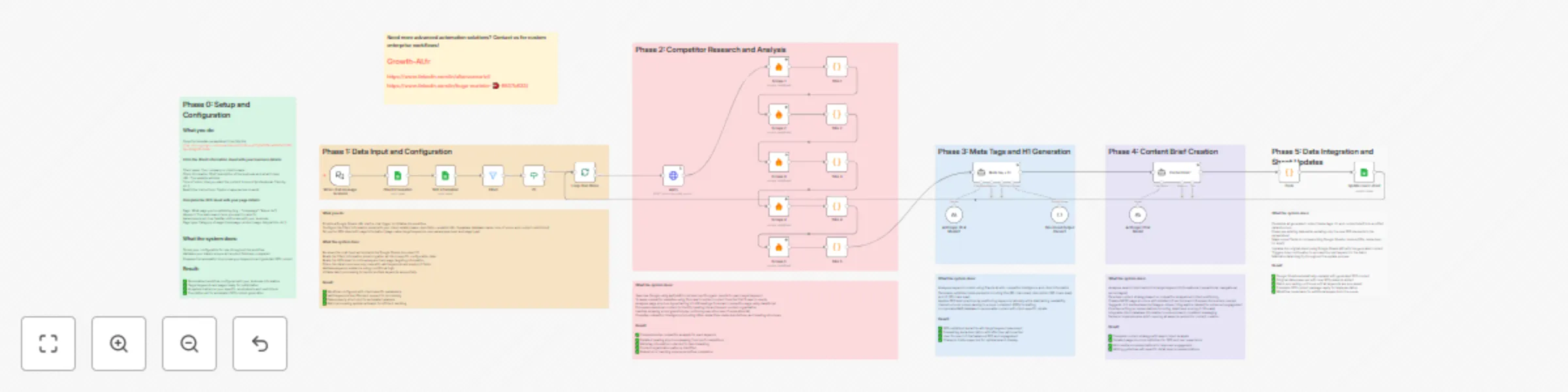
Workflow Process Overview

Phase 0: Setup and Configuration

  • Copy template spreadsheet
  • Configure client information and SEO parameters
  • Set up API credentials in n8n

Phase 1: Data Input and Processing

  • Chat trigger receives Google Sheets URL
  • System reads client configuration and SEO data
  • Filters valid keywords and empty H1 fields
  • Initiates batch processing

Phase 2: Competitor Research and Analysis

  • Searches Google for top 10 results per keyword using Apify
  • Scrapes first 5 competitor websites using Firecrawl
  • Extracts heading structures (H1-H6) from competitor pages
  • Analyzes competitor meta tags and content organization
  • Processes markdown content to identify heading hierarchies

Phase 3: Meta Tags and H1 Generation

  • AI analyzes keyword context and competitor data using Claude
  • Incorporates client information for personalization
  • Generates optimized meta title (65 characters maximum)
  • Creates compelling meta description (165 characters maximum)
  • Produces user-focused H1 (70 characters maximum)
  • Uses structured output parsing for consistent formatting

Phase 4: Content Brief Creation

  • Analyzes search intent percentages (informational, transactional, navigational)
  • Develops content strategy based on competitor analysis
  • Creates detailed MECE page structure with H2 and H3 sections
  • Suggests rich media elements (images, videos, infographics, tables)
  • Provides writing recommendations and detail level scoring (1-10 scale)
  • Ensures SEO optimization while maintaining user relevance

Phase 5: Data Integration and Updates

  • Combines all generated content into unified structure
  • Updates Google Sheets with new SEO elements
  • Preserves existing data while adding new content
  • Continues batch processing for remaining keywords

Key Differences from Advanced Version

This basic version focuses on core SEO functionality without additional complexity:

  • No Vector Database: Removes Supabase integration for simpler setup
  • Streamlined Architecture: Fewer dependencies and configuration steps
  • Essential Features Only: Core competitor analysis and content generation
  • Faster Setup: Reduced time to deployment
  • Lower Costs: Fewer API services required

How to customize the workflow

Adjusting AI Models

  • Replace Anthropic Claude with other LLM providers in the agent nodes
  • Modify system prompts for different content styles or languages
  • Adjust character limits for meta elements in the structured output parser

Modifying Competitor Analysis

  • Change number of competitors analyzed (currently 5) by adding/removing Scrape nodes
  • Adjust scraping parameters in Firecrawl nodes for different content types
  • Modify heading extraction logic in JavaScript Code nodes

Customizing Output Format

  • Update Google Sheets column mapping in the final Code node
  • Modify structured output parser schema for different data structures
  • Change batch processing size in Split in Batches node

Adding Quality Controls

  • Insert validation nodes between workflow phases
  • Add error handling and retry logic to critical nodes
  • Implement content quality scoring mechanisms

Extending Functionality

  • Add keyword research capabilities with additional APIs
  • Include image optimization suggestions
  • Integrate social media content generation
  • Connect to CMS platforms for direct publishing

Best Practices

Setup and Testing

  • Always test with small batches before processing large keyword lists
  • Monitor API usage and costs across all services
  • Regularly update system prompts based on output quality
  • Maintain clean data in your Google Sheets template

Content Quality

  • Review generated content before publishing
  • Customize system prompts to match your brand voice
  • Use descriptive node names for easier workflow maintenance
  • Keep competitor analysis current by running regularly

Performance Optimization

  • Process keywords in small batches to avoid timeouts
  • Set appropriate retry policies for external API calls
  • Monitor workflow execution times and optimize bottlenecks

Troubleshooting

Common Issues and Solutions

API Errors

  • Check credential configuration in n8n settings
  • Verify API usage limits and billing status
  • Ensure proper authentication for each service

Scraping Failures

  • Firecrawl nodes have error handling enabled to continue on failures
  • Some websites may block scraping - this is normal behavior
  • Check if competitor URLs are accessible and valid

Empty Results

  • Verify keyword formatting in Google Sheets
  • Ensure competitor websites contain the expected content structure
  • Check if meta tags are properly formatted in system prompts

Sheet Update Errors

  • Ensure proper column mapping in final Code node
  • Verify Google Sheets permissions and sharing settings
  • Check that target sheet names match exactly

Processing Stops

  • Review batch processing limits and timeout settings
  • Check for errors in individual nodes using execution logs
  • Verify all required fields are populated in input data

Template Structure

Required Sheets

  1. Client Information: Business details and configuration
  2. SEO: Target keywords and page information
  3. Results Sheet: Where generated content will be written

Expected Columns

  • Keywords: Target search terms
  • Description: Brief page description
  • Type de page: Page category
  • Awareness level: User familiarity level
  • title, meta-desc, h1, brief: Generated output columns

This streamlined version provides all essential SEO content generation capabilities while being easier to set up and maintain than the advanced version with vector database integration.

1.2 Logical Blocks

This catalog entry is organized from the workflow JSON. The node-level section below shows the executable blocks available for review before importing the template.

2. Block-by-Block Analysis

Block 1 - Filter1

Type / Role
n8n-nodes-base.filter - filter
Config choices
Version 2.2

Block 2 - If1

Type / Role
n8n-nodes-base.if - if
Config choices
Version 2.2

Block 3 - Anthropic Chat Model2

Type / Role
@n8n/n8n-nodes-langchain.lmChatAnthropic - lmChatAnthropic
Config choices
Version 1.3

Block 4 - Structured Output Parser2

Type / Role
@n8n/n8n-nodes-langchain.outputParserStructured - outputParserStructured
Config choices
Version 1.2

Block 5 - Anthropic Chat Model

Type / Role
@n8n/n8n-nodes-langchain.lmChatAnthropic - lmChatAnthropic
Config choices
Version 1.3

Block 6 - Titre 1

Type / Role
n8n-nodes-base.code - code
Config choices
Version 2

Block 7 - Titre 2

Type / Role
n8n-nodes-base.code - code
Config choices
Version 2

Block 8 - Titre 3

Type / Role
n8n-nodes-base.code - code
Config choices
Version 2

Block 9 - Titre 4

Type / Role
n8n-nodes-base.code - code
Config choices
Version 2

Block 10 - Titre 5

Type / Role
n8n-nodes-base.code - code
Config choices
Version 2

Block 11 - Code

Type / Role
n8n-nodes-base.code - code
Config choices
Version 2

Block 12 - Apify

Type / Role
n8n-nodes-base.httpRequest - httpRequest
Config choices
Version 4.2

Block 13 - Update row in sheet

Type / Role
n8n-nodes-base.googleSheets - googleSheets
Config choices
Version 4.5

Block 14 - Scrape 1

Type / Role
@mendable/n8n-nodes-firecrawl.firecrawl - firecrawl
Config choices
Version 1

Block 15 - Scrape 2

Type / Role
@mendable/n8n-nodes-firecrawl.firecrawl - firecrawl
Config choices
Version 1

Block 16 - Scrape 5

Type / Role
@mendable/n8n-nodes-firecrawl.firecrawl - firecrawl
Config choices
Version 1

Block 17 - Scrape 4

Type / Role
@mendable/n8n-nodes-firecrawl.firecrawl - firecrawl
Config choices
Version 1

Block 18 - Scrape 3

Type / Role
@mendable/n8n-nodes-firecrawl.firecrawl - firecrawl
Config choices
Version 1

Block 19 - Client Information

Type / Role
n8n-nodes-base.googleSheets - googleSheets
Config choices
Version 4.5

Block 20 - SEO information

Type / Role
n8n-nodes-base.googleSheets - googleSheets
Config choices
Version 4.5

Block 21 - When chat message received

Type / Role
@n8n/n8n-nodes-langchain.chatTrigger - chatTrigger
Config choices
Version 1.1

Block 22 - Loop Over Items

Type / Role
n8n-nodes-base.splitInBatches - splitInBatches
Config choices
Version 3

Block 23 - Meta tag + h1

Type / Role
@n8n/n8n-nodes-langchain.agent - agent
Config choices
Version 1.9

Block 24 - Sticky Note

Type / Role
n8n-nodes-base.stickyNote - stickyNote
Config choices
Version 1

Showing the first 24 of 36 workflow blocks. Download the JSON for the full node graph.

3. Summary Table

Workflow Generate SEO content with Claude AI & competitor analysis using Apify
Complexity advanced
Nodes 36
Categories Market Research, Multimodal AI
Author Growth AI
Published 26 Sept 2025

4. Reproducing the Workflow from Scratch

  1. 1. Download the workflow JSON

    Use the JSON export at /data/workflows/8946/8946.json as the source template for this automation.

  2. 2. Import the template into n8n

    Open n8n, import the downloaded JSON, and review each node before activating the workflow.

  3. 3. Configure credentials and variables

    Replace placeholder credentials, API keys, webhook URLs, account IDs, and environment-specific values with your own settings.

  4. 4. Test with sample data

    Run the workflow manually or in a staging workspace, inspect node output, and confirm downstream systems receive the expected data.

  5. 5. Activate and monitor

    Enable the workflow only after testing, then monitor executions, errors, and rate limits during the first production runs.

5. General Notes & Resources

Review imported nodes carefully before activation. This catalog entry is intended to help you inspect the workflow structure, understand required services, and find related templates faster.

Node names, credentials, schedules, webhook paths, and external service limits may need adjustment for your workspace.

Frequently asked questions

What does Generate SEO content with Claude AI & competitor analysis using Apify do?

SEO Content Generation Workflow (Basic Version) n8n Template Instructions Who's it for This workflow is designed for SEO professionals, content marketers, digital agencies, and businesses who need ...

What do I need before importing this workflow?

Review the workflow JSON, configure any required credentials in n8n, and test the automation in a safe workspace before using it in production.

Can I customize this workflow?

Yes. Use the block-by-block analysis and the downloadable JSON to inspect each node, then adjust credentials, prompts, schedules, filters, or destinations for your Market Research, Multimodal AI use case.