Block 1 - Set Fields
- Type / Role
- n8n-nodes-base.set - set
- Config choices
- Version 3.4


 Early Deal
This workflow is provided as-is. Please review and test before using in production.
Introduction The Content SEO Audit Workflow is a powerful automated solution that generates comprehensive SEO audit reports for websites. By combining the crawling capabilities of DataForSEO with t...
n8n-nodes-base.set, n8n-nodes-base.manualtrigger, n8n-nodes-base.httprequest, n8n-nodes-base.if, n8n-nodes-base.wait, n8n-nodes-base.code, n8n-nodes-base.splitinbatches, n8n-nodes-base.stickynote
This workflow is cataloged by N8N Workflows and links back to its original n8n.io source page by Custom Workflows AI.
Original n8n.io sourceThe Content SEO Audit Workflow is a powerful automated solution that generates comprehensive SEO audit reports for websites.
By combining the crawling capabilities of DataForSEO with the search performance metrics from Google Search Console, this workflow delivers actionable insights into content quality, technical SEO issues, and performance optimization opportunities.
The workflow crawls up to 1,000 pages of a website, analyzes various SEO factors including metadata, content quality, internal linking, and search performance, and then generates a professional, branded HTML report that can be shared directly with clients.
The entire process is automated, transforming what would typically be hours of manual analysis into a streamlined workflow that produces consistent, thorough results.
This workflow bridges the gap between technical SEO auditing and practical, client-ready deliverables, making it an invaluable tool for SEO professionals and digital marketing agencies.
This workflow is designed for SEO consultants, digital marketing agencies, and content strategists who need to perform comprehensive content audits for clients or their own websites. It's particularly valuable for professionals who:
Users should have basic familiarity with SEO concepts and metrics, as well as a basic understanding of how to set up API credentials in n8n.
While no coding knowledge is required to run the workflow, users should be comfortable with configuring workflow parameters and following setup instructions.
Content audits are essential for SEO strategy but are traditionally labor-intensive and time-consuming. This workflow addresses several key challenges:
Manual Data Collection: Gathering data from multiple sources (crawlers, Google Search Console, etc.) typically requires hours of work. This workflow automates the entire data collection process.
Inconsistent Analysis: Manual audits can suffer from inconsistency in methodology. This workflow applies the same comprehensive analysis criteria to every page, ensuring thorough and consistent results.
Report Generation: Creating professional, client-ready reports often requires additional design work after the analysis is complete. This workflow generates a fully branded HTML report automatically.
Data Integration: Correlating technical SEO issues with actual search performance metrics is difficult when working with separate tools. This workflow seamlessly integrates crawl data with Google Search Console metrics.
Scale Limitations: Manual audits become increasingly difficult with larger websites. This workflow can efficiently process up to 1,000 pages without additional effort.
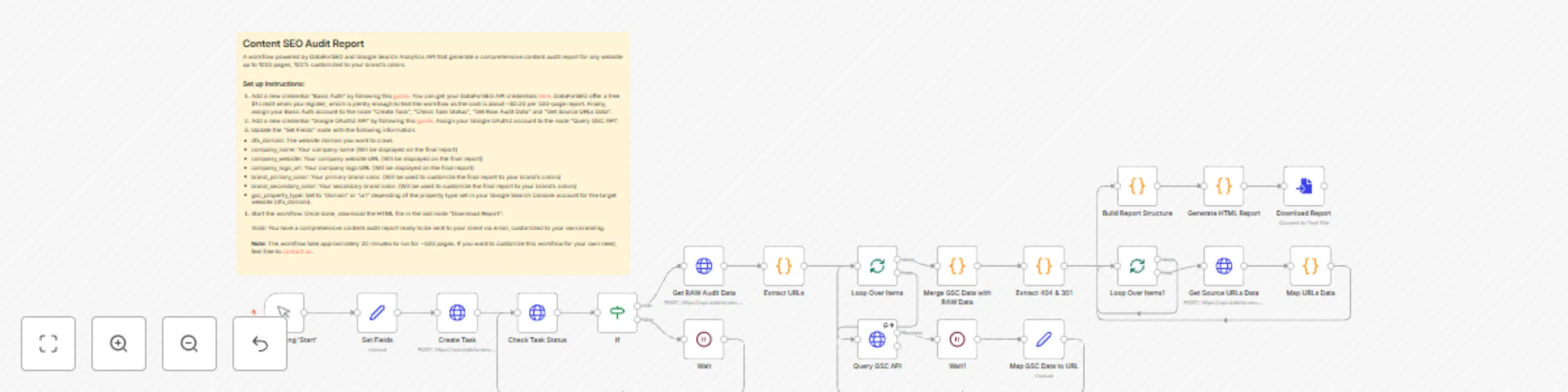
The Content SEO Audit Workflow crawls a specified website, analyzes its content for various SEO issues, retrieves performance data from Google Search Console, and generates a comprehensive HTML report.
The workflow identifies issues in five key categories: status issues (404 errors, redirects), content quality (thin content, readability), metadata SEO (title/description issues), internal linking (orphan pages, excessive click depth), and performance (underperforming content).
The final report includes executive summaries, detailed issue breakdowns, and actionable recommendations, all branded with your company's colors and logo.
Initial Configuration: The workflow begins by setting parameters including the target domain, crawl limits, company information, and branding colors.
Website Crawling: The workflow creates a crawl task in DataForSEO and periodically checks its status until completion.
Data Collection: Once crawling is complete, the workflow:
Data Analysis: The workflow analyzes the collected data to identify issues including:
Report Generation: Finally, the workflow:
To set up this workflow, follow these steps:
Import the workflow: Download the JSON file and import it into your n8n instance.
Configure DataForSEO credentials:
Configure Google Search Console credentials:
Update the "Set Fields" node with:
Run the workflow: Click "Start" and wait for it to complete (approximately 20 minutes for 500 pages).
Download the report: Once complete, download the HTML file from the "Download Report" node.
This workflow can be adapted in several ways to better suit your specific requirements:
Adjust crawl parameters: Modify the "Set Fields" node to change:
Customize issue detection thresholds: In the "Build Report Structure" code node, you can modify:
Modify the report design: In the "Generate HTML Report" code node, you can:
Add additional data sources: You could extend the workflow by:
Implement automated delivery: Add nodes after the "Download Report" to:
This catalog entry is organized from the workflow JSON. The node-level section below shows the executable blocks available for review before importing the template.
| Workflow | Generate SEO content audit reports with DataForSEO and Google Search Console |
|---|---|
| Complexity | advanced |
| Nodes | 21 |
| Categories | Market Research |
| Author | Custom Workflows AI |
| Published | 30 Apr 2025 |
Use the JSON export at /data/workflows/3809/3809.json as the source template for this automation.
Open n8n, import the downloaded JSON, and review each node before activating the workflow.
Replace placeholder credentials, API keys, webhook URLs, account IDs, and environment-specific values with your own settings.
Run the workflow manually or in a staging workspace, inspect node output, and confirm downstream systems receive the expected data.
Enable the workflow only after testing, then monitor executions, errors, and rate limits during the first production runs.
Review imported nodes carefully before activation. This catalog entry is intended to help you inspect the workflow structure, understand required services, and find related templates faster.
Node names, credentials, schedules, webhook paths, and external service limits may need adjustment for your workspace.
Introduction The Content SEO Audit Workflow is a powerful automated solution that generates comprehensive SEO audit reports for websites. By combining the crawling capabilities of DataForSEO with t...
Review the workflow JSON, configure any required credentials in n8n, and test the automation in a safe workspace before using it in production.
Yes. Use the block-by-block analysis and the downloadable JSON to inspect each node, then adjust credentials, prompts, schedules, filters, or destinations for your Market Research use case.