C

Custom Workflows AI

4
Workflows

Workflows by Custom Workflows AI
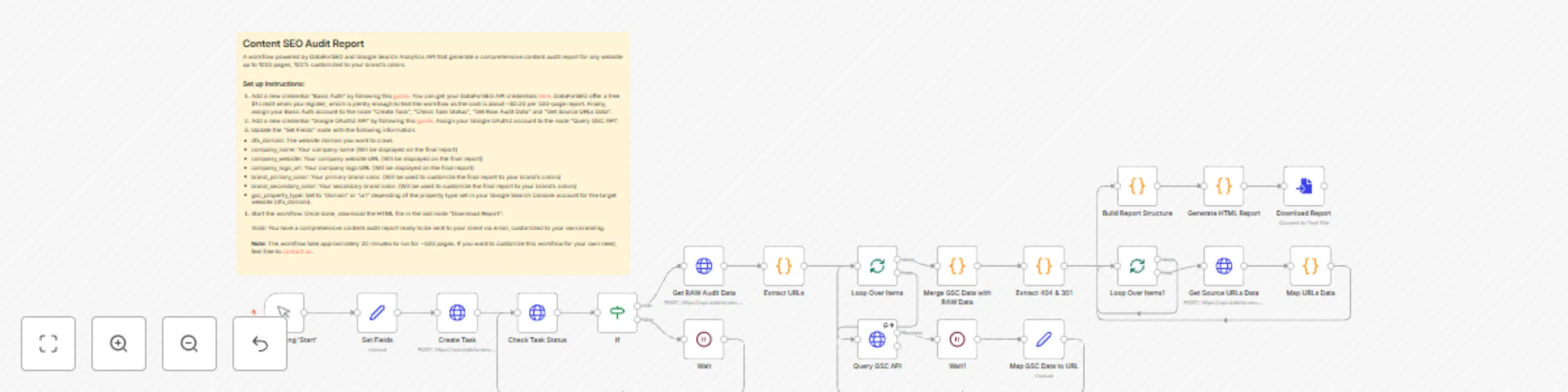
Workflow preview: Generate SEO content audit reports with DataForSEO and Google Search Console
Free advanced

Generate SEO content audit reports with DataForSEO and Google Search Console

## Introduction The Content SEO Audit Workflow is a powerful automated solution that generates comprehensive SEO audit reports for websites. By combining the crawling capabilities of DataForSEO with the search performance metrics from Google Search Console, this workflow delivers actionable insights into content quality, technical SEO issues, and performance optimization opportunities. The workflow crawls up to 1,000 pages of a website, analyzes various SEO factors including metadata, content quality, internal linking, and search performance, and then generates a professional, branded HTML report that can be shared directly with clients. The entire process is automated, transforming what would typically be hours of manual analysis into a streamlined workflow that produces consistent, thorough results. This workflow bridges the gap between technical SEO auditing and practical, client-ready deliverables, making it an invaluable tool for SEO professionals and digital marketing agencies. ## Who is this for? This workflow is designed for SEO consultants, digital marketing agencies, and content strategists who need to perform comprehensive content audits for clients or their own websites. It's particularly valuable for professionals who: 1. Regularly conduct SEO audits as part of their service offerings 2. Need to provide branded, professional reports to clients 3. Want to automate the time-consuming process of content analysis 4. Require data-driven insights to inform content strategy decisions Users should have basic familiarity with SEO concepts and metrics, as well as a basic understanding of how to set up API credentials in n8n. While no coding knowledge is required to run the workflow, users should be comfortable with configuring workflow parameters and following setup instructions. ## What problem is this workflow solving? Content audits are essential for SEO strategy but are traditionally labor-intensive and time-consuming. This workflow addresses several key challenges: 1. **Manual Data Collection**: Gathering data from multiple sources (crawlers, Google Search Console, etc.) typically requires hours of work. This workflow automates the entire data collection process. 2. **Inconsistent Analysis**: Manual audits can suffer from inconsistency in methodology. This workflow applies the same comprehensive analysis criteria to every page, ensuring thorough and consistent results. 3. **Report Generation**: Creating professional, client-ready reports often requires additional design work after the analysis is complete. This workflow generates a fully branded HTML report automatically. 4. **Data Integration**: Correlating technical SEO issues with actual search performance metrics is difficult when working with separate tools. This workflow seamlessly integrates crawl data with Google Search Console metrics. 5. **Scale Limitations**: Manual audits become increasingly difficult with larger websites. This workflow can efficiently process up to 1,000 pages without additional effort. ## What this workflow does ### Overview The Content SEO Audit Workflow crawls a specified website, analyzes its content for various SEO issues, retrieves performance data from Google Search Console, and generates a comprehensive HTML report. The workflow identifies issues in five key categories: status issues (404 errors, redirects), content quality (thin content, readability), metadata SEO (title/description issues), internal linking (orphan pages, excessive click depth), and performance (underperforming content). The final report includes executive summaries, detailed issue breakdowns, and actionable recommendations, all branded with your company's colors and logo. ### Process 1. **Initial Configuration**: The workflow begins by setting parameters including the target domain, crawl limits, company information, and branding colors. 2. **Website Crawling**: The workflow creates a crawl task in DataForSEO and periodically checks its status until completion. 3. **Data Collection**: Once crawling is complete, the workflow: - Retrieves the raw audit data from DataForSEO - Extracts all URLs with status code 200 (successful pages) - Queries Google Search Console API for each URL to get clicks and impressions data - Identifies 404 and 301 pages and retrieves their source links 4. **Data Analysis**: The workflow analyzes the collected data to identify issues including: - Technical issues: 404 errors, redirects, canonicalization problems - Content issues: thin content, outdated content, readability problems - SEO metadata issues: missing/duplicate titles and descriptions, H1 problems - Internal linking issues: orphan pages, excessive click depth, low internal links - Performance issues: underperforming pages based on GSC data 5. **Report Generation**: Finally, the workflow: - Calculates a health score based on the severity and quantity of issues - Generates prioritized recommendations - Creates a comprehensive HTML report with interactive tables and visualizations - Customizes the report with your company's branding - Provides the report as a downloadable HTML file ## Setup To set up this workflow, follow these steps: 1. **Import the workflow**: Download the JSON file and import it into your n8n instance. 2. **Configure DataForSEO credentials**: - Create a DataForSEO account at https://app.dataforseo.com/api-access (they offer a free $1 credit for testing) - Add a new "Basic Auth" credential in n8n following the [HTTP Request Authentication guide](https://docs.n8n.io/integrations/builtin/credentials/httprequest/) - Assign this credential to the "Create Task", "Check Task Status", "Get Raw Audit Data", and "Get Source URLs Data" nodes 3. **Configure Google Search Console credentials**: - Add a new "Google OAuth2 API" credential following the [Google OAuth guide](https://docs.n8n.io/integrations/builtin/credentials/google/oauth-generic/) - Ensure your Google account has access to the Google Search Console property you want to analyze - Assign this credential to the "Query GSC API" node 4. **Update the "Set Fields" node** with: - dfs_domain: The website domain you want to audit - dfs_max_crawl_pages: Maximum number of pages to crawl (default: 1000) - dfs_enable_javascript: Whether to enable JavaScript rendering (default: false) - company_name: Your company name for the report branding - company_website: Your company website URL - company_logo_url: URL to your company logo - brand_primary_color: Your primary brand color (hex code) - brand_secondary_color: Your secondary brand color (hex code) - gsc_property_type: Set to "domain" or "url" depending on your Google Search Console property type 5. **Run the workflow**: Click "Start" and wait for it to complete (approximately 20 minutes for 500 pages). 6. **Download the report**: Once complete, download the HTML file from the "Download Report" node. ## How to customize this workflow to your needs This workflow can be adapted in several ways to better suit your specific requirements: 1. **Adjust crawl parameters**: Modify the "Set Fields" node to change: - The maximum number of pages to crawl (dfs_max_crawl_pages). This workflow supports up to 1000 pages. - Whether to enable JavaScript rendering for JavaScript-heavy sites (dfs_enable_javascript) 2. **Customize issue detection thresholds**: In the "Build Report Structure" code node, you can modify: - Word count thresholds for thin content detection (currently 1500 words) - Click depth thresholds (currently flags pages deeper than 4 clicks) - Title and description length parameters (currently 40-60 chars for titles, 70-155 for descriptions) - Readability score thresholds (currently flags Flesch-Kincaid scores below 55) 3. **Modify the report design**: In the "Generate HTML Report" code node, you can: - Adjust the HTML/CSS to change the report layout and styling - Add or remove sections from the report - Change the recommendations logic - Modify the health score calculation algorithm 4. **Add additional data sources**: You could extend the workflow by: - Adding Pagespeed Insights data for performance metrics - Incorporating backlink data from other APIs - Adding keyword ranking data from rank tracking APIs 5. **Implement automated delivery**: Add nodes after the "Download Report" to: - Send the report directly to clients via email - Upload it to cloud storage - Create a PDF version of the report

C
Custom Workflows AI
Market Research
1 May 2025
4578
0

Workflow preview: High-level service page SEO blueprint report generator
Free advanced

High-level service page SEO blueprint report generator

## Introduction The "High-Level Service Page SEO Blueprint Report" workflow is a powerful, AI-driven solution designed to generate comprehensive SEO content strategies for service-based businesses. By analyzing competitor websites and user intent, this workflow creates a detailed blueprint that outlines the optimal structure, content, and conversion elements for a service page. The workflow leverages the JINA Reader API to extract content from competitor websites and uses Google Gemini AI to perform deep analysis across multiple dimensions: competitor content structure, user intent, strategic opportunities, and conversion optimization. The final output is a professionally formatted Markdown document that provides actionable guidance for creating a high-performing service page that satisfies both user needs and search engine requirements. This workflow eliminates the time-consuming process of manually analyzing competitors and developing content strategies, providing a data-driven foundation for service page creation that would typically require hours of expert analysis. ## Who is this for? This workflow is designed for digital marketers, SEO specialists, content strategists, and web developers who need to create or optimize service pages for businesses. It's particularly valuable for marketing agencies and freelancers who regularly develop content strategies for clients across various industries. Users should have a basic understanding of SEO concepts, content marketing, and website structure. While technical SEO knowledge is beneficial, the workflow is designed to provide comprehensive guidance even for those with intermediate-level expertise. The ideal user is someone who wants to streamline their content planning process and ensure their service pages are built on data-driven insights rather than guesswork. ## What problem is this workflow solving? Creating effective service pages that rank well in search engines while converting visitors is a complex challenge that typically requires extensive competitive research, content planning, and conversion optimization expertise. This workflow addresses several key pain points: 1. **Time-consuming competitor analysis**: Manually analyzing multiple competitor websites to identify content patterns, heading structures, and meta tag strategies can take hours. 2. **Difficulty identifying content gaps**: Determining what topics competitors are missing that could provide a competitive advantage requires deep analysis and industry knowledge. 3. **Balancing SEO and conversion elements**: Creating content that satisfies both search engines and user needs while driving conversions is a delicate balance that many struggle to achieve. 4. **Lack of structured approach**: Many content creators work without a comprehensive blueprint, leading to inconsistent results and missed opportunities. 5. **Difficulty translating analysis into actionable recommendations**: Even when analysis is performed, turning those insights into a concrete content plan can be challenging. This workflow automates these processes, providing a structured, data-driven approach to service page creation that saves hours of research and planning time. ## What this workflow does ### Overview The workflow takes a list of competitor URLs and a target keyword as input, then performs a multi-stage analysis to generate a comprehensive service page blueprint. It extracts and analyzes competitor content, evaluates user intent, identifies strategic opportunities, and creates detailed recommendations for page structure, content, and conversion elements. The final output is a professionally formatted Markdown document that serves as a complete roadmap for creating an effective service page. ### Process 1. **Data Collection**: The workflow begins with a form that collects essential information: competitor URLs, target keyword, services offered, brand name, and whether the page is a homepage. 2. **Competitor Content Extraction**: The workflow processes each competitor URL, using the JINA Reader API to extract the HTML content from each site. 3. **Content Structure Analysis**: For each competitor site, the workflow extracts and analyzes heading structures, meta tags, schema markup, and recurring phrases (n-grams). 4. **Competitor Analysis Report**: The AI synthesizes the competitive data to identify patterns in meta titles/descriptions, common outline sections, key heading concepts, and structural elements. 5. **User Intent Analysis**: The workflow analyzes the target keyword to determine primary and secondary user intents, user personas, and their position in the buyer's journey. 6. **Gap Analysis**: The AI identifies content overlaps ("table stakes"), content gaps (opportunities), SEO keyword priorities, and potential UX/conversion advantages. 7. **Page Outline Generation**: Based on the previous analyses, the workflow creates an optimal page structure with H1, H2s, H3s, and potentially H4s, with justifications for each section. 8. **UX & Conversion Recommendations**: The workflow adds detailed recommendations for calls-to-action, trust signals, copywriting tone, visual elements, and risk reversal strategies. 9. **Final Blueprint Creation**: All analyses and recommendations are compiled into a comprehensive, well-structured Markdown document that serves as a complete service page blueprint. ## Setup 1. Download or import the "High-Level Service Page SEO Blueprint Report" workflow JSON file into your n8n instance. 2. Create a JINA Reader API key by visiting [https://jina.ai/api-dashboard/key-manager](https://jina.ai/api-dashboard/key-manager). You can claim a free API key that allows up to 1 million tokens. 3. Set up Google Gemini (PaLM) credentials by following the guide at [https://docs.n8n.io/integrations/builtin/credentials/googleai/#using-geminipalm-api-key](https://docs.n8n.io/integrations/builtin/credentials/googleai/#using-geminipalm-api-key). 4. Update the "Edit Fields" node with: - Your JINA Reader API Key - Adjust the "Waiting Time" to 20 seconds if using the free Google Gemini API tier (which limits to 5 requests per minute) - Optionally change the Gemini model if needed 5. Activate the workflow and start the form trigger. 6. Complete the form with: - Competitors (up to 5 direct competitor URLs) - Target Keyword (the query related to your service) - Services Offered (details of your complete service offerings) - Brand Name (your company name) - Whether the page is a homepage 7. After processing, download the generated .txt file, which contains the blueprint in Markdown format. ## How to customize this workflow to your needs 1. **Adjust AI parameters**: Modify the temperature settings in the Google Gemini Chat Model nodes to control creativity vs. precision in the AI outputs. 2. **Customize extraction logic**: Edit the "Extract HTML Elements" code node to focus on specific HTML elements that are most relevant to your industry or content type. 3. **Modify analysis prompts**: Customize the prompts in the various analysis nodes to focus on specific aspects of SEO or content strategy that are most important for your use case. 4. **Add industry-specific guidance**: Enhance the prompts with industry-specific instructions or examples to make the output more relevant to particular sectors. 5. **Integrate with content management systems**: Extend the workflow to automatically send the blueprint to content management systems, project management tools, or document storage platforms. 6. **Add competitor scoring**: Implement a scoring system to evaluate and rank competitors based on specific criteria relevant to your strategy. 7. **Expand the analysis**: Add additional analysis nodes to evaluate other aspects of competitor websites, such as page speed, mobile-friendliness, or backlink profiles.

C
Custom Workflows AI
Market Research
17 Apr 2025
10063
0
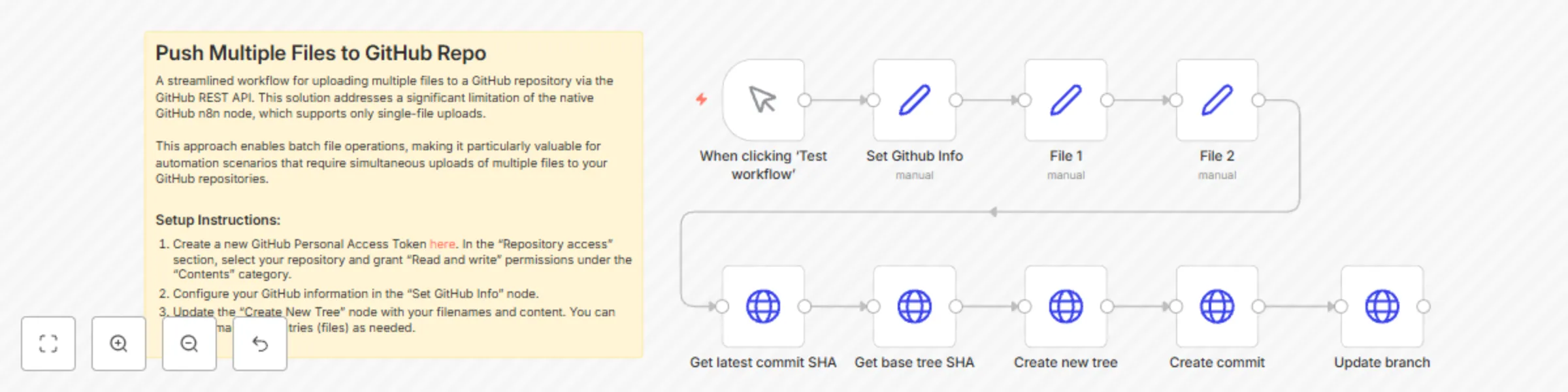
Workflow preview: Push multiple files to GitHub repository via Github REST API
Free intermediate

Push multiple files to GitHub repository via Github REST API

## Introduction This workflow offers a streamlined solution for uploading multiple files to a GitHub repository simultaneously using GitHub's REST API. It addresses a significant limitation of n8n's native GitHub node, which only supports single-file uploads at a time. By leveraging GitHub's Git Data API, this workflow creates a new Git tree containing multiple files, commits this tree, and updates the target branch—all in a single automated process. The workflow is particularly valuable for automation scenarios that require batch file operations, such as deploying website updates, publishing documentation, or maintaining configuration files across repositories. It eliminates the need for multiple separate API calls when working with multiple files, making your automation more efficient and less prone to partial update issues. By abstracting the complexities of GitHub's Git Data API into a reusable workflow, it provides a practical solution for developers, content managers, and DevOps professionals who need to programmatically manage repository content at scale. ## Who is this for? This workflow is designed for: - Developers and DevOps engineers who need to automate file updates in GitHub repositories - Content managers who regularly publish multiple files to GitHub-hosted websites or documentation - Automation specialists looking to integrate GitHub operations into larger workflows - Teams using n8n for CI/CD processes who need to push code or configuration changes Users should have basic familiarity with GitHub concepts (repositories, branches, commits) and should be comfortable obtaining and using GitHub Personal Access Tokens. While the workflow handles the API complexity, users should understand the fundamentals of version control to effectively utilize and customize it. ## What problem is this workflow solving? This workflow addresses several key challenges: 1. **Limited batch operations**: n8n's native GitHub node only supports uploading one file at a time, making multi-file operations cumbersome and inefficient. 2. **API complexity**: GitHub's Git Data API requires multiple sequential calls with interdependent data to create commits with multiple files, which is complex to implement manually. 3. **Automation bottlenecks**: Without this workflow, automating multi-file updates would require either multiple separate API calls (risking partial updates) or custom scripting outside of n8n. 4. **Consistency issues**: When files need to be updated together (e.g., code and corresponding documentation), this workflow ensures they're committed in a single atomic operation. By solving these issues, the workflow enables reliable, atomic updates of multiple files, maintaining repository consistency and simplifying automation processes. ## What this workflow does ### Overview This workflow uses GitHub's REST API to push multiple files to a repository in a single operation. It follows Git's internal model by: 1. Retrieving the current state of the repository 2. Creating a new tree with the files to be added or updated 3. Creating a new commit with this tree 4. Updating the branch reference to point to the new commit ### Process 1. **Initialization**: The workflow starts with a manual trigger and sets up GitHub credentials and repository information. 2. **File Content Definition**: Two "Set" nodes define the content for the files to be uploaded. 3. **Repository State Retrieval**: - The workflow fetches the latest commit SHA for the specified branch - It then retrieves the base tree SHA from this commit 4. **Tree Creation**: A new Git tree is created that includes both files (file1.txt and file2.txt), specifying their paths and content. 5. **Commit Creation**: A new commit is created with the specified commit message, referencing the new tree and the parent commit. 6. **Branch Update**: Finally, the branch reference is updated to point to the new commit, making the changes visible in the repository. ## Setup To use this workflow: 1. **Import the workflow**: Download the workflow JSON and import it into your n8n instance. 2. **Create a GitHub Personal Access Token**: - Go to GitHub Settings → Developer Settings → Personal Access Tokens → Fine-grained tokens - Create a new token with "Contents" permission (Read and write) for your target repository 3. **Configure the workflow**: - Update the "Set Github Info" node with: - Your GitHub Personal Access Token - Your GitHub username - Your repository name - The target branch (default is "main") - A commit message 4. **Define file content**: - Modify the "File 1" and "File 2" nodes with the content you want to upload 5. **Adjust file paths if needed**: - In the "Create new tree" node, update the file paths if you want to change where the files are stored in the repository 6. **Save and run the workflow**: Click "Test workflow" to execute the process. ## How to customize this workflow to your needs This workflow can be adapted in several ways: 1. **Add more files**: - Create additional "Set" nodes for more file content - In the "Create new tree" node, add more tree entries following the same pattern (path, mode, type, content) 2. **Change file locations**: - Modify the "path" parameters in the "Create new tree" node to place files in different directories 3. **Dynamic file content**: - Replace the static content in the "File" nodes with data from other sources - Use previous nodes or HTTP requests to generate file content dynamically 4. **Conditional file updates**: - Add IF nodes to determine which files should be updated based on certain conditions - Create separate branches in your workflow for different update scenarios 5. **Scheduled updates**: - Replace the manual trigger with a Schedule node to run the workflow at specific intervals - Combine with other triggers like Webhook or database events to push files when certain events occur 6. **Error handling**: - Add Error Trigger nodes to handle potential API failures - Implement notification nodes to alert you of successful pushes or failures

C
Custom Workflows AI
DevOps
24 Mar 2025
1032
0

Workflow preview: Automatic weekly digital PR stories suggestions with Reddit and Anthropic
Free advanced

Automatic weekly digital PR stories suggestions with Reddit and Anthropic

## Introduction The "Automatic Weekly Digital PR Stories Suggestions" workflow is a sophisticated automated system designed to identify trending news stories on Reddit, analyze public sentiment through comment analysis, extract key information from source articles, and generate strategic angles for potential digital PR campaigns. This workflow leverages the power of social media trends, natural language processing, and AI-driven analysis to deliver curated, sentiment-analyzed news opportunities for PR professionals. Operating on a weekly schedule, the workflow searches Reddit for posts related to specified topics, filters them based on engagement metrics, and performs a deep analysis of both the content and public reaction. It then generates comprehensive reports that include story opportunities, audience insights, and strategic recommendations. These reports are automatically compiled, stored in Google Drive, and shared with team members via Mattermost for immediate collaboration. This workflow solves the time-consuming process of manually monitoring social media for trending stories, analyzing public sentiment, and identifying PR opportunities. By automating these tasks, PR professionals can focus on strategy development and execution rather than spending hours on research and analysis. ## Who is this for? This workflow is designed for digital PR professionals, content marketers, communications teams, and media relations specialists who need to stay on top of trending stories and public sentiment to develop timely and effective PR campaigns. It's particularly valuable for: - PR agencies managing multiple clients across different industries - In-house PR teams needing to identify media opportunities quickly - Content marketers looking for trending topics to create timely content - Communications professionals monitoring public perception of industry news Users should have basic familiarity with n8n workflows and the PR strategy development process. While technical knowledge of the integrated APIs is not required to use the workflow, some understanding of Reddit, sentiment analysis, and PR campaign development would be beneficial for interpreting and acting on the generated reports. ## What problem is this workflow solving? Digital PR professionals face several challenges that this workflow addresses: 1. **Information Overload**: Manually monitoring social media platforms for trending stories is time-consuming and often results in missed opportunities. 2. **Sentiment Analysis Complexity**: Understanding public perception of news stories requires reading through hundreds of comments and identifying patterns, which is labor-intensive and subjective. 3. **Content Extraction**: Visiting multiple news sources to read and analyze articles takes significant time. 4. **Strategic Angle Development**: Identifying unique PR angles that leverage trending stories and public sentiment requires synthesizing large amounts of information. 5. **Team Collaboration**: Sharing findings and insights with team members in a structured format can be cumbersome. By automating these processes, the workflow enables PR professionals to quickly identify trending stories with PR potential, understand public sentiment, and develop strategic angles based on comprehensive analysis, all while maintaining a structured approach to team collaboration. ## What this workflow does ### Overview The workflow automatically identifies trending posts on Reddit related to specified topics, analyzes both the content of linked articles and public sentiment from comments, and generates comprehensive PR strategy reports. These reports include story opportunities, audience insights, and strategic recommendations based on the analysis. The final reports are compiled, stored in Google Drive, and shared with team members via Mattermost. ### Process 1. **Topic Selection and Reddit Search**: - The workflow starts with a list of topics specified in the "Set Data" node - It searches Reddit for posts related to these topics - Posts are filtered based on upvotes and other criteria to focus on trending content 2. **Comment Analysis**: - For each post, the workflow retrieves comments - It extracts the top 30 comments based on score - Using Claude AI, it analyzes the comments to understand: - Overall sentiment - Dominant narratives - Audience insights - PR implications 3. **Content Analysis**: - The workflow extracts the content of the linked article using Jina AI - It analyzes the content to identify: - Core story elements - Technical aspects - Narrative opportunities - Viral elements 4. **PR Strategy Development**: - Based on the combined analysis of comments and content, the workflow generates: - First-mover story opportunities - Trend-amplifier story ideas - Priority rankings - Execution roadmap - Strategic recommendations 5. **Report Generation and Distribution**: - The workflow compiles comprehensive reports for each post - Reports are converted to text files - All files are compressed into a ZIP archive - The archive is uploaded to Google Drive - A link to the archive is shared with team members via Mattermost ## Setup To set up this workflow, follow these steps: 1. **Import the Workflow**: - Download the workflow JSON file - Import it into your n8n instance 2. **Configure API Credentials**: - Reddit: Add a new credential "Reddit OAuth2 API" by following the guide at https://docs.n8n.io/integrations/builtin/credentials/reddit/ - Anthropic: Add a new credential "Anthropic Account" by following the guide at https://docs.n8n.io/integrations/builtin/credentials/anthropic/ - Google Drive: Add a new credential "Google Drive OAuth2 API" by following the guide at https://docs.n8n.io/integrations/builtin/credentials/google/oauth-single-service/ 3. **Configure the "Set Data" Node**: - Set your interested topics (one per line) - Add your Jina API key (obtain from https://jina.ai/api-dashboard/key-manager) 4. **Configure the Mattermost Node**: - Update your Mattermost instance URL - Set your Webhook ID and Channel - Follow the guide at https://developers.mattermost.com/integrate/webhooks/incoming/ for webhook setup 5. **Adjust the Schedule (Optional)**: - The workflow is set to run every Monday at 6am - Modify the "Schedule Trigger" node if you need a different schedule 6. **Test the Workflow**: - Run the workflow manually to ensure all connections are working properly - Check the output to verify the reports are being generated correctly ## How to customize this workflow to your needs This workflow can be customized in several ways to better suit your specific requirements: 1. **Topic Selection**: - Modify the topics in the "Set Data" node to focus on industries or subjects relevant to your PR strategy - Add multiple topics to cover different client interests or market segments 2. **Filtering Criteria**: - Adjust the "Upvotes Requirement Filtering" node to change the minimum upvotes threshold - Modify the filtering conditions to include or exclude certain types of posts 3. **Analysis Parameters**: - Customize the prompts in the "Comments Analysis," "News Analysis," and "Stories Report" nodes to focus on specific aspects of the content or comments - Adjust the temperature settings in the Anthropic Chat Model nodes to control the creativity of the AI responses 4. **Report Format**: - Modify the "Set Final Report" node to change the structure or content of the final reports - Add or remove sections based on your specific reporting needs 5. **Distribution Method**: - Replace or supplement the Mattermost notification with email notifications, Slack messages, or other communication channels - Add additional storage options beyond Google Drive 6. **Schedule Frequency**: - Change the "Schedule Trigger" node to run the workflow more or less frequently - Set up multiple triggers for different topics or clients 7. **Integration with Other Systems**: - Add nodes to integrate with your CRM, content management system, or project management tools - Create connections to automatically populate content calendars or task management systems

C
Custom Workflows AI
Market Research
14 Mar 2025
3429
0