📖 Overview
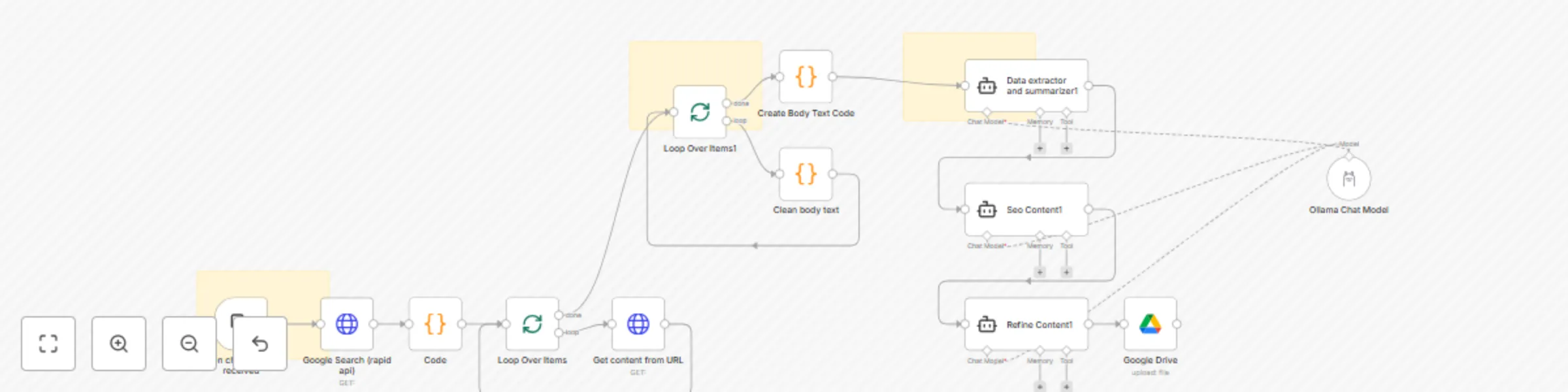
This template automates the process of researching a keyword, scraping top-ranking articles, cleaning their content, and generating a high-quality SEO-optimized blog post. It uses Google Search via RapidAPI, Ollama with Mistral AI, and Google Drive to deliver an end-to-end automated content workflow.
Ideal for content creators, SEO specialists, bloggers, and marketers who need to quickly gather and summarize insights from multiple sources to create superior content.
⚙️ Prerequisites
Before using this workflow, make sure you have:
n8n installed (Desktop, Docker, or Cloud).
Ollama installed with the mistral:7b model:
ollama pull mistral:7b
RapidAPI account (for Google Search API).
Google Drive account (with a target folder where articles will be saved).
🔑 Credentials Required
RapidAPI (Google Search API)
Header authentication with your API key.
Example headers:
x-rapidapi-key: YOUR_API_KEY
x-rapidapi-host: google-search74.p.rapidapi.com
Google Drive OAuth2
Allow read/write permissions.
Update the folderId with your Drive folder where articles should be stored.
Ollama API
Base URL:
http://localhost:11434 (local n8n)
http://host.docker.internal:11434 (inside Docker)
Ensure the mistral:7b model is available.
🚀 Setup Instructions
Configure RapidAPI
Sign up at RapidAPI
.
Subscribe to the Google Search API.
Create an HTTP Header Auth credential in n8n with your API key.
Configure Google Drive
In n8n, add a Google Drive OAuth2 credential.
Select the Drive folder ID where output files should be saved.
Configure Ollama
Install Ollama locally.
Pull the required model (mistral:7b).
Create an Ollama API credential in n8n.
Run the Workflow
Trigger by sending a chat message with your target keyword.
The workflow searches Google, extracts the top 3 results, scrapes the articles, cleans the content, and generates a structured blog post.
Final output is stored in Google Drive as a .docx file.
🎨 Customization Options
Search Engine → Swap out RapidAPI with Bing or SerpAPI.
Number of Articles → Change limit: 3 in the Google Search node.
Content Cleaning → Modify the regex in the “Clean Body Text” node to capture
or
tags.
AI Model → Replace mistral:7b with llama3, mixtral, or any other Ollama-supported model.
Storage → Save output to a different Google Drive folder or export to Notion/Slack.
📌 Workflow Highlights
Google Search (RapidAPI) → Fetch top 3 results for your keyword.
HTTP Request + Code Nodes → Extract and clean article body text.
Mistral AI via Ollama → Summarize, optimize, and refine the content.
Google Drive → Save the final blog-ready article automatically.