Block 1 - When chat message received
- Type / Role
- @n8n/n8n-nodes-langchain.chatTrigger - chatTrigger
- Config choices
- Version 1.1


 Early Deal
This workflow is provided as-is. Please review and test before using in production.
Overview This template automates the process of researching a keyword, scraping top ranking articles, cleaning their content, and generating a high quality SEO optimized blog post. It uses Googl...
@n8n/n8n-nodes-langchain.chattrigger, n8n-nodes-base.code, n8n-nodes-base.splitinbatches, n8n-nodes-base.httprequest, n8n-nodes-base.stickynote, n8n-nodes-base.googledrive, @n8n/n8n-nodes-langchain.agent, @n8n/n8n-nodes-langchain.lmchatollama
This workflow is cataloged by N8N Workflows and links back to its original n8n.io source page by Zakwan.
Original n8n.io source📖 Overview
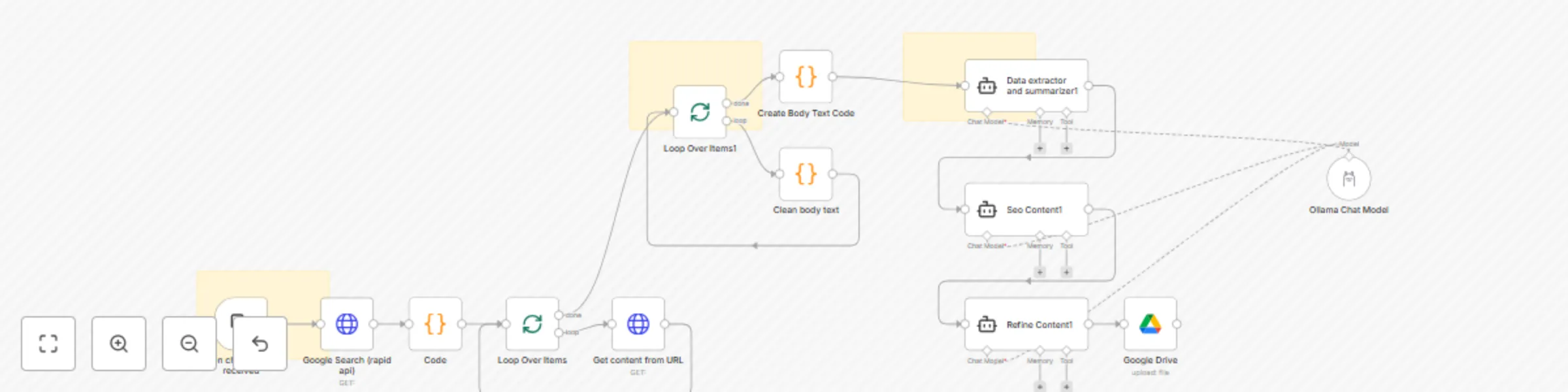
This template automates the process of researching a keyword, scraping top-ranking articles, cleaning their content, and generating a high-quality SEO-optimized blog post. It uses Google Search via RapidAPI, Ollama with Mistral AI, and Google Drive to deliver an end-to-end automated content workflow.
Ideal for content creators, SEO specialists, bloggers, and marketers who need to quickly gather and summarize insights from multiple sources to create superior content.
⚙️ Prerequisites
Before using this workflow, make sure you have:
n8n installed (Desktop, Docker, or Cloud).
Ollama installed with the mistral:7b model:
ollama pull mistral:7b
RapidAPI account (for Google Search API).
Google Drive account (with a target folder where articles will be saved).
🔑 Credentials Required
RapidAPI (Google Search API)
Header authentication with your API key.
Example headers:
x-rapidapi-key: YOUR_API_KEY x-rapidapi-host: google-search74.p.rapidapi.com
Google Drive OAuth2
Allow read/write permissions.
Update the folderId with your Drive folder where articles should be stored.
Ollama API
Base URL:
http://localhost:11434 (local n8n)
http://host.docker.internal:11434 (inside Docker)
Ensure the mistral:7b model is available.
🚀 Setup Instructions
Configure RapidAPI
Sign up at RapidAPI .
Subscribe to the Google Search API.
Create an HTTP Header Auth credential in n8n with your API key.
Configure Google Drive
In n8n, add a Google Drive OAuth2 credential.
Select the Drive folder ID where output files should be saved.
Configure Ollama
Install Ollama locally.
Pull the required model (mistral:7b).
Create an Ollama API credential in n8n.
Run the Workflow
Trigger by sending a chat message with your target keyword.
The workflow searches Google, extracts the top 3 results, scrapes the articles, cleans the content, and generates a structured blog post.
Final output is stored in Google Drive as a .docx file.
🎨 Customization Options
Search Engine → Swap out RapidAPI with Bing or SerpAPI.
Number of Articles → Change limit: 3 in the Google Search node.
Content Cleaning → Modify the regex in the “Clean Body Text” node to capture
AI Model → Replace mistral:7b with llama3, mixtral, or any other Ollama-supported model.
Storage → Save output to a different Google Drive folder or export to Notion/Slack.
📌 Workflow Highlights
Google Search (RapidAPI) → Fetch top 3 results for your keyword.
HTTP Request + Code Nodes → Extract and clean article body text.
Mistral AI via Ollama → Summarize, optimize, and refine the content.
Google Drive → Save the final blog-ready article automatically.
This catalog entry is organized from the workflow JSON. The node-level section below shows the executable blocks available for review before importing the template.
| Workflow | Generate SEO blog posts from web searches with Mistral AI and Google Drive |
|---|---|
| Complexity | advanced |
| Nodes | 16 |
| Categories | Content Creation, Multimodal AI |
| Author | Zakwan |
| Published | 02 Sept 2025 |
Use the JSON export at /data/workflows/8192/8192.json as the source template for this automation.
Open n8n, import the downloaded JSON, and review each node before activating the workflow.
Replace placeholder credentials, API keys, webhook URLs, account IDs, and environment-specific values with your own settings.
Run the workflow manually or in a staging workspace, inspect node output, and confirm downstream systems receive the expected data.
Enable the workflow only after testing, then monitor executions, errors, and rate limits during the first production runs.
Review imported nodes carefully before activation. This catalog entry is intended to help you inspect the workflow structure, understand required services, and find related templates faster.
Node names, credentials, schedules, webhook paths, and external service limits may need adjustment for your workspace.
Overview This template automates the process of researching a keyword, scraping top ranking articles, cleaning their content, and generating a high quality SEO optimized blog post. It uses Googl...
Review the workflow JSON, configure any required credentials in n8n, and test the automation in a safe workspace before using it in production.
Yes. Use the block-by-block analysis and the downloadable JSON to inspect each node, then adjust credentials, prompts, schedules, filters, or destinations for your Content Creation, Multimodal AI use case.