Generate secure social media connection links for clients with Upload-Post

Workflow preview

Workflow preview
100%
Generate secure social media connection links for clients with Upload-Post preview
Open on n8n.io

Important notice

This workflow is provided as-is. Please review and test before using in production.

1. Workflow Overview

This automated workflow template helps agencies and social media managers securely onboard clients by generating a branded Connect Ac...

Best for

  • Social Media automation workflows
  • intermediate n8n builders looking for reusable templates

Tools used

n8n-nodes-base.stickynote, n8n-nodes-base.manualtrigger, n8n-nodes-upload-post.uploadpost, n8n-nodes-base.telegram, n8n-nodes-base.formtrigger

Source and attribution

This workflow is cataloged by N8N Workflows and links back to its original n8n.io source page by Juan Carlos Cavero Gracia.

Original n8n.io source

1.1 Workflow description

Title
Generate secure social media connection links for clients with Upload-Post
Workflow name
Generate secure social media connection links for clients with Upload-Post

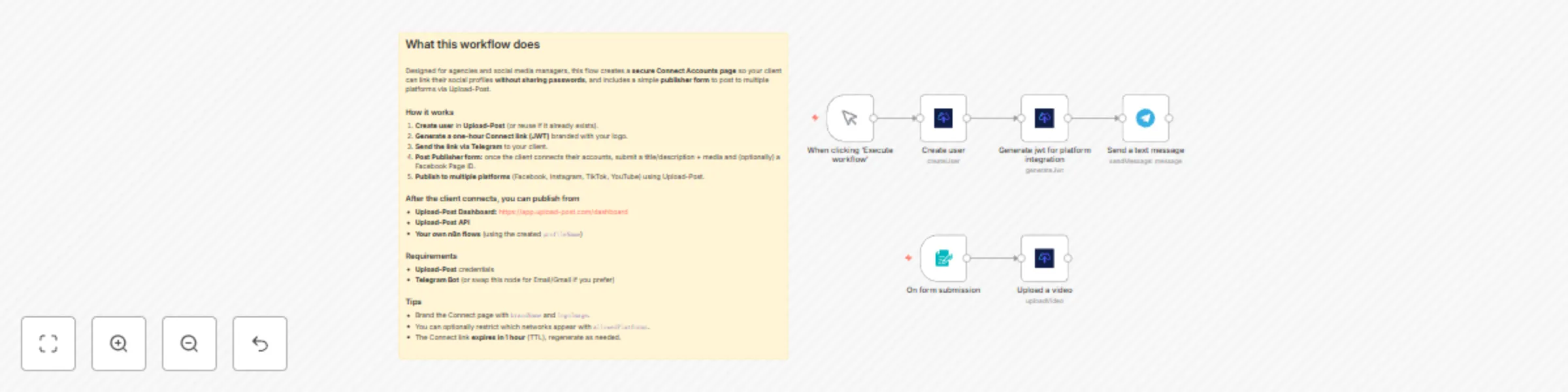
This automated workflow template helps agencies and social media managers securely onboard clients by generating a branded Connect Accounts page where clients can link their social profiles without sharing passwords. The flow creates a user in Upload-Post and returns a one-hour magic link you can send to the client. Once connected, you can publish from the Upload-Post dashboard, via API, or from your own n8n automations using the created profile name.

Note: This workflow uses the Upload-Post.com API to create the user and generate a time-limited JWT connect link. You can brand the connect page with your logo via the logoImage parameter (and optionally brandName, redirectUrl, or allowedPlatforms).

Who Is This For?

  • Marketing & Creative Agencies: Onboard new clients quickly and securely without requesting credentials.
  • Social Media Managers & Freelancers: Standardize account connection across all clients in one simple step.
  • SaaS & No-Code Builders: Offer a white-label “connect your socials” experience inside your tools and client portals.
  • In-House Marketing Teams: Let internal stakeholders connect brand accounts without IT hand-offs.

Why This Matters

Collecting passwords is risky, slow, and non-compliant. Onboarding often means back-and-forth emails, shared logins, and manual setup. This template:

  • Eliminates Password Sharing: Clients connect through secure OAuth flows.
  • Reduces Friction: A single, short-lived link guides clients to connect supported platforms.
  • Speeds Activation: As soon as accounts are linked, you can publish from the dashboard, API, or n8n.
  • Builds Trust & Compliance: Brandable, auditable, and privacy-first onboarding.

How It Works

  1. Trigger: Start the workflow in n8n.
  2. Create User: The Create user node provisions a client user in Upload-Post (use a unique handle/slug).
  3. Generate Connect Link: The Generate JWT for platform integration node returns a one-hour connect URL (plus metadata), brandable via logoImage.
  4. Share With Client: Send the link via your preferred channel (Email/Telegram/Slack/CRM).
  5. Client Connects Accounts: The client links their social profiles on the secure page—no passwords required.
  6. Start Publishing: Post from https://app.upload-post.com/dashboard, the Upload-Post API, or your n8n flows referencing the created profile name.

Setup

  1. Upload-Post Account & Credentials
    Create an account at upload-post.com and add your API credentials in n8n.
  2. Configure Nodes
    • Create user: Set newUser to a unique identifier (e.g., client email/slug).
    • Generate JWT: Set user to the same identifier and (optionally) logoImage to a public logo URL. You can also pass brandName, redirectUrl, and allowedPlatforms.
  3. Branding (Optional)
    Use a square transparent PNG for best results on the connect page.
  4. Delivery (Optional)
    Add Email/Telegram/Slack nodes to automatically send the connect link to the client and log the action in your CRM.

Requirements

  • Accounts: n8n, Upload-Post.com
  • API Keys/Creds: Upload-Post API credentials
  • Social Media: Clients must have the social accounts they want to connect

Features

  • Secure Client Onboarding: One-click, no-password account linking via OAuth.
  • Time-Limited Access: One-hour magic link for safer sharing and compliance.
  • Brandable Experience: Show your own branding on the connect page with logoImage (plus brandName).
  • Ready to Publish: Post immediately from the dashboard, API, or n8n using the profile name.
  • Scales With You: Reuse the template for every client and integrate with your CRM and comms tools.
  • Multi-Platform Support: Works with all social platforms supported by Upload-Post (e.g., TikTok, Instagram, YouTube, Facebook, X, Threads, LinkedIn, Pinterest).

Use this template to onboard clients in minutes and start publishing securely—without ever asking for a password.

1.2 Logical Blocks

This catalog entry is organized from the workflow JSON. The node-level section below shows the executable blocks available for review before importing the template.

2. Block-by-Block Analysis

Block 1 - About this workflow

Type / Role
n8n-nodes-base.stickyNote - stickyNote
Config choices
Version 1

Block 2 - When clicking ‘Execute workflow’

Type / Role
n8n-nodes-base.manualTrigger - manualTrigger
Config choices
Version 1

Block 3 - Create user

Type / Role
n8n-nodes-upload-post.uploadPost - uploadPost
Config choices
Version 1

Block 4 - Generate jwt for platform integration

Type / Role
n8n-nodes-upload-post.uploadPost - uploadPost
Config choices
Version 1

Block 5 - Send a text message

Type / Role
n8n-nodes-base.telegram - telegram
Config choices
Version 1.2

Block 6 - On form submission

Type / Role
n8n-nodes-base.formTrigger - formTrigger
Config choices
Version 2.2

Block 7 - Upload a video

Type / Role
n8n-nodes-upload-post.uploadPost - uploadPost
Config choices
Version 1

3. Summary Table

Workflow Generate secure social media connection links for clients with Upload-Post
Complexity intermediate
Nodes 7
Categories Social Media
Author Juan Carlos Cavero Gracia
Published 15 Sept 2025

4. Reproducing the Workflow from Scratch

  1. 1. Download the workflow JSON

    Use the JSON export at /data/workflows/8596/8596.json as the source template for this automation.

  2. 2. Import the template into n8n

    Open n8n, import the downloaded JSON, and review each node before activating the workflow.

  3. 3. Configure credentials and variables

    Replace placeholder credentials, API keys, webhook URLs, account IDs, and environment-specific values with your own settings.

  4. 4. Test with sample data

    Run the workflow manually or in a staging workspace, inspect node output, and confirm downstream systems receive the expected data.

  5. 5. Activate and monitor

    Enable the workflow only after testing, then monitor executions, errors, and rate limits during the first production runs.

5. General Notes & Resources

Review imported nodes carefully before activation. This catalog entry is intended to help you inspect the workflow structure, understand required services, and find related templates faster.

Node names, credentials, schedules, webhook paths, and external service limits may need adjustment for your workspace.

Frequently asked questions

What does Generate secure social media connection links for clients with Upload-Post do?

This automated workflow template helps agencies and social media managers securely onboard clients by generating a branded Connect Ac...

What do I need before importing this workflow?

Review the workflow JSON, configure any required credentials in n8n, and test the automation in a safe workspace before using it in production.

Can I customize this workflow?

Yes. Use the block-by-block analysis and the downloadable JSON to inspect each node, then adjust credentials, prompts, schedules, filters, or destinations for your Social Media use case.