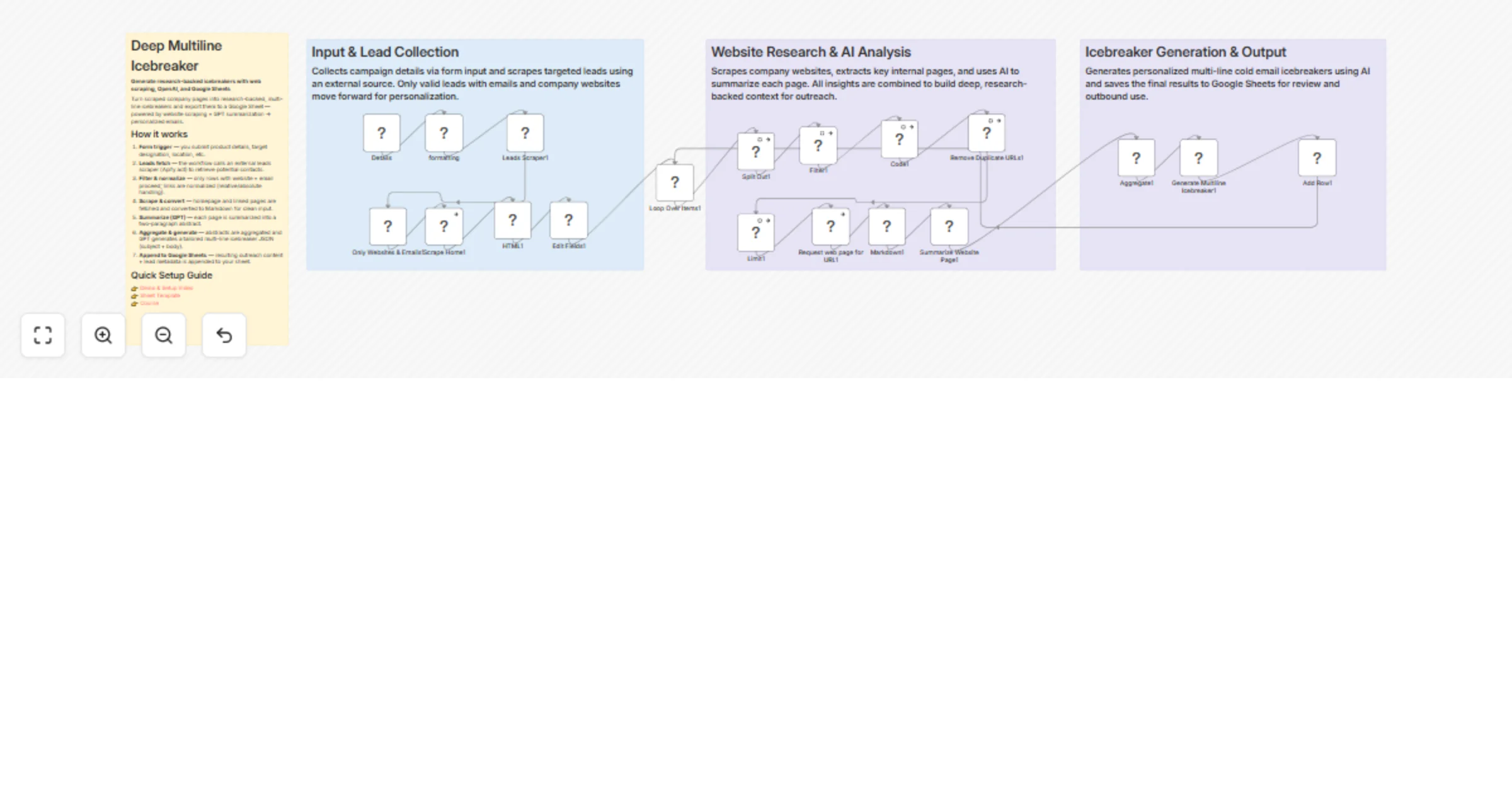
Generate research-backed cold email icebreakers with web scraping, OpenAI and Google Sheets

Workflow preview

Workflow preview
100%
Generate research-backed cold email icebreakers with web scraping, OpenAI and Google Sheets preview
Open on n8n.io

1. Workflow Overview

Deep Multiline Icebreaker — AI driven research + personalized cold outreach Deep Multiline Icebreaker automates high quality, research led outreach. Feed it a list of leads (emails + websites) and ...

Best for

  • Lead Nurturing automation workflows
  • AI Summarization automation workflows
  • advanced n8n builders looking for reusable templates

Tools used

n8n-nodes-base.removeduplicates, n8n-nodes-base.html, n8n-nodes-base.splitout, n8n-nodes-base.filter, n8n-nodes-base.httprequest, n8n-nodes-base.markdown, @n8n/n8n-nodes-langchain.openai, n8n-nodes-base.limit

Source and attribution

This workflow is cataloged by N8N Workflows and links back to its original n8n.io source page by Pratyush Kumar Jha.

Original n8n.io source

1.1 Workflow description

Title
Generate research-backed cold email icebreakers with web scraping, OpenAI and Google Sheets
Workflow name
Generate research-backed cold email icebreakers with web scraping, OpenAI and Google Sheets

Deep Multiline Icebreaker — AI-driven research + personalized cold outreach

Deep Multiline Icebreaker automates high-quality, research-led outreach. Feed it a list of leads (emails + websites) and a short product brief via the built-in form; the workflow scrapes each company's site, extracts meaningful page content, uses GPT to produce concise page abstracts, aggregates insights, and then generates tailored, multi-line cold email bodies (JSON). Final outreach rows are appended automatically to a Google Sheet so you can review, sequence, or plug into your outreach stack.

This template is built for SDRs, growth folks, and agencies who want dramatically better reply rates by replacing generic blasts with short, highly-specific icebreakers that reference subtle site signals. It’s opinionated (focuses on non-obvious details and concise, credible tone) but easy to tweak — prompts, output format, and the Google Sheet mapping are all editable inside n8n.

How it works

  1. Form trigger — you submit product details, target designation, location, etc.
  2. Leads fetch — the workflow calls an external leads scraper (Apify act) to retrieve potential contacts.
  3. Filter & normalize — only rows with website + email proceed; links are normalized (relative/absolute handling).
  4. Scrape & convert — homepage and linked pages are fetched and converted to Markdown for clean input.
  5. Summarize (GPT) — each page is summarized into a two-paragraph abstract.
  6. Aggregate & generate — abstracts are aggregated and GPT generates a tailored multi-line icebreaker JSON (subject + body).
  7. Append to Google Sheets — resulting outreach content + lead metadata is appended to your sheet.

Nodes of interest you can edit

  • On form submission1
  • Leads Scraper1
  • Scrape Home1
  • Summarize Website Page1
  • Generate Multiline Icebreaker1
  • Add Row1

Quick Setup Guide

👉 Demo & Setup Video 👉 Sheet Template 👉 Course

What you’ll need (credentials)

  • OpenAI API key (used by Summarize Website Page1 and Generate Multiline Icebreaker1).
  • Google Sheets OAuth (write access for Add Row1).
  • Apify (or your leads-source) API token for Leads Scraper1 (the template calls an Apify act).
  • Optional: outbound HTTP access from your n8n host to target websites.

Recommended settings & best practices

  • Limit batch sizes (the template uses Limit1 set to 3 by default) — ramp the maxItems up slowly to respect rate limits and token costs.
  • Prompt tweaks — open the Generate Multiline Icebreaker1 prompt to tune tone, cost framing, or add product-specific selling points.
  • DeduplicationRemove Duplicate URLs1 is included; keep it ON to avoid repeated scraping.
  • Privacy — don’t store PII longer than necessary; if you store outreach drafts, ensure your Google Sheet access is restricted.
  • Cost control — set temperature lower (0–0.6) for more consistent outputs and monitor your OpenAI usage.

Customization ideas

  • Swap GPT model name or change prompt to produce shorter cold SMS or LinkedIn messages.
  • Replace Apify with your own lead source (CSV upload, CRM query, or Airtable).
  • Add an approval step (Slack/Email) before rows are appended to Google Sheets.
  • Add a follow-up sequence generator that writes 2–3 follow-up messages per lead.

Troubleshooting quick tips

  • If pages return empty abstracts, check Request web page for URL1 and network access / user-agent restrictions.
  • If outputs are malformed JSON, open the Generate Multiline Icebreaker1 node and validate the JSON output option.
  • If Google Sheets fails, re-authorize the Google Sheets credential and ensure the sheet ID & sheet name are correct.

Tags / Suggested listing fields

outreach, lead-gen, sales-automation, openai, web-scraping, google-sheets

1.2 Logical Blocks

This catalog entry is organized from the workflow JSON. The node-level section below shows the executable blocks available for review before importing the template.

2. Block-by-Block Analysis

Block 1 - Remove Duplicate URLs1

Type / Role
n8n-nodes-base.removeDuplicates - removeDuplicates
Config choices
Version 1.1

Block 2 - HTML1

Type / Role
n8n-nodes-base.html - html
Config choices
Version 1.2

Block 3 - Split Out1

Type / Role
n8n-nodes-base.splitOut - splitOut
Config choices
Version 1

Block 4 - Filter1

Type / Role
n8n-nodes-base.filter - filter
Config choices
Version 2.2

Block 5 - Request web page for URL1

Type / Role
n8n-nodes-base.httpRequest - httpRequest
Config choices
Version 4.2

Block 6 - Markdown1

Type / Role
n8n-nodes-base.markdown - markdown
Config choices
Version 1

Block 7 - Summarize Website Page1

Type / Role
@n8n/n8n-nodes-langchain.openAi - openAi
Config choices
Version 1.6

Block 8 - Limit1

Type / Role
n8n-nodes-base.limit - limit
Config choices
Version 1

Block 9 - Scrape Home1

Type / Role
n8n-nodes-base.httpRequest - httpRequest
Config choices
Version 4.2

Block 10 - Aggregate1

Type / Role
n8n-nodes-base.aggregate - aggregate
Config choices
Version 1

Block 11 - Generate Multiline Icebreaker1

Type / Role
@n8n/n8n-nodes-langchain.openAi - openAi
Config choices
Version 1.6

Block 12 - Add Row1

Type / Role
n8n-nodes-base.googleSheets - googleSheets
Config choices
Version 4.5

Block 13 - Edit Fields1

Type / Role
n8n-nodes-base.set - set
Config choices
Version 3.4

Block 14 - Only Websites & Emails1

Type / Role
n8n-nodes-base.filter - filter
Config choices
Version 2.2

Block 15 - Loop Over Items1

Type / Role
n8n-nodes-base.splitInBatches - splitInBatches
Config choices
Version 3

Block 16 - Code1

Type / Role
n8n-nodes-base.code - code
Config choices
Version 2

Block 17 - Sticky Note1

Type / Role
n8n-nodes-base.stickyNote - stickyNote
Config choices
Version 1

Block 18 - Leads Scraper1

Type / Role
n8n-nodes-base.httpRequest - httpRequest
Config choices
Version 4.2

Block 19 - Details

Type / Role
n8n-nodes-base.formTrigger - formTrigger
Config choices
Version 2.3

Block 20 - formatting

Type / Role
n8n-nodes-base.code - code
Config choices
Version 2

Block 21 - Sticky Note

Type / Role
n8n-nodes-base.stickyNote - stickyNote
Config choices
Version 1

Block 22 - Sticky Note2

Type / Role
n8n-nodes-base.stickyNote - stickyNote
Config choices
Version 1

Block 23 - Sticky Note3

Type / Role
n8n-nodes-base.stickyNote - stickyNote
Config choices
Version 1

3. Summary Table

Workflow Generate research-backed cold email icebreakers with web scraping, OpenAI and Google Sheets
Complexity advanced
Nodes 23
Categories Lead Nurturing, AI Summarization
Author Pratyush Kumar Jha
Published 10 Feb 2026

4. Reproducing the Workflow from Scratch

  1. 1. Download the workflow JSON

    Use the JSON export at /data/workflows/13282/13282.json as the source template for this automation.

  2. 2. Import the template into n8n

    Open n8n, import the downloaded JSON, and review each node before activating the workflow.

  3. 3. Configure credentials and variables

    Replace placeholder credentials, API keys, webhook URLs, account IDs, and environment-specific values with your own settings.

  4. 4. Test with sample data

    Run the workflow manually or in a staging workspace, inspect node output, and confirm downstream systems receive the expected data.

  5. 5. Activate and monitor

    Enable the workflow only after testing, then monitor executions, errors, and rate limits during the first production runs.

5. General Notes & Resources

Review imported nodes carefully before activation. This catalog entry is intended to help you inspect the workflow structure, understand required services, and find related templates faster.

Node names, credentials, schedules, webhook paths, and external service limits may need adjustment for your workspace.

Frequently asked questions

What does Generate research-backed cold email icebreakers with web scraping, OpenAI and Google Sheets do?

Deep Multiline Icebreaker — AI driven research + personalized cold outreach Deep Multiline Icebreaker automates high quality, research led outreach. Feed it a list of leads (emails + websites) and ...

What do I need before importing this workflow?

Review the workflow JSON, configure any required credentials in n8n, and test the automation in a safe workspace before using it in production.

Can I customize this workflow?

Yes. Use the block-by-block analysis and the downloadable JSON to inspect each node, then adjust credentials, prompts, schedules, filters, or destinations for your Lead Nurturing, AI Summarization use case.