Block 1 - Sticky Note - Data Source
- Type / Role
- n8n-nodes-base.stickyNote - stickyNote
- Config choices
- Version 1


 Early Deal
This workflow is provided as-is. Please review and test before using in production.
AI Powered Lead Generation: Personalized Icebreakers with Perplexity Research & Claude Sonnet 4.5 This production ready workflow transforms your lead generation by automatically researching prospec...
n8n-nodes-base.stickynote, n8n-nodes-base.manualtrigger, n8n-nodes-base.splitinbatches, @n8n/n8n-nodes-langchain.openai, @n8n/n8n-nodes-langchain.lmchatopenrouter, @n8n/n8n-nodes-langchain.outputparserstructured, @n8n/n8n-nodes-langchain.chainllm, n8n-nodes-base.googlesheets
This workflow is cataloged by N8N Workflows and links back to its original n8n.io source page by Anatoly.
Original n8n.io sourceThis production-ready workflow transforms your lead generation by automatically researching prospects and generating genuinely personalized icebreakers that feel human-written. What normally takes 10-15 minutes per lead now happens in under a minute, at scale.
🎯 What It Does:
Pulls lead data from Google Sheets, conducts real-time AI research on each prospect, and generates custom cold email opening lines that reference actual company achievements and recent news. The workflow processes leads in batches, updates your spreadsheet automatically, and maintains context throughout the entire process.
💡 Use Cases & Results:
Perfect for: B2B sales teams, marketing agencies, business development, recruiters, freelancers, startup founders doing cold outreach.
Expected results:
Why it works: Icebreakers reference real, current information vs generic templates. Prospects notice the personalization.
🔧 How It Works:
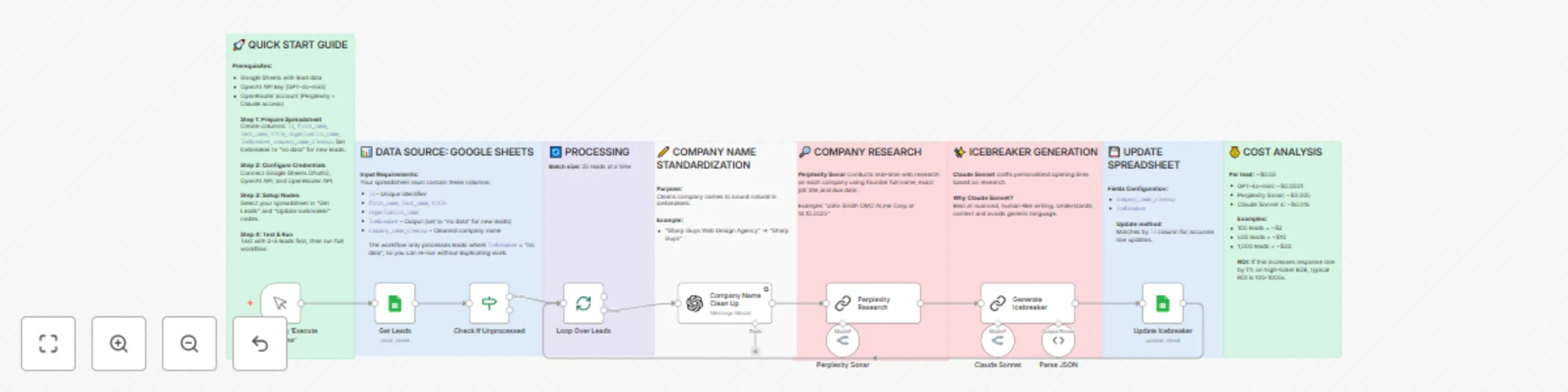
The workflow follows a six-step process. First, it retrieves lead data from your Google Sheets and filters out any leads that already have icebreakers to avoid reprocessing. Then it processes leads in manageable batches of 25 to respect API rate limits while maintaining efficiency.
For each lead, the system standardizes the company name by removing corporate suffixes like "Agency," "Inc.," or "Group" to make icebreakers sound more natural. Next, Perplexity Sonar conducts real-time web research on the prospect, finding recent company news, achievements, funding rounds, and relevant background information.
Claude Sonnet 4 then analyzes this research and generates a personalized icebreaker that sounds genuinely human-written. The prompt instructs Claude to use a casual, spartan tone and to look for plausible connections without stretching the truth. Each icebreaker follows a proven format: "Hey [FirstName], [specific observation about their company], I wanted to share something that could be relevant for [Company]."
Finally, the workflow updates your spreadsheet with both the cleaned company name and the personalized icebreaker, then loops back to process the next batch until all unprocessed leads are complete.
✨ Key Features:
📋 Requirements:
⚡ Quick Setup:
Prepare your Google Sheets spreadsheet with the required columns and fill in your lead data. Connect your Google Sheets, OpenAI, and OpenRouter credentials to n8n. Configure the "Get Leads" and "Update Icebreaker" nodes to point to your spreadsheet. Test with a couple of leads first to ensure everything works, then run the full workflow.
The workflow includes comprehensive documentation via sticky notes covering data structure, AI model selection rationale, customization options, cost analysis.
🎁 What You Get:
Complete end-to-end automation with detailed sticky note documentation explaining each step, customizable prompts for adjusting tone and style, batch processing logic that respects API limits, error handling and retry mechanisms, cost optimization using the right AI model for each task (GPT-4o-mini for simple transformations, Perplexity for research, Claude for writing), and security best practices for handling lead data responsibly.
💰 Expected Results:
At approximately $0.02 per lead, this workflow typically delivers response rate improvements of 2-3x compared to generic templates. For a hundred leads, you invest about $2 and save over fifteen hours of manual research and writing time. The icebreakers sound genuinely human because they reference real, current information rather than generic templates. Many users report that prospects often respond positively to the personalized opening, commenting that it doesn't feel like a mass email.
🔄 Integration Ready:
The output format is designed to integrate seamlessly with popular cold email tools like Instantly, Lemlist, Smartlead, and others. Simply export your updated spreadsheet and import the icebreakers into your outreach sequences. The casual tone and specific details make these icebreakers perfect for relationship-building campaigns where authenticity matters.
Icebreaker Examples:
https://docs.google.com/spreadsheets/d/1_oxNW4l54fVjxq6Y62xR_yqqQK6O3gCsmqmBhO2ei1Y/edit?usp=sharing
This catalog entry is organized from the workflow JSON. The node-level section below shows the executable blocks available for review before importing the template.
| Workflow | Generate personalized cold email icebreakers with Perplexity Research & Claude Sonnet |
|---|---|
| Complexity | advanced |
| Nodes | 19 |
| Categories | Lead Generation, Multimodal AI |
| Author | Anatoly |
| Published | 14 Oct 2025 |
Use the JSON export at /data/workflows/9629/9629.json as the source template for this automation.
Open n8n, import the downloaded JSON, and review each node before activating the workflow.
Replace placeholder credentials, API keys, webhook URLs, account IDs, and environment-specific values with your own settings.
Run the workflow manually or in a staging workspace, inspect node output, and confirm downstream systems receive the expected data.
Enable the workflow only after testing, then monitor executions, errors, and rate limits during the first production runs.
Review imported nodes carefully before activation. This catalog entry is intended to help you inspect the workflow structure, understand required services, and find related templates faster.
Node names, credentials, schedules, webhook paths, and external service limits may need adjustment for your workspace.
AI Powered Lead Generation: Personalized Icebreakers with Perplexity Research & Claude Sonnet 4.5 This production ready workflow transforms your lead generation by automatically researching prospec...
Review the workflow JSON, configure any required credentials in n8n, and test the automation in a safe workspace before using it in production.
Yes. Use the block-by-block analysis and the downloadable JSON to inspect each node, then adjust credentials, prompts, schedules, filters, or destinations for your Lead Generation, Multimodal AI use case.