Generate personalized cold email icebreakers with GPT-4 Mini, Apify & LinkedIn

Workflow preview

Workflow preview
100%
Generate personalized cold email icebreakers with GPT-4 Mini, Apify & LinkedIn preview
Open on n8n.io

Important notice

This workflow is provided as-is. Please review and test before using in production.

1. Workflow Overview

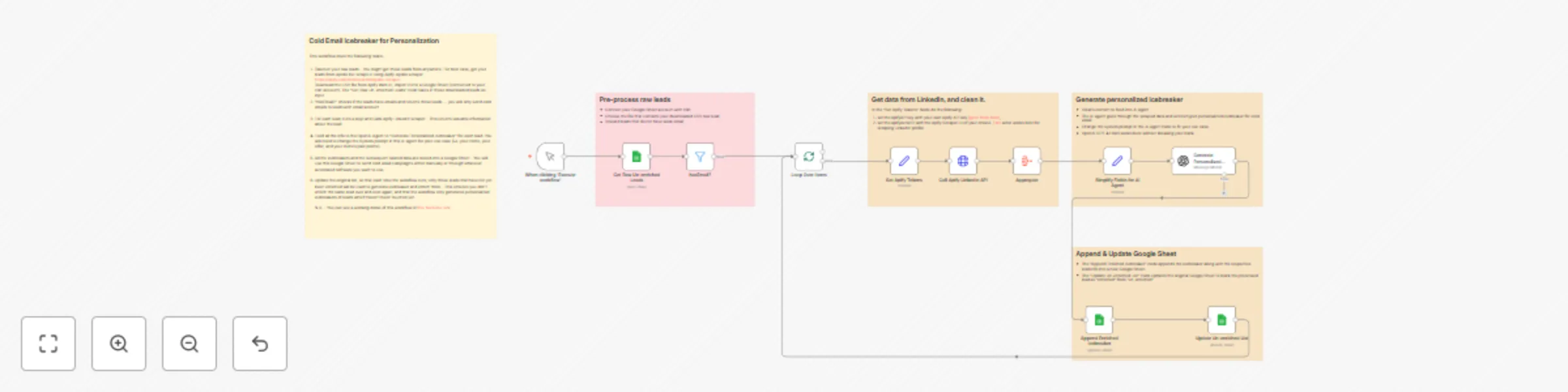
This n8n workflow scrapes LinkedIn data for your leads, feeds it into a GPT 4 AI agent, and generates laser targeted, personalized icebreakers you can drop into your cold email campaigns. It automa...

Best for

  • Lead Generation automation workflows
  • Multimodal AI automation workflows
  • advanced n8n builders looking for reusable templates

Tools used

n8n-nodes-base.manualtrigger, n8n-nodes-base.splitinbatches, n8n-nodes-base.httprequest, n8n-nodes-base.aggregate, @n8n/n8n-nodes-langchain.openai, n8n-nodes-base.googlesheets, n8n-nodes-base.filter, n8n-nodes-base.set

Source and attribution

This workflow is cataloged by N8N Workflows and links back to its original n8n.io source page by Erfan Mostafiz.

Original n8n.io source

1.1 Workflow description

Title
Generate personalized cold email icebreakers with GPT-4 Mini, Apify & LinkedIn
Workflow name
Generate personalized cold email icebreakers with GPT-4 Mini, Apify & LinkedIn

This n8n workflow scrapes LinkedIn data for your leads, feeds it into a GPT-4 AI agent, and generates laser-targeted, personalized icebreakers you can drop into your cold email campaigns.

It automates the personalization process at scale — saving you hours of research while sounding human and thoughtful.

Step-by-Step Setup (Beginner Friendly)

Step 1: Prepare Your Leads (Input Sheet)

  • Get your lead list based on your industry and niche from Apollo (free)
  • Copy the entire link
  • Go to Apify and use this Apollo Scraper to scrape the leads.
  • Download the result as CSV and upload the CSV to Google Sheets
  • Add a column at the end of the Sheet. Name this column as "status". Mark the entire column (every row) as "un-enriched" (this is important)
  • Connect your Google Sheets account to n8n
  • The workflow will pull leads from this sheet where status = un-enriched

Step 2: Set Your Credentials

Step 3: Customize the AI Agent

  • In the node “Generate Personalized Icebreaker”, adjust the system prompt.
  • Update it with your own niche, offer, tone, and insights
  • Keep the JSON output format exactly as shown. The rest of the workflow depends on it

Step 4: Run the Workflow

  • Click "Execute Workflow"
  • The system will: -- Pull all unenriched leads -- Filter out entries without email -- Scrape LinkedIn profiles using Apify -- Use GPT-4 to write a short, personalized icebreaker -- Save the result to a separate “Enriched” sheet -- Mark those leads as “enriched” in your original sheet

How It Works Behind the Scenes

  • Manual Trigger starts the workflow
  • Get Raw Leads from a Google Sheet (filter = un-enriched)
  • Filter for Valid Emails (hasEmail?)
  • Loop Over Leads
  • Set Apify API credentials
  • Call Apify’s LinkedIn Scraper using each lead's LinkedIn URL
  • Aggregate the scraped data
  • Simplify fields for AI prompt
  • Call OpenAI GPT-4.1 Mini with structured, data-rich prompt to generate icebreaker
  • Append results to Enriched Sheet
  • Update original list’s status to prevent reprocessing
  • Loop continues to the next lead

Best Practices for Successful Use

  • Clean your leads: Remove unnecessary columns from your Google Sheet raw lead list
  • Throttle large batches: The Apify actor and OpenAI calls may hit rate limits. Process in small batches.
  • Customize prompt deeply: The better your AI instructions, the more believable your icebreakers will sound.
  • Use shortened company names and local slang: The system prompt already does this — keep it.
  • Avoid fluff: Keep the tone Spartan, specific, and real.

Ideal Use Cases

  • Cold email campaigns for SMB SaaS, agency offers, B2B sales
  • Personalized intros for LinkedIn DMs
  • Data enrichment for lead gen automation
  • Integrating with tools like Instantly.ai, Smartlead, or Mailshake

Demo Link

Watch the full walkthrough and see it in action: 👉 Watch me build this LIVE on YouTube

1.2 Logical Blocks

This catalog entry is organized from the workflow JSON. The node-level section below shows the executable blocks available for review before importing the template.

2. Block-by-Block Analysis

Block 1 - When clicking ‘Execute workflow’

Type / Role
n8n-nodes-base.manualTrigger - manualTrigger
Config choices
Version 1

Block 2 - Loop Over Items

Type / Role
n8n-nodes-base.splitInBatches - splitInBatches
Config choices
Version 3

Block 3 - Call Apify LinkedIn API

Type / Role
n8n-nodes-base.httpRequest - httpRequest
Config choices
Version 4.2

Block 4 - Aggregate

Type / Role
n8n-nodes-base.aggregate - aggregate
Config choices
Version 1

Block 5 - Generate Personalized Icebreaker

Type / Role
@n8n/n8n-nodes-langchain.openAi - openAi
Config choices
Version 1.8

Block 6 - Append Enriched Icebreaker

Type / Role
n8n-nodes-base.googleSheets - googleSheets
Config choices
Version 4.6

Block 7 - Update Un-enriched List

Type / Role
n8n-nodes-base.googleSheets - googleSheets
Config choices
Version 4.6

Block 8 - hasEmail?

Type / Role
n8n-nodes-base.filter - filter
Config choices
Version 2.2

Block 9 - Simplify Fields for AI Agent

Type / Role
n8n-nodes-base.set - set
Config choices
Version 3.4

Block 10 - Sticky Note

Type / Role
n8n-nodes-base.stickyNote - stickyNote
Config choices
Version 1

Block 11 - Sticky Note1

Type / Role
n8n-nodes-base.stickyNote - stickyNote
Config choices
Version 1

Block 12 - Sticky Note2

Type / Role
n8n-nodes-base.stickyNote - stickyNote
Config choices
Version 1

Block 13 - Get Raw Un-enriched Leads

Type / Role
n8n-nodes-base.googleSheets - googleSheets
Config choices
Version 4.6

Block 14 - Set Apify Tokens

Type / Role
n8n-nodes-base.set - set
Config choices
Version 3.4

Block 15 - Sticky Note3

Type / Role
n8n-nodes-base.stickyNote - stickyNote
Config choices
Version 1

Block 16 - Sticky Note4

Type / Role
n8n-nodes-base.stickyNote - stickyNote
Config choices
Version 1

3. Summary Table

Workflow Generate personalized cold email icebreakers with GPT-4 Mini, Apify & LinkedIn
Complexity advanced
Nodes 16
Categories Lead Generation, Multimodal AI
Author Erfan Mostafiz
Published 28 Jul 2025

4. Reproducing the Workflow from Scratch

  1. 1. Download the workflow JSON

    Use the JSON export at /data/workflows/6599/6599.json as the source template for this automation.

  2. 2. Import the template into n8n

    Open n8n, import the downloaded JSON, and review each node before activating the workflow.

  3. 3. Configure credentials and variables

    Replace placeholder credentials, API keys, webhook URLs, account IDs, and environment-specific values with your own settings.

  4. 4. Test with sample data

    Run the workflow manually or in a staging workspace, inspect node output, and confirm downstream systems receive the expected data.

  5. 5. Activate and monitor

    Enable the workflow only after testing, then monitor executions, errors, and rate limits during the first production runs.

5. General Notes & Resources

Review imported nodes carefully before activation. This catalog entry is intended to help you inspect the workflow structure, understand required services, and find related templates faster.

Node names, credentials, schedules, webhook paths, and external service limits may need adjustment for your workspace.

Frequently asked questions

What does Generate personalized cold email icebreakers with GPT-4 Mini, Apify & LinkedIn do?

This n8n workflow scrapes LinkedIn data for your leads, feeds it into a GPT 4 AI agent, and generates laser targeted, personalized icebreakers you can drop into your cold email campaigns. It automa...

What do I need before importing this workflow?

Review the workflow JSON, configure any required credentials in n8n, and test the automation in a safe workspace before using it in production.

Can I customize this workflow?

Yes. Use the block-by-block analysis and the downloadable JSON to inspect each node, then adjust credentials, prompts, schedules, filters, or destinations for your Lead Generation, Multimodal AI use case.