Block 1 - Sticky Note5
- Type / Role
- n8n-nodes-base.stickyNote - stickyNote
- Config choices
- Version 1


 Early Deal
This workflow is provided as-is. Please review and test before using in production.
MemeCoin Art Generator using Gemini Flash NanoBanana & upload to Twitter Watch the Youtube Tutorial video [ ](http...
n8n-nodes-base.stickynote, n8n-nodes-base.twitter, n8n-nodes-base.scheduletrigger, @n8n/n8n-nodes-langchain.agent, @n8n/n8n-nodes-langchain.outputparserstructured, @n8n/n8n-nodes-langchain.lmchatgooglegemini, n8n-nodes-base.httprequest, n8n-nodes-base.extractfromfile
This workflow is cataloged by N8N Workflows and links back to its original n8n.io source page by Jay Emp0.
Original n8n.io source> Watch the Youtube Tutorial video
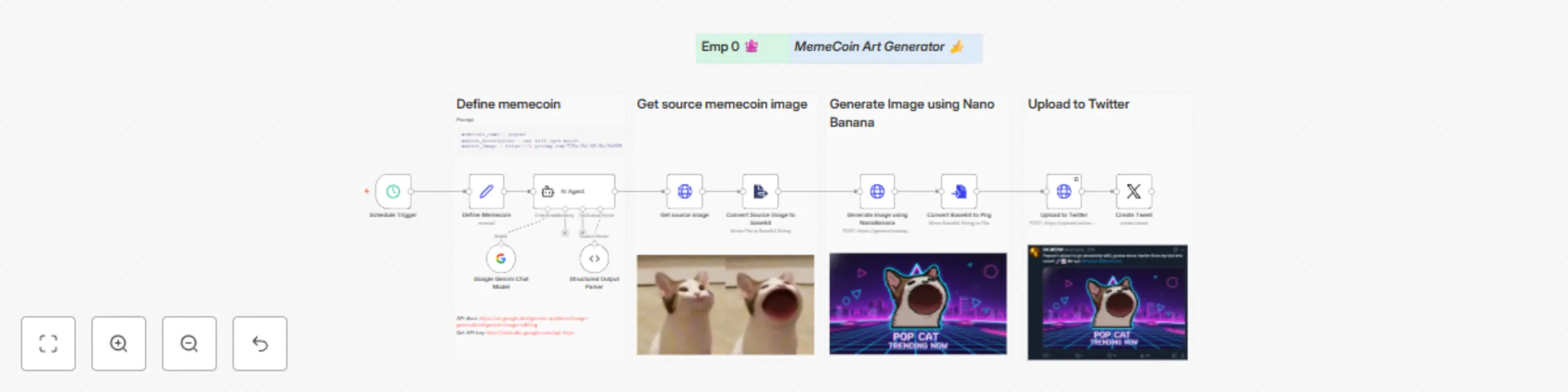
Automatically generates memecoin art and posts it to Twitter (X) powered by Google Gemini, NanoBanana image generation, and n8n automation.
This workflow creates viral style memecoin images (like Popcat) and posts them directly to Twitter with a witty, Gen Z style tweet.
It combines text to image AI, scheduled triggers, and social publishing, all in one seamless flow.
Workflow flow:
| Node | Function |
|---|---|
| Schedule Trigger | Runs automatically at chosen intervals to start meme generation. |
| Define Memecoin | Defines mascot name, description, and base image URL. |
| AI Agent | Generates tweet text and creative image prompt using Google Gemini. |
| Google Gemini Chat Model | Provides trending topic context and meme phrasing. |
| Get Source Image | Fetches the original mascot image (e.g., Popcat). |
| Convert Source Image to Base64 | Prepares image for AI based remixing. |
| Generate Image using NanoBanana | Sends the prompt and base image to Gemini Image API for art generation. |
| Convert Base64 to PNG | Converts the AI output to an image file. |
| Upload to Twitter | Uploads generated image to Twitter via media upload API. |
| Create Tweet | Publishes the tweet with attached image. |
1️⃣ Schedule Trigger - starts the automation (e.g., hourly or daily).
2️⃣ Define Memecoin - stores your mascot metadata:
memecoin_name: popcat
mascot_description: cat with open mouth
mascot_image: https://i.pinimg.com/736x/9d/05/6b/9d056b5b97c0513a4fc9d9cd93304a05.jpg
3️⃣ AI Agent - prompts Gemini to:
Base Source Image:
Generated Image (AI remix):
Published Tweet:
Example tweet text: > Popcat's about to go absolutely wild, gonna moon harder than my last test score! 🚀📈 We up! #Popcat #Memecoin
| Tool | Purpose |
|---|---|
| n8n (Cloud or Self hosted) | Workflow automation platform |
| Google Gemini API Key | For generating tweet and image prompts |
| Twitter (X) API OAuth1 + OAuth2 | For uploading and posting tweets |
memecoin art generator.json. In the Define Memecoin node, edit these fields to change your meme theme:
memecoin_name: "doggo"
mascot_description: "shiba inu in astronaut suit"
mascot_image: "https://example.com/shiba.jpg"
That’s it - next cycle will generate your new meme and post it.
This catalog entry is organized from the workflow JSON. The node-level section below shows the executable blocks available for review before importing the template.
| Workflow | Generate MemeCoin Art with Gemini Flash & NanoBanana and Post to Twitter |
|---|---|
| Complexity | advanced |
| Nodes | 17 |
| Categories | Social Media, Multimodal AI |
| Author | Jay Emp0 |
| Published | 10 Oct 2025 |
Use the JSON export at /data/workflows/9470/9470.json as the source template for this automation.
Open n8n, import the downloaded JSON, and review each node before activating the workflow.
Replace placeholder credentials, API keys, webhook URLs, account IDs, and environment-specific values with your own settings.
Run the workflow manually or in a staging workspace, inspect node output, and confirm downstream systems receive the expected data.
Enable the workflow only after testing, then monitor executions, errors, and rate limits during the first production runs.
Review imported nodes carefully before activation. This catalog entry is intended to help you inspect the workflow structure, understand required services, and find related templates faster.
Node names, credentials, schedules, webhook paths, and external service limits may need adjustment for your workspace.
MemeCoin Art Generator using Gemini Flash NanoBanana & upload to Twitter Watch the Youtube Tutorial video [ ](http...
Review the workflow JSON, configure any required credentials in n8n, and test the automation in a safe workspace before using it in production.
Yes. Use the block-by-block analysis and the downloadable JSON to inspect each node, then adjust credentials, prompts, schedules, filters, or destinations for your Social Media, Multimodal AI use case.