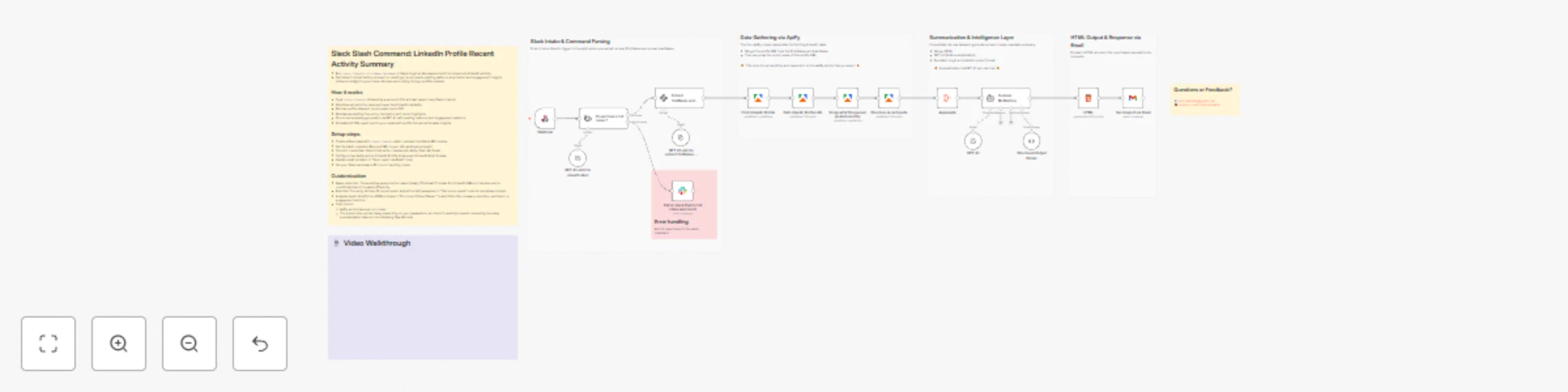
Generate LinkedIn activity reports via Slack commands with GPT-4.1 and email

Workflow preview

Workflow preview
100%
Generate LinkedIn activity reports via Slack commands with GPT-4.1 and email preview
Open on n8n.io

Important notice

This workflow is provided as-is. Please review and test before using in production.

1. Workflow Overview

This workflow helps Customer Success Managers and customer success professionals quickly gather intelligence on clients or prospects by analyzing their recent LinkedIn activity via a simple Slack c...

Best for

  • Lead Generation automation workflows
  • AI Summarization automation workflows
  • advanced n8n builders looking for reusable templates

Tools used

n8n-nodes-base.webhook, n8n-nodes-base.aggregate, @n8n/n8n-nodes-langchain.outputparserstructured, @n8n/n8n-nodes-langchain.agent, n8n-nodes-base.html, n8n-nodes-base.gmail, n8n-nodes-base.stickynote, n8n-nodes-base.slack

Source and attribution

This workflow is cataloged by N8N Workflows and links back to its original n8n.io source page by Emir Belkahia.

Original n8n.io source

1.1 Workflow description

Title
Generate LinkedIn activity reports via Slack commands with GPT-4.1 and email
Workflow name
Generate LinkedIn activity reports via Slack commands with GPT-4.1 and email

This workflow helps Customer Success Managers and customer success professionals quickly gather intelligence on clients or prospects by analyzing their recent LinkedIn activity via a simple Slack command.

Who's it for

CSMs, Account Managers, and Sales professionals who need fast, structured insights about a person's LinkedIn presence before a call, meeting, or outreach.

What it does (and doesn't do)

It DOES:

  • Fetch recent LinkedIn posts from any profile
  • Analyze posting frequency and cadence patterns
  • Identify top themes and focus areas
  • Extract recent highlights with context
  • Generate a clean HTML report sent via email

It DOESN'T:

  • Access private/non-public LinkedIn content
  • Provide real-time updates (it's a snapshot)
  • Replace actual researches when needed

Think of it as: Your personal LinkedIn research assistant that turns a name into actionable intelligence in under a minute.

How it works

  1. Slack command - Type /check-linkedin [Full Name] in Slack
  2. Name validation - AI verifies you provided a full name (not just "John")
  3. Profile discovery - Finds the correct LinkedIn profile via Apify
  4. Content scraping - Pulls their recent posts (last 20)
  5. AI analysis - GPT-4.1 analyzes posting patterns, topics, and highlights
  6. Report generation - Creates a formatted HTML email report
  7. Email delivery - Sends the intelligence brief to your inbox

Set up steps

Setup time: ~15 minutes

  1. Create or use your existing Slack app and add a Slash Command (it can be done here https://api.slack.com/apps)
  2. Configure the webhook URL in your Slack app
  3. Connect credentials:
    • Slack OAuth
    • Apify API
    • OpenAI API
    • Gmail OAuth
  4. Update the email recipient in "Send report via Email" node
  5. Test with a known LinkedIn profile

Requirements

  • Slack workspace (with app installation permissions)
  • Apify account with credits
  • OpenAI API key (GPT-4.1 access)
  • Gmail account
  • Apify actors:
    • LinkedIn Profile Finder
    • LinkedIn Post Scraper

Cost estimation

~$0.05-0.09 per profile check. You could research 11-20 people for $1.

⚠️ Cost Disclaimer: The costs displayed above are indicative only and may vary significantly depending on which n8n actors you select. Some actors incur monthly charges—for example, one of the two actors used in this workflow costs $35/month. So, I recommend using this actor only when there's a clear business need for it. For cost optimization, consider switching to alternative actors that can deliver similar / simpler functionality at a lower cost. If you plan to use this workflow extensively, I strongly suggest performing a budget assessment and evaluating other actor options to maximize cost efficiency.

The workflow uses GPT-4.1-mini for lightweight classification and GPT-4.1 for the heavy analysis to balance quality and cost.

Known Limitations

Common names have limited accuracy: Very common names (e.g., "John Smith") often fail to identify the correct person accurately. An improved version could support company name in the slash command as an additional input to help narrow down results and improve first-try matching accuracy.

💡 Pro tips

Check before important meetings: Run this 15-30 minutes before a call. The email report gives you conversation starters and context about what they care about.

Batch your research: If you have multiple clients or prospects, queue them up. Just remember each lookup costs ~$0.05-0.09.

Watch your Apify credits: The LinkedIn scrapers are the main cost driver. Monitor your Apify usage if you're doing high volume.

Don't spam the same profile: LinkedIn may rate-limit. Space out repeat checks on the same person by at least a few hours.

Review the "Quick Scan" section first: The email report starts with key stats and top focus areas. Perfect for a 30-second pre-call prep.

What to do after the workflow runs

  1. Check your email - Report arrives in 30-90 seconds
  2. Review the report - Latest post date, cadence, and top themes
  3. Read Recent Activity Summary - High-level overview of their content
  4. Dive into Detailed Analysis - Two main topics with keywords and rationale
  5. Use it strategically:
    • Reference their recent posts in your outreach
    • Ask about topics they're clearly passionate about
    • Tailor your pitch to their demonstrated interests
    • Avoid generic "saw you on LinkedIn" messages

Questions or Feedback?

📧 [email protected]
💼 linkedin.com/in/emirbelkahia

1.2 Logical Blocks

This catalog entry is organized from the workflow JSON. The node-level section below shows the executable blocks available for review before importing the template.

2. Block-by-Block Analysis

Block 1 - Webhook

Type / Role
n8n-nodes-base.webhook - webhook
Config choices
Version 2.1

Block 2 - Aggregate

Type / Role
n8n-nodes-base.aggregate - aggregate
Config choices
Version 1

Block 3 - Structured Output Parser

Type / Role
@n8n/n8n-nodes-langchain.outputParserStructured - outputParserStructured
Config choices
Version 1.3

Block 4 - Summer McBriefing

Type / Role
@n8n/n8n-nodes-langchain.agent - agent
Config choices
Version 3

Block 5 - HTML

Type / Role
n8n-nodes-base.html - html
Config choices
Version 1.2

Block 6 - Send report via Email

Type / Role
n8n-nodes-base.gmail - gmail
Config choices
Version 2.1

Block 7 - Sticky Note12

Type / Role
n8n-nodes-base.stickyNote - stickyNote
Config choices
Version 1

Block 8 - Tell on slack that no full name was found

Type / Role
n8n-nodes-base.slack - slack
Config choices
Version 2.3

Block 9 - Sticky Note1

Type / Role
n8n-nodes-base.stickyNote - stickyNote
Config choices
Version 1

Block 10 - GPT 4.1-mini for classification

Type / Role
@n8n/n8n-nodes-langchain.lmChatOpenAi - lmChatOpenAi
Config choices
Version 1.3

Block 11 - Do we have a full name ?

Type / Role
@n8n/n8n-nodes-langchain.textClassifier - textClassifier
Config choices
Version 1.1

Block 12 - GPT 4.1-mini to extract firstName + lastName

Type / Role
@n8n/n8n-nodes-langchain.lmChatOpenAi - lmChatOpenAi
Config choices
Version 1.3

Block 13 - Sticky Note

Type / Role
n8n-nodes-base.stickyNote - stickyNote
Config choices
Version 1

Block 14 - Sticky Note2

Type / Role
n8n-nodes-base.stickyNote - stickyNote
Config choices
Version 1

Block 15 - Sticky Note3

Type / Role
n8n-nodes-base.stickyNote - stickyNote
Config choices
Version 1

Block 16 - Sticky Note4

Type / Role
n8n-nodes-base.stickyNote - stickyNote
Config choices
Version 1

Block 17 - Sticky Note5

Type / Role
n8n-nodes-base.stickyNote - stickyNote
Config choices
Version 1

Block 18 - Extract firstName and lastName

Type / Role
@n8n/n8n-nodes-langchain.informationExtractor - informationExtractor
Config choices
Version 1.2

Block 19 - Get Linkedin Profile URL

Type / Role
@apify/n8n-nodes-apify.apify - apify
Config choices
Version 1

Block 20 - Find Linkedin Profile

Type / Role
@apify/n8n-nodes-apify.apify - apify
Config choices
Version 1

Block 21 - Scrap what this person posted recently

Type / Role
@apify/n8n-nodes-apify.apify - apify
Config choices
Version 1

Block 22 - Structure recent posts

Type / Role
@apify/n8n-nodes-apify.apify - apify
Config choices
Version 1

Block 23 - GPT 4.1

Type / Role
@n8n/n8n-nodes-langchain.lmChatOpenAi - lmChatOpenAi
Config choices
Version 1.3

Block 24 - Sticky Note9

Type / Role
n8n-nodes-base.stickyNote - stickyNote
Config choices
Version 1

3. Summary Table

Workflow Generate LinkedIn activity reports via Slack commands with GPT-4.1 and email
Complexity advanced
Nodes 24
Categories Lead Generation, AI Summarization
Author Emir Belkahia
Published 20 Nov 2025

4. Reproducing the Workflow from Scratch

  1. 1. Download the workflow JSON

    Use the JSON export at /data/workflows/11052/11052.json as the source template for this automation.

  2. 2. Import the template into n8n

    Open n8n, import the downloaded JSON, and review each node before activating the workflow.

  3. 3. Configure credentials and variables

    Replace placeholder credentials, API keys, webhook URLs, account IDs, and environment-specific values with your own settings.

  4. 4. Test with sample data

    Run the workflow manually or in a staging workspace, inspect node output, and confirm downstream systems receive the expected data.

  5. 5. Activate and monitor

    Enable the workflow only after testing, then monitor executions, errors, and rate limits during the first production runs.

5. General Notes & Resources

Review imported nodes carefully before activation. This catalog entry is intended to help you inspect the workflow structure, understand required services, and find related templates faster.

Node names, credentials, schedules, webhook paths, and external service limits may need adjustment for your workspace.

Frequently asked questions

What does Generate LinkedIn activity reports via Slack commands with GPT-4.1 and email do?

This workflow helps Customer Success Managers and customer success professionals quickly gather intelligence on clients or prospects by analyzing their recent LinkedIn activity via a simple Slack c...

What do I need before importing this workflow?

Review the workflow JSON, configure any required credentials in n8n, and test the automation in a safe workspace before using it in production.

Can I customize this workflow?

Yes. Use the block-by-block analysis and the downloadable JSON to inspect each node, then adjust credentials, prompts, schedules, filters, or destinations for your Lead Generation, AI Summarization use case.