Block 1 - When clicking ‘Execute workflow’
- Type / Role
- n8n-nodes-base.manualTrigger - manualTrigger
- Config choices
- Version 1


 Early Deal
This workflow is provided as-is. Please review and test before using in production.
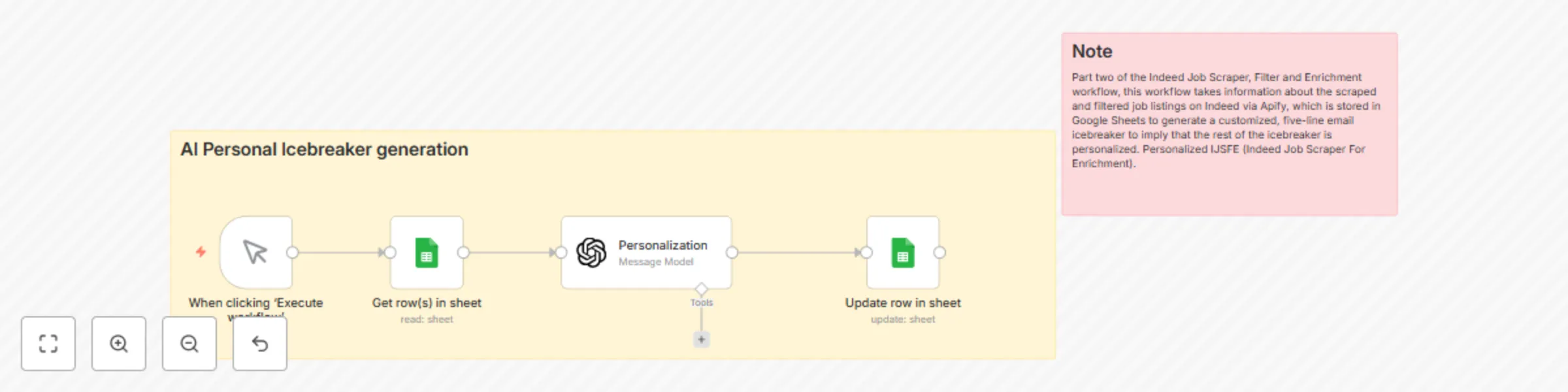
Part two of the Indeed Job Scraper, Filter, and Enrichment workflow, this workflow takes information about the scraped and filtered job listings on Indeed via Apify, which is stored in Google Sheet...
n8n-nodes-base.manualtrigger, n8n-nodes-base.googlesheets, n8n-nodes-base.stickynote, @n8n/n8n-nodes-langchain.openai
This workflow is cataloged by N8N Workflows and links back to its original n8n.io source page by Adrian Bent.
Original n8n.io sourcePart two of the Indeed Job Scraper, Filter, and Enrichment workflow, this workflow takes information about the scraped and filtered job listings on Indeed via Apify, which is stored in Google Sheets to generate a customized, five-line email icebreaker that implies the rest of the icebreaker is personalized. Personalized IJSFE (Indeed Job Scraper For Enrichment). ++ I am an engineering student, so I love my acronyms.
Instant Icebreaker Generation - Convert hours of research, copywriting and personalization into seconds automatically Live Integration - Generate and send personalized icebreakers whenever, wherever Virtually Complete Automation - From research into company and job description to personalized response with the AI solution, this workflow does it in a click. Professional Presentation - Because the chatbot has context about the company and the job listing, it generates an icebreaker that makes the reader think that there was some research done
Google Sheets Template: Create a Google Sheet with these variables:
jobUrl - Unique identifier for job listings title - Position Title descriptionText - Description of job listing hiringDemand/isHighVolumeHiring - Are they hiring at high volume? hiringDemand/isUrgentHire - Are they hiring at high urgency? isRemote - Is this job remote? jobType/0 - Job type: In person, Remote, Part-time, etc. companyCeo/name - CEO name collected from Tavily’s search icebreaker - AI-generated icebreakers for each job listing scrapedCeo - CEO name collected from Apify Scraper email - Email listed on for job listing companyName - Name of the company that posted the job companyDescription - Description of the company that posted the job companyLinks/corporateWebsite - Website of the company that posted the job companyNumEmployees - Number of employees the company listed that they have location/country - Location of where job is to take place salary/salaryText - Salary on job listing
Setup Instructions:
Google Sheets Search & Update Setup:
Create a new Google Sheet with these column headers in the first row Name the sheet whatever you please Connect your Google Sheets OAuth credentials in n8n Update the document ID in the workflow nodes
The search logic in the first Google Sheets node relies on the ID column for icebreaker generation, so this structure is essential for the workflow to function correctly. Feel free to reach out for additional help or clarification at my Gmail: [email protected], and I'll get back to you as soon as I can.
AI Icebreaker Generation Setup:
Configure OpenAI API for sophisticated proposal writing Implement example-based training with input/output for more specific output Set up JSON formatting for structure (Personally, I think JSON is easier to handle as an output)
This catalog entry is organized from the workflow JSON. The node-level section below shows the executable blocks available for review before importing the template.
| Workflow | Generate job application icebreakers with GPT-4 and Indeed data from Google Sheets |
|---|---|
| Complexity | intermediate |
| Nodes | 6 |
| Categories | Lead Nurturing, Multimodal AI |
| Author | Adrian Bent |
| Published | 18 Jul 2025 |
Use the JSON export at /data/workflows/6113/6113.json as the source template for this automation.
Open n8n, import the downloaded JSON, and review each node before activating the workflow.
Replace placeholder credentials, API keys, webhook URLs, account IDs, and environment-specific values with your own settings.
Run the workflow manually or in a staging workspace, inspect node output, and confirm downstream systems receive the expected data.
Enable the workflow only after testing, then monitor executions, errors, and rate limits during the first production runs.
Review imported nodes carefully before activation. This catalog entry is intended to help you inspect the workflow structure, understand required services, and find related templates faster.
Node names, credentials, schedules, webhook paths, and external service limits may need adjustment for your workspace.
Part two of the Indeed Job Scraper, Filter, and Enrichment workflow, this workflow takes information about the scraped and filtered job listings on Indeed via Apify, which is stored in Google Sheet...
Review the workflow JSON, configure any required credentials in n8n, and test the automation in a safe workspace before using it in production.
Yes. Use the block-by-block analysis and the downloadable JSON to inspect each node, then adjust credentials, prompts, schedules, filters, or destinations for your Lead Nurturing, Multimodal AI use case.