Generate ideal customer profile leads & personalized pitches with GPT-4o-mini, Perplexity and Apify

Workflow preview

Workflow preview
100%
Generate ideal customer profile leads & personalized pitches with GPT-4o-mini, Perplexity and Apify preview
Open on n8n.io

Important notice

This workflow is provided as-is. Please review and test before using in production.

1. Workflow Overview

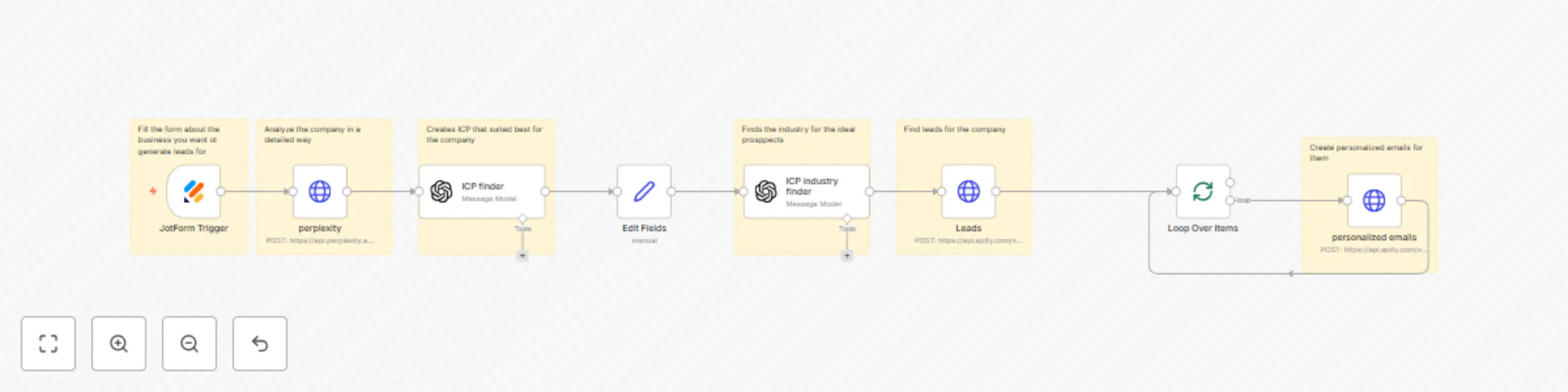
n8n Workflow: Automated Lead Generation & Personalized Outreach Overview This n8n workflow automates t...

Best for

  • Lead Generation automation workflows
  • Multimodal AI automation workflows
  • intermediate n8n builders looking for reusable templates

Tools used

n8n-nodes-base.jotformtrigger, n8n-nodes-base.set, n8n-nodes-base.splitinbatches, n8n-nodes-base.stickynote, n8n-nodes-base.httprequest, @n8n/n8n-nodes-langchain.openai

Source and attribution

This workflow is cataloged by N8N Workflows and links back to its original n8n.io source page by neightn011.

Original n8n.io source

1.1 Workflow description

Title
Generate ideal customer profile leads & personalized pitches with GPT-4o-mini, Perplexity and Apify
Workflow name
Generate ideal customer profile leads & personalized pitches with GPT-4o-mini, Perplexity and Apify

n8n Workflow: Automated Lead Generation & Personalized Outreach

Overview

This n8n workflow automates the entire lead generation and personalized email creation process for businesses. It analyzes a company's profile, identifies ideal customer profiles (ICP), finds matching leads, and generates customized outreach emails.


Workflow Components

1. JotForm Trigger

Purpose: Form Submission Entry Point

  • Captures business information through JotForm (Form ID: 252802732808054)
  • Initiates the automation workflow when form is submitted
  • Collects company website and business details

2. Perplexity API Integration

Purpose: Company Analysis

  • Method: POST request to Perplexity AI Search API
  • Function: Performs detailed research on the submitted company website
  • Output: Comprehensive business intelligence and market positioning data

3. ICP Finder (OpenAI GPT-4o-mini)

Purpose: Ideal Customer Profile Creation

  • Model: GPT-4o-mini
  • Role: Expert client acquisition manager
  • Task: Analyzes company details and generates best-fit customer profile
  • Input: Company snippet from Perplexity research
  • Output: Detailed ICP description

4. Edit Fields

Purpose: Data Transformation

  • Extracts and formats the ICP output
  • Prepares data for next workflow stage
  • Ensures clean data flow between nodes

5. ICP Industry Finder (OpenAI GPT-4o-mini)

Purpose: Industry Classification

  • Model: GPT-4o-mini
  • Role: Expert ICP analyzer
  • Task: Identifies specific business sector matching the ICP
  • Rules:
    • Returns single industry sector only
    • Uses professional terminology (e.g., "healthcare", "call centre", "plumber")
    • Excludes all SaaS-related companies
    • Avoids generic terms like "technology industry"
  • Output: Single industry sector name

6. Leads Generator (Apify API)

Purpose: Lead Discovery

  • API: Local Business Lead Generator by james.logantech
  • Method: Synchronous run with dataset items retrieval
  • Configuration:
    • Location: United States
    • Maximum Results: 5 leads
    • Business Types: Based on ICP industry output
  • Output: List of qualified business leads

7. Loop Over Items

Purpose: Batch Processing

  • Processes leads individually
  • Enables personalized email creation for each lead
  • Controls workflow iteration

8. Personalized Emails (Apify API)

Purpose: Custom Email Generation

  • API: Pitches Pro by onescales
  • Method: Synchronous run with dataset items retrieval
  • Configuration:
    • Promoting: Automation services
    • Benefits: "Save 10+ hours per week by automating manual tasks"
    • Goal: Partnership
    • Tone: Professional yet approachable, confident but not pushy
    • Language: English
    • Additional Notes: Focus on time-saving, avoid technical jargon, include soft CTA
  • Output: Personalized email for each lead

Data Flow

JotForm → Perplexity Analysis → ICP Generation → Field Formatting → 
Industry Classification → Lead Discovery → Batch Processing → Email Personalization

Key Features

Fully Automated: No manual intervention required
AI-Powered: Uses GPT-4o-mini for intelligent ICP analysis
Personalized: Custom emails for each prospect
Scalable: Processes multiple leads in batches
Time-Saving: Automates 10+ hours of manual work per week


Requirements

  • APIs Required:
    • Perplexity AI (with Authorization token)
    • OpenAI (GPT-4o-mini access)
    • Apify (2 actors: Local Business Lead Generator & Pitches Pro)
  • Form Platform: JotForm account
  • n8n Instance: Self-hosted or cloud

1.2 Logical Blocks

This catalog entry is organized from the workflow JSON. The node-level section below shows the executable blocks available for review before importing the template.

2. Block-by-Block Analysis

Block 1 - JotForm Trigger

Type / Role
n8n-nodes-base.jotFormTrigger - jotFormTrigger
Config choices
Version 1

Block 2 - Edit Fields

Type / Role
n8n-nodes-base.set - set
Config choices
Version 3.4

Block 3 - Loop Over Items

Type / Role
n8n-nodes-base.splitInBatches - splitInBatches
Config choices
Version 3

Block 4 - Sticky Note

Type / Role
n8n-nodes-base.stickyNote - stickyNote
Config choices
Version 1

Block 5 - perplexity

Type / Role
n8n-nodes-base.httpRequest - httpRequest
Config choices
Version 4.2

Block 6 - Sticky Note1

Type / Role
n8n-nodes-base.stickyNote - stickyNote
Config choices
Version 1

Block 7 - Sticky Note2

Type / Role
n8n-nodes-base.stickyNote - stickyNote
Config choices
Version 1

Block 8 - Sticky Note3

Type / Role
n8n-nodes-base.stickyNote - stickyNote
Config choices
Version 1

Block 9 - Sticky Note4

Type / Role
n8n-nodes-base.stickyNote - stickyNote
Config choices
Version 1

Block 10 - Sticky Note5

Type / Role
n8n-nodes-base.stickyNote - stickyNote
Config choices
Version 1

Block 11 - personalized emails

Type / Role
n8n-nodes-base.httpRequest - httpRequest
Config choices
Version 4.2

Block 12 - Leads

Type / Role
n8n-nodes-base.httpRequest - httpRequest
Config choices
Version 4.2

Block 13 - ICP finder

Type / Role
@n8n/n8n-nodes-langchain.openAi - openAi
Config choices
Version 1.8

Block 14 - ICP industry finder

Type / Role
@n8n/n8n-nodes-langchain.openAi - openAi
Config choices
Version 1.8

3. Summary Table

Workflow Generate ideal customer profile leads & personalized pitches with GPT-4o-mini, Perplexity and Apify
Complexity intermediate
Nodes 14
Categories Lead Generation, Multimodal AI
Author neightn011
Published 16 Oct 2025

4. Reproducing the Workflow from Scratch

  1. 1. Download the workflow JSON

    Use the JSON export at /data/workflows/9794/9794.json as the source template for this automation.

  2. 2. Import the template into n8n

    Open n8n, import the downloaded JSON, and review each node before activating the workflow.

  3. 3. Configure credentials and variables

    Replace placeholder credentials, API keys, webhook URLs, account IDs, and environment-specific values with your own settings.

  4. 4. Test with sample data

    Run the workflow manually or in a staging workspace, inspect node output, and confirm downstream systems receive the expected data.

  5. 5. Activate and monitor

    Enable the workflow only after testing, then monitor executions, errors, and rate limits during the first production runs.

5. General Notes & Resources

Review imported nodes carefully before activation. This catalog entry is intended to help you inspect the workflow structure, understand required services, and find related templates faster.

Node names, credentials, schedules, webhook paths, and external service limits may need adjustment for your workspace.

Frequently asked questions

What does Generate ideal customer profile leads & personalized pitches with GPT-4o-mini, Perplexity and Apify do?

n8n Workflow: Automated Lead Generation & Personalized Outreach Overview This n8n workflow automates t...

What do I need before importing this workflow?

Review the workflow JSON, configure any required credentials in n8n, and test the automation in a safe workspace before using it in production.

Can I customize this workflow?

Yes. Use the block-by-block analysis and the downloadable JSON to inspect each node, then adjust credentials, prompts, schedules, filters, or destinations for your Lead Generation, Multimodal AI use case.