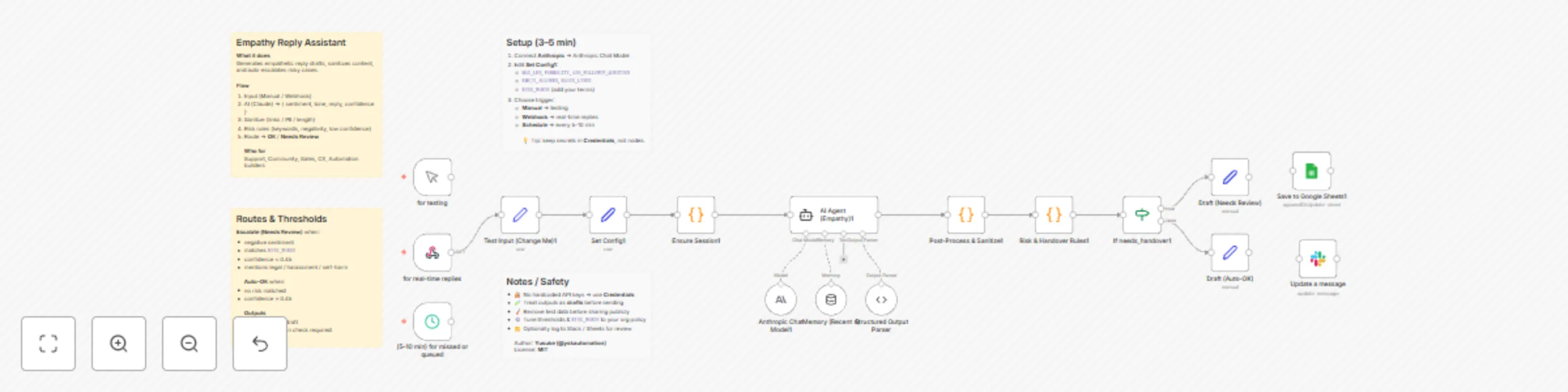
Generate empathetic customer replies with Claude AI and auto-escalation

Workflow preview

Workflow preview
100%
Generate empathetic customer replies with Claude AI and auto-escalation preview
Open on n8n.io

Important notice

This workflow is provided as-is. Please review and test before using in production.

1. Workflow Overview

Overview Generate empathetic, professional reply drafts for customer or user messages. The workflow detects sentiment , tone , and risk level , drafts a concise response, sanitizes PII/links/emo...

Best for

  • Ticket Management automation workflows
  • Multimodal AI automation workflows
  • advanced n8n builders looking for reusable templates

Tools used

n8n-nodes-base.set, n8n-nodes-base.code, @n8n/n8n-nodes-langchain.agent, @n8n/n8n-nodes-langchain.lmchatanthropic, @n8n/n8n-nodes-langchain.memorybufferwindow, @n8n/n8n-nodes-langchain.outputparserstructured, n8n-nodes-base.if, n8n-nodes-base.webhook

Source and attribution

This workflow is cataloged by N8N Workflows and links back to its original n8n.io source page by Yusuke.

Original n8n.io source

1.1 Workflow description

Title
Generate empathetic customer replies with Claude AI and auto-escalation
Workflow name
Generate empathetic customer replies with Claude AI and auto-escalation

🧠 Overview

Generate empathetic, professional reply drafts for customer or user messages.
The workflow detects sentiment, tone, and risk level, drafts a concise response, sanitizes PII/links/emojis, and auto-escalates risky or low-confidence cases to human review.


⚙️ How It Works

  1. Input — Manual Test or Webhook Trigger
  2. AI Agent (Empathy) — returns { sentiment, tone, reply, confidence, needs_handover }
  3. Post-Process & Sanitize — removes URLs/hashtags, masks PII, caps length
  4. Risk & Handover Rules — checks confidence threshold, risk words, and negativity
  5. Routing — auto-send safe replies or flag to Needs Review

🧩 Setup Instructions (3–5 min)

  • Open Set Config1 and adjust:
    • MAX_LEN (default 600)
    • ADD_FOLLOWUP_QUESTION (true/false)
    • FORMALITY (auto | casual | polite)
    • EMOJI_ALLOWED (true/false), BLOCK_LINKS (true/false)
    • RISK_WORDS (e.g., refund, lawsuit, self-harm)
  • Connect Anthropic credential to Anthropic Chat Model
  • (Optional) Replace Manual Trigger with Webhook Trigger for real-time use

> Tip: If you need to show literal angle brackets in messages, use backticks like <example> (no HTML entities needed).


📚 Use Cases

1) SaaS Billing Complaints

  • Input: “I was billed after canceling. This is unacceptable.”
  • Output: Calm, apologetic reply with refund steps; escalates if refund is in RISK_WORDS or confidence < 0.45.

2) Product Bug Reports

  • Input: “Upload fails on large files since yesterday.”
  • Output: Acknowledges impact, requests logs, offers workaround; routes to auto-send if low risk and high confidence.

3) Delivery/Logistics Delays

  • Input: “My order is late again. Should I file a complaint?”
  • Output: Empathetic apology, ETA guidance, partial credit policy note; escalates if language indicates legal action.

4) Community Moderation / Abuse

  • Input: “Support is useless—you’re all scammers.”
  • Output: De-escalating, policy-aligned response; auto-flags due to negative sentiment + risk keyword match.

5) Safety / Self-harm Mentions

  • Input: “I feel like hurting myself if this isn’t fixed.”
  • Output: Immediate escalation, inserts approved resources; never auto-sends.

🚨 Auto-Escalation Rules (defaults)

  • Negative sentiment
  • Message matches any RISK_WORDS
  • confidence < 0.45
  • Mentions of legal, harassment, or self-harm context

🧪 Notes & Best Practices

  • 🔐 No hardcoded API keys — use n8n Credentials
  • 🧭 Tune thresholds and RISK_WORDS to your org policy
  • 🧩 Works on self-hosted or cloud n8n
  • ✅ Treat outputs as drafts; ship after human/policy review

🔗 Resources

1.2 Logical Blocks

This catalog entry is organized from the workflow JSON. The node-level section below shows the executable blocks available for review before importing the template.

2. Block-by-Block Analysis

Block 1 - Test Input (Change Me)1

Type / Role
n8n-nodes-base.set - set
Config choices
Version 3.4

Block 2 - Set Config1

Type / Role
n8n-nodes-base.set - set
Config choices
Version 3.4

Block 3 - Ensure Session1

Type / Role
n8n-nodes-base.code - code
Config choices
Version 2

Block 4 - AI Agent (Empathy)1

Type / Role
@n8n/n8n-nodes-langchain.agent - agent
Config choices
Version 1.6

Block 5 - Anthropic Chat Model1

Type / Role
@n8n/n8n-nodes-langchain.lmChatAnthropic - lmChatAnthropic
Config choices
Version 1.3

Block 6 - Memory (Recent 4)

Type / Role
@n8n/n8n-nodes-langchain.memoryBufferWindow - memoryBufferWindow
Config choices
Version 1.3

Block 7 - Structured Output Parser

Type / Role
@n8n/n8n-nodes-langchain.outputParserStructured - outputParserStructured
Config choices
Version 1.2

Block 8 - Post-Process & Sanitize1

Type / Role
n8n-nodes-base.code - code
Config choices
Version 2

Block 9 - Risk & Handover Rules1

Type / Role
n8n-nodes-base.code - code
Config choices
Version 2

Block 10 - If needs_handover1

Type / Role
n8n-nodes-base.if - if
Config choices
Version 2.2

Block 11 - Draft (Needs Review)

Type / Role
n8n-nodes-base.set - set
Config choices
Version 3.4

Block 12 - Draft (Auto-OK)

Type / Role
n8n-nodes-base.set - set
Config choices
Version 3.4

Block 13 - for real-time replies

Type / Role
n8n-nodes-base.webhook - webhook
Config choices
Version 2.1

Block 14 - (5–10 min) for missed or queued

Type / Role
n8n-nodes-base.scheduleTrigger - scheduleTrigger
Config choices
Version 1.2

Block 15 - Update a message

Type / Role
n8n-nodes-base.slack - slack
Config choices
Version 2.3

Block 16 - Save to Google Sheets1

Type / Role
n8n-nodes-base.googleSheets - googleSheets
Config choices
Version 4.5

Block 17 - for testing

Type / Role
n8n-nodes-base.manualTrigger - manualTrigger
Config choices
Version 1

Block 18 - Sticky Note

Type / Role
n8n-nodes-base.stickyNote - stickyNote
Config choices
Version 1

Block 19 - Sticky Note1

Type / Role
n8n-nodes-base.stickyNote - stickyNote
Config choices
Version 1

Block 20 - Sticky Note2

Type / Role
n8n-nodes-base.stickyNote - stickyNote
Config choices
Version 1

Block 21 - Sticky Note3

Type / Role
n8n-nodes-base.stickyNote - stickyNote
Config choices
Version 1

3. Summary Table

Workflow Generate empathetic customer replies with Claude AI and auto-escalation
Complexity advanced
Nodes 21
Categories Ticket Management, Multimodal AI
Author Yusuke
Published 05 Nov 2025

4. Reproducing the Workflow from Scratch

  1. 1. Download the workflow JSON

    Use the JSON export at /data/workflows/10539/10539.json as the source template for this automation.

  2. 2. Import the template into n8n

    Open n8n, import the downloaded JSON, and review each node before activating the workflow.

  3. 3. Configure credentials and variables

    Replace placeholder credentials, API keys, webhook URLs, account IDs, and environment-specific values with your own settings.

  4. 4. Test with sample data

    Run the workflow manually or in a staging workspace, inspect node output, and confirm downstream systems receive the expected data.

  5. 5. Activate and monitor

    Enable the workflow only after testing, then monitor executions, errors, and rate limits during the first production runs.

5. General Notes & Resources

Review imported nodes carefully before activation. This catalog entry is intended to help you inspect the workflow structure, understand required services, and find related templates faster.

Node names, credentials, schedules, webhook paths, and external service limits may need adjustment for your workspace.

Frequently asked questions

What does Generate empathetic customer replies with Claude AI and auto-escalation do?

Overview Generate empathetic, professional reply drafts for customer or user messages. The workflow detects sentiment , tone , and risk level , drafts a concise response, sanitizes PII/links/emo...

What do I need before importing this workflow?

Review the workflow JSON, configure any required credentials in n8n, and test the automation in a safe workspace before using it in production.

Can I customize this workflow?

Yes. Use the block-by-block analysis and the downloadable JSON to inspect each node, then adjust credentials, prompts, schedules, filters, or destinations for your Ticket Management, Multimodal AI use case.