Y

Yusuke

3
Workflows

Workflows by Yusuke

Workflow preview: Generate Twitter content in personal style with OpenAI & Supabase RAG
Free advanced

Generate Twitter content in personal style with OpenAI & Supabase RAG

# 🎯 Self-Learning X Content Engine (Creator RAG Booster) Learn your voice. Generate posts that sound *like you* — not AI. ## 🧩 Overview This n8n workflow builds a **personal RAG (Retrieval-Augmented Generation)** system for creators. It learns from your own past posts and generates new tweets, replies, and image prompts in your tone. ## ⚙️ How it works **Step 1 — Ingest** - Use the “Add to KB” Form to upload your past posts or notes. - Text + metadata (topic, style) are stored in **Supabase** as vectors. **Step 2 — Generate** - Use the “Generate Posts” Form to create new post ideas. - The Agent fetches the most relevant style snippets (via Supabase VectorStore) - Output includes: - 📝 `post` - 💬 `quote` - 💭 `reply` - 🎨 `image_prompt` ## 🔧 Setup (3–5 min) 1. Connect **Supabase** (URL + Key) - Make sure the table name is `documents` - Enable vector extension (`pgvector`) 2. Connect **OpenAI API Key** 3. Activate both **Forms** and open the URLs to test. 4. Optionally replace Forms with Webhooks. 💡 Tip: RLS enabled? Ensure your API key allows **insert/select** for `documents`. ## 🧠 Tech Stack - n8n (self-hosted) - Supabase (Vector Store) - OpenAI (gpt-4.1-mini) - HTML-based completion form ## 🪄 Credits Built by [Yusuke | @yskautomation](https://x.com/yskautomation) License: MIT[View on GitHub](https://github.com/yskmtb0714/n8n-workflows/blob/main/creator-rag-booster.json)

Y
Yusuke
Content Creation
10 Nov 2025
70
0
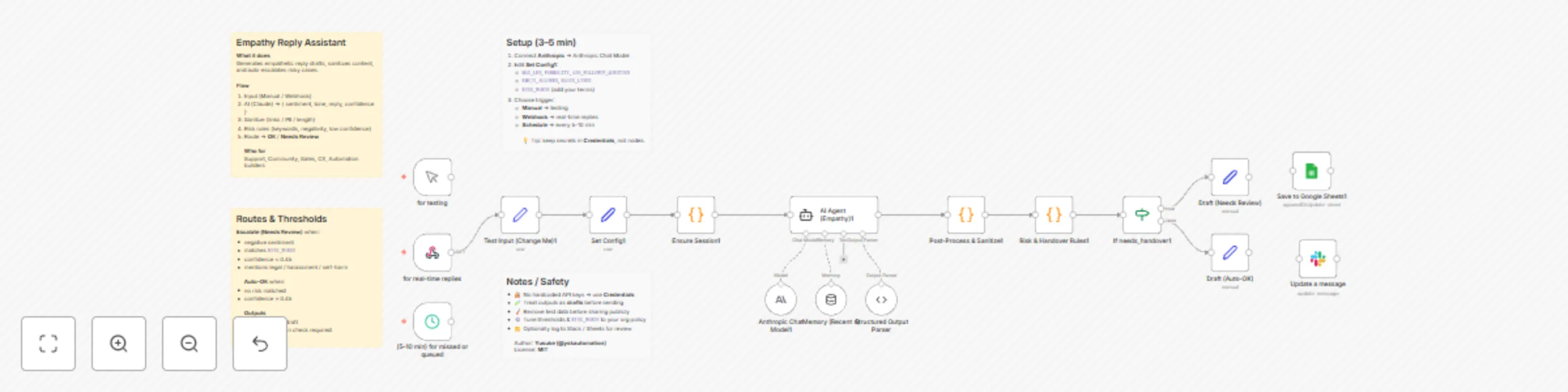
Workflow preview: Generate empathetic customer replies with Claude AI and auto-escalation
Free advanced

Generate empathetic customer replies with Claude AI and auto-escalation

## 🧠 Overview Generate empathetic, professional reply drafts for customer or user messages. The workflow detects **sentiment**, **tone**, and **risk level**, drafts a concise response, sanitizes PII/links/emojis, and **auto-escalates** risky or low-confidence cases to human review. --- ## ⚙️ How It Works 1. **Input** — Manual Test or Webhook Trigger 2. **AI Agent (Empathy)** — returns `{ sentiment, tone, reply, confidence, needs_handover }` 3. **Post-Process & Sanitize** — removes URLs/hashtags, masks PII, caps length 4. **Risk & Handover Rules** — checks confidence threshold, risk words, and negativity 5. **Routing** — auto-send safe replies or flag to **Needs Review** --- ## 🧩 Setup Instructions (3–5 min) - Open **Set Config1** and adjust: - `MAX_LEN` (default 600) - `ADD_FOLLOWUP_QUESTION` (true/false) - `FORMALITY` (`auto | casual | polite`) - `EMOJI_ALLOWED` (true/false), `BLOCK_LINKS` (true/false) - `RISK_WORDS` (e.g., `refund, lawsuit, self-harm`) - Connect **Anthropic credential** to **Anthropic Chat Model** - *(Optional)* Replace **Manual Trigger** with **Webhook Trigger** for real-time use > Tip: If you need to show literal angle brackets in messages, use backticks like ``<example>`` (no HTML entities needed). --- ## 📚 Use Cases ### 1) SaaS Billing Complaints - **Input:** “I was billed after canceling. This is unacceptable.” - **Output:** Calm, apologetic reply with refund steps; escalates if `refund` is in `RISK_WORDS` or `confidence < 0.45`. ### 2) Product Bug Reports - **Input:** “Upload fails on large files since yesterday.” - **Output:** Acknowledges impact, requests logs, offers workaround; routes to auto-send if low risk and high confidence. ### 3) Delivery/Logistics Delays - **Input:** “My order is late again. Should I file a complaint?” - **Output:** Empathetic apology, ETA guidance, partial credit policy note; escalates if language indicates legal action. ### 4) Community Moderation / Abuse - **Input:** “Support is useless—you’re all scammers.” - **Output:** De-escalating, policy-aligned response; auto-flags due to negative sentiment + risk keyword match. ### 5) Safety / Self-harm Mentions - **Input:** “I feel like hurting myself if this isn’t fixed.” - **Output:** **Immediate escalation**, inserts approved resources; never auto-sends. --- ## 🚨 Auto-Escalation Rules (defaults) - **Negative** sentiment - Message matches any `RISK_WORDS` - `confidence < 0.45` - Mentions of **legal**, **harassment**, or **self-harm** context --- ## 🧪 Notes & Best Practices - 🔐 No hardcoded API keys — use **n8n Credentials** - 🧭 Tune thresholds and `RISK_WORDS` to your org policy - 🧩 Works on self-hosted or cloud n8n - ✅ Treat outputs as **drafts**; ship after human/policy review --- ## 🔗 Resources - **GitHub (template JSON):** https://github.com/yskmtb0714/n8n-workflows/blob/main/empathy-reply-assistant.json

Y
Yusuke
Ticket Management
5 Nov 2025
32
0

Workflow preview: Discover & analyze n8n workflows from GitHub with OpenAI and Google Sheets
Free advanced

Discover & analyze n8n workflows from GitHub with OpenAI and Google Sheets

## 🧠 Overview Discover and analyze the most valuable community-built n8n workflows on GitHub. This automation searches public repositories, analyzes JSON workflows using AI, and saves a ranked report to Google Sheets — including summaries, use cases, difficulty, stars, node count, and repository links. --- ## ⚙️ How It Works 1. **Search GitHub Code API** — queries for `extension:json n8n` and splits results 2. **Fetch & Parse** — downloads each candidate file’s raw JSON and safely parses it 3. **Extract Metadata** — detects AI-powered flows and collects key node information 4. **AI Analysis** — evaluates the top N workflows (description, use case, difficulty) 5. **Merge Insights** — combines AI analysis with GitHub data 6. **Save to Google Sheets** — appends or updates by workflow name --- ## 🧩 Setup Instructions (5–10 min) - Open **Config** node and set: - `search_query` — e.g., `"openai" extension:json n8n` - `max_results` — number of results to fetch (1–100) - `ai_analysis_top` — number of workflows analyzed with AI - `SPREADSHEET_ID`, `SHEET_NAME` — Google Sheets target - Add **GitHub PAT** via HTTP Header Credential: - `Authorization: Bearer <YOUR_TOKEN>` - Connect **OpenAI Credential** to **OpenAI Chat Model** - Connect **Google Sheets (OAuth2)** to **Save to Google Sheets** - *(Optional)* Enable **Schedule Trigger** to run weekly for automatic updates > 💡 Tip: If you need to show literal brackets, use backticks like ``<example>`` (no HTML entities needed). --- ## 📚 Use Cases ### 1) Trend Tracking for AI Automations - **Goal:** Identify the fastest-growing AI-powered n8n workflows on GitHub. - **Output:** Sorted list by stars and AI detection, updated weekly. ### 2) Internal Workflow Benchmarking - **Goal:** Compare your organization’s workflows against top public examples. - **Output:** Difficulty, node count, and AI usage metrics in Google Sheets. ### 3) Market Research for Automation Agencies - **Goal:** Discover trending integrations and tool combinations (e.g., OpenAI + Slack). - **Output:** Data-driven insights for client projects and content planning. --- ## 🧪 Notes & Best Practices - 🔐 No hardcoded secrets — use **n8n Credentials** - 🧱 Works with self-hosted or cloud n8n - 🧪 Start small (`max_results = 10`) before scaling - 🧭 Use “AI Powered” + “Stars” columns in Sheets to identify top templates - 🧩 Uses only Markdown sticky notes — no HTML formatting required --- ## 🔗 Resources - **GitHub (template JSON):** [github-workflow-finder-ai.json](https://github.com/yskmtb0714/n8n-workflows/blob/main/github-workflow-finder-ai.json)

Y
Yusuke
Market Research
5 Nov 2025
164
0