Generate contextual recommendations from Slack using Pinecone

Workflow preview

Workflow preview
100%
Generate contextual recommendations from Slack using Pinecone preview
Open on n8n.io

Important notice

This workflow is provided as-is. Please review and test before using in production.

1. Workflow Overview

This advanced Retrieval Augmented Generation (RAG) automation template for n8n enables contextual, real time recommendations using Slack messages as input. The workflow extracts referenced document...

Best for

  • Internal Wiki automation workflows
  • AI RAG automation workflows
  • advanced n8n builders looking for reusable templates

Tools used

n8n-nodes-base.slacktrigger, @n8n/n8n-nodes-langchain.agent, @n8n/n8n-nodes-langchain.lmchatazureopenai, @n8n/n8n-nodes-langchain.vectorstorepinecone, @n8n/n8n-nodes-langchain.embeddingsazureopenai, n8n-nodes-base.googlesheetstool, @n8n/n8n-nodes-langchain.rerankercohere, @n8n/n8n-nodes-langchain.outputparserstructured

Source and attribution

This workflow is cataloged by N8N Workflows and links back to its original n8n.io source page by Rahul Joshi.

Original n8n.io source

1.1 Workflow description

Title
Generate contextual recommendations from Slack using Pinecone
Workflow name
Generate contextual recommendations from Slack using Pinecone

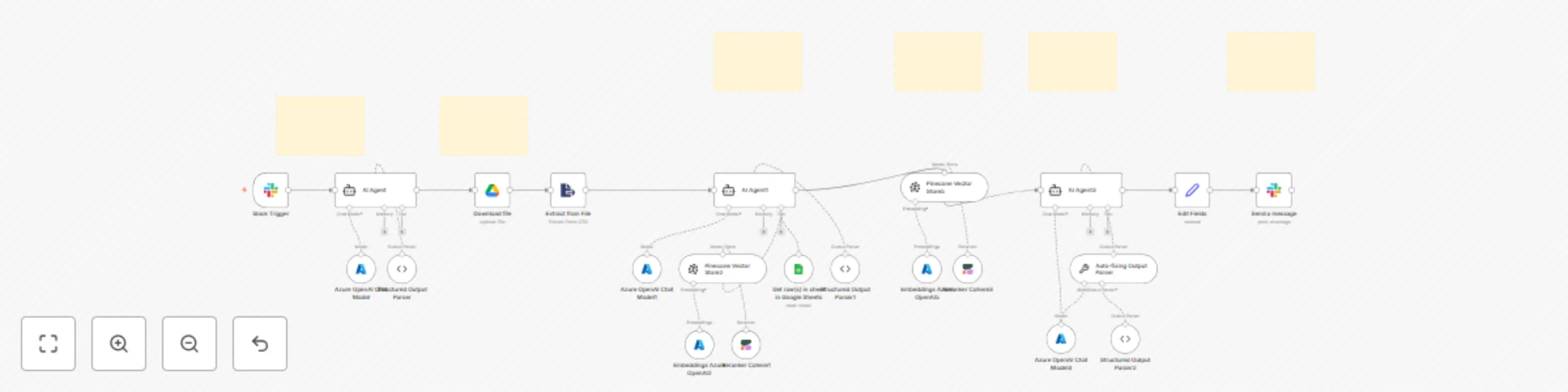
This advanced Retrieval-Augmented Generation (RAG) automation template for n8n enables contextual, real-time recommendations using Slack messages as input. The workflow extracts referenced documents from Google Drive, performs semantic retrieval from Pinecone, and generates next-step advice using GPT-4o β€” tailored specifically for executives and knowledge workers.

Perfect for AI copilots, Slack-based assistants, or CTO coaching tools, this no-code RAG implementation gives you the building blocks to combine unstructured inputs with memory-augmented intelligence.

What This Template Does

βœ… Triggers from a Slack Message or Mention Monitors a Slack channel using a bot, capturing user input in real-time. πŸ” Extracts Key Info from Message GPT-4o parses the message to identify the subject person and Google Drive link (if present). πŸ“₯ Downloads File from Google Drive Automatically fetches and extracts PDF content using the built-in extractor. πŸ“‡ Retrieves Metadata from Google Sheets & Pinecone

Looks up user ID from Google Sheets and retrieves context from Pinecone based on embeddings and reranking.

🧠 Contextual Response via GPT-4o (RAG) Combines user data and document context to generate a single, actionable next step using a tightly scoped GPT-4o prompt.

πŸ› οΈ Auto-Fixes & Structures Output Ensures formatted response with recommended_action, rationale, and optional risk_note.

πŸ“¨ Sends Final Output Back to Slack Posts the recommendation directly to the channel as a reply.

Required Integrations

  • Slack Bot with channels:history & app_mentions:read
  • Google Drive OAuth for file fetching
  • Google Sheets for ID mapping
  • Pinecone for vector document retrieval
  • Azure OpenAI or OpenAI GPT-4o for language processing
  • (Optional) Cohere for reranking results

Ideal Use Cases

πŸ§‘β€πŸ’Ό Executive coaching bots (e.g., for CTOs or founders) 🧠 Slack-based internal AI assistants πŸ“„ AI-powered document summarization with memory πŸ’¬ Actionable recommendations based on real Slack conversations πŸ“Š Enterprise knowledge augmentation from vector DBs

Why This Template Stands Out

  1. Combines live Slack interaction, file ingestion, and Pinecone retrieval into a fully RAG-powered response system.
  2. AI prompts are carefully scoped for actionable, context-aware, and time-bound responses.
  3. No-code setup with modular components for scaling or adapting to new use cases (e.g., different roles or goals).

1.2 Logical Blocks

This catalog entry is organized from the workflow JSON. The node-level section below shows the executable blocks available for review before importing the template.

2. Block-by-Block Analysis

Block 1 - Slack Trigger

Type / Role
n8n-nodes-base.slackTrigger - slackTrigger
Config choices
Version 1

Block 2 - AI Agent1

Type / Role
@n8n/n8n-nodes-langchain.agent - agent
Config choices
Version 2

Block 3 - Azure OpenAI Chat Model1

Type / Role
@n8n/n8n-nodes-langchain.lmChatAzureOpenAi - lmChatAzureOpenAi
Config choices
Version 1

Block 4 - Pinecone Vector Store2

Type / Role
@n8n/n8n-nodes-langchain.vectorStorePinecone - vectorStorePinecone
Config choices
Version 1.3

Block 5 - Embeddings Azure OpenAI2

Type / Role
@n8n/n8n-nodes-langchain.embeddingsAzureOpenAi - embeddingsAzureOpenAi
Config choices
Version 1

Block 6 - Get row(s) in sheet in Google Sheets

Type / Role
n8n-nodes-base.googleSheetsTool - googleSheetsTool
Config choices
Version 4.6

Block 7 - Reranker Cohere1

Type / Role
@n8n/n8n-nodes-langchain.rerankerCohere - rerankerCohere
Config choices
Version 1

Block 8 - Structured Output Parser1

Type / Role
@n8n/n8n-nodes-langchain.outputParserStructured - outputParserStructured
Config choices
Version 1.3

Block 9 - Pinecone Vector Store5

Type / Role
@n8n/n8n-nodes-langchain.vectorStorePinecone - vectorStorePinecone
Config choices
Version 1.3

Block 10 - Embeddings Azure OpenAI5

Type / Role
@n8n/n8n-nodes-langchain.embeddingsAzureOpenAi - embeddingsAzureOpenAi
Config choices
Version 1

Block 11 - Reranker Cohere3

Type / Role
@n8n/n8n-nodes-langchain.rerankerCohere - rerankerCohere
Config choices
Version 1

Block 12 - AI Agent3

Type / Role
@n8n/n8n-nodes-langchain.agent - agent
Config choices
Version 2

Block 13 - Azure OpenAI Chat Model3

Type / Role
@n8n/n8n-nodes-langchain.lmChatAzureOpenAi - lmChatAzureOpenAi
Config choices
Version 1

Block 14 - Auto-fixing Output Parser

Type / Role
@n8n/n8n-nodes-langchain.outputParserAutofixing - outputParserAutofixing
Config choices
Version 1

Block 15 - Structured Output Parser2

Type / Role
@n8n/n8n-nodes-langchain.outputParserStructured - outputParserStructured
Config choices
Version 1.3

Block 16 - AI Agent

Type / Role
@n8n/n8n-nodes-langchain.agent - agent
Config choices
Version 2

Block 17 - Azure OpenAI Chat Model

Type / Role
@n8n/n8n-nodes-langchain.lmChatAzureOpenAi - lmChatAzureOpenAi
Config choices
Version 1

Block 18 - Structured Output Parser

Type / Role
@n8n/n8n-nodes-langchain.outputParserStructured - outputParserStructured
Config choices
Version 1.3

Block 19 - Download file

Type / Role
n8n-nodes-base.googleDrive - googleDrive
Config choices
Version 3

Block 20 - Extract from File

Type / Role
n8n-nodes-base.extractFromFile - extractFromFile
Config choices
Version 1

Block 21 - Send a message

Type / Role
n8n-nodes-base.slack - slack
Config choices
Version 2.3

Block 22 - Edit Fields

Type / Role
n8n-nodes-base.set - set
Config choices
Version 3.4

Block 23 - Sticky Note

Type / Role
n8n-nodes-base.stickyNote - stickyNote
Config choices
Version 1

Block 24 - Sticky Note1

Type / Role
n8n-nodes-base.stickyNote - stickyNote
Config choices
Version 1

Showing the first 24 of 28 workflow blocks. Download the JSON for the full node graph.

3. Summary Table

Workflow Generate contextual recommendations from Slack using Pinecone
Complexity advanced
Nodes 28
Categories Internal Wiki, AI RAG
Author Rahul Joshi
Published 15 Jul 2025

4. Reproducing the Workflow from Scratch

  1. 1. Download the workflow JSON

    Use the JSON export at /data/workflows/6018/6018.json as the source template for this automation.

  2. 2. Import the template into n8n

    Open n8n, import the downloaded JSON, and review each node before activating the workflow.

  3. 3. Configure credentials and variables

    Replace placeholder credentials, API keys, webhook URLs, account IDs, and environment-specific values with your own settings.

  4. 4. Test with sample data

    Run the workflow manually or in a staging workspace, inspect node output, and confirm downstream systems receive the expected data.

  5. 5. Activate and monitor

    Enable the workflow only after testing, then monitor executions, errors, and rate limits during the first production runs.

5. General Notes & Resources

Review imported nodes carefully before activation. This catalog entry is intended to help you inspect the workflow structure, understand required services, and find related templates faster.

Node names, credentials, schedules, webhook paths, and external service limits may need adjustment for your workspace.

Frequently asked questions

What does Generate contextual recommendations from Slack using Pinecone do?

This advanced Retrieval Augmented Generation (RAG) automation template for n8n enables contextual, real time recommendations using Slack messages as input. The workflow extracts referenced document...

What do I need before importing this workflow?

Review the workflow JSON, configure any required credentials in n8n, and test the automation in a safe workspace before using it in production.

Can I customize this workflow?

Yes. Use the block-by-block analysis and the downloadable JSON to inspect each node, then adjust credentials, prompts, schedules, filters, or destinations for your Internal Wiki, AI RAG use case.