Block 1 - Weekly Schedule Trigger
- Type / Role
- n8n-nodes-base.scheduleTrigger - scheduleTrigger
- Config choices
- Version 1.2


 Early Deal
This workflow is provided as-is. Please review and test before using in production.
Description This workflow automates the process of finding new content ideas by scraping trending news and social media posts, analyzing them with AI, and delivering a summarized report to Slack. I...
n8n-nodes-base.scheduletrigger, n8n-nodes-base.code, n8n-nodes-base.set, n8n-nodes-base.merge, @apify/n8n-nodes-apify.apify, @n8n/n8n-nodes-langchain.agent, @n8n/n8n-nodes-langchain.lmchatopenrouter, n8n-nodes-base.stickynote
This workflow is cataloged by N8N Workflows and links back to its original n8n.io source page by 飯盛 正幹.
Original n8n.io sourceThis workflow automates the process of finding new content ideas by scraping trending news and social media posts, analyzing them with AI, and delivering a summarized report to Slack. It is perfect for content marketers, social media managers, and strategists who spend hours researching trending topics manually.
Content Marketers: To discover trending topics for blogs or newsletters. Social Media Managers: To keep up with competitor activity or industry news. Market Researchers: To monitor specific keywords or brands.
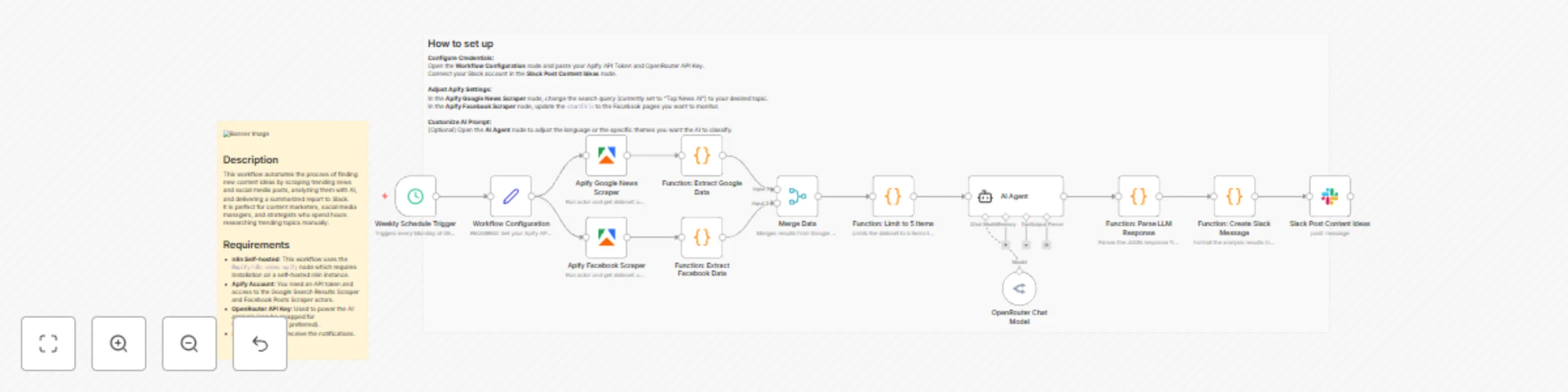
Schedule: The workflow runs automatically on a weekly schedule (default is Monday morning). Data Collection: It uses Apify to scrape the latest news from Google Search and recent posts from specific Facebook pages. Data Processing: The results are merged, and the top 5 most relevant items are selected to prevent information overload. AI Analysis: An AI Agent (powered by OpenRouter/LLM) analyzes each article to classify it into a theme (e.g., Marketing, Technology, Strategy) and extracts 3 catchy keywords. Notification: The analyzed insights, including the theme, keywords, summary, and original URL, are formatted and sent directly to Slack.
Apify Account: You need an API token and access to the Google Search Results Scraper and Facebook Posts Scraper actors. OpenRouter API Key: Used to power the AI analysis (can be swapped for OpenAI/Anthropic if preferred). Slack Account: To receive the notifications.
Configure Credentials: Open the Workflow Configuration node and paste your Apify API Token and OpenRouter API Key. Connect your Slack account in the Slack node. Adjust Apify Settings: In the Apify Google news node, change the search query (currently set to "Top News" in Japanese) to your desired topic. In the Apify Facebook node, update the startUrls to the Facebook pages you want to monitor. Customize AI Prompt: (Optional) Open the AI Agent node to adjust the language or the specific themes you want the AI to classify.
Change the LLM: Replace the OpenRouter model with the OpenAI or Anthropic Chat Model node if you prefer those providers. Increase Data Volume: Adjust the "Limit 5 items" Code node to process more articles at once (mind your API usage limits). Change Destination: Replace the Slack node with Notion, Google Sheets, or Email to save the ideas elsewhere. 3. ⚠️ Crucial Checklist Before Submission The n8n team will reject templates that contain non-English text in the nodes. Please apply these changes to your workflow in the n8n editor before exporting the JSON for submission: Rename Nodes to English: Cron トリガー → Schedule Trigger Function: Slackメッセージ作成 → Format Slack Message Slack: 企画ネタ投稿 → Slack Post Function: LLMレスポンス整形 → Parse LLM Response Merge Data (統合) → Merge Data Function: データ抽出・5件制限 → Limit to 5 Items Function: Googleデータ抽出 → Extract Google Data Function: Facebookデータ抽出 → Extract FB Data Translate Code Comments & Prompts: Inside the Code nodes, ensure comments are in English (e.g., // Slackへの投稿メッセージを作成します → // Create message for Slack). Inside the AI Agent node, translate the System Prompt into English (e.g., "You are a professional content planner..." instead of "あなたはプロの..."). Even if you want the output in Japanese, the template default should usually be English, or clearly labeled as a Japanese template. Add the Mandatory Sticky Note: Add a Yellow Sticky Note to the canvas. Paste the "Description" text (from step 2 above) into this sticky note. Place it clearly next to the start of the workflow. Remove Hardcoded IDs: Ensure MASKED_USER_ID and MASKED_WEBHOOK_ID are cleared out or set to expressions that reference the user's setup.
This catalog entry is organized from the workflow JSON. The node-level section below shows the executable blocks available for review before importing the template.
| Workflow | Generate content ideas with AI: Scrape Google & Facebook posts to Slack |
|---|---|
| Complexity | advanced |
| Nodes | 15 |
| Categories | Market Research, AI Summarization |
| Author | 飯盛 正幹 |
| Published | 23 Nov 2025 |
Use the JSON export at /data/workflows/11152/11152.json as the source template for this automation.
Open n8n, import the downloaded JSON, and review each node before activating the workflow.
Replace placeholder credentials, API keys, webhook URLs, account IDs, and environment-specific values with your own settings.
Run the workflow manually or in a staging workspace, inspect node output, and confirm downstream systems receive the expected data.
Enable the workflow only after testing, then monitor executions, errors, and rate limits during the first production runs.
Review imported nodes carefully before activation. This catalog entry is intended to help you inspect the workflow structure, understand required services, and find related templates faster.
Node names, credentials, schedules, webhook paths, and external service limits may need adjustment for your workspace.
Description This workflow automates the process of finding new content ideas by scraping trending news and social media posts, analyzing them with AI, and delivering a summarized report to Slack. I...
Review the workflow JSON, configure any required credentials in n8n, and test the automation in a safe workspace before using it in production.
Yes. Use the block-by-block analysis and the downloadable JSON to inspect each node, then adjust credentials, prompts, schedules, filters, or destinations for your Market Research, AI Summarization use case.