飯盛 正幹

3
Workflows

Workflows by 飯盛 正幹

Workflow preview: Invoice management system with Gmail reminders, Google Sheets, and Slack escalations
Free advanced

Invoice management system with Gmail reminders, Google Sheets, and Slack escalations

## Who is this for? This template is designed for freelancers, small businesses, and finance teams who need automated invoice management with intelligent payment follow-ups. Perfect for service providers, agencies, or any business that needs to track receivables and reduce late payments. ## What this workflow does This workflow provides complete invoice lifecycle management with two main flows: **Invoice Generation Flow:** - Receives order data via webhook with line items - Splits line items using Split Out node for individual processing - Calculates subtotals, tax, and totals - Aggregates results and saves to Google Sheets - Sends professional invoice email with payment link **Payment Reminder Flow:** - Runs daily via Schedule Trigger to check for overdue invoices - Loops through unpaid invoices using Split In Batches - Routes to appropriate reminder level using Switch node (5 levels) - Sends escalating reminders: friendly → second notice → urgent → final → collections - Notifies internal team via Slack for collections handoff ## Setup 1. Create a Google Sheet with columns: Invoice ID, Client, Email, Subtotal, Tax, Total, Due Date, Status, Created, Last Reminder 2. Connect Google Sheets and Gmail credentials 3. Configure Slack for collections escalation notifications 4. Set up the webhook URL in your order management system ## Requirements - Google Sheets (invoice database) - Gmail account (invoice and reminder emails) - Slack workspace (collections notifications) ## How to customize - Adjust overdue day thresholds in the Code node - Add SMS reminders via Twilio for urgent notices - Modify email templates for your brand - Connect to accounting software for automatic reconciliation

飯盛 正幹
Invoice Processing
25 Dec 2025
58
0
Workflow preview: Generate content ideas with AI: Scrape Google & Facebook posts to Slack
Free advanced

Generate content ideas with AI: Scrape Google & Facebook posts to Slack

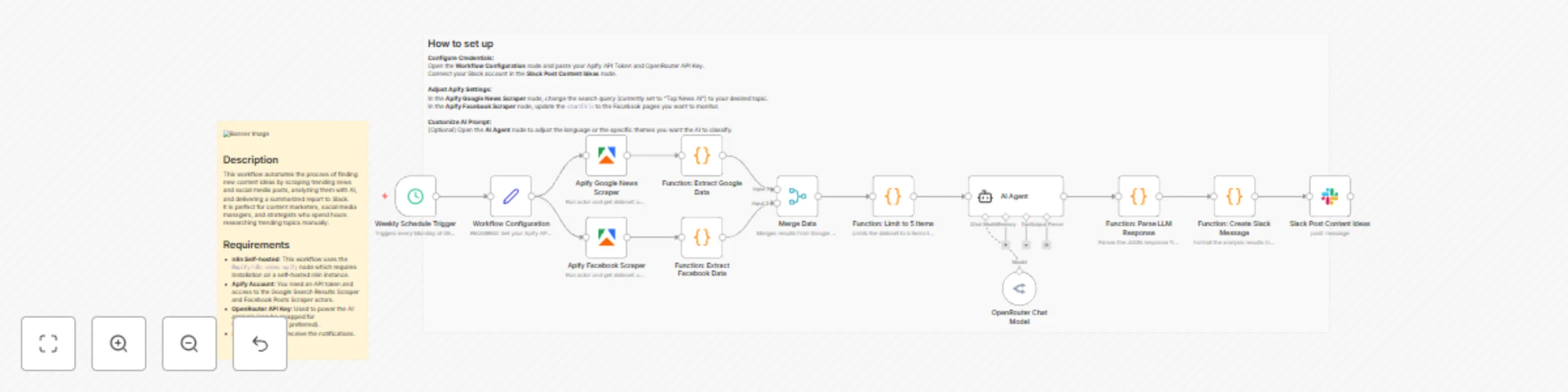
# Description This workflow automates the process of finding new content ideas by scraping trending news and social media posts, analyzing them with AI, and delivering a summarized report to Slack. It is perfect for content marketers, social media managers, and strategists who spend hours researching trending topics manually. # Who is this for Content Marketers: To discover trending topics for blogs or newsletters. Social Media Managers: To keep up with competitor activity or industry news. Market Researchers: To monitor specific keywords or brands. # How it works Schedule: The workflow runs automatically on a weekly schedule (default is Monday morning). Data Collection: It uses Apify to scrape the latest news from Google Search and recent posts from specific Facebook pages. Data Processing: The results are merged, and the top 5 most relevant items are selected to prevent information overload. AI Analysis: An AI Agent (powered by OpenRouter/LLM) analyzes each article to classify it into a theme (e.g., Marketing, Technology, Strategy) and extracts 3 catchy keywords. Notification: The analyzed insights, including the theme, keywords, summary, and original URL, are formatted and sent directly to Slack. # Requirements Apify Account: You need an API token and access to the Google Search Results Scraper and Facebook Posts Scraper actors. OpenRouter API Key: Used to power the AI analysis (can be swapped for OpenAI/Anthropic if preferred). Slack Account: To receive the notifications. # How to set up Configure Credentials: Open the Workflow Configuration node and paste your Apify API Token and OpenRouter API Key. Connect your Slack account in the Slack node. Adjust Apify Settings: In the Apify Google news node, change the search query (currently set to "Top News" in Japanese) to your desired topic. In the Apify Facebook node, update the startUrls to the Facebook pages you want to monitor. Customize AI Prompt: (Optional) Open the AI Agent node to adjust the language or the specific themes you want the AI to classify. # How to customize Change the LLM: Replace the OpenRouter model with the OpenAI or Anthropic Chat Model node if you prefer those providers. Increase Data Volume: Adjust the "Limit 5 items" Code node to process more articles at once (mind your API usage limits). Change Destination: Replace the Slack node with Notion, Google Sheets, or Email to save the ideas elsewhere. 3. ⚠️ Crucial Checklist Before Submission The n8n team will reject templates that contain non-English text in the nodes. Please apply these changes to your workflow in the n8n editor before exporting the JSON for submission: Rename Nodes to English: Cron トリガー → Schedule Trigger Function: Slackメッセージ作成 → Format Slack Message Slack: 企画ネタ投稿 → Slack Post Function: LLMレスポンス整形 → Parse LLM Response Merge Data (統合) → Merge Data Function: データ抽出・5件制限 → Limit to 5 Items Function: Googleデータ抽出 → Extract Google Data Function: Facebookデータ抽出 → Extract FB Data Translate Code Comments & Prompts: Inside the Code nodes, ensure comments are in English (e.g., // Slackへの投稿メッセージを作成します → // Create message for Slack). Inside the AI Agent node, translate the System Prompt into English (e.g., "You are a professional content planner..." instead of "あなたはプロの..."). Even if you want the output in Japanese, the template default should usually be English, or clearly labeled as a Japanese template. Add the Mandatory Sticky Note: Add a Yellow Sticky Note to the canvas. Paste the "Description" text (from step 2 above) into this sticky note. Place it clearly next to the start of the workflow. Remove Hardcoded IDs: Ensure MASKED_USER_ID and MASKED_WEBHOOK_ID are cleared out or set to expressions that reference the user's setup.

飯盛 正幹
Market Research
23 Nov 2025
188
0
Workflow preview: Monitor Furusato Nozei market trends with Google News, AI analysis and Slack reporting
Free advanced

Monitor Furusato Nozei market trends with Google News, AI analysis and Slack reporting

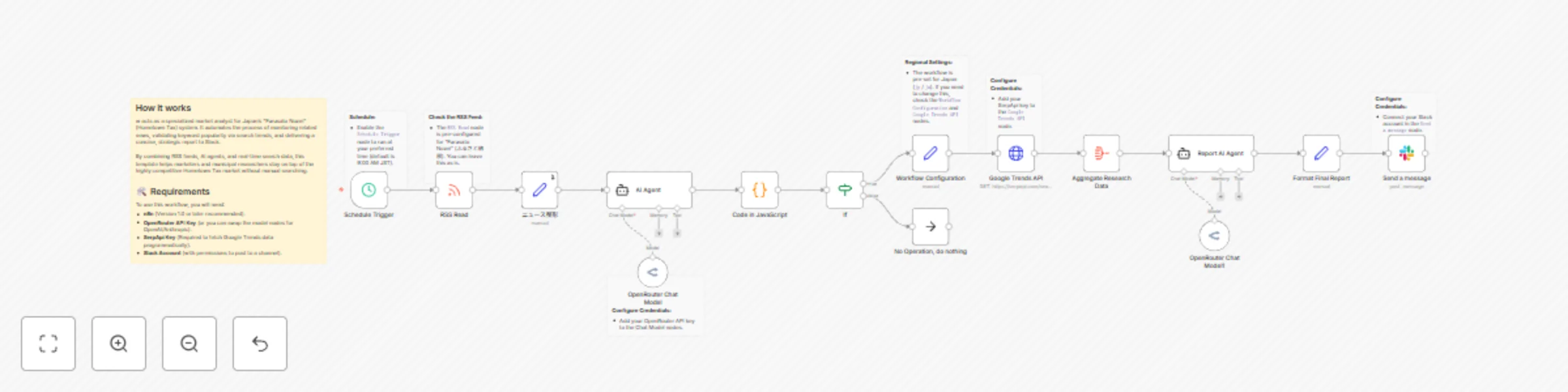
# Analyze Furusato Nozei trends from Google News to Slack This workflow acts as a specialized market analyst for Japan's "Furusato Nozei" (Hometown Tax) system. It automates the process of monitoring related news, validating keyword popularity via search trends, and delivering a concise, strategic report to Slack. By combining RSS feeds, AI agents, and real-time search data, this template helps marketers and municipal researchers stay on top of the highly competitive Hometown Tax market without manual searching. ## 👥 Who is this for? - **Municipal Government Planners:** To track trending return gifts and competitor strategies. - **E-commerce Marketers:** To identify high-demand keywords for Furusato Nozei portals. - **Content Creators:** To find trending topics for blogs or social media regarding tax deductions. - **Market Researchers:** To monitor the seasonality and shifting interests in the Hometown Tax sector. ## ⚙️ How it works 1. **News Ingestion:** The workflow triggers on a schedule and fetches the latest "Furusato Nozei" articles from Google News via RSS. 2. **AI Analysis & Extraction:** An AI Agent (using OpenRouter) summarizes the news cluster and identifies the most viable search keyword (e.g., "Scallops," "Travel Vouchers," or specific municipalities). 3. **Data Validation:** The workflow queries the Google Trends API (via SerpApi) to retrieve search volume history for the extracted keyword in Japan. 4. **Strategic Reporting:** A second AI Agent analyzes the search trend data alongside the keyword to generate a market insight report. 5. **Delivery:** The final report is formatted and sent directly to a Slack channel. ## 🛠️ Requirements To use this workflow, you will need: - **n8n** (Version 1.0 or later recommended). - **OpenRouter API Key** (or you can swap the model nodes for OpenAI/Anthropic). - **SerpApi Key** (Required to fetch Google Trends data programmatically). - **Slack Account** (with permissions to post to a channel). ## 🚀 How to set up 1. **Configure Credentials:** - Add your OpenRouter API key to the Chat Model nodes. - Add your SerpApi key to the `Google Trends API` node. - Connect your Slack account in the `Send a message` node. 2. **Check the RSS Feed:** - The `RSS Read` node is pre-configured for "Furusato Nozei" (ふるさと納税). You can leave this as is. 3. **Regional Settings:** - The workflow is pre-set for Japan (`jp` / `ja`). If you need to change this, check the `Workflow Configuration` and `Google Trends API` nodes. 4. **Schedule:** - Enable the `Schedule Trigger` node to run at your preferred time (default is 9:00 AM JST). ## 🎨 How to customize - **Change the Topic:** While this is optimized for Furusato Nozei, you can change the RSS feed URL to track other Japanese market trends (e.g., NISA, Inbound Tourism). - **Swap AI Models:** The template uses OpenRouter, but you can easily replace the "Chat Model" nodes with OpenAI (GPT-4) or Anthropic (Claude) depending on your preference. - **Adjust AI Prompts:** The AI prompts are currently in Japanese to match the content. You can modify the system instructions in the `AI Agent` nodes if you prefer English reports.

飯盛 正幹
Market Research
22 Nov 2025
56
0